
When selecting a monitor, two pivotal specifications that significantly impact your visual experience are refresh rate and response time. Understanding these terms is essential for making informed decisions, whether you’re gaming, watching movies, or engaging in professional work.
🔄 Understanding Refresh Rate
The refresh rate refers to the number of times per second a monitor updates its display, measured in Hertz (Hz). For instance, a 60Hz refresh rate means the screen refreshes 60 times per second.
Common Refresh Rates:
- 60Hz: Standard for general computing tasks.
- 75Hz: Offers a slight improvement over 60Hz, beneficial for casual gaming.
- 120Hz & 144Hz: Preferred by gamers for smoother motion and reduced input lag.
- 240Hz & 360Hz: Targeted at competitive gamers requiring ultra-smooth visuals.
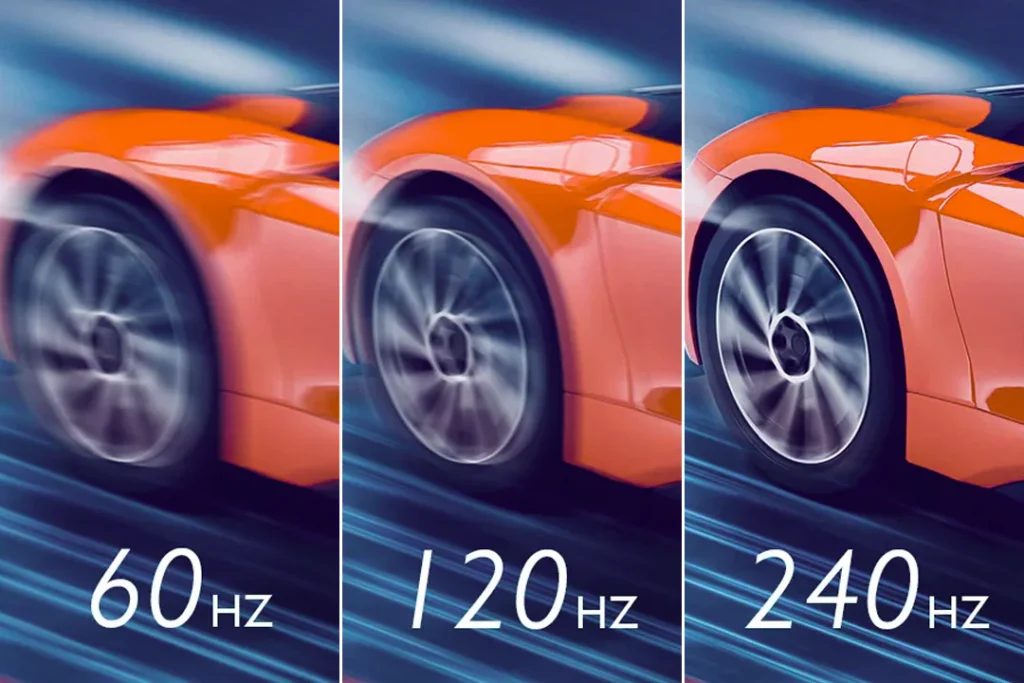
Importance: Higher refresh rates result in smoother motion, reducing motion blur and screen tearing, especially noticeable in fast-paced content like gaming or action movies. This leads to a more immersive and responsive experience.
⏱️ Understanding Response Time
Response time measures how quickly a pixel can change from one color to another, typically from gray-to-gray (GtG), and is measured in milliseconds (ms).
Common Response Times:
- 1ms: Ideal for fast-paced gaming, minimizing motion blur.
- 4-5ms: Suitable for general use and casual gaming.
- Above 5ms: May result in noticeable ghosting in fast-moving visuals.
Importance: Lower response times reduce ghosting and motion blur, enhancing clarity in fast-moving visuals. This is crucial for activities like gaming or watching sports, where rapid image transitions occur.
🎮 Matching Refresh Rate and Response Time
For an optimal viewing experience, it’s essential to balance both refresh rate and response time based on your usage:
| Usage Scenario | Recommended Refresh Rate | Recommended Response Time |
|---|---|---|
| Casual Use | 60Hz | 5ms or higher |
| Gaming | 120Hz or higher | 1ms to 5ms |
| Professional Work | 60Hz to 120Hz | 5ms or lower |
| Media Consumption | 60Hz to 120Hz | 5ms or lower |
Note: Achieving higher refresh rates and lower response times may require more powerful hardware to maintain optimal performance.
🧠 Additional Considerations
- Adaptive Sync Technologies: Features like NVIDIA’s G-Sync and AMD’s FreeSync synchronize the monitor’s refresh rate with the GPU’s frame rate, reducing screen tearing and stuttering.
- Input Lag: While related, input lag differs from response time. It refers to the delay between a user’s action and the corresponding on-screen response. Lower input lag is crucial for competitive gaming.
- Panel Types: Different panel technologies (IPS, TN, VA) affect response times and refresh rates. For instance, TN panels typically offer faster response times but may compromise on color accuracy.
Understanding the interplay between refresh rate and response time is vital for selecting a monitor that aligns with your specific needs. By considering these factors, you can enhance your viewing experience, whether it’s for gaming, professional work, or media consumption.
For a comprehensive overview of monitor features and how to select the best one for your needs, visit our monitor buying guide.
To delve deeper into how display size and resolution impact your viewing experience, check out our article on monitor display sizes and resolutions.