
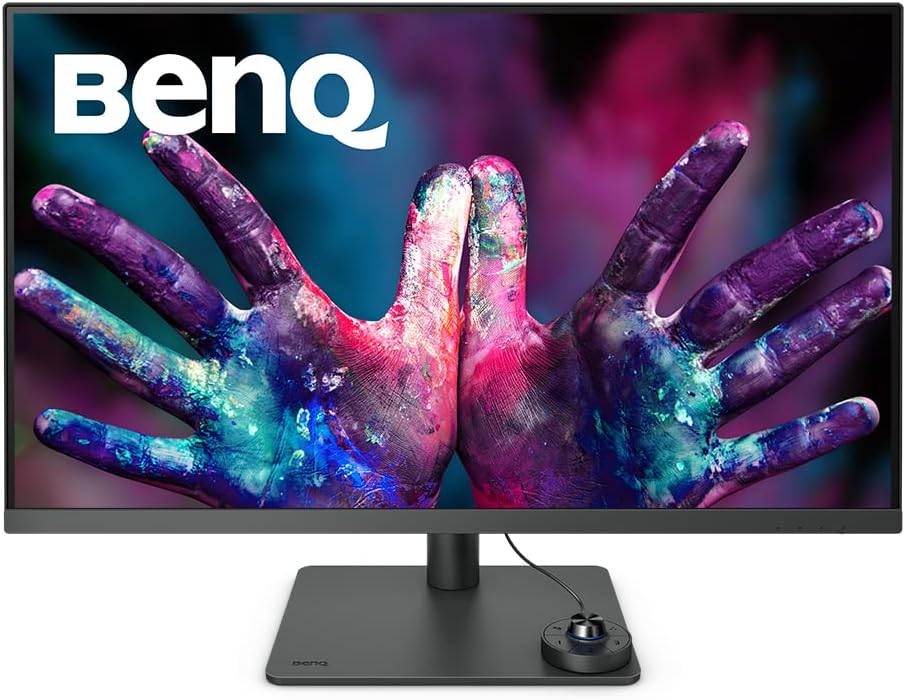
BenQ PD3205U 4K Monitor Review: Exceptional Colour Accuracy for Creatives
Quick Verdict
The BenQ PD3205U is a 32-inch 4K monitor tailored squarely at creatives who need accurate colour reproduction without compromise. Its factory calibration with a Delta E under 3, 99% sRGB and Rec.709 coverage, and uniform brightness deliver genuinely reliable colour straight out of the box. While not the fastest for gaming, it’s a brilliant choice for designers, video editors, and photographers focused on colour precision and ergonomic comfort, boasting thoughtful features like USB-C power delivery and KVM switching. For professional creatives who value faithful tones and versatile connectivity, the PD3205U offers excellent value in today’s 2026 market.

Overview and First Impressions
BenQ’s PD series is renowned among creative professionals, and the PD3205U continues this tradition with a clear focus on productivity and colour performance. Positioned in the UK as a mid-to-high tier option for digital artists, designers, and content creators, this monitor caters to those requiring colour accuracy on a sizeable, sharp canvas. Out of the box, the build quality feels robust and considered, with a solid height-adjustable stand (HAS) that also allows tilt, swivel, and pivot — a requirement for long sessions and detailed work.
The bezels are moderately thin, more practical than ultra-sleek, helping keep distractions minimal whilst maintaining structural integrity. The 32-inch real estate fills desk space well without overwhelming, striking a balance between immersive and ergonomic. Its matte screen finish reduces reflections effectively, a notable plus for bright office or studio environments in the UK, while avoiding the glare and fingerprints that glossed panels typically attract.
Port selection rounds off the practical user experience. Besides an ample 90W USB-C port capable of video, data, and power, there are DisplayPort and two HDMI inputs. The inclusion of a KVM switch is a nice touch for multi-device setups — especially useful if you run a laptop alongside a desktop. This array ensures straightforward connectivity for MacBooks, Windows PCs, and external devices without resorting to hubs. For a creative professional juggling several machines or peripherals, BenQ’s port strategy here is smart and future-proof.

Display Technology and Features Explained
At the heart of the BenQ PD3205U is a 32-inch IPS panel, delivering 3840 x 2160 4K resolution. This equates to approximately 140 pixels per inch, offering crisp text and finely detailed imagery without scaling headaches on typical desktop setups. The IPS technology is crucial here: it guarantees wide viewing angles of around 178 degrees both horizontally and vertically, so colours and contrast stay stable whether looking head-on or from oblique positions. This is important for collaborative work or when colour shifts from poor viewing angles could mislead a critical evaluation.
Colour accuracy is where this display shines. Covering 99% of sRGB and Rec.709 colour spaces ensures most web content, broadcast standards, and digital graphics are represented faithfully. The average Delta E ≤ 3 calibrated at the factory indicates that colours deviate minimally from their intended reference, making it particularly useful for photographers, video editors, and graphic designers who need to trust their screen straightaway, without costly calibrations. For critical colour work, the uniformity correction technology minimises brightness and colour shifts across the panel surface — corner to corner brightness stays consistent, helping avoid patchiness in gradients or solid fills.
The PD3205U supports HDR10, which on paper sounds impressive for enhancing contrast and visual depth. However, the peak brightness of around 400 nits and typical IPS contrast ratio of roughly 1000:1 mean HDR effects remain modest rather than spectacular. This display will provide better detail in shadows and highlights than SDR but won’t approach the vividness or punch of high-end HDR displays with higher peak nit levels or local dimming. For professional video work reviewing HDR content, this is serviceable as a preview but not a definitive mastering tool.
Response time runs around the typical 5ms grey-to-grey for IPS panels. In practice, this means smooth motion rendering for daily tasks and video editing, with only minor ghosting visible during rapid movements—nothing distracting for the intended professional use. The 60Hz refresh rate aligns with the creative focus; it is far from gaming-grade speed but perfectly fine for design workflows, video scrub, and general productivity.
The ergonomics extend further: BenQ’s Eye-Care technologies include flicker-free backlighting and low blue light modes, critical in 2026 for extended hours at the desktop where eye strain from LEDs is a constant challenge. This monitor helps alleviate fatigue without compromising colour fidelity, a thoughtful balance for creators spending all day grading and retouching.
Software-wise, the bundled Palette Master Ultimate calibration tool and Display Pilot 2 suite give users powerful control over ICC profiles and desktop layouts. This complements the hardware uniformity and factory settings, allowing seamless syncing of colour modes across BenQ devices or MacBooks without a separate calibration device — a genuine productivity boost in professional environments.
Real-World Performance — What Customers Say
Users in the UK and beyond consistently praise the PD3205U’s out-of-the-box colour fidelity, confirming factory calibration lives up to BenQ’s specs. Many reviewers mention how minimal further calibration is needed, which saves time and expense. The uniformity reportedly holds true in daily use, with few complaints of uneven backlight or brightness flickers. There are some isolated reports of minor backlight bleed typical of IPS panels, but nothing widespread enough to impact overall satisfaction.
Longevity and reliability reviews are largely positive, with users reporting this monitor sustains colour accuracy over months with no degradation. Some professional photographers note that while the 99% sRGB gamut is excellent, it’s not wide enough for those needing AdobeRGB or DCI-P3—important if you’re working in wider-gamut print or cinema post-production.
The USB-C functionality receives enthusiastic feedback for single-cable convenience, especially for MacBook users, though some users highlight that cable quality can affect charge rate and signal stability — a reminder to use the included or high-quality third-party cables. KVM switching and the programmable hotkeys receive praise for boosting workflow efficiency, a less flashy but genuinely useful bonus in studios handling multiple sources.
Discover Your Design Power with 4K Clarity
Connectivity, Ergonomics and Setup
Breaking down ports: the single USB-C port not only carries 4K@60Hz video but offers 90W power delivery — enough to charge most laptops including MacBooks — and transmits data, reducing clutter. This can replace multiple cables with one neat connection, ideal for modern workspaces. Dual HDMI 2.0 ports allow connection to external devices like cameras or consoles, while the DisplayPort 1.4 input supports high bandwidth for sharp signals and colour depth, catering especially to PC users.
Unlock Creative Potential – Buy Now!
The USB hub function built into the monitor further simplifies peripheral connectivity, with USB-A ports for keyboards, mice, or storage devices. The inclusion of a KVM switch means you can control two PCs with the same keyboard and mouse without swapping devices physically, a blessing for users who juggle home and work computers.
Ergonomics are strong: height adjustment spans several centimetres, tilt angles from -5 to 20 degrees, full swivel left and right, and a pivot function to rotate between landscape and portrait modes. This ensures correct posture and reduces neck strain, facilitating prolonged editing sessions. The good VESA compatibility (100 x 100 mm) supports alternative mounting solutions if needed—valuable for custom desk setups.
Setup is straightforward with clear user manuals and easy access to OSD controls through a side joystick. Cable management on the stand is modest but adequate, helping keep desks tidy without elaborate systems.
Who Should Buy This
This monitor is an excellent match for creative professionals—graphic designers, photographers, video editors, and illustrators—who prioritise colour accuracy and uniformity at a large 32-inch scale. The factory calibration with professional colour modes and regular ICC profile syncing makes it perfect for those needing immediate reliability without ongoing calibration hassle.
Remote workers who handle creative or content-heavy tasks will also find the ergonomic features and eye-care technologies beneficial for comfort. MacBook users will appreciate the seamless USB-C and ColourTalk compatibility, integrating well with macOS workflows.
It is less suited for hardcore gamers or users prioritising ultra-fast response times and refresh rates above 60Hz. Likewise, those requiring wider colour gamuts like AdobeRGB or DCI-P3 for high-end print or cinematic post will want to explore alternatives such as the Eizo ColorEdge CG319X or Dell UltraSharp U3224KB, which sacrifice some connectivity and ergonomics for even deeper colour fidelity.
For a versatile, dependable, and ergonomically friendly 4K colour-accurate monitor in 2026, the BenQ PD3205U sits comfortably near the top of its class.
Pros and Cons
Pros:
- Factory calibrated with an average Delta E ≤ 3, ensuring accurate colours out of the box for professional use
- Covers 99% sRGB and Rec.709, ideal for web and video content creators
- Uniformity technology maintains consistent brightness and colour across the entire panel
- 90W USB-C port simplifies connectivity for MacBooks and other laptops with a single cable
- Comprehensive ergonomic stand with height, tilt, swivel, and pivot for comfortable long hours
- KVM switch and programmable hotkeys enhance multi-device workflow efficiency
- EyeCare features reduce blue light and flicker to minimise eye strain during extended use
- Palette Master Ultimate software enables effortless calibration and ICC profile management
Cons:
- HDR10 support is limited by panel brightness and contrast, offering only basic HDR preview capability
- 60Hz refresh rate and 5ms response time may discourage gamers or users needing faster motion performance
- Colour gamut does not extend beyond sRGB/Rec.709, inadequate for AdobeRGB or DCI-P3 colour workflows
- Some users report minor IPS glow and backlight bleed in dark scenes, a typical IPS trade-off
- The matte screen surface slightly softens perceived sharpness compared to gloss, possibly affecting critical review
- Cable quality impacts USB-C performance, necessitating use of supplied or premium cables
- Stand’s cable management is functional but not advanced, may leave some desk clutter persistently visible
Final Verdict and Recommendation
The BenQ PD3205U stands out as a robust, no-nonsense 32-inch 4K monitor that delivers what many creative professionals need most: consistent, accurate colour and thoughtful ergonomic design. Its factory calibration and uniformity make it a trusted tool for designers and editors working in sRGB and Rec.709 colour spaces, while the USB-C 90W power delivery and KVM capability simplify modern multi-device setups. Although HDR is more of a mild enhancement and gaming is not its focus, this display remains a compelling choice for anyone seeking a reliable, ergonomic, and colour-true screen in 2026. Check current availability of the BenQ PD3205U on Amazon to ensure you get the latest model and bundles.
Explore the BenQ PD3205U Monitor
As an Amazon Associate, I earn from qualifying purchases.