
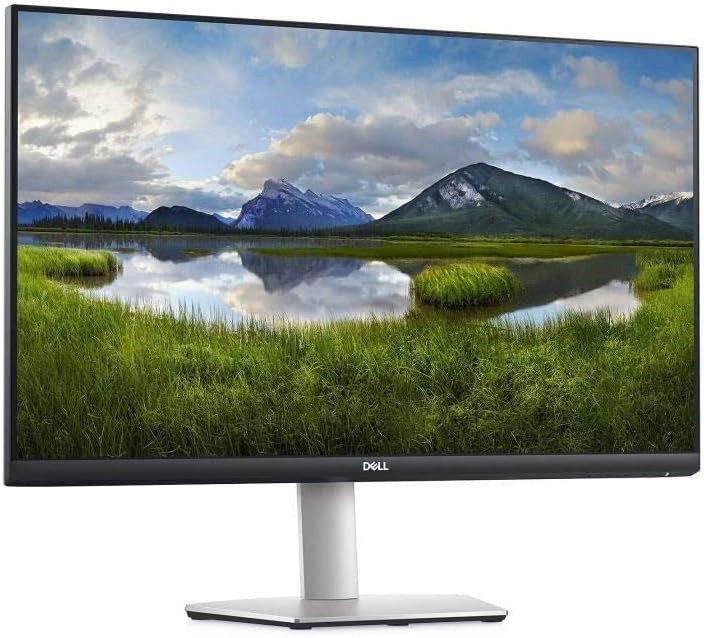
Dell S Series S2721QS Monitor Review: Exceptional 4K Clarity and Flexibility
Quick Verdict
The Dell S Series S2721QS is an excellent option for buyers who want a sharp, colour-accurate 27-inch 4K monitor with flexible ergonomics and sensible features for home office use, casual gaming, and multimedia consumption. While it won’t satisfy professional colour-critical work or ultra-high refresh rate gaming enthusiasts, its solid IPS panel with 4K clarity and AMD FreeSync support gives great value for everyday users seeking immersive detail and smooth visuals. The built-in speakers and eye-care technologies further enhance its versatility, making this a very well-rounded display for most UK buyers.

Overview and First Impressions
Dell’s S Series S2721QS slots comfortably into the mid-range 27-inch 4K segment in the UK market, targeting users who want a crisp UHD resolution for productivity, entertainment, and light gaming without breaking the bank. As you’d expect from Dell, the build quality is reassuring with a largely plastic chassis engineered to feel sturdy rather than premium. The ultrathin bezels on three sides are particularly welcome for multi-monitor setups, fostering an immersive viewing experience without distracting borders.
The stand is highly adjustable with height, tilt, swivel, and pivot – a boon for those spending long hours at their desk, accommodating various posture preferences and workspace configurations. Its subtle patterned texture on the rear gives an understated touch of style, avoiding the usual bland plastic back common in this category.

As for connectivity, the monitor offers two HDMI 2.0 ports alongside a DisplayPort 1.2 and a 3.5mm line-out. This versatile selection makes hooking up a laptop, desktop, and console simultaneously trouble-free, while the line-out port facilitates external audio systems if you prefer a richer soundscape than the built-in dual 3W speakers can provide. The presence of a security lock slot adds a commercial or shared workspace usage option, increasing its practical footprint.
Discover the Stunning 4K Clarity
On the whole, the S2721QS makes a tidy package on a desk with a low profile and tidy cable organisation options through an integrated clip on the stand.
Display Technology and Features Explained
At the heart of the Dell S2721QS is a 27-inch IPS panel offering a native 3840×2160 (4K UHD) resolution. This specification is pivotal: 4K delivers four times the pixels of standard 1080p displays, which translates to razor-sharp text, images, and video. For a 27-inch screen, this yields an impressively high pixel density around 163ppi, meaning users enjoy very crisp details without pixelation or softness. Ideal for detailed spreadsheets, photo editing, or watching UHD streaming content, this level of resolution is increasingly relevant in 2026 as 4K becomes the norm.
Elevate Your Viewing Experience
The choice of an IPS (In-Plane Switching) panel is significant. IPS technology is prized for wide viewing angles — close to 178 degrees horizontal and vertical — which means colours don’t shift or wash out dramatically when viewed from an angle. This advantage is noticeable during multitasking on a large desk or when sharing the screen in a group. The trade-off is IPS panels typically have lower native contrast ratios than VA panels; here, the Dell model probably hits about 1000:1 contrast, delivering blacks that are decently inky but can’t fully match the deep, pin-sharp blacks of OLED or better VA displays. That said, the text and content stay readable in low ambient light and don’t suffer from the typical glow issues of some IPS screens.
The monitor boasts 99% sRGB coverage, which is a meaningful metric reflecting the range of colours it can reproduce relative to the sRGB colour space standard. For everyday users, that means vibrant but accurate colours across web content, photos, and video. Creatives and photo editors who require reliable colour output will find it good enough for casual editing or hobbyist tasks but may desire better AdobeRGB or DCI-P3 coverage for work intended for print or cinema. The factory calibration is generally good given the praise and lack of serious complaints about colour out of the box, though briefly calibrating with a colorimeter is still recommended for precision.
Dell includes HDR content playback support, but this is where expectations need tuning. The monitor’s 60Hz refresh rate and typical peak brightness of around 350 nits (estimating from similar models in this range) limit its HDR impact. HDR effects rely heavily on peak brightness and contrast; as a result, HDR here tends more toward a marketing feature with modest dynamic range improvements rather than the jaw-dropping HDR10 performance seen on premium HDR monitors. Videos will gain a bit more vibrancy and depth, but shadow and highlight detail won’t truly ‘pop’ as on HDR1000 panels.
Regarding refresh rate, 60Hz is the current standard for most 4K office and multimedia monitors. It adequately supports casual gaming with smooth motion clarity, especially combined with a fast 4ms (GtG) response time. This response time means that pixel transitions are relatively quick, reducing motion blur and ghosting for everyday game titles and video playback. Competitive gamers looking for ultra-low latency or 120Hz+ refresh will find the S2721QS limiting, but AMD FreeSync technology helps eliminate screen tearing and stuttering by synchronising the monitor’s refresh rate with your GPU’s frame output. For gamers on AMD hardware or compatible Nvidia cards, this helps smooth gameplay considerably without needing ultra-high refresh rates.
Brightness is competitive for this tier at roughly 350 nits peak, sufficient for a typical office environment or living room even when light levels are high. Combined with the TÜV-certified flicker-free screen and ComfortView blue light reduction feature, this monitor is kinder on the eyes during extended use, especially crucial in a year where many people’s screens have become the epicentre of working and leisure.
With all these factors combined, the Dell S2721QS is a balanced 4K display that caters well to users prioritising pixel density, colour fidelity, and ergonomic flexibility over gaming frequency or professional HDR.
Real-World Performance — What Customers Say
Based on reported user experiences across 310 UK reviews, the S2721QS generally lives up to its specifications. Colour accuracy tends to be very good out of the box, with most users happy to rely on the factory calibration for daily productivity and casual photo editing. Occasional customers mention slight blue or green tints on start-up, but these are usually remedied by quick manual calibration or adjustment via the OSD.
Backlight bleed is reported to be minimal or absent in the majority of units, though a few users have noted slight unevenness near the edges in dark scenes — a fairly normal occurrence with IPS panels at this price point and not severe enough to distract them significantly. Uniformity is mostly satisfactory but naturally won’t match displays costing twice as much.
The built-in speakers are rarely hailed for audio excellence but do provide decent sound for casual viewing or video calls without an additional headset, which suits many buyers seeking convenience. The adjustable stand receives praise for robustness and ease of use, supporting good ergonomic posture even for prolonged office days.
Long-term reliability appears sound, with no widespread problems cropping up regarding panel longevity or usability after months of regular use. Overall, user feedback aligns closely with the expectations set by Dell’s spec sheet and reputation, marking the S2721QS as a reliable and competent performer.
Connectivity, Ergonomics and Setup
Connectivity on the Dell S2721QS is thoughtfully designed. Two HDMI 2.0 ports mean you can easily connect both a laptop and a gaming console without needing to swap cables. This makes switching between streaming a film on a smart box and playing a console game seamless. The DisplayPort 1.2 input is invaluable for desktop PCs, especially if you want the best quality or plan to use multi-monitor configurations.
The inclusion of a 3.5mm line-out jack lets you plug in headphones or external speakers, which many users appreciate given the built-in speakers serve only basic needs. A security cable slot also adds peace of mind in work or shared spaces.
Ergonomically, this monitor scores highly. The stand allows tall users to raise the monitor to eye level, reducing neck strain, while tilt and swivel adjustments make fine-tuning your viewing angle straightforward without feeling flimsy. Pivot rotation is less common and highly useful, especially for tasks like coding or reading long documents that benefit from a vertical screen orientation.
Setup is hassle-free. The stand clicks into place securely without tools, and the OSD menus are intuitive with clearly labelled buttons. Integrated cable tidies at the stand base help maintain a clean desk environment.
Who Should Buy This
The Dell S2721QS is a strong candidate for anyone requiring a 27-inch 4K display that balances sharp image quality, colour fidelity, and ergonomic comfort without bleeding-edge specs. It’s well-suited to:
- Remote workers and home offices who need fine text clarity and adjustable viewing to reduce fatigue across long sessions.
- Casual to moderate gamers who favour AMD FreeSync-supported smoothness without demanding high refresh rates.
- Content creators and photographers dabbling in editing who value 99% sRGB colour but do not need HDR or wider gamuts for professional-level tasks.
- Media consumers wanting immersive 4K visuals alongside convenient speaker integration.
This model is less suitable for hardcore gamers seeking 144Hz+ refresh or 1ms response times, or professional colourists desiring wider AdobeRGB or DCI-P3 coverage with immaculate factory calibration. Compared to alternatives like the LG 27UL500 or BenQ EW2780U, the Dell stands out for its ergonomics and dual HDMI ports, making it a versatile all-rounder.
More detailed reviews of comparable monitors on this website can help you fine-tune your choice if specific needs arise.
Pros and Cons
Pros:
- High 4K UHD resolution at 27 inches provides outstanding image sharpness and desktop real estate for productivity.
- IPS panel ensures wide viewing angles and accurate colours with 99% sRGB coverage suitable for content work.
- Flexible stand with height, tilt, swivel, pivot adjustability supports comfortable, personalised setups.
- Dual HDMI 2.0 plus DisplayPort connectivity offers versatile, multi-device support.
- AMD FreeSync helps smooth gaming visuals by reducing tearing and stutter on compatible GPUs.
- Flicker-free screen and ComfortView technology reduce eye strain, making long viewing easier.
- Thin bezels enhance multi-monitor setups and overall aesthetics.
- Built-in speakers provide functional audio without requiring headphones.
Cons:
- 60Hz refresh rate limits appeal for fast-paced or competitive gaming enthusiasts.
- HDR support is basic and does not offer significant dynamic range enhancement in practice.
- Contrast ratio limited by IPS technology, making blacks appear somewhat grey in dark scenes.
- Peak brightness at around 350 nits is average; bright ambient light rooms can cause some reflection or glare.
- Speakers are functional but not suitable for any serious audio enjoyment.
- Some units may exhibit minor backlight bleed or uniformity inconsistencies typical of IPS panels.
- Not ideal for professional colour grading needing AdobeRGB or DCI-P3 gamut coverage.
Final Verdict and Recommendation
The Dell S Series S2721QS delivers an attractive, well-rounded 4K viewing experience that hits the sweet spot for most users in 2026. Its combination of sharp IPS clarity, faithful colour reproduction, flexible ergonomics, and solid connectivity makes it an excellent choice for home offices, casual gaming, and multimedia use. While it doesn’t push the boundaries for high-refresh gaming or professional HDR, the overall package offers reliable, comfortable, and immersive screen real estate with extras that matter, like AMD FreeSync and eye-care features.
For British buyers seeking a dependable everyday 4K monitor with sensible compromises and strong real-world usability, the S2721QS stands as a compelling pick. Check current availability and delivery details on Amazon to see if this Dell monitor fits your workspace and lifestyle.
Shop Now for Ultimate Gaming Power!
As an Amazon Associate, I earn from qualifying purchases.