
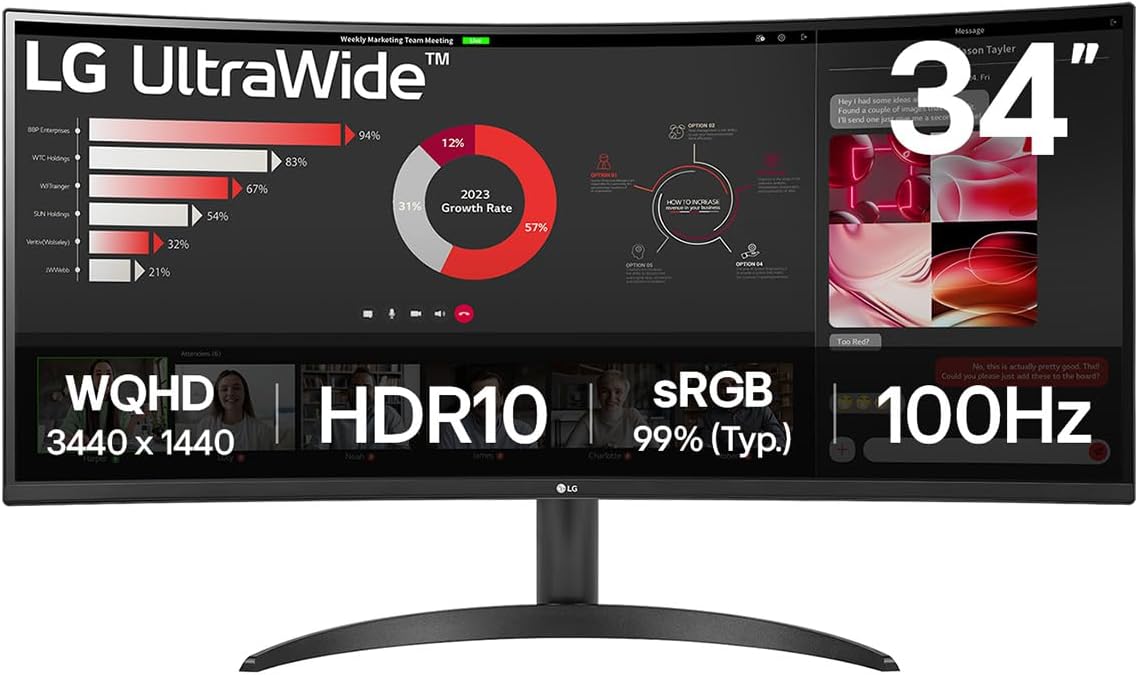
LG Electronics 34WR50QK Review: A Curved Delight
Have you ever wished for a monitor that helps you see more without juggling windows constantly? The LG Electronics 34WR50QK presents itself as a tempting solution with its Ultrawide screen and subtle curve designed to immerse you in your work or entertainment. It promises to improve productivity with a larger canvas and less neck strain, making it a compelling choice if you spend long hours in front of your screen.

Key Features Explained
Stunning UltraWide QHD Display
At the heart of the LG 34WR50QK is a 34-inch VA panel delivering a crisp 3440×1440 resolution. The 21:9 aspect ratio means you get a broader workspace compared to standard 16:9 monitors, ideal for side-by-side document editing, spreadsheets, and multitasking. The 1800R curvature gently wraps around your field of view, which enhances immersion without being overwhelming—a sweet spot especially useful for creative professionals or video editors who appreciate accurate visuals and a wider perspective.

Smooth Visual Performance
The monitor boasts a 100Hz refresh rate combined with an impressive 5ms response time. While not aimed specifically at hardcore gamers, these specs ensure smoother motion and reduced blur during casual gaming or video playback. The compatibility with HDR10 and a 99% sRGB colour gamut means you get vibrant and more lifelike colours, which artists or content creators will find beneficial for their colour-critical tasks.
Versatile Connectivity and Productivity Tools
Connectivity comes through DisplayPort and HDMI, enabling seamless connections to a variety of devices, including laptops like the MacBook Pro—a notable plus for Apple users. One standout feature is the Picture By Picture (PBP) mode, allowing content from two different computers to be displayed side-by-side. This can be a real time-saver if you juggle multiple systems at work.
Explore the LG Curved UltraWide Monitor!
Comfort and Eye Care Features
Setting the monitor up is fuss-free thanks to the ergonomic stand, which allows quick one-click height adjustments and easy tilting. Eye comfort is another priority here: the Reader Mode adjusts brightness and colour temperature to reduce eye strain during long reading sessions, while the Flicker Safe technology helps minimise screen flicker, essential for those who work late into the night.
Upgrade Your Viewing Experience Now!
Smart Software Support
LG’s proprietary Switch app offers some clever capabilities. You can split the screen into up to six sections, tailor the display themes, and even launch your video calling platform with a hotkey. This intelligent software makes workflow smoother and takes full advantage of the UltraWide real estate.
Buy the LG 34″ UltraWide Monitor Today!
Pros of the LG Electronics 34WR50QK
- The 34-inch UltraWide curved panel offers excellent immersive viewing that’s great for multitasking or media consumption.
- Sharp QHD resolution with rich, accurate colours thanks to HDR10 and near-complete sRGB coverage.
- Comfortable ergonomic adjustments combined with eye-care features make it suitable for prolonged use.
- The Picture By Picture mode and LG Switch software enhance productivity by simplifying complex workflows.
- Easy setup and solid compatibility with devices like the MacBook Pro increase versatility.
Cons to Consider
- Some users have reported occasional issues with USB port functionality, which might impact peripheral connections.
- The monitor isn’t the best fit for competitive gaming since the response time and refresh rate, while respectable, don’t match high-end gaming screens.
- The built-in speakers are absent or minimal, so you’ll need external audio solutions for media.
Who Is It For?
This monitor is ideal for professionals who value a larger, versatile workspace without going to the extremes of ultrahigh-end displays. For instance:
- Remote workers and freelancers who manage multiple windows and applications simultaneously.
- University students juggling research, essays, and video calls.
- Casual creatives and video editors who need more accurate colours and space for timelines and tools.
The curved screen and ergonomic design also suit those who want to reduce eye strain from long hours spent in front of the screen.
Final Thoughts
The LG Electronics 34WR50QK balances productivity and comfort with an expansive curved display and helpful features. Its vibrant image quality and multitasking enhancements make it a smart choice for anyone needing more screen real estate beyond the standard monitor. While it’s not tailored for serious gamers and has minor flaws like USB port quirks, these don’t substantially detract from its overall value. If you want a well-made, immersive monitor that supports your workflow and helps minimise eye fatigue, the 34WR50QK is certainly worth considering.
As an Amazon Associate, I earn from qualifying purchases.