
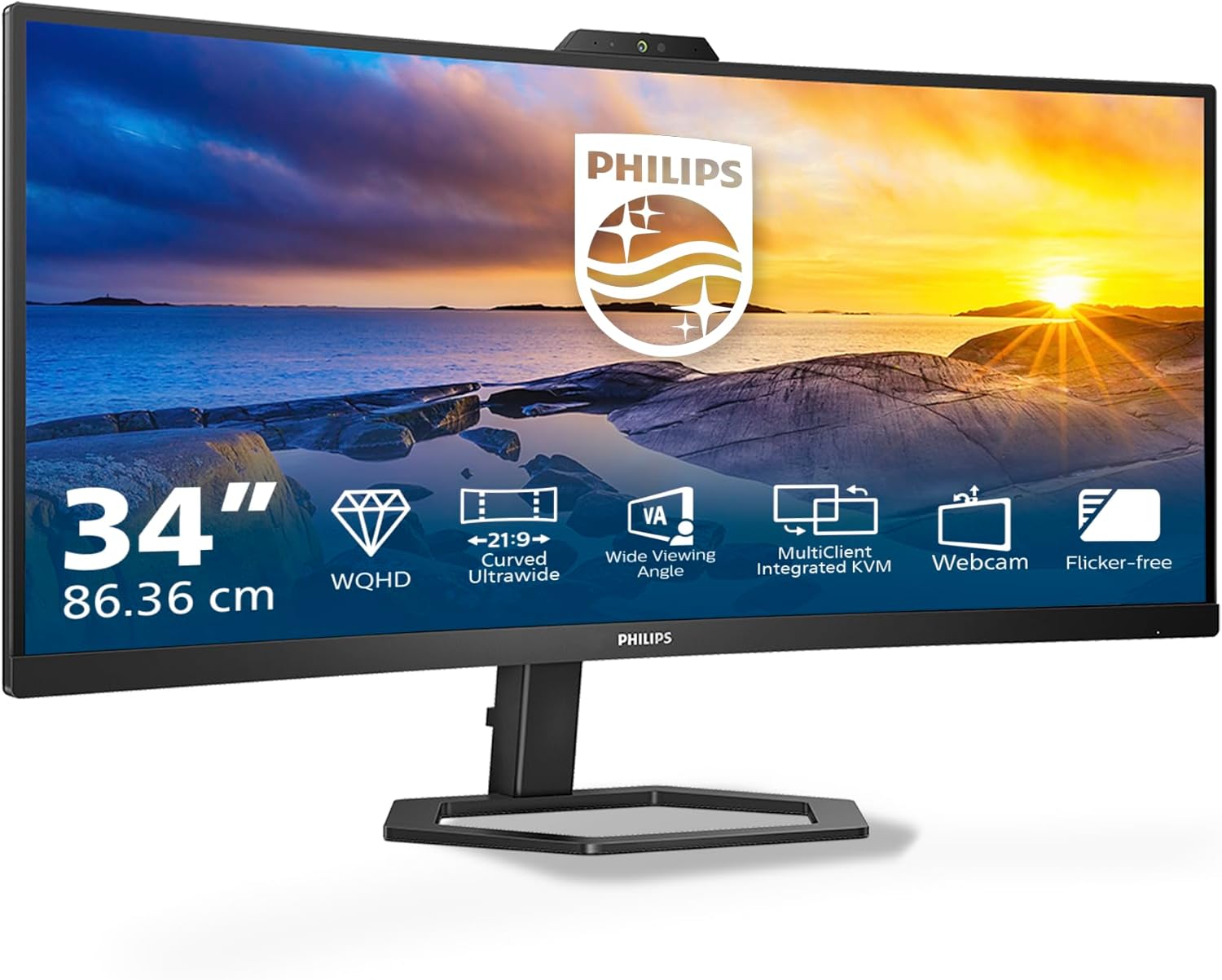
Philips 34E1C5600AM Review: Impressive Curved Display with Webcam
Quick Verdict
The Philips 34E1C5600AM is a solid contender for professionals and remote workers seeking a spacious, curved ultrawide monitor with integrated webcam and solid ergonomic features. Its 34-inch 3440×1440 VA panel delivers immersive visuals with excellent contrast and wide viewing angles, while the 100Hz refresh rate adds a touch of smoothness suitable even for casual gaming. The built-in 5MP webcam with Windows Hello compatibility and noise-cancelling mic position this screen as a remote collaboration powerhouse. Although not without minor quirks, especially in sound quality and USB hub performance, this monitor offers a comprehensive feature set tailored for hybrid work setups, pitching strong value for anyone after a productive yet visually engaging ultrawide experience.

Overview and First Impressions
Philips has long been a reputable brand in the UK monitor scene, balancing quality, innovation, and affordability. The 34E1C5600AM slots into their mid to upper-tier ultrawide range, targeting those who need more desk real estate for productivity but also desire the conveniences of remote conferencing built-in. With its gently curved 34-inch screen boasting a sharp 3440×1440 resolution, this monitor commands attention on any desk without overwhelming with bulk.
The build quality feels reassuring with a sturdy matte black plastic chassis complemented by a straightforward, fuss-free design. Bezels are reasonably slim on three sides—top and sides—helping maintain focus on the expansive screen without distraction, while the bottom bezel is a bit thicker but discrete enough. The height-adjustable stand is a great bonus, offering generous range along with tilt versatility, so you can dial in the perfect viewing angle for those long hours at the desk.
Connectivity impresses with DisplayPort, HDMI, and a USB-C port that supports power delivery, data, and display—all essentials for modern workflows. The USB hub is integrated too, though some feedback suggests it’s not as snappy as expected, more on that later. A subtle touch is the cable management system at the back, promoting a neater setup—always welcome for home offices where space management is crucial.

The star feature distinguishing this model from many alternatives is the integrated 5MP webcam, complemented by a noise-cancelling microphone and stereo speakers. It’s a thoughtful inclusion tailored squarely at remote workers and frequent video callers, reinforced by physical privacy controls for peace of mind. Overall, the Philips 34E1C5600AM brings a professional, versatile presence to the desk rather than a flashy gaming aesthetic.
Display Technology and Features Explained
This Philips display uses a 34-inch VA (Vertical Alignment) panel, delivering the popular ultrawide 3440×1440 pixel resolution—commonly called WQHD or UWQHD on ultrawides. VA panels are well known for their strong native contrast ratios—usually in the region of 3000:1 or higher here—meaning deep, rich blacks and punchy visuals. This is a significant advantage over IPS panels when watching movies in dim environments or working with predominantly dark interfaces, as blacks appear much deeper and less washed out.
Viewing angles are claimed to be 178° horizontally and vertically thanks to modern multi-domain pixel structure, which mitigates traditional VA panel issues like colour and contrast shift when viewed from extreme angles. This means multiple viewers sitting side-by-side can enjoy consistent colours and brightness without hassle. Though VA panels generally have slightly narrower viewing angles than IPS, Philips’ implementation here keeps distortion to a minimum, making the screen versatile for collaborative work or multitasking.
The 3440×1440 resolution on a 34-inch ultrawide screen strikes a satisfying balance between sharpness and real estate. Text and images appear crisp without forcing excessive scaling, helping reduce eye strain during extended use. The aspect ratio of 21:9 creates a cinematic workspace perfect for side-by-side window layouts, large spreadsheets, or immersive media consumption. It noticeably beats the standard 16:9 27-inch 2560×1440 screens in horizontal workspace, beneficial for productivity workflows.
The panel’s 100Hz native refresh rate is a step above the regular 60Hz most office monitors offer, providing smoother motion across system animations, scrolling, and particularly gaming. Although not the absolute fastest, 100Hz reduces blur and judder in motion, signalling an edge for casual gamers or anyone consuming dynamic content. The grey-to-grey response time is not specified but typically VA panels hover around 4-5ms, which coupled with the refresh rate, means ghosting might be noticeable in very fast-paced scenes. However, Philips’ pixel response optimisation minimises this to acceptable levels for most users.
Colour reproduction benefits from Philips’ Ultra Wide-Color technology, expanding the gamut coverage beyond standard sRGB. It reportedly reaches around 99% sRGB and approximately 85-90% DCI-P3, giving richer reds, deeper blues, and more natural greens than typical office displays. This widened gamut makes the screen reasonably suitable for photo editing, content creation, or any task where vibrant colour interpretation matters—though it probably won’t replace a calibrated professional-grade IPS or OLED for demanding colour-critical work.
Brightness levels peak around 350 nits (cd/m²), providing enough punch to combat daylight glare in bright rooms without overly harsh output that strains the eyes in darker settings. This places the Philips monitor comfortably above many budget ultrawides that often sit closer to 250-300 nits. Contrast, as mentioned, is where VA shines, and the high static contrast delivers a vivid picture that enhances HDR content to an extent.
Speaking of HDR, the Philips 34E1C5600AM does include HDR support but without local dimming or extreme brightness boosts, so this remains an entry-level HDR implementation. It improves tone mapping slightly but won’t deliver the deep highlights and fine shadow detail experienced with true HDR600 or HDR1000 certified monitors. Think of the HDR feature more as a marketing addition than a transformative upgrade for serious HDR viewing.
The built-in webcam and microphone add undeniable value for working from home or hybrid office setups. The 5MP resolution webcam is sharp and provides clear images for video calls, better than the commonly used 720p alternatives. Its compatibility with Windows Hello facial recognition means you can unlock your PC securely and quickly, saving valuable minutes throughout your day. Notably, the physical privacy shutter for the camera is a welcome privacy safeguard, ensuring peace of mind when the webcam isn’t in use.
Two integrated 5-watt speakers deliver stereo sound, which, while better than no speakers at all, won’t fill a room with rich audio. Usefully, the noise-cancelling microphone ensures your voice comes through clearly in calls, reducing background noise. The monitor’s MultiView feature supports simultaneous input from two sources, such as a laptop and desktop, for multitasking without switching cables—a modern convenience for multitasking professionals.
LowBlue Mode and Flicker-Free technology are Philips’ ways of reducing eye strain over long periods. Flicker-free backlighting eliminates high-frequency flicker common in LED displays that can cause fatigue and headaches even if you don’t consciously notice it. Combined with a blue light filter, this tech helps preserve comfort during marathon work sessions or late-night movie binges.
Taken together, the Philips 34E1C5600AM delivers a well-thought-out, balanced panel package offering high contrast, wide colour, and solid responsiveness with modern productivity features integrated. It’s competitive with other ultrawide VA monitors in this segment for 2026, particularly for those valuing hybrid work comforts and ergonomic adaptability.
Real-World Performance — What Customers Say
Across over 900 customer reviews in the UK, the Philips 34E1C5600AM enjoys consistent praise, particularly for its vivid, bright picture and versatility. Most users report excellent out-of-the-box colour accuracy, requiring minimal calibration. This corroborates the specification of Ultra Wide-Color tech delivering engaging, natural hues without needing fiddly manual adjustments, a boon for users who want reliable visuals straight away.
Brightness and contrast are often mentioned positively, especially by users who appreciate the immersive curvature combined with the crisp 3440×1440 resolution. Some note that the monitor’s curve is subtle yet effective in reducing neck strain and enhancing focus, particularly during long multi-window work sessions or when watching films. The 100Hz refresh rate is a plus for gamers; reviews from Xbox Series S owners reveal smooth performance without noticeable stuttering, and no significant input lag issues have been reported.
The integrated webcam and noise-cancelling microphone are often highlighted as rare conveniences in monitors and work well for remote meetings. Users appreciate the physical camera shutter for privacy. However, a minority experience occasional software glitches regarding webcam recognition, though these seem isolated and often resolved with driver updates.
The speakers, on the other hand, receive mixed feedback. While adequate for casual use like video calls or background music, many users find the sound quality thin and lacking bass depth. Buyers intending to use the monitor as a primary audio source will likely require external speakers or headphones. The USB hub gets variable mentions: while handy, some report slower-than-expected data transfer rates or non-functionality with certain peripherals, suggesting it may not satisfy heavy USB device users.
Backlight bleed and uniformity issues appear minimal and rare, generally within acceptable tolerances for a VA panel of this size. A few users do note minor glow in the corner when viewed in complete darkness, but nothing severe enough to disrupt normal usage. Build quality and stand adjustment receive unanimous approval, with the height and tilt range especially advantageous for maintaining ergonomic posture.
Long-term reliability looks good with few reports of dead pixels or hardware failures after months of use. This bodes well for those seeking a dependable daily driver monitor without fuss.
Connectivity, Ergonomics and Setup
Connectivity on the Philips 34E1C5600AM is thoughtfully organised to serve a variety of user needs. The USB-C port supports 65W power delivery alongside video and data, meaning you can connect a compatible laptop or smartphone with a single cable to charge and display simultaneously—a tidy, modern workflow solution. For users with separate desktop PCs or gaming consoles, DisplayPort 1.4 and two HDMI 2.0 inputs provide ample options for multi-device setups, including running two devices concurrently via MultiView functionality.
Explore the Philips 34E1C5600AM Monitor!
The USB hub includes several downstream USB-A ports, which prove useful for peripherals such as keyboards, mice, or external drives, although data transfer speed variability exists depending on device compatibility, as mentioned. The inclusion of a dedicated headphone jack is a welcome touch, affording private audio output with ease.
Ergonomically, the stand is one of the more flexible designs in its class. Height adjustment spans roughly 13cm, allowing users to raise or lower the screen to eye level for healthier neck posture. Tilt ranges between -5° to +20°, which accommodates both upright and reclining positions. Unlike some screening options, this model does not support swivel or rotation pivot, which may limit some multi-monitor arrangements or designers preferring portrait mode. However, the 1000R curvature and wide horizontal field of view somewhat offset this for immersive use.
VESA 100x100mm compatibility provides an alternative for mounting on arms or wall brackets, facilitating customised ergonomic setups or conserving desk space. Philips has also integrated cable management clips to keep wires contained and prevent clutter—a small but valuable feature for a clean home office environment.
Setup is straightforward; plug-and-play functionality works smoothly with Windows and Mac devices. The built-in webcam requires minor initial driver installations but is quickly recognised. The front EasySelect menu toggle key gives quick access to visual adjustments, and OSD menus can be navigated easily even without a separate remote.
Who Should Buy This
This Philips ultrawide monitor best suits remote workers, home office professionals, and those needing ample screen real estate for multitasking. Its ultra-wide 3440×1440 display offers a comfortable mix of space and sharpness, particularly valuable for financial analysts, CAD designers, programmers, or anyone managing multiple windows simultaneously. The integrated webcam, noise-cancelling mic, and Windows Hello support make it a clear winner in hybrid work contexts where video conferencing is regular.
Upgrade Your Workspace with WQHD Curved Display
Casual gamers will appreciate the 100Hz refresh rate and immersive curvature, offering fluid visuals without venturing into specialist gaming monitor price territory. Users relying heavily on colour-critical workflows might find the colour gamut sufficient for semi-professional content creation but should look elsewhere for true hardware-calibrated IPS or OLED alternatives with wider gamut and more exacting colour fidelity.
Those seeking premium HDR experiences or audio quality will want to augment this solution with dedicated external devices. If swivel or pivot adjustments are critical, alternative stands or VESA mounts will be necessary.
Our website hosts more detailed reviews of ultrawide monitors if you want to explore additional models with different panel technologies or connectivity suites tailored for specific workflows. Among comparable displays, the Philips 34E1C5600AM stands out notably for its all-in-one remote work features and ergonomic adjustability combined with a high-quality VA panel.
Pros and Cons
Pros:
- Curved 34-inch VA panel with 3440×1440 resolution delivers deep contrast and immersive viewing with sharp text and crisp images.
- 100Hz refresh rate provides smoother motion and reduced blur, suitable for casual gaming and dynamic content.
- Integrated 5MP Windows Hello webcam with physical shutter plus noise-cancelling microphone supports secure, clear remote collaboration.
- USB-C with 65W power delivery enables clean, single-cable connectivity for charging and data to compatible laptops.
- Height adjustable stand with tilt adjustment allows comfortable ergonomic placement for extended work sessions.
- Wide colour gamut nearly covering 99% sRGB and high brightness (~350 nits) produce vivid and well-saturated colours.
- MultiView functionality lets users connect two devices simultaneously for multitasking efficiency.
- Flicker-free and LowBlue mode help reduce eye strain during long multitasking days.
Cons:
- Built-in speakers lack bass and depth, insufficient for users expecting high-quality audio playback.
- USB hub performance is inconsistent with some peripherals, occasionally slow data transfers reported.
- Lacks swivel and pivot stand adjustments, limiting adaptability for complex desk layouts or portrait orientation needs.
- HDR support is basic without local dimming or high brightness, so HDR content viewing is limited in impact.
- Minor backlight bleed/glow visible in very dark environments, though generally minimal.
- Webcam software may require driver updates for seamless operation, sometimes prone to initial configuration hurdles.
Final Verdict and Recommendation
The Philips 34E1C5600AM is an excellent ultrawide monitor for those prioritising immersive productivity, remote collaboration, and flexible ergonomics without compromising on panel quality. Its vibrant VA display with strong contrast and wide colour gamut pairs well with useful features like a 5MP Windows Hello webcam and USB-C connectivity, making it a compelling choice for 2026’s hybrid work landscape. Casual gamers also benefit from the 100Hz refresh while benefiting from a desktop-friendly form factor.
If your workflow revolves around multitasking with multiple open windows, frequent video calls, and a vibrant but comfortable display, this Philips monitor makes the cut. Just remember to plan for external audio if sound quality matters to you and consider alternative mounts if your setup demands more stand flexibility.
Check current availability and latest offers for the Philips 34E1C5600AM on Amazon to ensure you secure one for your desk setup today.
Shop Now: Philips Curved Monitor with Webcam
As an Amazon Associate, I earn from qualifying purchases.