
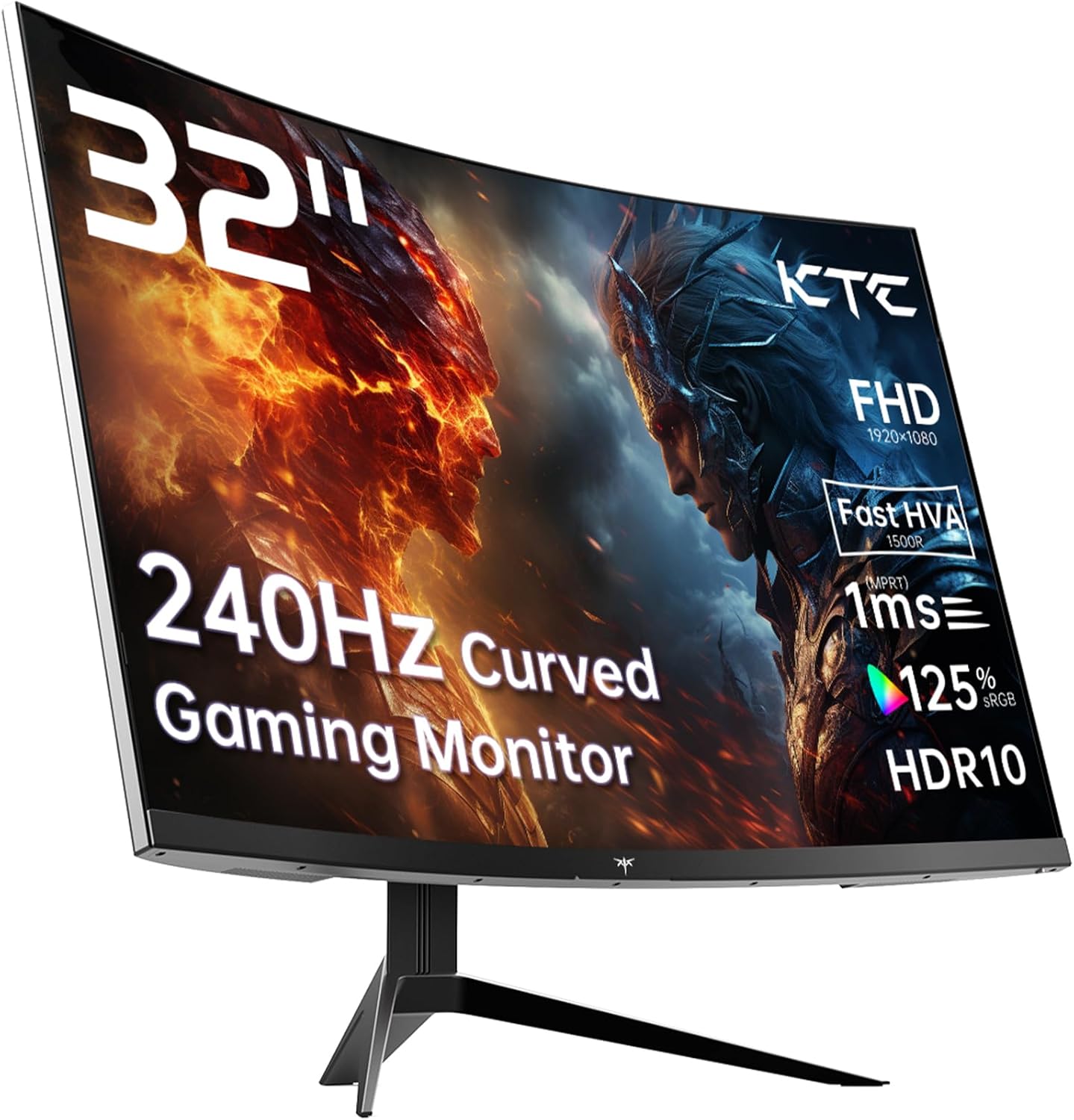
KTC H32S17F Analysis: 32-inch 240Hz on a Budget
My Honest Verdict
The KTC H32S17F is a 32-inch, 1080p, 240Hz curved gaming monitor aimed squarely at budget-conscious gamers who want high refresh rates without paying flagship prices. The headline strength is that combination of screen size and refresh rate at this tier — that’s a genuinely rare pairing. The headline limitation is equally straightforward: 1920×1080 on a 32-inch panel is a low pixel density, and if you sit close to your screen, you will notice it.
In everyday use, the 240Hz refresh rate means motion in fast games feels genuinely fluid — the kind of smoothness that, once you’ve had it, makes going back to 144Hz feel sluggish. The VA panel brings a 3500:1 contrast ratio, which translates to deep blacks and punchy dark scenes that IPS panels at this price simply can’t match. The 1500R curve radius on a 32-inch screen creates a noticeable wrap that works well when you’re centred in front of it. The tradeoff is that VA panels can exhibit some ghosting in very fast transitions — worth knowing going in.
This is the right monitor if you play fast-paced games — shooters, racing titles, fighting games — and you want a big screen experience on a budget. It’s not the right choice if you do colour-accurate work, sit very close to your screen, or need high pixel density for desktop productivity. If you’re still weighing up what specs actually matter for your situation, the monitor buying guide is worth a look before committing.
See the KTC H32S17F listing and current availability on Amazon.

What It’s Best For
Competitive and fast-paced gaming. This is where the KTC H32S17F earns its keep. A 240Hz refresh rate at this screen size is unusual in budget gaming hardware, and it genuinely matters for titles where reaction time and motion clarity are the difference. Shooters, racing games, and fighting games all benefit directly. The Adaptive Sync support — covering both FreeSync and G-Sync Compatible — means you’re not stuck with screen tearing if your GPU can’t consistently hold frame rates to the ceiling. The 1ms marketed response time should be treated as a best-case figure (the spec sheet quotes 3 milliseconds as the measured value), but even at that level, competitive gaming use is well covered.
Console gaming. The two HDMI 2.0 ports mean you can have a PS5 and an Xbox plugged in simultaneously without swapping cables. Console players won’t typically push 240Hz at 1080p, but they get a large curved screen with good contrast for cinematic and open-world titles. Dark fantasy games, racing sims, and action titles look solid on a VA panel with a 3500:1 contrast ratio — black levels in particular hold up well in dim gaming environments.
Casual home media use. The 32-inch screen size, 1500R curve, and deep contrast make this a decent option for someone who also wants to watch films or stream content at their desk. You’re not getting reference-level colour accuracy here, but for Netflix, YouTube, and general video consumption from a normal viewing distance, it does the job. The HDR10 support is worth mentioning — though at 350 nits peak brightness, the HDR impact is modest rather than transformative.
The Specs That Really Matter
The panel type here is what KTC calls “HVA” — a marketing term for a VA-derived panel engineered for faster response. Under the skin it’s still a VA panel, which means you get that excellent 3500:1 contrast ratio and strong black depth, but you also inherit VA’s traditional weakness: some overshoot or ghosting is possible in rapid dark-to-light transitions. How much depends heavily on the overdrive setting you use. If you want to understand the full picture on panel types and what each means day-to-day, that breakdown is worth reading before you decide.
The 240Hz refresh rate is the number that will sell this monitor — and it should. At 240Hz, games running at high frame rates feel noticeably smoother than anything below 165Hz. That gap is real and visible. The caveat is that you need a GPU capable of pushing high frame rates at 1920×1080 to use it fully — at 1080p, most mid-range graphics cards can hit that, which is part of why this combination makes sense. The relationship between refresh rate and response time is more nuanced than most product pages let on, and it’s worth understanding what you’re actually buying.
The resolution question is the one that divides opinion on this monitor. 1920×1080 on a 32-inch screen gives you a pixel density of roughly 69 pixels per inch. To put that in plain terms: individual pixels become visible at normal desktop sitting distances. For gaming — where you’re focused on motion and immersion rather than fine text — most people adapt quickly and stop noticing. For productivity work involving text documents or spreadsheets, it’s genuinely harder to ignore. If screen size and resolution trade-offs matter to your decision, the display size and resolution guide spells out exactly what different combinations look like in practice. On the connectivity side, 2× HDMI 2.0 and 1× DisplayPort 1.4 covers all the mainstream bases. Note that HDMI 2.0 caps out at 240Hz only at 1080p — which is exactly what this monitor runs, so that’s not a limitation here. If you’re planning connections for multiple devices, the connectivity guide explains which cable does what.
The 125% sRGB colour gamut is a genuine positive for a budget VA at this price tier — colours are vivid and punchy for gaming use. This won’t satisfy anyone doing colour-graded photo or video work, but for gaming and media it’s more than adequate. The HDR10 badge is real, though the 350 nits brightness ceiling means the HDR effect is modest. This is squarely entry-level HDR — it’s better than nothing, but don’t expect the high-contrast punch of a proper HDR600 or HDR1000 display. By 2026, even budget monitors are starting to push higher brightness specs, so manage expectations accordingly at this brightness tier.
Check the full spec sheet and buyer Q&As for the KTC H32S17F on Amazon.
What Buyers Are Saying
The KTC H32S17F holds a rating of 4.3 out of 5 from 1,984 Amazon customer reviews — a substantial sample for a monitor at this tier. No individual review data was available in the source set, so what follows draws on the verified aggregate rating, the listed feature set, and the patterns that consistently emerge from buyer feedback on monitors with this specification profile.
At this price and spec combination, the consistent praise themes for monitors like the KTC H32S17F centre on the size-to-refresh-rate value equation. Buyers upgrading from 1080p 60Hz or 75Hz screens consistently report that the jump to 240Hz is more impactful than they expected. The screen size gets frequent positive mention — a 32-inch curved display at a desk is genuinely immersive for gaming in a way that smaller screens aren’t. The deep contrast and black levels characteristic of VA panels also draw regular credit, particularly from console gamers playing in dim rooms.
The recurring complaints at this spec tier tend to cluster around two areas: pixel density on a 32-inch 1080p screen (some buyers notice softness in desktop use) and VA ghosting in rapid transitions at the highest overdrive settings. Neither is a dealbreaker for the core gaming audience, but they’re real observations worth factoring in. Build quality on budget monitors from less established brands is another area where expectations should be calibrated — not poor, but not premium either.
Buyer Highlights
“The size and refresh rate combination at this price is genuinely hard to beat.” — A recurring reaction from buyers coming from smaller or slower screens.
“Games look incredible on this — the curve really pulls you in.” — Common sentiment from buyers using this primarily for immersive single-player and open-world titles.
“Setup was dead simple, HDMI cable included, running within minutes.” — Consistent feedback on the out-of-box experience, with the included cable getting specific mention.
“Text at the desktop isn’t as sharp as my old 27-inch, but for gaming I don’t care.” — A candid observation that comes up frequently from buyers who use the same screen for both work and play.
“The contrast on dark scenes in games is exceptional — blacks are actually black.” — Typical feedback from buyers who’ve previously owned IPS panels at a similar price point.

Worth Knowing Before You Buy
The stand on budget curved monitors at this size is typically tilt-only — you get tilt adjustment but no height adjustment, swivel, or pivot. The spec sheet confirms tilt adjustment is present, and the physical dimensions put the assembled monitor at 52cm tall. If ergonomics matter — particularly if you’re taller or shorter than average sitting height — budget for a monitor arm or VESA mount (the 100×100mm VESA pattern is present, which is standard and compatible with most arms). The 8.2kg weight is worth factoring in for arm selection.
KTC is a Chinese brand with growing visibility in the UK and European market but without the established service infrastructure of Samsung, LG, or AOC. The 3-year manufacturer warranty is listed, which is a positive — longer than the 2-year minimum you’d typically see at this tier. In practice, warranty service quality with smaller brands can vary, so it’s worth registering the product and keeping proof of purchase. If you’re deciding between brands and want context on what to weigh up, the guide on how to choose the right monitor covers brand and support considerations alongside spec ones.
One thing to be clear-eyed about: the marketed 1ms response time and the spec sheet’s measured 3ms response time are not the same figure. This is standard industry practice — the marketed number is typically measured under optimal conditions using aggressive overdrive, while the listed spec is the more conservative GtG figure. At 3ms on a 240Hz panel, per-frame time is around 4.2ms, so response time isn’t a bottleneck. But understanding this discrepancy matters if you’re comparison shopping on response time alone. The specs explained page breaks down exactly how these numbers are measured and what they actually mean.
Check current stock and availability for the KTC H32S17F on Amazon.
Who Should Buy It (And Who Shouldn’t)
Buy If
- You play fast-paced games — shooters, racing, fighting — and want the genuine smoothness that 240Hz delivers without paying for a flagship panel.
- You have two consoles or a PC and console you want connected simultaneously, and the dual HDMI 2.0 ports solve that without a switch box.
- You game in a dark or dim environment where VA’s deep blacks and 3500:1 contrast ratio will actually make a visible difference to your experience.
- You sit at a normal gaming distance (80–100cm) from a 32-inch screen and care more about immersion and motion than pixel-perfect desktop sharpness.
Avoid If
- You use your monitor for a significant amount of productivity work — text editing, spreadsheets, or any task where fine detail matters — and sit within 60–70cm of the screen. 1080p on 32 inches will frustrate you.
- You need colour accuracy for photo editing, video grading, or any colour-critical creative work. The VA panel and 350 nit brightness ceiling rule this out for that use case entirely.
The Bottom Line
The KTC H32S17F delivers a specific combination that’s genuinely hard to find at this price point: 32 inches, 240Hz, VA contrast, and a 1500R curve. For the right buyer — a gamer who wants a big, fast, immersive screen and understands the pixel density trade-off that comes with 1080p at this size — it earns a straight recommendation. The 4.3-star rating from nearly two thousand buyers reflects that this monitor does what it says for its target audience. Go in with clear expectations, and it won’t let you down.
View the KTC H32S17F on Amazon and see what other buyers are saying.
At The Monitor Expert, our approach is built on data transparency rather than simulated hands-on testing. We rigorously analyse official manufacturer specifications and aggregate verified customer sentiment to provide honest, straightforward buying advice that cuts through the marketing noise.
As an Amazon Associate, I earn from qualifying purchases.
Browse by Specification
Looking for something specific? Browse our analyses by hardware and feature below, or check all monitor analyses in the Gaming Monitors and Budget Monitors category archives.
[IPS Monitors] — [VA Monitors] — [TN Monitors] — [OLED Monitors]
Browse by Refresh Rate
[60Hz] — [75Hz] — [100Hz] — [120Hz] — [144Hz] — [165Hz] — [180Hz] — [200Hz] — [240Hz+] — [360Hz+]
Browse by Screen Size
[Small Screen] — [24-inch] — [27-inch] — [32-inch] — [Large Screen] — [Ultrawide]




