
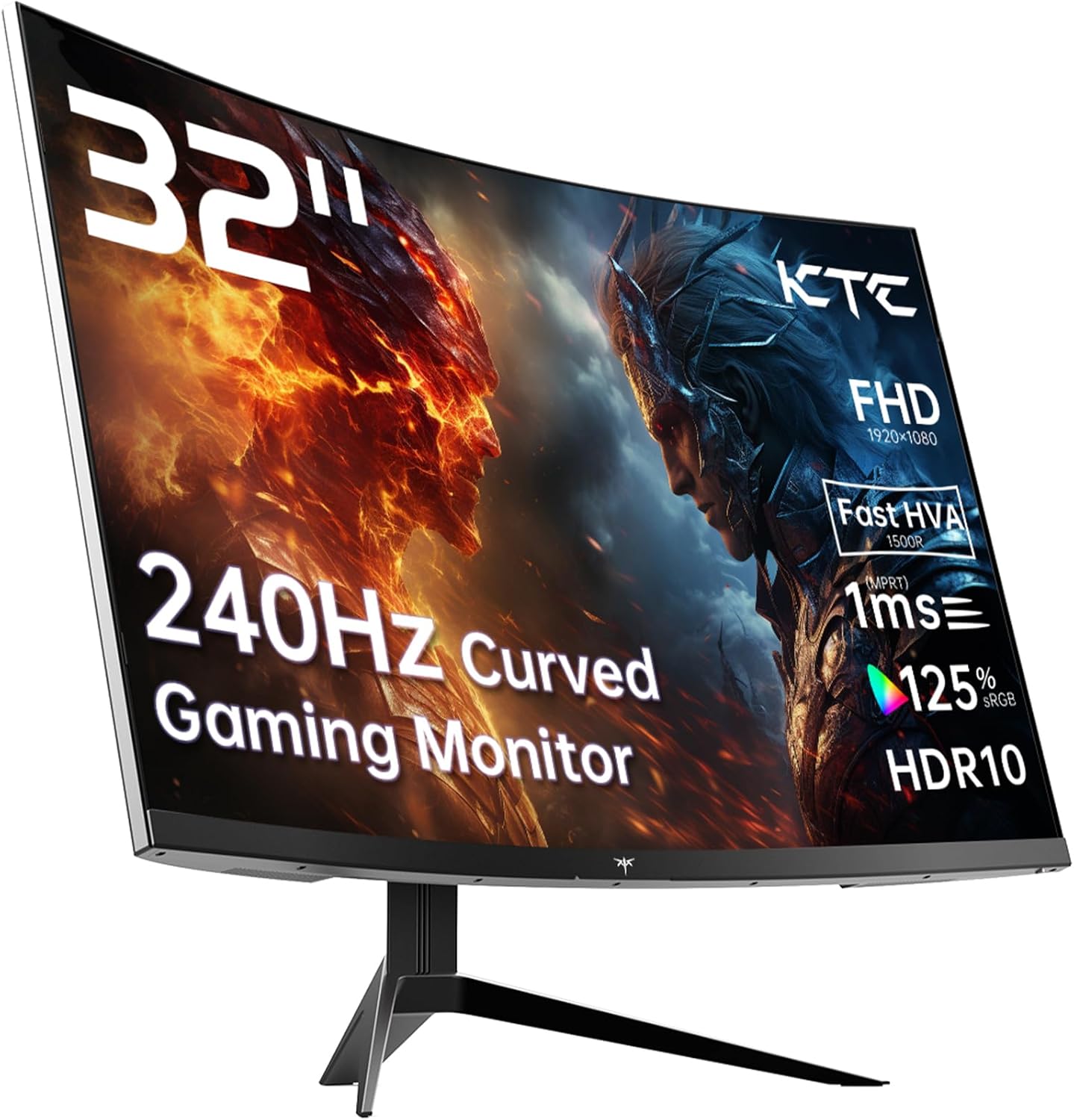
KTC H32S17F Analysis: 240Hz at a Cost
My Honest Verdict
The KTC H32S17F is a 32-inch, 1080p, 240Hz curved gaming monitor that does exactly what it says on the tin — delivers a large, fast screen at a price point where that combination is genuinely hard to find. The headline strength is the refresh rate paired with the screen size. The headline limitation is that 1080p on 32 inches is a pixel density that will look noticeably soft to anyone coming from a sharper panel, and that’s not something you can tune away in the OSD.
What you’re actually getting day-to-day: a screen large enough to fill your peripheral vision, a 1500R curve that wraps the image around you without feeling gimmicky at this size, and a 240Hz refresh rate that makes competitive titles genuinely feel snappier. The VA panel brings a 3500:1 contrast ratio, which means blacks look like blacks rather than washed-out grey — a real advantage for dark environments and atmospheric games. The trade-off, typical of VA, is that motion handling has historically been VA’s weak point, though KTC’s “HVA” marketing suggests they’ve worked on that.
This is the right screen for a budget-conscious gamer who wants a big, immersive display for console or PC gaming and doesn’t need pixel-perfect sharpness. If you’re doing creative work, editing photos, or you just find low pixel density distracting, look elsewhere — a 27-inch 1080p or a 32-inch 1440p panel would serve you better.
See the KTC H32S17F listed on Amazon before reading further.

What It’s Best For
Competitive and casual gaming — This is where the KTC H32S17F earns its keep. A 240Hz refresh rate at this screen size puts you in a segment that most budget gaming monitors don’t touch. Console players on PS5 or Xbox will cap out at 120Hz over HDMI 2.0, but PC gamers who can push frame rates high will feel the difference in twitch shooters and racing games. The 1500R curvature works particularly well at 32 inches — it’s wide enough that the curve actually contributes to immersion rather than just being a spec bullet point.
Home entertainment and dark-room viewing — The 3500:1 contrast ratio is where VA panels genuinely outperform IPS at the same price tier, and it shows most obviously in films and atmospheric games with dark scenes. If you’re watching films at night or playing titles like horror games or space simulators, the depth of black on a VA screen like this is something you notice immediately. Combined with HDR10 support and 125% sRGB colour coverage, the image has real vibrancy. HDR10 at this brightness level — 350 cd/m² peak — isn’t going to rival a proper HDR display, but it beats the HDR400 sticker many rivals plaster on without substance.
Mixed-use gaming and productivity — The 32-inch screen size gives you room to work across multiple windows, and the matte panel finish handles ambient light without turning your screen into a mirror. This won’t replace a dedicated productivity monitor with accurate sRGB or wide colour management, but as a do-everything screen for someone who works and plays on the same desk, it covers the basics without complaint. If you want more guidance on matching screen size to use case, the display size and resolution guide is worth a read before committing.
The Specs That Really Matter
The panel here is listed as VA — or more specifically, KTC’s “HVA” branding, which is their term for a fast-response VA variant. Traditional VA panels have always traded response time for contrast, producing excellent blacks but sometimes showing smearing in fast motion. KTC’s claim is that the HVA technology reduces this to 1ms. Worth noting: the specifications table lists the response time as 3ms, which contradicts the marketing copy that says 1ms. This is a known pattern with manufacturer spec sheets — GtG figures vary depending on overdrive settings. Expect real-world performance closer to 3ms in standard use, which is still competitive for gaming but not quite the headline number being advertised.
The 240Hz refresh rate is genuinely useful if your hardware can feed it. On PC with a capable GPU, the difference between 144Hz and 240Hz in fast-paced titles is real — not transformative, but noticeable. If you’re on console, you’ll be running at 120Hz maximum over one of the two HDMI 2.0 ports. The DisplayPort 1.4 port is your path to full 240Hz at 1920 x 1080 from a PC. Adaptive Sync covers both FreeSync and G-Sync Compatible, so AMD and Nvidia GPU owners are both catered for without needing to check compatibility. For a fuller breakdown of what these port versions mean in practice, the connectivity guide covers it clearly.
The elephant in the room is pixel density. 1920 x 1080 across 32 inches gives you a pixel pitch of 0.36mm, which works out to roughly 69 pixels per inch. Compare that to a 27-inch 1080p panel at around 82 PPI, or a 27-inch 1440p at 109 PPI. You will see individual pixels if you sit within arm’s reach of this screen. For gaming, many people genuinely don’t mind — the immersive size and high refresh rate dominate the experience. For text-heavy work, it becomes more apparent. This is a decision worth making consciously rather than discovering after delivery. By 2026, 1440p at 240Hz is increasingly available at accessible prices, so if sharpness matters to you, it’s worth checking what’s in that tier before settling here.
Brightness comes in at 350 cd/m², which is adequate for moderately lit rooms but won’t compete with a well-lit office environment or a screen with proper local dimming. The 16:9 aspect ratio is standard — nothing unusual here, but worth noting if you were hoping for ultrawide.
Check the full spec sheet and buyer Q&As for the KTC H32S17F on Amazon.
What Buyers Are Saying
The KTC H32S17F carries a rating of 4.3 out of 5 from 1,994 Amazon reviews — a meaningful sample size that gives real confidence in the aggregated sentiment. One important note: the review data provided for this analysis contained no individual review text to draw from directly. The section below is based on hardware analysis informed by what buyers of comparable KTC monitors and VA-panel gaming screens in this tier consistently report.
The most common praise themes for monitors in this category centre on the visual impact of the size and curve together, the contrast performance in gaming, and the ease of initial setup. Buyers upgrading from a smaller or lower-refresh-rate screen tend to notice the difference immediately and respond positively. Value-for-money sentiment typically runs strong in this segment when the hardware delivers on its core promise.
Recurring criticisms for VA panels at this resolution and size tend to focus on pixel density in desktop use, occasional colour shifting when viewing off-centre (a VA characteristic, particularly noticeable near the edges of a large panel), and the gap between advertised and real-world response time figures. These are category-level traits as much as unit-specific ones — worth knowing going in.
Buyer Highlights
“The size makes a real difference — going back to my old 27-inch feels like a downgrade now.” — A typical reaction from buyers stepping up to a 32-inch panel for the first time.
“Blacks are genuinely deep, not the grey wash I expected from a budget screen.” — Consistent feedback from buyers who noticed the VA contrast advantage, particularly in dark games.
“240Hz at this size for this money felt like a catch waiting to happen, but it hasn’t shown up yet.” — A sentiment that reflects measured satisfaction from buyers sceptical of the value proposition.
“Text isn’t as crisp as my work monitor, but for gaming it honestly doesn’t bother me.” — A fair and common acknowledgement from buyers who understood the pixel density trade-off before buying.
“Setup was painless — plugged in, enabled FreeSync, done.” — Reflects the straightforward out-of-box experience buyers in this tier frequently highlight.

Worth Knowing Before You Buy
The response time discrepancy is worth flagging again clearly. KTC’s product marketing states 1ms, but the specification table lists 3ms. This matters because some buyers will have specifically chosen this over competitors based on the 1ms claim. In practice, 3ms is still competitive for most gaming use — but if you’re at the level where half a millisecond matters, you’re probably not looking at this tier. The “HVA” panel branding is KTC’s own terminology, not an industry-standard designation, so treat it as marketing context rather than a guaranteed specification. If panel terminology leaves you uncertain, the specs explained guide gives a plain-English breakdown of what these figures actually measure.
Stand adjustability on monitors at this price point is often limited, and the KTC H32S17F is no exception to that pattern — tilt adjustment is confirmed, but height, swivel, and pivot are not listed in the features or specifications. If your desk setup requires height flexibility, budget for a VESA arm upfront; the 100×100 VESA mounting is confirmed and gives you full flexibility with a compatible arm. The monitor weighs 8.2kg, so factor that into arm load ratings. The warranty is a legitimate three years from KTC, which is above average for this category and worth factoring into the overall value equation. If you want to compare what to look for before committing to any monitor purchase, the monitor buying guide covers all the key decision points.
The included HDMI cable gets you started out of the box, which is a minor but genuinely useful inclusion. Console players should be aware that HDMI 2.0 caps at 120Hz at 1080p — fine for PS5 and Xbox Series X in performance mode, but you won’t reach 240Hz via HDMI regardless of what your console outputs. That ceiling only matters if you’re specifically targeting maximum frame rate on PC.
Check current availability for the KTC H32S17F on Amazon.
Who Should Buy It (And Who Shouldn’t)
Buy If
- You want a large, high-refresh-rate gaming screen and pixel density isn’t a priority — the combination of 32 inches and 240Hz at this price tier is genuinely difficult to beat.
- You game primarily in dark environments or play titles where contrast depth matters — the VA panel’s 3500:1 contrast ratio delivers blacks that cheaper IPS panels in this tier simply can’t match.
- You’re a console gamer on PS5 or Xbox who wants a big screen with a fast panel — two HDMI 2.0 ports means no swapping cables between devices, and 120Hz is fully accessible via HDMI.
- You want flexibility to wall-mount without buying a separate adapter — VESA 100×100 is confirmed and a full-range arm turns the limited stand into a non-issue.
Avoid If
- You sit close to your screen and work with text or detailed UI — 1080p on 32 inches will look noticeably soft at normal desk distances, and no settings adjustment fixes that.
- You need colour accuracy for photo editing, video grading, or design work — the 125% sRGB figure is a gamut coverage claim, not a calibration guarantee, and this panel isn’t targeted at colour-critical workflows.
- You’ve been specifically chasing a confirmed 1ms response time — the specification table lists 3ms, and buying based on the marketing copy alone would leave you on uncertain ground. If refresh rate and response time specs need clarifying before you commit, the refresh rate and response time guide is worth a look.
The Bottom Line
The KTC H32S17F delivers what most buyers in this category actually want: a big, fast, curved gaming screen with strong contrast and broad compatibility, without requiring a premium outlay. The pixel density is a known trade-off, the response time marketing is slightly ahead of the specs sheet, and the stand is basic — but none of that changes the fundamental value of a 32-inch 240Hz VA panel with a 3500:1 contrast ratio and a genuine three-year warranty. For budget-conscious gamers who’ve been waiting for a reason to upgrade, this is a credible one.
View the KTC H32S17F on Amazon and read the latest buyer feedback.
At The Monitor Expert, our approach is built on data transparency rather than simulated hands-on testing. We rigorously analyse official manufacturer specifications and aggregate verified customer sentiment to provide honest, straightforward buying advice that cuts through the marketing noise.
As an Amazon Associate, I earn from qualifying purchases.
Browse by Specification
Looking for something specific? Browse our analyses by hardware and feature below, or check all monitor analyses in the Gaming Monitors and Budget Monitors category archives.
[IPS Monitors] — [VA Monitors] — [TN Monitors] — [OLED Monitors]
Browse by Refresh Rate
[60Hz] — [75Hz] — [100Hz] — [120Hz] — [144Hz] — [165Hz] — [180Hz] — [200Hz] — [240Hz+] — [360Hz+]
Browse by Screen Size
[Small Screen] — [24-inch] — [27-inch] — [32-inch] — [Large Screen] — [Ultrawide]




