
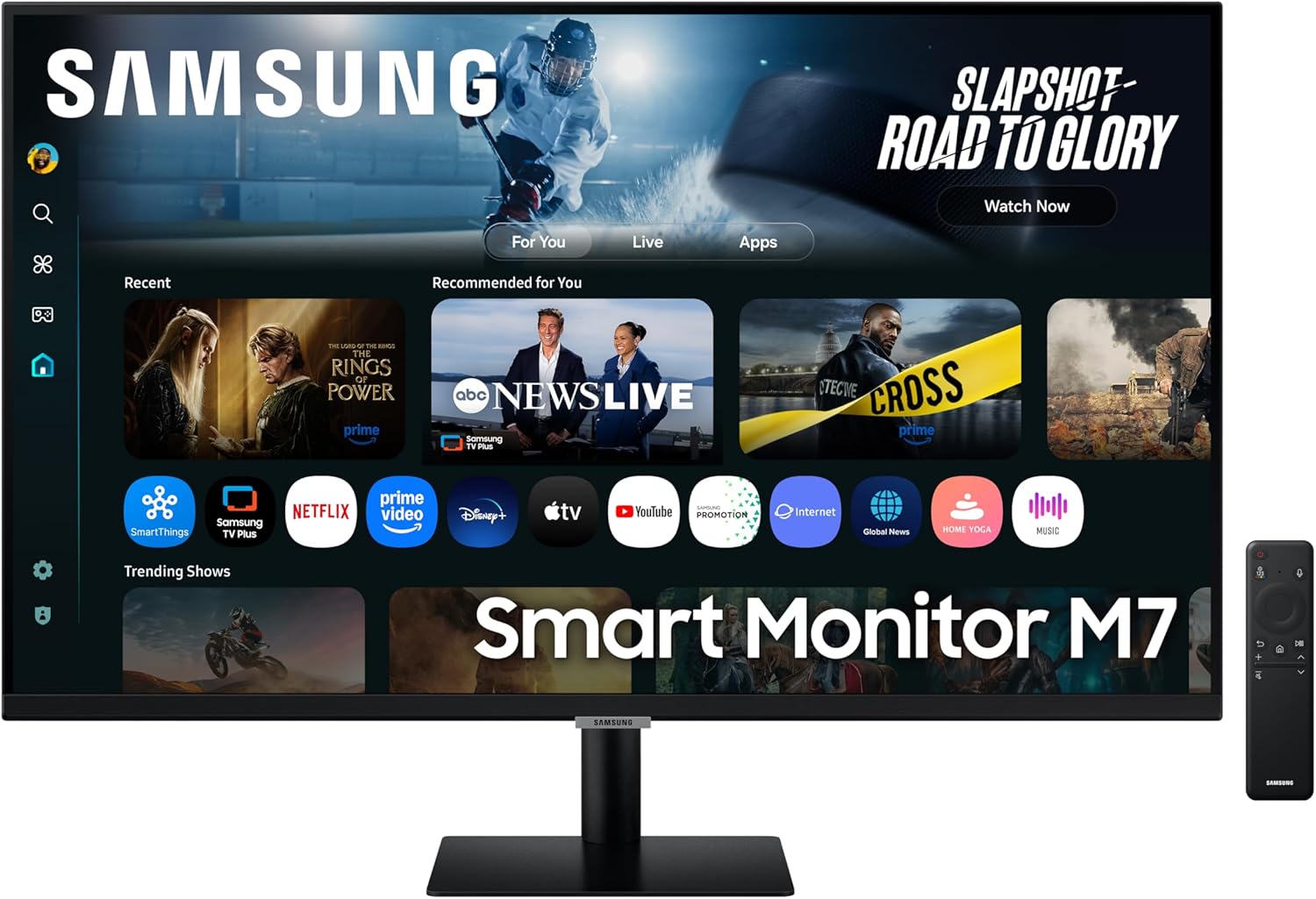
Samsung LS32FM702UUXXU Analysis: One Screen, No Boxes
My Honest Verdict
The Samsung LS32FM702UUXXU is a hybrid device — part monitor, part smart TV — and that dual identity is exactly what makes it worth considering for the right buyer and worth skipping for others. At its core, you’re getting a 32-inch, 4K (3840×2160) screen with a built-in Tizen OS smart platform that gives you Netflix, Disney+, YouTube, Samsung TV Plus and a gaming hub without needing anything plugged in. For anyone who wants one screen that covers work, streaming, and casual gaming without a tangle of boxes and cables, this is a genuinely tidy solution.
The headline specs tell a reasonable story for a screen at this tier. A 60Hz refresh rate and 4ms response time are honest figures for a device that isn’t positioning itself as a competitive gaming monitor — it’s positioning itself as a flexible daily driver. The 3000:1 contrast ratio suggests a VA panel, which delivers deeper blacks than IPS at the cost of some motion clarity. HDR10 support is present, though at 300 nits peak brightness the HDR impact will be modest rather than transformative. The USB-C, dual HDMI, and USB-A port selection covers most desk setups without needing a hub.
This is the monitor for the person who wants to close the laptop, push back in their chair, and watch something without switching inputs or digging out a Fire Stick. It’s also a workable second screen for anyone running a MacBook or Windows laptop over USB-C. If you’re a competitive gamer who needs anything beyond 60Hz, or a creative professional who demands colour accuracy above all else, this is not your screen. For everyone else — students, home workers, console gamers who aren’t frame-rate obsessives — it earns its keep.
See the Samsung LS32FM702UUXXU listing and current availability on Amazon.

What It’s Best For
Home streaming and cord-cutting. This is where the Samsung LS32FM702UUXXU genuinely earns its stripes. The built-in Tizen OS smart platform means you can access streaming services, Samsung TV Plus free channels, and the Samsung Gaming Hub without connecting anything else. AirPlay support means iPhone and Mac users can throw content to the screen wirelessly in seconds. One buyer noted a BBC iPlayer hiccup that required a factory reset to fix — annoying, but resolvable, and everyone who worked through it reported the platform functioning well afterwards. For a desk that doubles as an entertainment setup, this is one of the cleaner ways to do it.
Office and home working. A 32-inch screen at 3840×2160 gives you genuine desktop real estate. Text is sharp, multiple windows sit comfortably side by side, and the USB-C input means MacBook users get display and charging from a single cable — which is one less thing to think about. Microsoft 365 is also available directly through the smart OS, so if you need to pull up a document without opening a laptop, you can. Buyers who’ve run dual-laptop setups through this screen — MacBook via USB-C and a Windows machine via HDMI — report both working without issue. That kind of flexibility at a single desk is genuinely useful.
Console gaming at a relaxed pace. An Xbox Series X through HDMI, a 4K picture, and HDR10 support makes for a solid setup for single-player games, sports titles, and anything that doesn’t demand sub-10ms response times. The 60Hz cap is a real ceiling here — fast-paced multiplayer shooters will feel smoother on a proper gaming monitor — but for the majority of console gaming, it’s not a problem in practice. The built-in Samsung Gaming Hub also lets you access cloud gaming services without a console at all, which is a useful fallback if you’re between hardware generations.
The Specs That Really Matter
The panel type isn’t explicitly confirmed in Samsung’s UK spec sheet for this model, but a 3000:1 contrast ratio points clearly toward a VA panel. That’s worth understanding before you buy. VA panels do contrast and deep blacks better than IPS — movies look genuinely cinematic, and dark scenes in games aren’t washed out. The tradeoff is that viewing angles are narrower than IPS, and fast motion can exhibit some ghosting. For a panel type breakdown, the practical upshot for this screen is that if you’re sitting directly in front of it at a normal desk distance, VA works well. If you’re frequently watching from a sofa at a wide angle, colours may shift. Know your setup before committing.
The 60Hz refresh rate is the single spec that will matter most to buyers who game. It is entirely adequate for console gaming, media consumption, and productivity work. It is not adequate for competitive PC gaming or anyone coming from a 144Hz or faster display who intends to use this as a primary gaming monitor — the difference there is perceptible and persistent, not just a spec-sheet footnote. The 4ms response time is reasonable for a 60Hz screen. If you want to understand what these figures actually mean in practice, the refresh rate and response time guide is worth a read. For the target audience here, neither figure should put you off.
4K at 32 inches in a 16:9 aspect ratio produces a pixel density that makes text genuinely crisp and detail in video content pleasingly sharp. One buyer noted it doesn’t match a mobile screen for absolute sharpness — which is technically true — but that’s an unreasonable benchmark. At typical desk viewing distances, 3840×2160 on a 32-inch panel is a comfortable, high-quality experience. If you’re curious about how resolution scales across screen sizes, the display size and resolution guide covers this in practical terms. In 2026, 4K is firmly the standard for anyone spending at this tier who intends to keep a monitor for several years.
The HDR10 certification is present, but 300 nits peak brightness is an honest limitation. HDR on this panel will deliver some improvement in colour volume and shadow detail compared to SDR, but it won’t produce the specular highlights you’d see on a proper HDR1000 display. Don’t expect HDR to be a headline selling point — treat it as a useful bonus rather than a core feature. The connectivity picture is stronger: USB-C with power delivery, two HDMI ports, and built-in Wi-Fi and Bluetooth 5 give you a lot of flexibility for both wired and wireless setups. For anyone trying to understand how to make best use of these ports, the connectivity guide covers the practical differences clearly.
Check the full spec sheet and buyer Q&As for the Samsung LS32FM702UUXXU on Amazon.
What Buyers Are Saying
With 64 Amazon customer reviews averaging 4.1 out of 5, the sample is reasonably sized — enough to draw some consistent threads, though not large enough to call every pattern definitive. The split is informative: most buyers are happy, a small minority had a genuinely bad experience, and the reasons on both sides are pretty clearly articulated.
The praise clusters around three things: picture quality, ease of setup, and the smart platform’s convenience. Multiple buyers specifically mention how quickly the initial setup was — one noted it was up and running without difficulty, another called it “super easy.” The 4K picture gets consistent credit for looking sharp and vivid. Several buyers using this with an Xbox Series X or as a dual-input work screen mention the multi-source flexibility as a real-world strength. Built-in speakers get a mention from one buyer who found them adequate for their use — though another sets realistic expectations by running a soundbar alongside it.
The criticism is worth taking seriously but also contextualising. One 1-star review describes a genuinely frustrating setup experience and poor picture quality — though no other review corroborates the picture quality complaint, and the setup issues may reflect a specific configuration or defective unit. More credible as a pattern: one buyer flagged the BBC iPlayer app not working out of the box, which was resolved by a factory reset. Another raised USB device compatibility limitations — particularly USB webcams — and noted the ecosystem feels deliberately Samsung-centric, similar to Apple’s closed approach. That’s a fair and useful observation. If your workflow depends on connecting third-party USB devices directly to the monitor rather than to a PC, that’s worth factoring in before buying.
Buyer Highlights
“It’s great for what I paid for it — gaming on Xbox Series X and streaming apps built right in.” — A common theme from buyers who picked this up as a do-everything desk screen for console use.
“Set it up right away, super easy — clear, crisp picture, great for working and watching shows.” — Consistent feedback across multiple UK buyers on how straightforward the out-of-box experience is.
“MacBook through USB-C and a Windows laptop through HDMI both work flawlessly.” — A useful data point for anyone running a dual-laptop desk setup.
“BBC iPlayer didn’t work at first, but a factory reset fixed it — frustrating to need to do that, but it works now.” — Something to be aware of upfront rather than troubleshoot after delivery.
“Very Samsung-only — purposely made to not work well with anything that isn’t theirs.” — A recurring frustration from buyers who expected broader third-party device compatibility.

Worth Knowing Before You Buy
The smart platform is the headline differentiator here, but it comes with Samsung’s characteristic closed-ecosystem approach. USB webcams don’t appear to be supported directly through the monitor’s USB ports for use within the smart OS — if you need webcam functionality, you’ll be routing that through a connected PC rather than the monitor itself. The smart hub is well-stocked with streaming services but feels Samsung-centric; if you live outside that ecosystem, some friction is possible. A factory reset resolved app issues for at least one buyer, which is slightly more of a faff than it should be, but it’s a known fix rather than an unresolved mystery. Worth doing if something feels off after initial setup.
Ergonomics are a practical consideration. The spec data confirms tilt adjustment but doesn’t indicate height adjustment or pivot capability — which is fairly standard at this price point but worth noting if your desk setup requires precise vertical positioning. The stand footprint is 71.6cm wide, so measure your desk before ordering. Build quality feedback from buyers is broadly positive — no structural complaints surfaced in the reviews — and Samsung’s 2-year manufacturer warranty is a reasonable safety net. If you’re weighing up whether a smart monitor at this tier fits your particular workflow, the monitor selection guide covers the use-case tradeoffs clearly. One more thing: always go into advanced settings and run the smart calibration after setup — at least one buyer found it made a noticeable difference to picture quality, and it takes only a few minutes.
View current stock and delivery options for the Samsung LS32FM702UUXXU on Amazon.
Who Should Buy It (And Who Shouldn’t)
Buy If
- You want a single screen that handles work, streaming, and casual gaming without needing a Fire Stick, Apple TV, or any other streaming box plugged in.
- You’re running a MacBook or Windows laptop and want USB-C single-cable connection that delivers display output and charging simultaneously.
- You play console games (Xbox, PlayStation) and want a 32-inch, 4K picture with HDR10 — and frame rate beyond 60Hz isn’t a priority for your game library.
- You’re an Apple household — AirPlay integration means iPhones, iPads, and Macs all talk to this screen without any extra setup.
Avoid If
- Competitive or fast-paced PC gaming is your main use case — 60Hz is a hard ceiling and there are purpose-built gaming monitors with 144Hz or higher at comparable screen sizes that will serve you far better. Check the monitor buying guide for a sense of what to prioritise at different use cases.
- You need to connect third-party USB devices — webcams, USB hubs, custom peripherals — directly through the monitor’s smart OS rather than via a PC, as the ecosystem compatibility is limited to Samsung-approved devices.
The Bottom Line
The Samsung LS32FM702UUXXU is a well-executed answer to a specific question: what if one screen could cover a desk workstation, a streaming setup, and a casual gaming display without any extra hardware? At 32 inches and 4K, the screen itself is genuinely good — sharp, punchy contrast from what looks like a VA panel, and a connectivity suite that handles most desk configurations without adapters. The smart platform has rough edges, particularly for anyone outside Samsung’s ecosystem, but the core functionality works and the picture quality earns its positive reviews. If the shoe fits — and for a lot of home workers, students, and console gamers, it genuinely does — this is a screen that earns a clear recommendation.
At The Monitor Expert, our approach is built on data transparency rather than simulated hands-on testing. We rigorously analyse official manufacturer specifications and aggregate verified customer sentiment to provide honest, straightforward buying advice that cuts through the marketing noise.
As an Amazon Associate, I earn from qualifying purchases.
Browse by Specification
Looking for something specific? Browse our analyses by hardware and feature below, or check all monitor analyses in the Office Monitors and Mid-Range Monitors category archives.
[IPS Monitors] — [VA Monitors] — [TN Monitors] — [OLED Monitors]
Browse by Refresh Rate
[60Hz] — [75Hz] — [100Hz] — [120Hz] — [144Hz] — [165Hz] — [180Hz] — [200Hz] — [240Hz+] — [360Hz+]
Browse by Screen Size
[Small Screen] — [24-inch] — [27-inch] — [32-inch] — [Large Screen] — [Ultrawide]




