
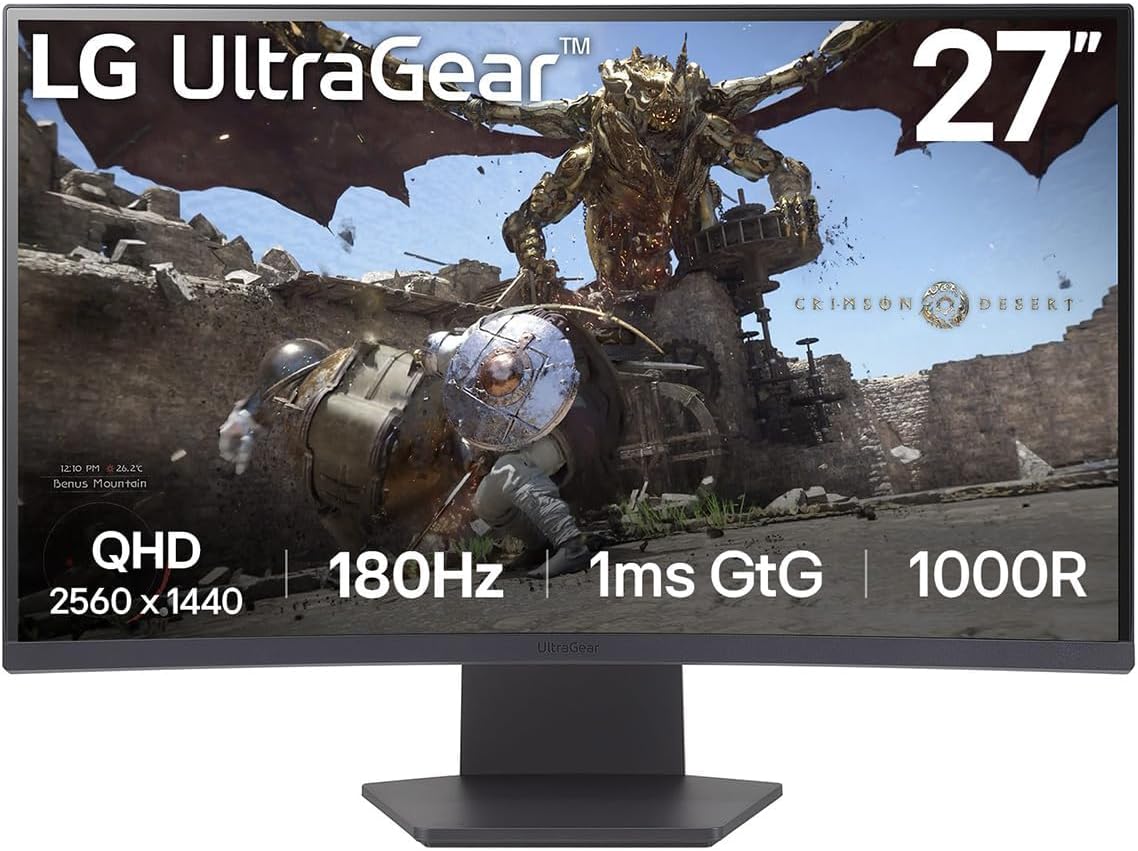
LG UltraGear 27GS60QC Analysis: VA Contrast Meets 180Hz
My Honest Verdict
The LG UltraGear 27GS60QC is a 27-inch, 1440p curved gaming monitor that earns a genuine recommendation for the vast majority of PC gamers who aren’t chasing esports-level perfection. The headline numbers — 180Hz refresh rate, 1ms response time, VA panel with a 2000:1 contrast ratio — are legitimately good at this tier, and the real-world buyer feedback backs that up. This isn’t marketing padding over a mediocre screen. It’s a properly capable monitor from a brand that knows how to build them.
What you’re actually getting day-to-day: a curved screen with noticeably deep blacks and punchy contrast that makes VA panels worth considering over IPS if you game in a dimmer room. The 1000R curve wraps the image around your field of view in a way that feels natural at this size. At 2560 x 1440 on a 27-inch panel, the pixel density is sharp enough that you won’t feel the urge to sit closer or further back — it’s a comfortable viewing resolution. And 180Hz is fast enough that anyone coming from 144Hz or below will notice the difference immediately in motion clarity.
This is the right monitor for PC gamers who want a step up from 1080p without committing to 4K hardware demands, and for anyone who games in a room with controlled lighting where VA contrast really shines. If you’re an ultra-competitive FPS player who prioritises zero ghosting above all else, or you need USB-C connectivity or advanced ergonomics, read the caveats below before committing.
See the LG UltraGear 27GS60QC listing and current availability on Amazon.

What It’s Best For
Gaming — PC first, console capable. This is the obvious sweet spot. The combination of 180Hz and 1ms (GtG) on a 1440p screen puts the LG UltraGear 27GS60QC in genuinely good company for fast gameplay. RPGs, racing titles, and open-world games benefit enormously from the VA panel’s contrast — shadow detail in dark environments is meaningfully better than most IPS panels at this tier. For competitive shooters the monitor performs well, though one caveat applies — more on that in the concerns section. AMD FreeSync and VESA AdaptiveSync certification mean variable refresh rate works properly if your GPU supports it, which eliminates tearing without the G-Sync tax. Console gamers using PS5 or Xbox Series X will get a clean signal at up to 120Hz at 1440p, though VRR compatibility depends on the specific console and game.
Immersive single-player gaming and media. The 1000R curve and VA contrast ratio are a proper combination for anyone who spends long sessions in narrative-driven games or watches content on their monitor. Deep blacks matter more than most spec sheets let on — when you’re watching a dark sci-fi scene or navigating a night-time game environment, a 2000:1 contrast ratio versus the typical 1000:1 on an IPS panel is a visible, tangible difference. The sRGB 99% coverage means colours in games and films look accurate without calibration gymnastics, and the HDR10 support, while entry-level, adds a degree of dynamic range if your content supports it.
Daily PC use alongside gaming. The 27-inch screen size and 2560 x 1440 resolution give you enough real estate to work comfortably — two windows side by side is usable at this size in a way it isn’t on a 24-inch 1080p panel. The three-sided slim bezel keeps the desk looking tidy. This isn’t a productivity monitor — there’s no USB hub, height adjustment is limited, and colour accuracy for professional photo or video work isn’t what you’d get from a dedicated content creation display — but as a do-it-all gaming-primary monitor, it handles light office use without complaint.
The Specs That Really Matter
The VA panel is the most important spec decision here and the one most manufacturers bury in the small print. VA sits between TN and IPS in most respects: better contrast than both, slower pixel response than TN, and narrower viewing angles than IPS. For a monitor you sit directly in front of, those viewing angles are rarely an issue. The contrast advantage — 2000:1 here — is real and visible. If you’re interested in understanding how panel type affects what you see on screen, this guide to monitor panel types covers the trade-offs clearly. The short version: VA is the right choice if contrast and deep blacks matter to you, and you’re not doing colour-critical professional work.
The 180Hz refresh rate paired with 1ms (GtG) response time is a combination that works well in practice for gaming. The jump from 144Hz to 180Hz is more noticeable than the commonly dismissed gap between 144Hz and 165Hz — it’s not transformational, but it’s real in competitive titles and high-framerate racing games. The 1ms figure is the GtG (grey-to-grey) measurement, which is the fastest possible transition between specific pixel states. Real-world motion clarity depends on how the overdrive is tuned across all transitions, not just the best case — this is where one buyer’s ghosting complaint becomes relevant, and it’s worth understanding how refresh rate and response time interact before drawing conclusions.
Resolution and screen size are paired well here. 2560 x 1440 on a 27-inch panel gives a pixel density that’s noticeably sharper than 1080p at the same size without demanding the GPU horsepower that 4K requires. It’s the sweet spot for mid-range GPUs — an RTX 4060 or RX 7600 can drive most games at high settings and still push reasonable frame rates toward that 180Hz ceiling. If you’re still deciding whether 27 inches at 1440p is the right fit for your desk distance, this breakdown of display size and resolution will help you work it out.
Connectivity is functional but minimal. The LG UltraGear 27GS60QC ships with 2x HDMI and 1x DisplayPort — enough to run a PC and a console simultaneously without cable-swapping. There is no USB-C, no Thunderbolt, and no USB hub. For pure gaming that’s fine. For a work-from-home setup where you’d want to daisy-chain peripherals or connect a laptop cleanly, it’s a limitation worth noting. The DisplayPort input is what you want for PC gaming at full 180Hz — use it. If you need more detail on which ports do what, the monitor connectivity guide is worth a scan before you buy.
The HDR10 support is entry-level. 300 cd/m² peak brightness is not enough to deliver the highlights and shadow separation that proper HDR requires. HDR10 here means the monitor can accept an HDR signal — it doesn’t mean the result will match what you’d see on a genuine HDR display. One buyer specifically mentioned turning HDR off and finding the image better without it. That tracks. By 2026, this remains a common pattern with VA monitors at this price tier — the SDR image quality is the real story, and it’s a good one. Don’t buy this for HDR performance. Buy it for everything else.
Check the full spec sheet and buyer Q&As for the LG UltraGear 27GS60QC on Amazon.
What Buyers Are Saying
The LG UltraGear 27GS60QC holds a 4.5 out of 5 rating across 160 Amazon reviews — a solid base for drawing genuine conclusions. The sample size is large enough to be meaningful, and the sentiment is predominantly positive with a clear, consistent pattern of praise across very different types of buyers.
The most recurring theme is value relative to the brand name. LG commands trust in the monitor space, and buyers repeatedly express surprise that they’re getting a screen that feels this capable without paying a premium for it. Colour quality and contrast earn specific praise — buyers upgrading from 1080p panels or older 144Hz VA screens describe an obvious visual jump, particularly in darker game scenes where VA contrast does its best work. Motion performance at 180Hz gets positive mentions from competitive gamers noting snappier tracking in games like Rainbow Six Siege and smoother driving feel in Forza Horizon 5.
The build quality is described as solid rather than exceptional — the stand is stable, setup is straightforward, and the slim bezel delivers on the immersive framing it promises. Multiple buyers note zero dead pixels and no backlight bleed on arrival, which is meaningful given how hit-and-miss that can be at this tier. The one consistent complaint worth flagging: ghosting in fast FPS scenarios. One buyer specifically found VA smearing problematic enough in competitive shooters to prefer an alternative, and this is a known VA panel characteristic that overdrive settings only partially address. It won’t bother most gamers, but it’s a real concern for anyone whose entire use case is ultra-competitive FPS at high sensitivity.
A small number of buyers were reviewing the 32-inch variant of the GS60QC rather than the 27-inch — worth noting since most of the sentiment still applies to the panel technology and feature set, but size-specific impressions should be read with that in mind.
Buyer Highlights
“At 180Hz the difference is obvious in competitive shooters — tracking and flicking feel noticeably snappier.” — A consistent reaction from buyers coming from 144Hz panels who were sceptical the upgrade would be meaningful.
“Colour and contrast are excellent for a VA panel — deep blacks, vibrant colours straight out the box.” — Repeated across multiple reviews from buyers who didn’t expect to be this pleased without any calibration.
“HDR is a bit weird for me personally, so I turn that off — even with HDR off the picture is great.” — An honest observation that reflects how entry-level HDR10 behaves on budget VA panels, and why SDR performance matters more here.
“Zero light bleed and zero ghosting — way above expectations for the price.” — Panel lottery concerns are always a factor with VA, but multiple buyers report clean units with no manufacturing defects.
“Ghosting is a major issue in FPS games — smearing and motion blur that overdrive doesn’t fully fix.” — A minority view but a legitimate one, and worth taking seriously if your primary use is ultra-competitive FPS gaming.

Worth Knowing Before You Buy
Ghosting on VA panels is a real thing. The LG UltraGear 27GS60QC’s 1ms GtG figure covers the best-case pixel transition — in practice, certain shades take longer to switch, and the result in fast, high-contrast scenes can be a faint smear trail behind moving objects. Most buyers don’t notice or don’t care, particularly in slower-paced or single-player titles. But if you play at high sensitivity in titles like Counter-Strike or Valorant, this is worth considering. The overdrive options in the OSD can help, but they introduce their own trade-offs if set too aggressively. If ghosting-free competitive play is your absolute priority, an IPS panel at this refresh rate would serve you better — the contrast trade-off is the price you’d pay for that. The guide on choosing the right monitor for your use case covers this decision in more depth.
Ergonomics are limited to tilt adjustment — there’s no height adjustment, swivel, or pivot built into the stand. For most gaming setups this is fine, especially if you’re using a monitor arm. The L-shaped stand has a small footprint, which is actually a positive for cluttered desks. Build quality is described as functional and stable rather than premium — this is a mid-range monitor and it feels like one, which is fair enough. LG’s warranty is 1 year manufacturer coverage, which is standard for this tier but shorter than what some rivals offer. The OSD and OnScreen Control software are well-regarded by buyers — LG’s menu system is one of the more sensible implementations in this category. No meaningful reliability concerns appear across the review base.
One worth flagging for console gamers: the monitor does not support VRR via HDMI in all scenarios — buyer feedback confirms it works fine switching between fixed refresh rates on PS5, but native VRR may depend on your specific console, firmware, and game. Worth verifying if that matters to you. For PC gaming with AMD FreeSync, the experience is straightforward and works as advertised. If you’re still weighing this up against alternatives at a similar spec level, the monitor buying guide is a good reference point for knowing what to compare.
View current stock levels for the LG UltraGear 27GS60QC on Amazon.
Who Should Buy It (And Who Shouldn’t)
Buy If
- You’re upgrading from a 1080p or 144Hz monitor and want a genuine step up in resolution and motion clarity without needing top-end GPU hardware to drive it.
- You game in a controlled-light environment where VA contrast — those deep blacks and a 2000:1 ratio — will actually make a visible difference to your experience.
- You use AMD graphics and want proper adaptive sync without paying for a G-Sync premium, or you run a mixed PC and console setup and need two HDMI inputs alongside DisplayPort.
- You want a curved gaming screen from a reputable manufacturer with a proven track record on panel quality, and you’re not willing to gamble on a lesser-known brand to save a small amount.
Avoid If
- Ultra-competitive FPS gaming is your primary use case and zero ghosting in high-contrast scenes is non-negotiable — the VA panel’s motion limitations will frustrate you, and an IPS alternative would serve you better.
- You need USB-C connectivity, a USB hub, or height/swivel adjustment — none of those are on offer here, and forcing workarounds will annoy you quickly.
- You’re buying primarily for HDR — 300 cd/m² brightness with HDR10 is not a proper HDR experience and buyers confirm the SDR image is actually better.
The Bottom Line
The LG UltraGear 27GS60QC is a genuinely well-balanced gaming monitor at a tier where most options involve compromises you’re not told about upfront. The VA panel, 180Hz refresh, 1440p resolution, and LG build quality combine into a package that earns its rating rather than coasting on brand name. The ghosting caveat for competitive FPS players is real and worth taking seriously — but for the majority of gamers, it simply won’t come up. If you want to understand how all this fits into the broader language of monitor specs, that’s worth a read before you finalise your choice. Otherwise: this is a solid screen that most buyers will be happy with from day one.
Find the LG UltraGear 27GS60QC on Amazon and check current availability.
At The Monitor Expert, our approach is built on data transparency rather than simulated hands-on testing. We rigorously analyse official manufacturer specifications and aggregate verified customer sentiment to provide honest, straightforward buying advice that cuts through the marketing noise.
As an Amazon Associate, I earn from qualifying purchases.
Browse by Specification
Looking for something specific? Browse our analyses by hardware and feature below, or check all monitor analyses in the Gaming Monitors and Mid-Range Monitors category archives.
[IPS Monitors] — [VA Monitors] — [TN Monitors] — [OLED Monitors]
Browse by Refresh Rate
[60Hz] — [75Hz] — [100Hz] — [120Hz] — [144Hz] — [165Hz] — [180Hz] — [200Hz] — [240Hz+] — [360Hz+]
Browse by Screen Size
[Small Screen] — [24-inch] — [27-inch] — [32-inch] — [Large Screen] — [Ultrawide]




