
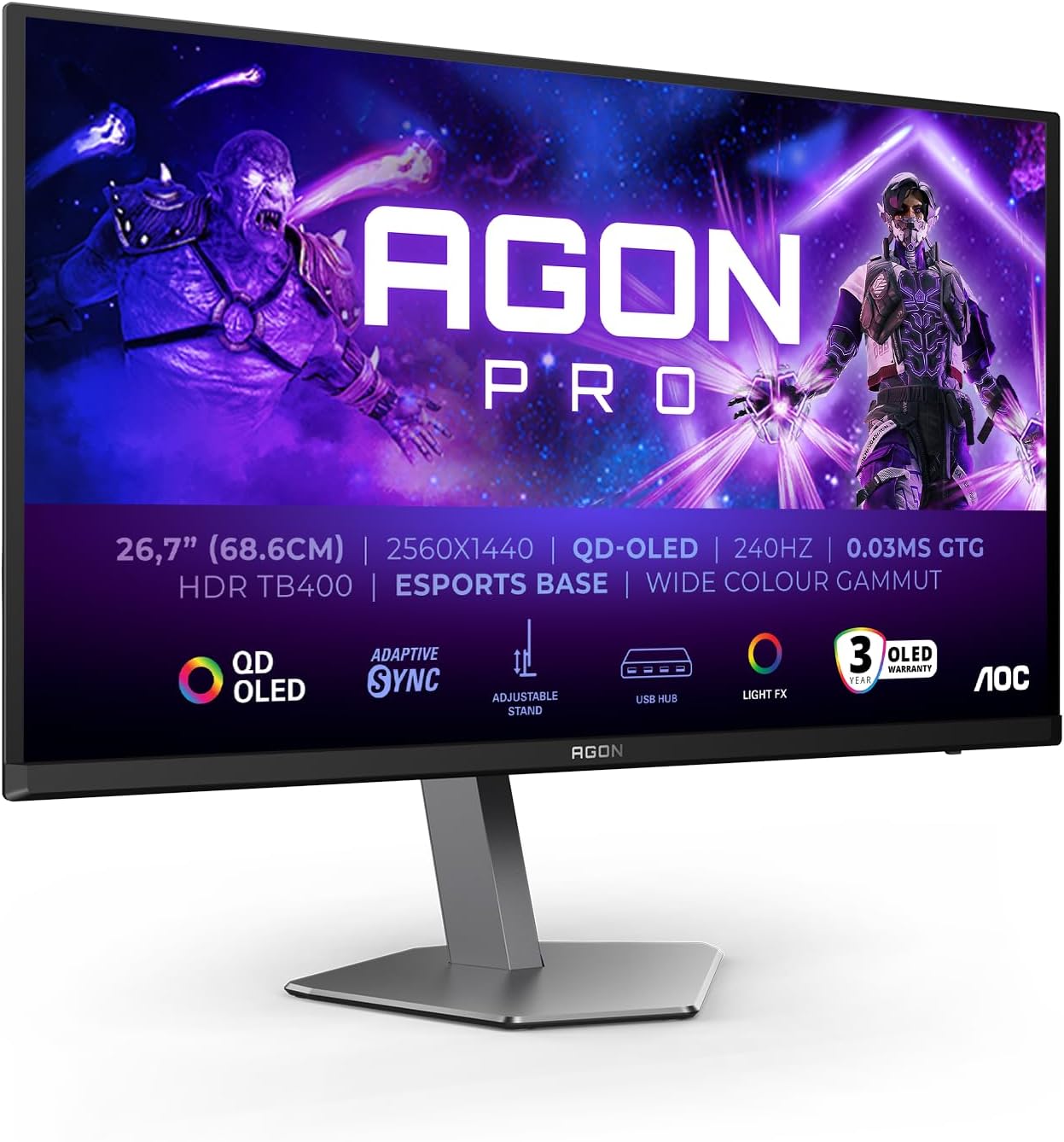
AOC AG276QZD2AM Analysis: QD-OLED Above Its Station
My Honest Verdict
The AOC AG276QZD2AM is a QD-OLED gaming monitor doing something genuinely unusual: putting a panel technology that was exotic and expensive two years ago into a form factor that buyers are actually considering against mid-range IPS alternatives. That matters. The headline strength is the panel itself — QD-OLED at 27 inches with a native 2560×1440 resolution and a 240Hz refresh rate is a combination that would have cost considerably more to access not long ago. The headline limitation is more niche than it sounds: console players on PS5 will encounter higher input lag than PC users, and that’s worth flagging upfront.
In everyday use, QD-OLED means you’re getting genuine per-pixel lighting. Every dark scene in a game or film goes properly black — not “dark grey with a backlight behind it” black. The 15,000,000:1 contrast ratio isn’t marketing fiction here, it’s a direct consequence of how OLED works. Colours are vivid without looking artificial, and at 1440p on a 27-inch panel the pixel density sits at roughly 108 PPI — sharp enough that individual pixels don’t register at normal viewing distances. The 240Hz refresh rate keeps motion clean in fast games, and multiple buyers have reported the panel actually runs at 280Hz in practice, which is an unexpectedly pleasant surprise rather than the usual case of a manufacturer overstating things.
This is squarely aimed at PC gamers who want OLED image quality without going ultrawide or paying for a flagship 32-inch panel. If you play fast-paced competitive titles and want motion that actually matches your GPU’s output, the AOC AG276QZD2AM is a serious option. If you’re primarily a console gamer on PS5, or you need colour-accurate work output with a hardware-calibrated display, look elsewhere.
See the AOC AG276QZD2AM listing and current availability on Amazon.

What It’s Best For
Competitive and immersive PC gaming is where the AOC AG276QZD2AM earns its keep most convincingly. A 0.03ms GtG response time combined with 240Hz — and apparently 280Hz for buyers who’ve received current stock — means motion handling is about as clean as it gets at this resolution tier. Fast-paced shooters and racing games in particular benefit from this: you’re not fighting pixel smear or motion blur from a slow VA panel, and you’re not tolerating the washed-out contrast of a budget IPS. The combination of speed and OLED image quality is genuinely unusual at this screen size. FreeSync Premium Pro and G-Sync Compatible adaptive sync support means both AMD and Nvidia GPU owners get tear-free gameplay without needing to think about which camp they’re in.
Home media and streaming is a natural secondary use case. OLED handles HDR content differently from LCD panels — because black pixels are simply off, HDR scenes with dark backgrounds and bright highlights look the way they’re supposed to. The HDR400 TrueBlack certification is worth unpacking here: standard HDR400 on an LCD panel is near-meaningless, but TrueBlack 400 on OLED is a different beast entirely. The “400” refers to peak brightness and the certification criteria are stricter for OLED. You’re not going to get the eye-searing highlights of a 1000-nit LCD, but the overall HDR presentation is more convincing because the black floor is real. For films and TV series, this translates to genuinely cinematic-looking dark scenes.
General desktop use and productivity works fine at 1440p on 27 inches, though this isn’t a monitor optimised for eight hours of document work. Text rendering on OLED panels can exhibit subtle colour fringing — one Italian buyer specifically noted this is “much improved compared to classic WOLED” panels but not entirely gone. For occasional mixed use alongside gaming it’s not a problem. For someone doing dense spreadsheet work all day as their primary activity, it’s worth knowing about before committing.
The Specs That Really Matter
The panel type is the starting point for everything here. QD-OLED sits above standard WOLED in colour volume — the quantum dot layer produces purer, more saturated primaries, which means colours that look vivid rather than washed out at higher brightness levels. If you want to understand the full picture of how OLED compares to IPS and VA in everyday use, that’s worth reading before you commit to any panel type. The short version: QD-OLED gives you contrast that LCD cannot match, colours that punch harder than standard WOLED, and a matte screen finish that’s genuinely unusual for this panel type — most QD-OLED monitors ship with a glossy or semi-glossy coating, so the anti-glare treatment here is a practical advantage in typical room lighting.
The 240Hz refresh rate is the other major selling point, and the practical difference between 144Hz and 240Hz is real in fast-paced games — more so than the often-marketed jump from 144Hz to 165Hz which most people can’t distinguish. Multiple buyers across different European markets received units running at 280Hz, which suggests a panel revision or an available overclock mode. Either way, no one is complaining. The 0.03ms GtG response time is the fastest category available — this is an OLED characteristic rather than an achievement specific to this model, but it’s worth stating clearly: pixel transitions this fast don’t introduce blur, full stop.
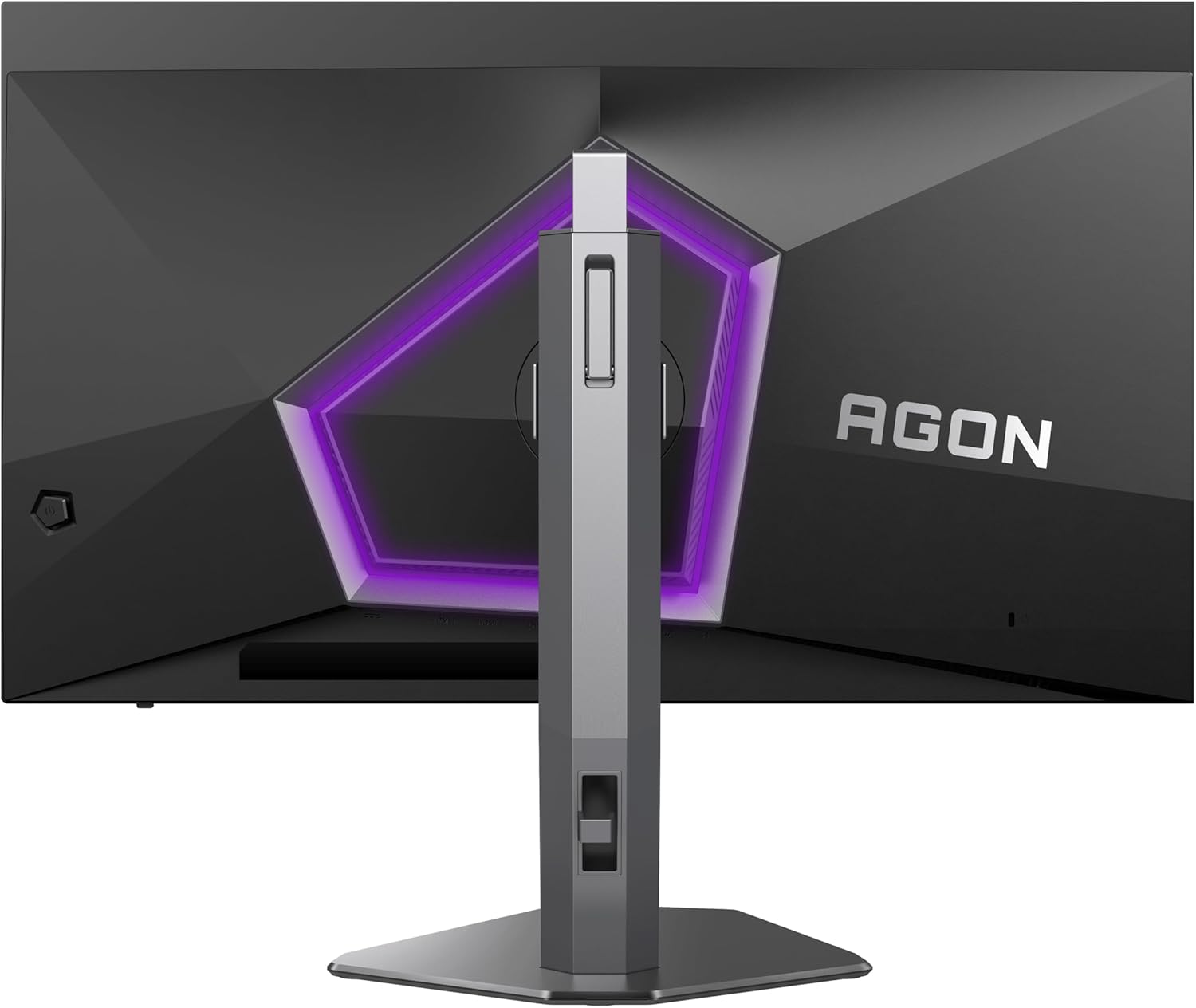
Connectivity is functional rather than generous. Two HDMI 2.0 ports and two DisplayPort 1.4 outputs cover the bases — you can run 1440p at 240Hz over DisplayPort 1.4 without issue, and the Italian buyer specifically confirmed 10-bit colour in RGB via DisplayPort. There’s a USB hub onboard, though the specification data shows one USB 3.0 port rather than a full multi-port hub. No USB-C is present, which matters if you want single-cable laptop connectivity. If port selection is a significant factor in your decision, the monitor connectivity guide covers what to look for. The stand offers 130mm of height adjustment alongside tilt, which is more ergonomic range than you typically get in this category. VESA 100×100 compatibility means a third-party arm is straightforward if you prefer that route. A 3-year manufacturer warranty is included, which is a reasonable safety net for an OLED panel where burn-in is a theoretical long-term concern. In the context of 2026’s mid-range gaming monitor landscape, getting QD-OLED at 27 inches and 1440p with a full ergonomic stand represents a meaningful shift in what this price tier can offer — size and resolution together at this panel quality would have pushed into a different budget bracket until relatively recently.
Check the full spec sheet and buyer Q&As for the AOC AG276QZD2AM on Amazon.
What Buyers Are Saying
The AOC AG276QZD2AM holds a rating of 4.6 out of 5 from 82 customer reviews on Amazon. That’s a small but not negligible sample — 82 reviews is enough to identify consistent themes, though it’s not large enough to be statistically conclusive. The sentiment is overwhelmingly positive, with no recurring technical failures in the feedback. The consistent praise themes are: image quality (specifically the black levels and colour vibrancy), the smoothness of high-refresh-rate gaming, and the surprise of receiving a panel that apparently runs faster than advertised.
The 280Hz discovery is worth dwelling on because it comes up independently across multiple buyers in different countries — UK, France, and Italy all. One buyer noticed it on the box before even connecting the monitor. Another confirmed 10-bit RGB colour support over DisplayPort as an additional undocumented capability. Whether this reflects a revised panel, an overclock mode, or a simple listing error that nobody has corrected is unclear — but the practical effect is that buyers are consistently receiving something that performs above spec rather than below it.
The one consistent negative — and it’s mild — is the pixel refresh cycle. OLED panels periodically run a maintenance cycle to compensate for uneven pixel wear, and on this monitor that happens every four hours. One buyer found it “a bit annoying.” That’s the entirety of the complaint, which says something about the overall experience. The PS5 input lag issue mentioned by one buyer is a real consideration for console players and isn’t contradicted by other reviews — it appears to be a monitor-side limitation specific to console connection modes rather than a defect. If you’re in the market for a gaming monitor that suits console use, that’s worth factoring in before deciding.
Buyer Highlights
“The black levels are night and day compared to my old monitor, and the viewing angle is incredible.” — A reaction that appears consistently from buyers upgrading from IPS or VA panels.
“It’s advertised as 240Hz but it’s actually 280Hz, so that’s a nice surprise.” — Reported independently by multiple buyers across the UK, France, and Italy.
“The OLED panel is the real highlight — blacks are truly deep, colours look vibrant, and the contrast makes games look amazing.” — Typical feedback from competitive gaming users in their first week with the monitor.
“Very good monitor for PC — the only thing that lets it down is high input lag when playing on PS5.” — A specific limitation flagged by a console user, not a PC gaming concern.
“Pixel refresh every 4 hours is a bit annoying, but bar that it’s great.” — The most commonly cited friction point, and a standard characteristic of OLED panel maintenance cycles.
Worth Knowing Before You Buy
OLED burn-in is the question that comes up with every OLED monitor, and it’s worth addressing directly rather than brushing past it. The risk is real but context-dependent. Static elements — taskbars, HUD elements in games, browser toolbars — left on screen for extended periods over months and years can cause permanent image retention. AOC’s built-in pixel refresh cycle (every four hours of use) is a mitigation measure, not a guarantee. For someone who games for a few hours a day on varied content, the practical risk over a normal ownership period is low. For someone who runs the same game with a static overlay for eight hours a day, it’s a legitimate consideration. The 3-year warranty provides some reassurance, but burn-in coverage varies by manufacturer policy and specific circumstances, so reading the warranty terms before purchase is sensible.
The absence of USB-C is a gap that matters depending on your setup. If you’re running a laptop alongside a desktop, or you want a single-cable connection to a modern notebook, you’ll need an adapter or an alternative source. The two HDMI 2.0 ports are fine for most use cases but worth noting — HDMI 2.0 tops out at 1440p at 144Hz for most configurations, so to get the full 240Hz (or 280Hz) the DisplayPort 1.4 connection is what you want for PC. One German buyer specifically flagged that a firmware update is available via AOC’s software utility, but it requires a USB connection between PC and monitor to apply — useful to know before setup. For anyone new to buying at this spec level, the monitor buying guide covers what to check before finalising a decision.
The used/like-new listing caveat from one buyer is worth a brief mention: they found the power indicator light non-functional on a “Used — Like New” unit. Straightforward advice: buy new if you’re buying OLED. The potential for minor defects in open-box units isn’t worth the risk on a panel technology where any dead pixel or inconsistency is more visible than on LCD.
View current stock and fulfilment options for the AOC AG276QZD2AM on Amazon.
Who Should Buy It (And Who Shouldn’t)
Buy If
- You play fast-paced PC games — shooters, racing, action — and want motion clarity and contrast that a mid-range IPS panel simply can’t match. The QD-OLED panel and 240Hz (or 280Hz) refresh rate combination is what this monitor is built around.
- You want OLED image quality without moving to an ultrawide or a larger 32-inch footprint. The 27-inch 16:9 format is a practical desk size that fits most standard setups.
- You’re upgrading from an IPS or VA panel at 144Hz or below and want a noticeable step up in both image quality and motion handling — based on buyer feedback, the difference lands clearly for people making this transition.
- You use both AMD and Nvidia GPUs across builds or are unsure which way you’ll go — FreeSync Premium Pro and G-Sync Compatible dual support means you’re covered either way without paying extra for a specific ecosystem.
Avoid If
- Your primary gaming platform is PS5 or another console. The elevated input lag reported in console mode is a real limitation that undermines the monitor’s core strength — there are better-suited options for console-first setups.
- You need USB-C connectivity for a laptop or single-cable workflow. It isn’t here, and retrofitting via adapters adds friction and potential signal quality considerations.
- You work with colour-critical content professionally and need a factory-calibrated display with certified accuracy. This is a gaming panel — the colours are vivid and visually impressive, but it’s not a colour grading tool.
The Bottom Line
The AOC AG276QZD2AM is one of the more straightforward recommendations in its category. QD-OLED at 27 inches and 1440p with a 240Hz refresh rate, a matte screen finish, a proper ergonomic stand, and buyer reports of receiving 280Hz panels — this is a monitor punching clearly above where its spec sheet positions it. The OLED-specific caveats around burn-in risk and the mandatory pixel refresh cycle are real, but neither is a dealbreaker for the target buyer. Console players and USB-C-dependent setups should look elsewhere. PC gamers wanting a genuine upgrade in image quality and motion clarity will find the AOC AG276QZD2AM hard to argue against.
Find the AOC AG276QZD2AM and read the latest buyer questions on Amazon.
At The Monitor Expert, our approach is built on data transparency rather than simulated hands-on testing. We rigorously analyse official manufacturer specifications and aggregate verified customer sentiment to provide honest, straightforward buying advice that cuts through the marketing noise.
As an Amazon Associate, I earn from qualifying purchases.
Browse by Specification
Looking for something specific? Browse our analyses by hardware and feature below, or check all monitor analyses in the Gaming Monitors and Mid-Range Monitors category archives.
[IPS Monitors] — [VA Monitors] — [TN Monitors] — [OLED Monitors]
Browse by Refresh Rate
[60Hz] — [75Hz] — [100Hz] — [120Hz] — [144Hz] — [165Hz] — [180Hz] — [200Hz] — [240Hz+] — [360Hz+]
Browse by Screen Size
[Small Screen] — [24-inch] — [27-inch] — [32-inch] — [Large Screen] — [Ultrawide]




