
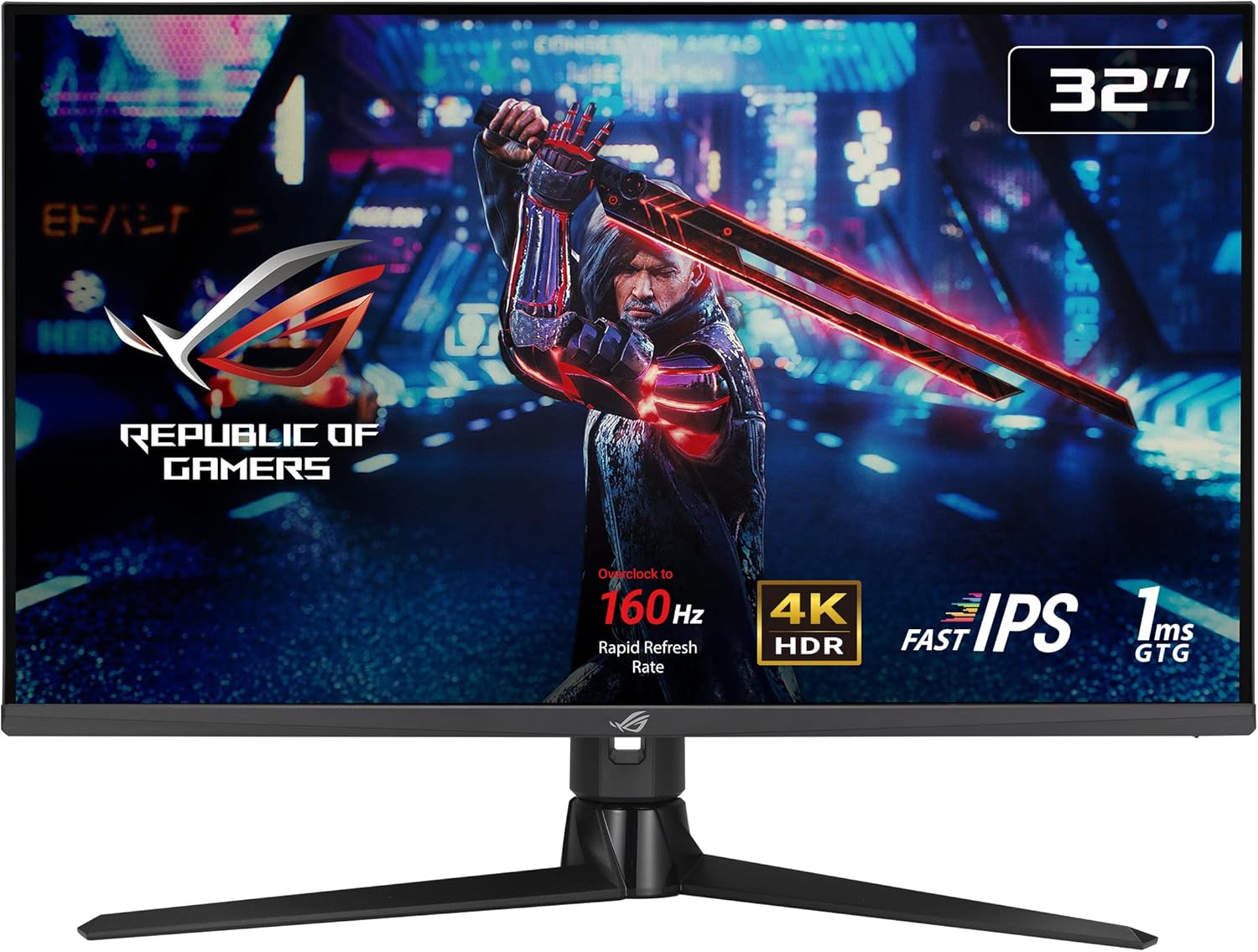
ASUS ROG Strix XG32UQ Analysis: 4K Fast IPS Delivered
My Honest Verdict
The ASUS ROG Strix XG32UQ is a serious 4K gaming monitor that gets the fundamentals right. 32-inch screen, Fast IPS panel, 160Hz refresh rate with overclocking, HDMI 2.1 for console use, and DisplayHDR 600 certification — that’s a genuinely strong spec sheet for anyone sitting at the intersection of high-end PC gaming and console use. The ASUS ROG Strix XG32UQ earns its place in the premium tier not through marketing fluff but through a combination of specs that actually work together coherently.
In everyday use, what you’ll notice first is the sheer sharpness of 3840 x 2160 resolution on a 32-inch panel — pixel density is high enough that individual pixels disappear entirely. The Fast IPS panel delivers wide, consistent colours across the screen and a quoted 96% DCI-P3 colour gamut that shows up clearly in games and video content alike. The 1ms GTG response time keeps motion clean at speed. And unlike the vast majority of monitors claiming HDR support, DisplayHDR 600 actually requires a minimum 600 nits peak brightness — so you’re getting genuine HDR performance, not just a badge.
This is built for PC gamers with a capable GPU and console players who want native 4K 120Hz from a PlayStation 5 or Xbox Series X without chroma subsampling. If you’re primarily after competitive FPS and want to push triple-digit framerates at 4K, you’ll need serious hardware to feed it. And if you already own a decent OLED, there’s nothing here to tempt you across. But for the vast majority of gamers who want a large, sharp, fast screen that handles both PC and console beautifully — this is a very strong option.
See the current listing and availability for the ASUS ROG Strix XG32UQ on Amazon.

What It’s Best For
High-end PC gaming. The ASUS ROG Strix XG32UQ was designed around GPU-heavy gaming, and it shows. The 160Hz refresh rate, G-SYNC Compatible and FreeSync Premium Pro adaptive sync support, and Variable Overdrive with six preset modes all combine to keep fast motion clean and tear-free. At 4K, you’ll need a high-end GPU to reach triple-digit framerates in demanding titles — but for games that do push those numbers, the combination of speed and resolution is genuinely impressive. The Fast IPS panel also means colours don’t shift when you’re not sitting dead centre, which matters on a 32-inch screen where your eyes cover a wide angle of view.
Console gaming on PS5 and Xbox Series X. This is one of the cleaner console monitor options available. HDMI 2.1 handles native 4K 120Hz without chroma subsampling, meaning colours are transmitted at full 4:4:4 — no washed-out gradients, no compromised image quality. VRR via HDMI 2.1 also works with both PlayStation 5 and Xbox Series X, which multiple buyers confirm in their feedback. At 32 inches, the screen size sits closer to a large monitor than a small TV, which suits gaming setups well — particularly if you’re seated closer than the typical TV viewing distance.
Content creation and colour-critical work. The 96% DCI-P3 colour gamut coverage makes this a credible screen for photo and video work alongside gaming. If you’re editing 4K drone footage or working in Lightroom alongside your gaming sessions, this handles both without needing a separate colour-accurate display. The factory-included calibration certificate suggests ASUS has put some effort into the out-of-box accuracy, which is more than many gaming monitors bother with. For hybrid use cases — creative work by day, gaming by night — the ASUS ROG Strix XG32UQ holds its own across both.
The Specs That Really Matter
The panel type is the foundation of everything here. Fast IPS gives you the wide viewing angles and colour consistency of traditional IPS, combined with a significantly faster pixel response. Standard IPS panels typically sit around 4–5ms GTG in practice; Fast IPS closes that gap considerably. The quoted 1ms GTG response time is measured under optimal overdrive conditions — as with all GTG figures, real-world performance varies — but for gaming at 160Hz, the motion clarity is meaningfully better than a standard IPS would deliver at the same refresh rate. The 4000:1 contrast ratio is on the higher end for IPS, which helps perceived depth in dark scenes, though it won’t challenge OLED or VA for pure black depth.
Refresh rate and resolution deserve an honest conversation. 160Hz at 4K is a legitimate combination in 2026 — not trivial to drive, but reachable with a current-generation GPU. If you’re playing at lower resolutions or GPU-limited, the 160Hz ceiling means you won’t hit a refresh rate wall quickly. The relationship between refresh rate and response time matters more at high framerates — and at 160Hz, the Fast IPS panel’s speed is genuinely relevant rather than a spec box tick. At 32 inches, 4K resolution also means text and fine detail look sharper than they would at 27 inches — more pixels per inch means finer detail, and on a screen this size it’s visible.
The HDR implementation is worth taking seriously. DisplayHDR 600 requires a minimum of 600 nits peak brightness and local dimming — it’s not the theatrical HDR of a high-end OLED, but it’s a genuine step above the HDR400 certification that’s plastered on most gaming monitors and makes virtually no visible difference. Buyers consistently flag the HDR performance as a noticeable upgrade from older screens, particularly for dark-scene gaming and 4K streaming. The 96% DCI-P3 gamut coverage means colours in HDR content are pulled from a genuinely wide palette, not just bumped up in brightness.
Connectivity is a genuine strong point. DisplayPort 1.4 and HDMI 2.1 cover the full range of PC and console input needs. The HDMI 2.1 port handles 4K 120Hz at full 4:4:4 colour from consoles, which is something to check carefully on competitors — not all monitors advertise this clearly. A solid port selection like this reduces the need for adapters and dongles, which matters if you’re switching between a PC, a console, and a laptop regularly. There’s also a 3.5mm audio output — no built-in speakers, but the headphone jack is confirmed to drive headphones well.
Check the full spec sheet and buyer Q&As for the ASUS ROG Strix XG32UQ on Amazon.
What Buyers Are Saying
The ASUS ROG Strix XG32UQ holds a rating of 4.5 out of 5 from 241 reviews — a solid sample size with a clear positive lean. The pattern in the feedback is consistent: buyers are genuinely impressed with the image quality, the out-of-box experience, and the console compatibility. Complaints exist but they’re not widespread.
The most common praise theme is colour quality and HDR performance. Multiple buyers mention being struck by the difference compared to their previous screens — one upgrading from an older LG 4K HDR display describes it as “night and day”, with the HDR specifically called out as “leagues ahead”. The 96% DCI-P3 gamut shows up in real-world use: buyers using the screen for 4K video editing and drone footage mention accurate, vivid colours as a standout quality.
Console compatibility is a recurring positive. PS5 and Xbox Series X buyers specifically confirm that VRR via HDMI 2.1 works correctly, and that the 4K 120Hz output from consoles comes through cleanly. For a monitor at this tier, that’s what you expect — but it’s worth noting that buyers aren’t just assuming it works, they’re reporting it does.
The unboxing and build quality receive repeated mentions. The packaging is described as thorough — cables included (both DisplayPort and HDMI), UK and EU power supply options, a cable management cover at the back, and a factory calibration certificate. The stand is described as sturdy with good adjustment range. These are details that don’t show up in the spec sheet but matter when you’re actually setting something up.
The one significant complaint worth flagging involves a firmware update that reportedly bricked one unit — reducing it to 1024×768 with no recovery path, and ASUS customer service advising a return rather than offering a fix. This is a single report out of 241, and it may reflect a specific edge case rather than a systematic issue. But it’s worth knowing ASUS’s support response wasn’t great in that instance. A French buyer also mentions light bleed — halos at the edges when white content appears against a dark background — and notes three dead pixels discovered a few days after unboxing. Both are known risks with IPS panels at this resolution; neither appears frequently enough in the feedback to be a systematic concern, but dead pixels on arrival can happen, so photograph the unboxing if you’re cautious.
One review is worth filtering out: the three-star-equivalent buyer who returned the XG32UQ for being “too big” and went to the smaller XG27UCS instead. That’s a size preference, not a product fault — it tells you the 32-inch form factor is genuinely large and worth measuring against your desk before ordering.
Buyer Highlights
“The HDR is leagues ahead of my old LG — the difference is night and day.” — Recurring theme from buyers upgrading from previous-generation 4K screens.
“VRR via HDMI 2.1 on the PS5 works very well — ticks all the boxes for console gaming.” — Consistent feedback from console users specifically testing HDMI 2.1 compatibility.
“Colours are amazing — using it for Xbox, Mac Mini, and 4K drone footage and it handles all three.” — Common response from buyers using the monitor across mixed PC, console, and creative workloads.
“Came with a calibration certificate, all cables included, and a neat little bag to keep them in — packaging was phenomenal.” — Frequently praised out-of-box experience, particularly the included accessories.
“Crisp, accurate, and snappy — no speakers, but that’s not a dealbreaker at all.” — Typical reaction from buyers who came in knowing about the absent speakers and weren’t bothered by it.

Worth Knowing Before You Buy
The 32-inch size is the thing most buyers underestimate. At normal desk distances — roughly 60–70cm — a 32-inch screen fills a significant portion of your field of view. Multiple buyers mention needing to adjust expected viewing distance, and one returned the monitor entirely because it was larger than anticipated. Measure your desk. If you’re used to a 27-inch screen, this is a meaningful step up in physical size, not just a marginal one. That said, buyers who committed to the size consistently report that it felt natural within a few days.
No built-in speakers. That’s not unusual at this tier, and most gaming setups use headphones or external speakers anyway — but it’s worth knowing upfront. The 3.5mm audio output works well for headphones and does pass audio from HDMI sources, so you’re not entirely without options. The OSD (on-screen menu) is reported as well laid out and navigable, with physical buttons on the rear right edge — straightforward enough that most buyers don’t mention it at all, which is usually a sign it works as expected.
The firmware update issue flagged by one buyer deserves a mention without being overblown. One report out of 241 reviews isn’t a pattern, but if you’re updating firmware, make sure you’re following ASUS’s official process carefully. The broader point is that ASUS’s customer support response in that case — “return to supplier” rather than any active troubleshooting — wasn’t impressive. The 3-year warranty is standard for this category and is a reasonable safety net for dead pixels or hardware failure. For a full overview of what specs and terms to compare before committing, the monitor buying guide covers what to look for and what to look out for.
One IPS-specific consideration: light bleed at screen edges is a known characteristic of IPS technology, and at least one buyer reports visible haloing with bright content against dark backgrounds. This isn’t unique to the ASUS ROG Strix XG32UQ — it’s a panel type trade-off. If you regularly work or game in very dark environments with high-contrast content, it’s something to be aware of. Also worth noting: the specifications list brightness as 400 nits typical, which is consistent with Fast IPS panels at this spec level — the 600 nits peak is available for HDR content bursts, not sustained across the full panel simultaneously.
View current stock and availability for the ASUS ROG Strix XG32UQ on Amazon.
Who Should Buy It (And Who Shouldn’t)
Buy If
- You’re gaming on PC with a capable GPU and want 4K at high refresh rates — the 160Hz Fast IPS panel at 3840 x 2160 is a combination that still feels relevant well into 2026 and beyond.
- You own a PS5 or Xbox Series X and want native 4K 120Hz with VRR via HDMI 2.1 — buyers confirm it works correctly and without chroma subsampling.
- You want legitimate HDR performance rather than a badge — DisplayHDR 600 makes a visible difference in dark-scene gaming and 4K video, unlike HDR400 which is barely worth enabling.
- You use the same screen for gaming, creative work, and streaming — the 96% DCI-P3 gamut, factory calibration certificate, and wide colour accuracy make this a credible dual-purpose screen rather than a compromised one.
- You have a desk and setup that can accommodate a physically large monitor and sit at an appropriate distance — at 32 inches, this rewards the right environment.
Avoid If
- You’re running a mid-range GPU and hoping to hit high framerates at 4K — you’ll be GPU-limited well before the monitor is, and a 1440p screen at the same refresh rate would serve you better. Knowing which monitor suits your actual hardware matters more than chasing the highest resolution.
- You already own a high-end OLED and are thinking about a lateral move — the Fast IPS contrast and black levels won’t match OLED, and there’s no feature here that compensates for that specific gap.
- Deep blacks in a dark room are your priority — IPS haloing is real on this panel type, and a VA or OLED would handle dark-scene content more convincingly.
The Bottom Line
The ASUS ROG Strix XG32UQ is a genuinely well-rounded 4K gaming monitor that earns its rating. Fast IPS at 32 inches, 160Hz, real HDR with a DisplayHDR 600 certification, HDMI 2.1 for consoles, and wide colour gamut coverage — the spec sheet isn’t padded, and the buyer feedback backs it up. There are caveats: no speakers, IPS light bleed is possible, and you need the desk space and GPU to do it justice. But if you’re buying a large 4K gaming screen in this tier and want something that works confidently across PC and console without compromise, the ASUS ROG Strix XG32UQ is a clear recommendation.
Find the ASUS ROG Strix XG32UQ and read the latest buyer questions on Amazon.
At The Monitor Expert, our approach is built on data transparency rather than simulated hands-on testing. We rigorously analyse official manufacturer specifications and aggregate verified customer sentiment to provide honest, straightforward buying advice that cuts through the marketing noise.
As an Amazon Associate, I earn from qualifying purchases.
Browse by Specification
Looking for something specific? Browse our analyses by hardware and feature below, or check all monitor analyses in the Gaming Monitors and Premium Monitors category archives.
[IPS Monitors] — [VA Monitors] — [TN Monitors] — [OLED Monitors]
Browse by Refresh Rate
[60Hz] — [75Hz] — [100Hz] — [120Hz] — [144Hz] — [165Hz] — [180Hz] — [200Hz] — [240Hz+] — [360Hz+]
Browse by Screen Size
[Small Screen] — [24-inch] — [27-inch] — [32-inch] — [Large Screen] — [Ultrawide]




