
KTC H32S17F Analysis: 240Hz at a Familiar Cost
My Honest Verdict
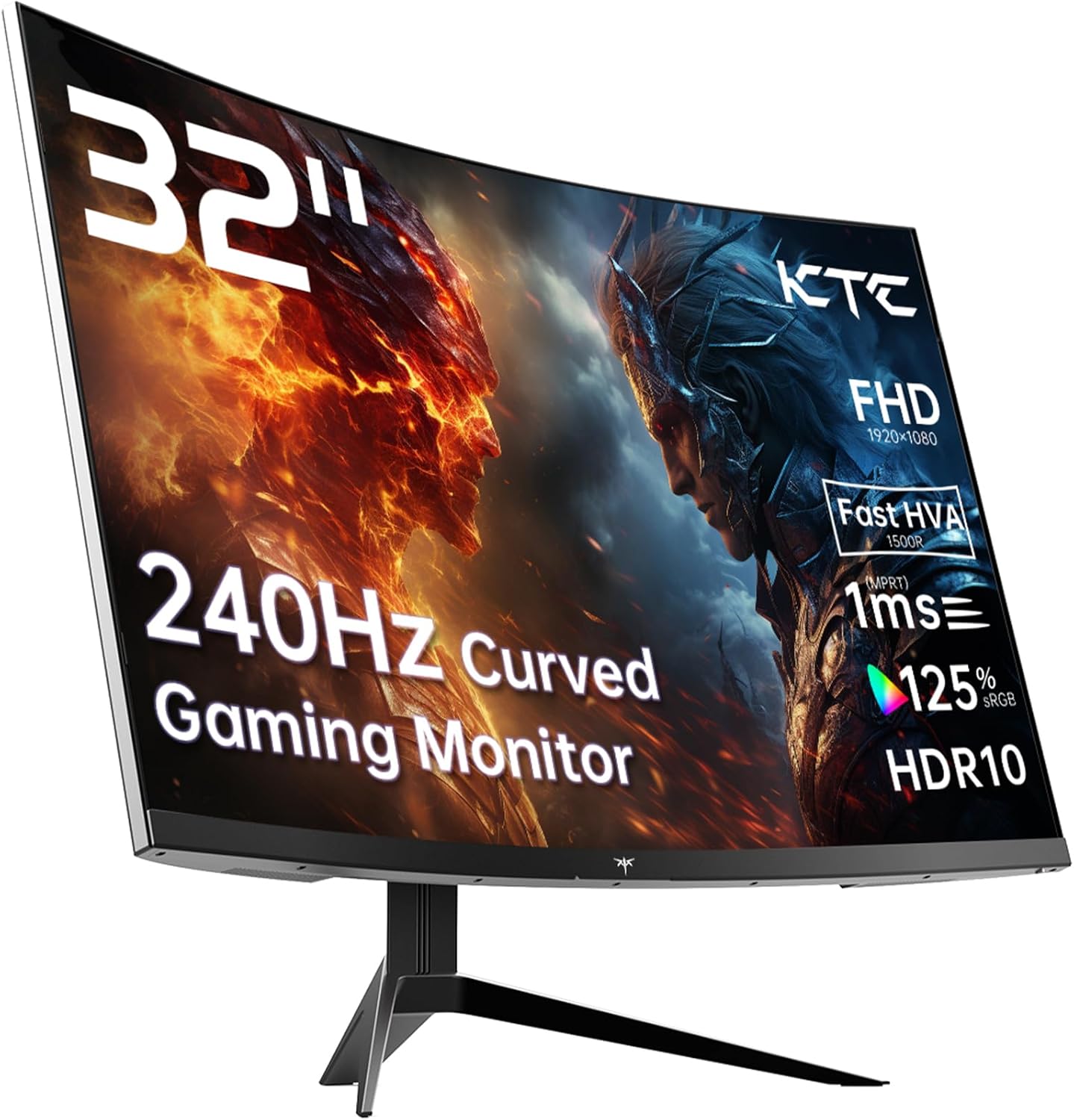
The KTC H32S17F is a 32-inch, 1080p, 240Hz curved gaming monitor built around a VA panel with a 1500R curve radius. For the money, the headline combination of screen size and refresh rate is genuinely hard to argue with. The catch — and it’s one worth knowing upfront — is that 1920×1080 spread across 32 inches produces a noticeably soft image. That trade-off defines everything about who this monitor suits.
In everyday use, 240Hz means motion is silky and competitive games feel properly responsive. The VA panel delivers contrast that IPS at this price tier can’t touch — KTC quotes 3500:1 — so dark scenes, night-time game environments, and cinematic content look genuinely rich. The 1500R curve on a 32-inch screen wraps the display noticeably around your field of view at normal desk distances, which is either immersive or mildly irritating depending on what you’re using it for. Brightness sits at 350 cd/m², which is adequate for most indoor use without being exceptional.
This monitor is aimed squarely at console and PC gamers who want a large, fast screen and aren’t pixel-peeping for work. If you’re spending most of your time in first-person shooters, racing games, or anything that benefits from smooth, low-latency motion, the KTC H32S17F delivers. If you’re doing spreadsheet work, photo editing, or reading dense text at a desk, 1080p on 32 inches will feel blurry by lunch. Pick up our monitor buying guide if you’re still deciding what spec tier fits your actual needs.
See the KTC H32S17F listed on Amazon and check current availability before reading further.

What It’s Best For
Competitive and casual gaming. This is where the KTC H32S17F makes its case most clearly. 240Hz at this screen size puts it in territory that, not long ago, would have cost significantly more. Fast games — shooters, racing titles, fighting games — feel genuinely fluid. Adaptive Sync (both FreeSync and G-Sync compatible, per the specs) keeps tearing out of the picture whether you’re on AMD or Nvidia. The VA panel’s contrast advantage over IPS means darker environments look properly dark rather than washed-out grey, which matters in a lot of modern games. Console players on PS5 or Xbox Series X get a straightforward setup via HDMI 2.0 — just note that HDMI 2.0 caps out below 240Hz at 1080p, so you’ll want DisplayPort 1.4 to hit the full refresh rate from a PC.
Home media and general entertainment. The curved 32-inch screen makes films and streaming content feel more enveloping than a flat panel at the same size. HDR10 support is present — though at 350 cd/m² peak brightness, don’t expect anything close to OLED-level HDR highlights. It adds a visible contrast boost in HDR-enabled content, but this is entry-level HDR in practice. Still, for a movie night or an evening of YouTube, the large curved screen and solid contrast make for a genuinely comfortable experience. 125% sRGB coverage means colours are punchy rather than dull, which helps streaming content look lively even if it’s not colour-accurate by professional standards.
Console gaming room setup. The 32-inch size and 1500R curve work well at slightly greater viewing distances — a couch or a gaming chair set back from a desk. For players moving from a television to a dedicated gaming monitor, the jump in motion clarity at 240Hz is immediately obvious. The VESA 100×100 mount compatibility gives you options if the basic stand doesn’t work for your setup.
The Specs That Really Matter
The panel type is the most important spec on this monitor and the one that shapes everything else. KTC markets this as an “HVA” panel — their term for a fast VA variant designed to cut the ghosting that traditional VA panels are known for. In practice, it’s still a VA-architecture panel, which means deep blacks and high contrast as a baseline, with viewing angles that degrade noticeably off-axis. If you sit straight on, the 3500:1 contrast ratio is a genuine strength. If you’re often viewing from the side, you’ll see greying and colour shift fairly quickly — something buyers have flagged directly. For a solo gaming screen at a desk, this is rarely a problem. For a shared screen, it can be. See our panel types guide for a full breakdown of what VA, IPS, and TN actually mean in day-to-day use.
The 240Hz refresh rate paired with the quoted 1ms response time is the headline selling point. One thing to flag: the spec sheet lists the response time as 3 milliseconds in the formal specifications, while the marketing copy claims 1ms. That gap is almost certainly a difference in measurement methodology — the 1ms figure likely reflects MPRT (Moving Picture Response Time) rather than the more meaningful GtG (grey-to-grey) figure. This doesn’t mean the monitor is slow — 240Hz and VA fast panels genuinely reduce ghosting — but don’t take the 1ms figure at face value. Real-world motion performance at 240Hz will still be strong. For more on how manufacturers measure response time and what the numbers actually mean for gaming, our refresh rate and response time explainer covers the detail.
Resolution is the honest conversation to have. 1920×1080 on a 32-inch screen gives you a pixel density of around 69 PPI. For context, 1080p on a 27-inch panel sits closer to 82 PPI. You will see the difference if you’re used to sharper screens — text softens, fine details in games are less crisp. For motion-heavy gaming this matters less than for productivity. If text clarity at your desk is important to you, 1080p at 32 inches is going to be a source of mild annoyance, possibly daily. Worth reading up on how screen size and resolution interact if you’re on the fence.
Connectivity is fairly standard for this tier. Two HDMI 2.0 ports cover most console and secondary device connections, and a single DisplayPort 1.4 handles the PC connection at full refresh rate. There’s one USB 2.0 port — useful for a mouse or keyboard but not much else. No USB-C, no Thunderbolt, no hub functionality. For most gamers this is fine; for anyone wanting a single-cable laptop connection, look elsewhere. More on what port selection means in practice in our connectivity guide. The three-year manufacturer warranty is a genuine plus at this price point — KTC includes it as standard on the H32S17F, which is worth noting as many competitors offer only one or two years. In 2026, three-year coverage from a lesser-known brand is a meaningful reassurance against early failure.
Check the full spec sheet and buyer Q&As for the KTC H32S17F on Amazon.
What Buyers Are Saying
The KTC H32S17F currently has a small number of UK reviews — fewer than 15 — so the sample is too limited to draw statistically firm conclusions. The available feedback skews positive across the board, but with this few reviews, individual experiences carry more weight than they would with a larger dataset. Take the sentiment as directional rather than definitive.
The consistent praise centres on the image quality and motion smoothness for the money. Multiple buyers comment on how vivid and punchy the colours look, particularly with HDR content enabled — one buyer described the brightness in HDR mode as almost physically uncomfortable, which for a 350 cd/m² VA panel suggests the HDR contrast handling is doing real work. The 240Hz fluidity gets a mention from buyers who game competitively and from those who just appreciate how smooth desktop navigation feels at this refresh rate. Setup and build are described as straightforward without complaints about structural quality.
The honest feedback also surfaces the limitations this analysis flagged. Viewing angles are called out directly — one buyer notes the image “greys out very quickly” if you’re not looking straight on, which is accurate VA behaviour. One reviewer also noted the stand offers no height adjustment, which aligns with KTC’s spec (tilt-only adjustment listed). One unit arrived faulty and was returned — a single data point, not a pattern, but worth knowing. The OSD menu controls are described as slightly clunky by one buyer, which is a common complaint across monitors in this category.
Buyer Highlights
“The picture quality is very nice and it gets laughably bright to the point where if the sun comes out in a game with HDR enabled I have to cover my eyes.” — A recurring theme from buyers who were surprised by how much the HDR contrast adds at this panel tier.
“The colours are amazing — the Mac and the monitor look identical to me.” — Reported by a non-gamer buyer who switched from an older HDMI display, highlighting how well the colour output holds up for general use.
“The viewing angles aren’t the best and it greys out very quickly if you’re not looking directly on.” — An honest observation that reflects the inherent trade-off of VA panel technology at this price point.
“Fast-paced games feel incredibly responsive, and even just moving around the desktop or scrolling through pages looks fluid and clean.” — Typical reaction from buyers upgrading from 60Hz or 75Hz screens, for whom 240Hz is a significant jump.
“For the money, it delivers the fancy pro-gamer feel without the pro-gamer price tag.” — Summarises the value proposition that draws most buyers to the KTC H32S17F over pricier alternatives.

Worth Knowing Before You Buy
The stand is the most tangible ergonomic limitation here. Adjustment is tilt-only — no height, no swivel, no pivot. For a 32-inch panel at a desk, getting the screen at the right eye height matters more than it would on a smaller display. If the default stand height doesn’t line up with your seated eye level, you’ll want a monitor arm or a wall mount — both are viable given the VESA 100×100 compatibility, but it’s an extra purchase and an extra step. One buyer flagged this directly and mentioned planning to mount anyway, which is probably the right move for anyone setting this up as a permanent workstation screen.
The resolution-to-size ratio is the spec that will genuinely bother some buyers and not others. At 32 inches with 1080p, pixel density is noticeably low compared to a 27-inch 1440p or 4K panel. If your use case involves long sessions reading text, coding, or detailed photo work, this matters. If you’re gaming from a metre away and prioritise smoothness over sharpness, it probably won’t. Know which category you fall into before committing. Our how to choose a monitor guide can help you work that out.
The OSD (on-screen display) controls get a mention as slightly awkward from one buyer — this is common with budget-tier gaming monitors and rarely a dealbreaker, but dialling in your preferred colour settings may take a bit of patience. On the reliability side, one unit arrived faulty in this review pool — KTC’s three-year warranty should cover any early failures, and the returns process appears to work, but it’s a minor flag. KTC is not a household name in the UK, but they manufacture panels for other brands, so the underlying production experience is there. The 125% sRGB coverage figure is worth a note too — sRGB overage can mean slightly oversaturated colours out of the box, which looks vivid but isn’t accurate. Calibrating or using an sRGB mode if available will bring things in line.
Check current stock and availability for the KTC H32S17F on Amazon.
Who Should Buy It (And Who Shouldn’t)
Buy If
- You want a large, fast gaming screen and 240Hz smooth motion is the priority over pixel sharpness — the KTC H32S17F delivers that combination at a price that undercuts most direct competitors.
- You’re a console gamer upgrading from a TV and want a proper gaming monitor — the 32-inch curved screen, HDMI 2.0 inputs, and PS5/Xbox compatibility make this a natural fit for the living room or gaming room setup.
- You value deep blacks and high contrast over wide viewing angles — the 3500:1 VA contrast ratio makes dark game environments and evening streaming genuinely atmospheric, and you’re sitting directly in front of the screen.
- You want a three-year warranty from a manufacturer at this price tier — KTC includes it as standard, which reduces the risk of buying from a less-established brand.
Avoid If
- You do any significant amount of productivity work — reading, writing, spreadsheets, coding — at your desk. 1080p on a 32-inch panel will feel soft for text-heavy tasks and will likely frustrate you within a week.
- You need ergonomic flexibility from your stand, or you regularly share the screen with someone sitting at an angle. Tilt-only adjustment and narrow VA viewing angles are a combination that limits how flexibly you can position and share this screen.
The Bottom Line
The KTC H32S17F makes a clear and honest case: if you want a big, fast, curved gaming screen and you’re not fixated on pixel density, this delivers. The 240Hz refresh rate and 3500:1 contrast from a VA panel on a 32-inch curved screen is a genuinely strong combination for gaming and entertainment. The compromises — stand ergonomics, low pixel density, limited off-axis performance — are real but predictable for this category. Go in with clear expectations and the KTC H32S17F is a monitor that earns its keep.
View the KTC H32S17F on Amazon and see what other buyers are saying.
At The Monitor Expert, our approach is built on data transparency rather than simulated hands-on testing. We rigorously analyse official manufacturer specifications and aggregate verified customer sentiment to provide honest, straightforward buying advice that cuts through the marketing noise.
As an Amazon Associate, I earn from qualifying purchases.
Browse by Specification
Looking for something specific? Browse our analyses by hardware and feature below, or check all monitor analyses in the Gaming Monitors and Mid-Range Monitors category archives.
[IPS Monitors] — [VA Monitors] — [TN Monitors] — [OLED Monitors]
Browse by Refresh Rate
[60Hz] — [75Hz] — [100Hz] — [120Hz] — [144Hz] — [165Hz] — [180Hz] — [200Hz] — [240Hz+] — [360Hz+]
Browse by Screen Size
[Small Screen] — [24-inch] — [27-inch] — [32-inch] — [Large Screen] — [Ultrawide]




