
KTC H32S17F Analysis: 240Hz at a Cost
My Honest Verdict
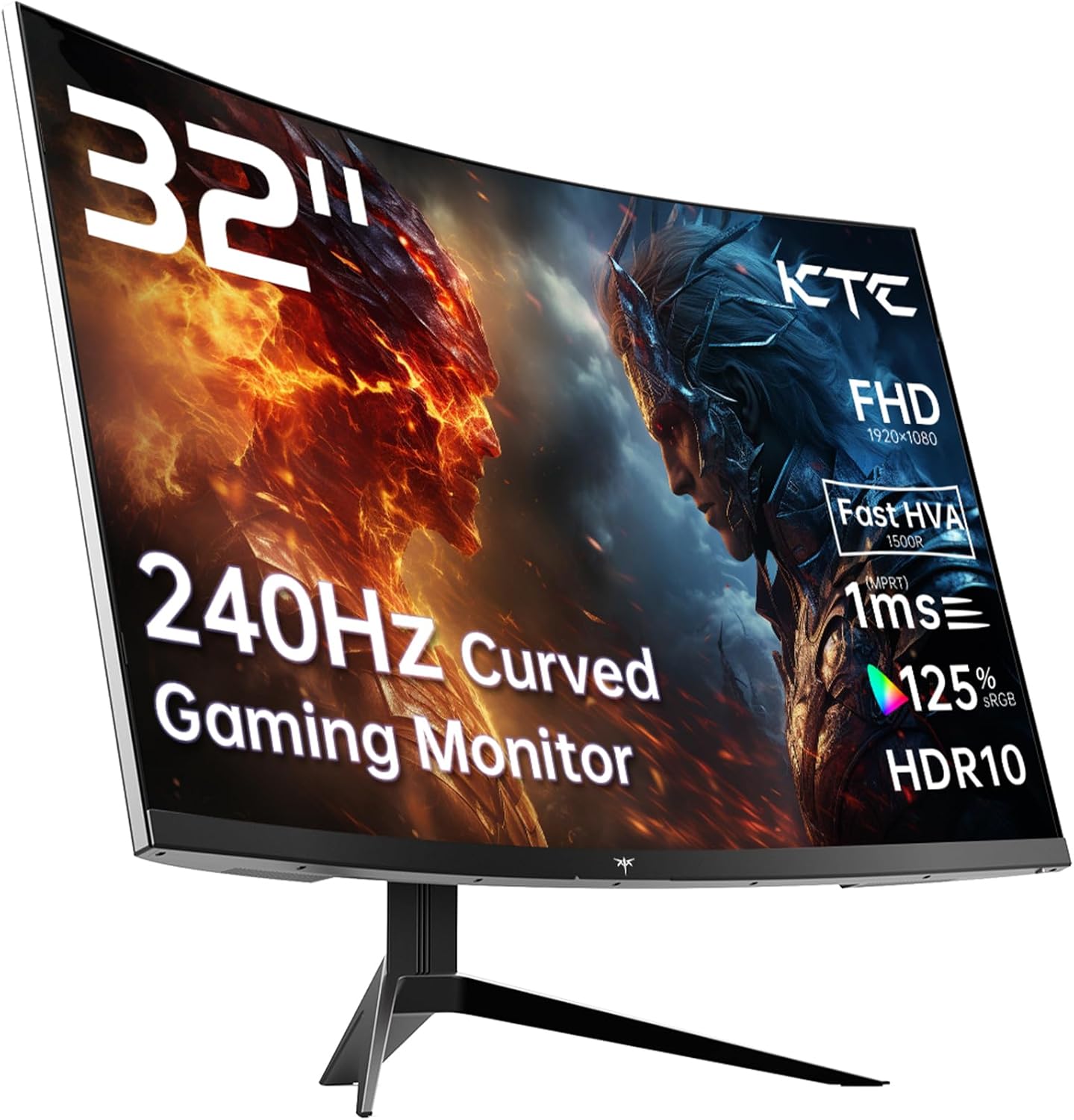
The KTC H32S17F is a 32-inch, 1080p, 240Hz curved gaming monitor built around an HVA panel — KTC’s own hybrid VA variant — and it’s aimed squarely at gamers who want a large, fast screen without spending serious money. The headline strength here is the combination of size and refresh rate at this price tier. The headline limitation is the resolution: 1920×1080 on a 32-inch screen is a real trade-off, and it’s one you need to make peace with before buying.
In practical terms, 240Hz on this panel means genuinely fluid motion in competitive titles — enemy movements are smooth, tracking feels responsive, and tearing is handled by Adaptive Sync (both FreeSync and G-Sync compatible). The 1500R curve adds to the sense of immersion at this size in a way that works better than it sounds on paper. What you’re giving up is pixel density — at 32 inches with 1080p, individual pixels are visible at normal viewing distances if you’re close to the screen. For gaming from a metre away, it’s less of an issue. For desktop work with small text, it’s genuinely noticeable.
This is the right monitor for someone who plays competitive or action games, wants a large curved screen, and cares more about smoothness than pin-sharp detail. If you do a lot of close-up productivity work alongside gaming, or if you’re planning to use it as a dual-purpose office and gaming screen, the pixel density gap will bother you. If pure gaming performance per pound is what you’re after, the KTC H32S17F makes a strong case for itself.
See the listing and current availability for the KTC H32S17F on Amazon.

What It’s Best For
Competitive and action gaming is where the KTC H32S17F is most at home. A 240Hz refresh rate at this size is genuinely unusual in its price bracket, and for fast-paced titles — shooters, racing games, fighting games — that smoothness translates directly into how the game feels to play. Motion blur is minimal, response is snappy, and the Adaptive Sync compatibility means both AMD and Nvidia GPU owners get tear-free output without needing to faff about with hardware-specific settings. The 1500R curve at 32 inches also gives you peripheral coverage that a flat monitor at this size simply can’t match, which helps with spatial awareness in open-world or immersive titles.
Console gaming is a solid secondary use case. The KTC H32S17F includes two HDMI 2.0 ports, which means PS5, Xbox Series X/S, and Switch can all be plugged in simultaneously. The caveat — flagged in at least one buyer review — is that HDMI 2.0 on PS5 caps output at 60Hz for 1080p over HDMI in some console configurations, so you won’t always be pulling the full 240Hz on a console. For casual console gaming, though, the large curved screen and punchy colours make it a genuinely enjoyable experience, and for Switch users it’s a significant step up from any TV.
Budget home entertainment is where the large size, decent brightness, and reasonable HDR performance combine usefully. Watching films or streaming on a 32-inch curved display with a 3500:1 contrast ratio produces noticeably deeper blacks than a typical budget IPS panel, which gives dark scenes more depth. It’s not a cinema replacement, but for a bedroom or study setup where the monitor doubles as the main display for everything, it holds its own.
The Specs That Really Matter
The panel type here deserves unpacking. KTC markets this as an “HVA” panel — their term for a fast-response VA variant. For the buyer, that means you’re getting the traditional VA advantages: a 3500:1 contrast ratio and noticeably richer blacks than any standard IPS at this price. The trade-off that comes with any VA panel is viewing angles. Multiple buyers noted this directly — the image degrades visibly if you’re not looking straight at it, and horizontal viewing angles off-axis can cause colour shift and greying. At a desk, sitting squarely in front of a 1500R curved panel, that’s rarely a problem in practice. Position it for multiple viewers and it becomes one.
The 240Hz refresh rate is the headline spec and it’s worth putting in context. For competitive gamers, the jump from 144Hz to 240Hz is perceivable — not dramatic, but real — and at 1080p most gaming rigs will actually be able to push that many frames without requiring top-end hardware. That’s one of the hidden benefits of the lower resolution: your GPU works less hard to hit high frame rates. The listed response time in the specs is 3ms (GtG), which is typical for VA panels even when marketed as 1ms — the 1ms figure in the product title refers to MPRT, a motion blur reduction measurement, not the actual pixel transition time. Worth knowing, but not a dealbreaker for most gamers. The 3ms GtG is competitive for a VA at this tier.
Resolution deserves a direct word because it affects everything else. 1920×1080 on a 32-inch panel gives a pixel density of roughly 69 PPI. That’s noticeably lower than a 27-inch 1080p screen, and considerably lower than a 32-inch 1440p alternative. If you want to understand how screen size and resolution interact, that trade-off is exactly what you’d be navigating here. For gaming from a normal desk distance, the lower density is acceptable and most buyers don’t complain about it in the context of gaming specifically. For text-heavy work or productivity at close range, it becomes more apparent. HDR support is HDR10, which is entry-level certification — one buyer claims brightness spikes approaching 1400 nits in HDR content, which if accurate would be genuinely good. The spec sheet lists 350 cd/m² as the standard brightness figure, which is reasonable but not spectacular.
Connectivity is covered by 2× HDMI 2.0 and 1× DisplayPort 1.4, plus a single USB 2.0 port. That’s sufficient for most setups — two consoles and a PC, or two PCs and a console, all plugged in at once. There’s no USB-C or Thunderbolt, which is unlikely to matter for the target buyer but worth noting if you’re on a modern laptop that relies on USB-C output. Full breakdown of what each port type means in practice is in our connectivity guide.
One spec worth flagging for 2026 buyers: HDMI 2.0 rather than HDMI 2.1 does limit maximum bandwidth. At 1080p 240Hz that’s not a bottleneck — HDMI 2.0 handles it fine. But if you ever plan to upgrade resolution or push frame rates beyond that ceiling, the port becomes the limiting factor before the panel does.
Check the full spec sheet and buyer Q&As for the KTC H32S17F on Amazon.
What Buyers Are Saying
The KTC H32S17F carries a rating of 4.3 out of 5 from 1,983 Amazon customer reviews — a sample size large enough to be meaningful. The overall sentiment skews clearly positive, with most buyers genuinely pleased with the image quality and gaming experience they’re getting relative to what they spent.
Brightness and colour quality come up repeatedly as genuine strengths. Multiple buyers describe being surprised by how vivid and punchy the display looks out of the box, with one buyer specifically noting the HDR performance approaches OLED-level impact after calibration — which is an overstatement, but the underlying point about strong HDR output for the price bracket is echoed by others. The 125% sRGB colour gamut coverage translates into a saturated, vivid image that most buyers responded well to, particularly for gaming and streaming content.
The stand gets a consistent mention as the weak link. More than one buyer called it flimsy and suggested pairing the monitor with a third-party arm — which is fair advice for any monitor where build rigidity matters to you. The stand adjusts for tilt only, with no height or swivel adjustment listed, which is a common limitation at this price tier but worth knowing if ergonomics are a priority.
The one serious complaint in the dataset involves after-sales support. One buyer experienced a hardware fault on the DisplayPort connection roughly a month after purchase and found KTC’s support slow and ultimately unresponsive. That’s a genuine red flag for support quality and it’s only partially offset by the 3-year manufacturer warranty on paper — a warranty is only useful if the support behind it actually responds. This appears to be an isolated case in the overall review pool, but it’s the kind of thing you should know going in.
Viewing angles attracted consistent mild criticism — expected for a VA panel, and flagged clearly by buyers including one who described greying off-axis as a notable characteristic. The consensus is that sitting directly in front of the monitor eliminates the issue for solo use.
Buyer Highlights
“The picture quality is very nice and it gets laughably bright to the point where if the sun comes out in a game with HDR enabled I have to cover my eyes.” — A recurring theme: the HDR brightness impact caught buyers off guard in the best way.
“Superbly bright, peaking at 1400 nits, and genuinely giving amazing HDR performance for the money.” — Several buyers flagged HDR output as a standout feature relative to comparable screens at this price.
“You’d do well to pick up a good monitor arm for this — the stand is flimsy at best.” — The one consistent hardware gripe across multiple buyers, worth budgeting for.
“Viewing angles aren’t amazing, so use this as a monitor directly in front of you — but despite that it’s a fantastic screen.” — The typical measured verdict from buyers who understand VA panel trade-offs and accept them.
“This came up top in all my comparisons for my budget — it delivers the fancy pro-gamer feel without the pro-gamer price tag.” — Captures the dominant buyer experience: value satisfaction from buyers who did their homework before buying.

Worth Knowing Before You Buy
The resolution question needs settling before anything else. 1080p on a 32-inch panel is a deliberate trade-off, not an oversight — it’s what allows the 240Hz refresh rate at this price point. If you’re gaming from a normal viewing distance and you’re not someone who notices pixel structure, you’ll probably be fine with it. If you’ve recently been using a 1440p or 4K screen, the step down to 1080p at this size will be noticeable, especially in desktop environments and text rendering. Our guide on choosing the right monitor type covers this kind of use-case decision in more detail if you’re still weighing it up.
The stand situation is worth planning around. It’s tilt-only — no height adjustment, no swivel, no pivot. At 8.2 kg the monitor itself isn’t feather-light either, so if you decide to go with a VESA arm (100×100 mounting pattern is confirmed), make sure your arm is rated for the weight. The glossy rear finish collects dust and shows fingerprints, which is a minor annoyance if the monitor is visible from behind. The rear lighting is decorative and purely aesthetic — nothing wrong with that, but it adds nothing functional and you shouldn’t pay extra for it.
The after-sales support concern raised by one buyer is worth taking seriously. KTC is not a household brand, and their support infrastructure appears less robust than the established names. The 3-year manufacturer warranty is a good headline figure, but make sure you purchase through Amazon directly or a fulfilled-by-Amazon seller so you have the standard Amazon buyer protection as a fallback if warranty support proves difficult. This is general good advice for any lesser-known brand, but it’s especially relevant here given the documented support experience in the reviews. Our general monitor buying guide covers what to look for in terms of brand reliability and warranty support if you want more context.
One response time note: the marketed “1ms” refers to MPRT, not GtG. The listed GtG figure is 3ms, which is perfectly acceptable for a VA gaming panel. Don’t let the marketing figure mislead you into expecting IPS-equivalent pixel transitions — it’s not that, and it doesn’t need to be for the vast majority of gaming use cases.
View current stock levels for the KTC H32S17F on Amazon.
Who Should Buy It (And Who Shouldn’t)
Buy If
- You play competitive or action games and want a genuinely fast 240Hz panel without paying top-tier prices — the refresh rate here is real and noticeable in fast-paced play.
- You’re gaming from a typical desk distance of 60–90 cm and the lower pixel density of 1080p at 32 inches isn’t something you’ll be inspecting closely — at that range it’s less of a visible issue.
- You want to connect multiple sources simultaneously — two consoles and a PC, for instance — and the dual HDMI 2.0 plus DisplayPort 1.4 layout suits your setup.
- You value contrast and punchy colour in dark gaming scenes — the 3500:1 contrast ratio and 125% sRGB coverage are genuine advantages over IPS alternatives in the same price bracket.
Avoid If
- You use the screen for text-heavy productivity work or sit close to the display — 1080p at 32 inches produces noticeably soft text at typical office viewing distances, and a 27-inch 1440p screen would serve you significantly better for that use case.
- You sit at an angle or share your screen with someone beside you — VA panel viewing angles are a genuine limitation and the image degradation off-axis is real enough to matter in multi-viewer setups.
- After-sales reliability is a priority and you’re not comfortable relying on Amazon buyer protection as a fallback — KTC’s support track record in the reviews is uneven.
The Bottom Line
The KTC H32S17F is a focused product that does exactly what it’s designed to do: deliver a large, fast, curved gaming screen at a price that undercuts most comparable options. The 240Hz refresh rate is the centrepiece and it earns its place — motion is smooth, tearing is eliminated, and the VA contrast makes dark scenes look genuinely good. The 1080p resolution is the cost of admission and it’s a real trade-off, not a minor footnote. If you’re a gamer who can accept that trade-off, this is a well-executed monitor for the money. If the resolution bothers you, look at 1440p alternatives at similar sizes before committing.
Find the KTC H32S17F on Amazon and check the latest buyer questions before deciding.
At The Monitor Expert, our approach is built on data transparency rather than simulated hands-on testing. We rigorously analyse official manufacturer specifications and aggregate verified customer sentiment to provide honest, straightforward buying advice that cuts through the marketing noise.
As an Amazon Associate, I earn from qualifying purchases.
Browse by Specification
Looking for something specific? Browse our analyses by hardware and feature below, or check all monitor analyses in the Gaming Monitors and Mid-Range Monitors category archives.
[IPS Monitors] — [VA Monitors] — [TN Monitors] — [OLED Monitors]
Browse by Refresh Rate
[60Hz] — [75Hz] — [100Hz] — [120Hz] — [144Hz] — [165Hz] — [180Hz] — [200Hz] — [240Hz+] — [360Hz+]
Browse by Screen Size
[Small Screen] — [24-inch] — [27-inch] — [32-inch] — [Large Screen] — [Ultrawide]




