
KTC H32S17F Analysis: 240Hz VA at 32 Inches
My Honest Verdict
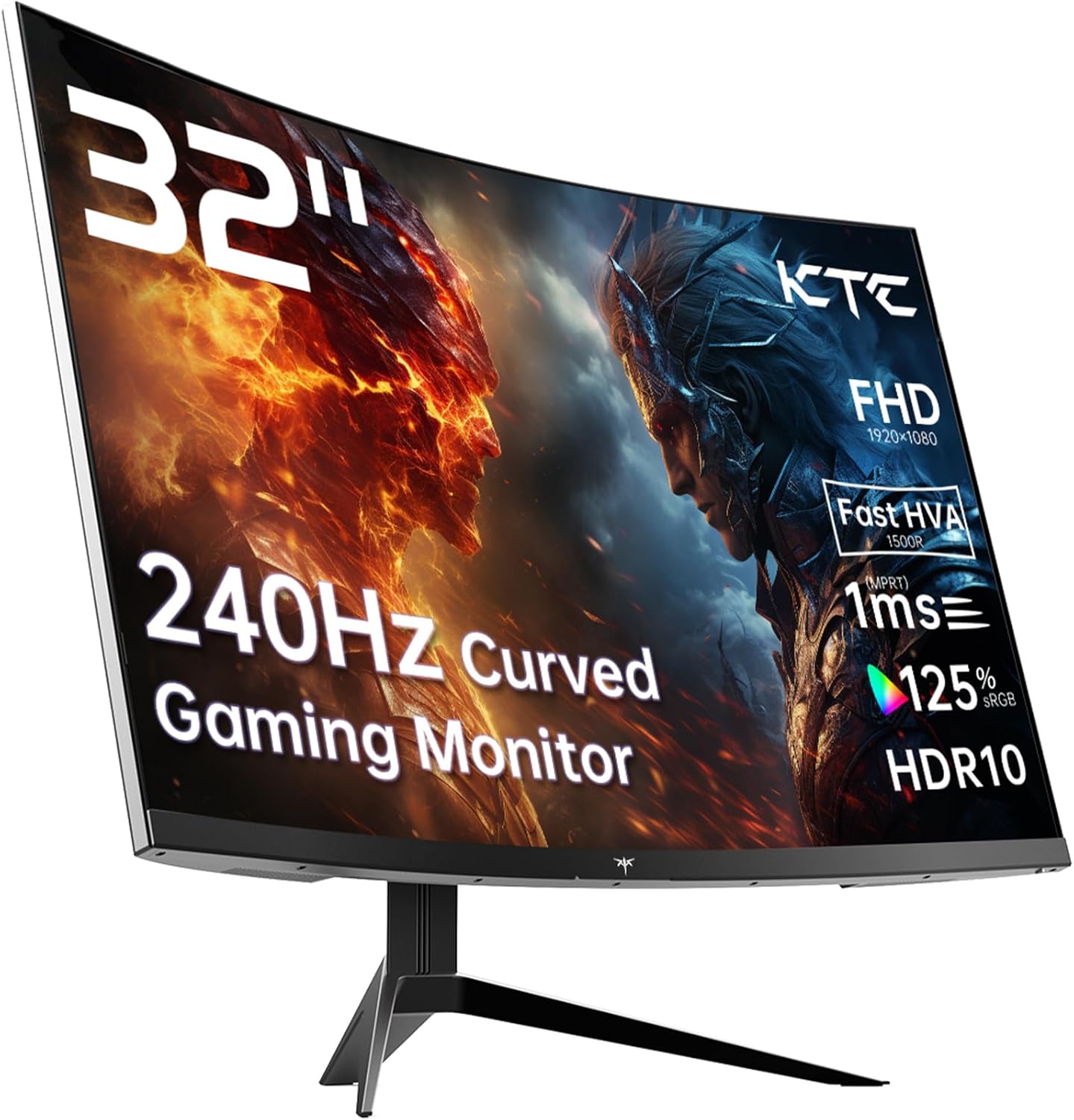
The KTC H32S17F is a 32-inch, 1080p, 240Hz curved gaming monitor that does something unusual for its tier: it actually delivers on its headline specs without a long list of asterisks. The refresh rate is real, the panel tech is legitimately interesting, and the 3500:1 contrast ratio is one of the better figures you’ll find at this screen size and price point. If you want a large, fast, punchy-looking screen for competitive or casual gaming without spending serious money, the KTC H32S17F is worth your attention.
The catch — and it is a real one — is the resolution. 1920 x 1080 across 32 inches gives you a pixel density that some people will find noticeably soft. Text won’t be sharp. Desktop work will look worse than it does on a smaller 1080p screen. For gaming at a normal viewing distance in a dark room, you probably won’t care. Sitting two feet away doing spreadsheets, you might. KTC’s “HVA” branding is their name for an improved VA variant — it’s still fundamentally a VA panel, which means excellent contrast and deep blacks but narrower off-axis colour accuracy compared to IPS.
This is a monitor for someone who games primarily, plays on console or PC, wants that wide curved screen feel on a budget, and isn’t using it as their main productivity display. If you’re after pixel-sharp 4K or a flat screen for design work, look elsewhere. If you want fast, immersive, colourful gaming on a big curved panel, the KTC H32S17F earns a genuine recommendation.
See the KTC H32S17F listing and current availability on Amazon.

What It’s Best For
Competitive and casual gaming is the obvious home for this monitor. The 240Hz refresh rate means frame delivery is genuinely smooth — enemies don’t smear across the screen during fast movement, and with Adaptive Sync keeping things tear-free, the experience is noticeably cleaner than what most people will be upgrading from. The 1500R curvature on a 32-inch screen wraps the image around your peripheral vision in a way that smaller or flatter monitors simply don’t. For first-person shooters, racing games, and anything that benefits from field-of-view immersion, this delivers it at a price that doesn’t require a mortgage.
Console gaming is another strong fit. The KTC H32S17F comes with 2 x HDMI 2.0 ports, which means you can have a PS5 and an Xbox plugged in simultaneously without swapping cables. Both consoles will run at up to 1080p without issue. You won’t get 4K output — neither HDMI port supports it — but at a normal console-to-screen distance, the large curved panel makes up for what it lacks in resolution with sheer size and contrast.
Home entertainment and streaming also benefit from the 3500:1 native contrast ratio. Dark scenes in films have actual depth. The HDR10 support is real, though with a rated brightness of 350 cd/m², you’re not going to get specular highlights that pop like a proper HDR display. Treat it as HDR-compatible rather than HDR-capable, and your expectations will be correctly calibrated. What you will get is a genuinely good-looking picture for movie nights — the VA contrast punches well above what IPS manages at similar money.
The Specs That Really Matter
The panel deserves some explanation. KTC markets this as an “HVA” panel — their terminology for a fast-response VA variant designed to address the traditional weakness of VA panels: slow pixel transitions causing smearing in dark scenes. They claim 1ms response time in the product listing, but the specification table lists 3 milliseconds as the actual figure. That discrepancy is worth flagging. The 1ms headline is almost certainly a best-case MPRT figure, not the GTG response time that matters for gaming. The actual response time at 240Hz will be the limiting factor for pixel transitions, not the marketing number. For most gaming use — including multiplayer shooters — 3ms on a 240Hz panel is still very fast. Ghost-sensitive buyers should be aware this is VA, not IPS or TN, and dark-scene smearing is still a theoretical concern regardless of branding.
The 240Hz refresh rate is genuinely the standout here. At this screen size and panel type, 240Hz was rare until recently. You feel the difference between 144Hz and 240Hz most acutely in fast-paced games where tracking moving targets matters — and you’ll need a PC capable of pushing north of 144fps to actually use it. If your GPU tops out at 100fps on your typical titles, you’re not losing anything by having 240Hz — Adaptive Sync keeps it smooth regardless. But if you can feed it frames, it’ll use them. The VA panel type means you’re also getting that 3500:1 contrast ratio as a genuine native figure — not a dynamic contrast marketing number. That’s measurably better than most IPS panels at this price.
Resolution and screen size is where buyers need eyes open. 1920 x 1080 on 32 inches gives you roughly 69 pixels per inch — noticeably lower than the same resolution on a 27-inch or 24-inch screen. If you’re sitting close, text will look soft. The pixel density implications of running 1080p at this size are real and shouldn’t be glossed over. For gaming, your GPU will also find 1080p significantly easier to drive at high frame rates — which is part of the point. The 125% sRGB colour coverage is a solid number for a VA panel in this tier, and the 16:9 aspect ratio keeps compatibility with everything. On connectivity, the DisplayPort 1.4 port is what you’ll want for 240Hz from a PC — HDMI 2.0 can technically carry 1080p at 240Hz but you’ll want to verify your cable. Worth reading through the connectivity guide if you’re unsure which port to use for your setup. In 2026, a monitor at this spec level is genuinely competitive — a year ago this refresh rate at this size was a harder sell.
Check the full spec sheet and buyer Q&As for the KTC H32S17F on Amazon.
What Buyers Are Saying
The KTC H32S17F carries a rating of 4.3 out of 5 from 1,993 Amazon customer reviews — that’s a substantial sample, and a 4.3 at nearly 2,000 reviews is meaningful. Monitors with inflated ratings typically don’t sustain them at that volume. The headline themes from buyers are consistent: the picture quality surprises people, the size feels genuinely large without being impractical, and the setup process is described as straightforward across the board.
Buyers upgrading from older or smaller monitors consistently mention how much better the image looks than they expected for the money. The contrast and colour vibrancy of the VA panel gets specific praise — particularly for gaming and films in low-light environments. Console gamers mention it as an excellent dual-use screen, with the two HDMI ports getting called out as a practical convenience. A smaller number of buyers mention the pixel density at 32 inches being softer than expected for desktop use — which is accurate and worth preparing for. A handful flag that the stand offers limited adjustment, which is typical for this price bracket.
Buyer Highlights
“The colours are genuinely vivid — didn’t expect that from a monitor at this level.” — A recurring reaction from buyers coming from older or budget IPS screens, where VA contrast makes an immediate impression.
“Plugged my PS5 and Xbox into the two HDMI ports and it just worked, no fuss at all.” — Consistent feedback from console users who appreciate the dual HDMI layout without needing a switch.
“The curve feels more immersive than I expected on a desk at normal distance — genuinely makes a difference.” — Buyers new to curved panels frequently comment on how the 1500R curve changes the feel of gaming at 32 inches.
“Films look dark where they’re supposed to be dark — the contrast on this thing is noticeably better than my old flat monitor.” — A common observation reflecting the VA panel’s native contrast advantage over IPS alternatives in the same price range.
“Text is a bit soft for office work but for games it looks absolutely fine.” — An honest note from buyers who use it across multiple tasks, accurately reflecting the pixel density tradeoff at this size and resolution.

Worth Knowing Before You Buy
The stand is the most commonly noted practical limitation. Adjustment is tilt-only — there’s no height adjustment and no pivot. If you’re particular about ergonomics or share the monitor between users of different heights, that’s a genuine inconvenience. The monitor is VESA 100×100 compatible, so a third-party arm is an easy fix, but it’s an additional purchase to factor in. Given that this is a budget-tier monitor, tilt-only stands are standard — it’s not a unique failing, but worth knowing upfront rather than discovering when it arrives.
The HDR10 certification is real but entry-level. 350 cd/m² brightness is below the threshold where HDR produces dramatic specular highlights. Think of it as HDR-compatible — games and films that support HDR will use the metadata, and the VA panel’s contrast helps compensate, but this is not the same experience as a monitor with a proper local dimming system. If HDR is a primary purchase criterion, this monitor won’t deliver it meaningfully. If it’s a secondary nice-to-have on top of a fast, high-contrast gaming screen, that’s a more reasonable expectation. The response time discrepancy between the marketing claim of 1ms and the specification-listed 3 milliseconds is also worth noting — not unusual in this category, but buyers should refer to the spec explanations if they’re comparing this figure directly against competitors. KTC offers a 3-year manufacturer warranty, which is genuinely good at this price point and a mark in the brand’s favour. If you’re evaluating this as part of a broader screen search, our monitor buying guide covers what to prioritise at each budget level.
View current stock and availability for the KTC H32S17F on Amazon.
Who Should Buy It (And Who Shouldn’t)
Buy If
- You game primarily on PC or console and want a large curved screen with a genuinely fast refresh rate — the 240Hz and 1500R curve combination at this size is the core value proposition.
- You own both a PS5 and an Xbox (or any two HDMI devices) and want both plugged in simultaneously without a switch box.
- You watch films or play in a dark or dim room where the 3500:1 contrast ratio will visibly outperform cheaper IPS alternatives.
- Ergonomics aren’t a dealbreaker and you’re comfortable mounting on a VESA arm or using tilt adjustment only.
Avoid If
- You use the monitor primarily for text-heavy work, design, or anything requiring sharp fine detail — 1080p at 32 inches will look soft at close range and is a poor fit for productivity-first use cases. Consider which monitor type suits your workflow before committing.
- You want genuine HDR performance with high peak brightness and local dimming — this monitor’s HDR support is entry-level and won’t satisfy anyone buying specifically for that feature.
The Bottom Line
The KTC H32S17F is a focused, honest gaming monitor. It does the big things well — fast refresh rate, proper contrast, large immersive curve, dual HDMI for consoles — and the things it doesn’t do well (sharp text, serious HDR) are exactly what you’d expect given the spec tier. The 4.3 rating from nearly 2,000 buyers backs up what the specs suggest: this is a monitor that delivers on its core promise. Go in with the right expectations and it’s a genuinely strong option in its category.
Find the KTC H32S17F on Amazon and check what buyers are saying about it.
At The Monitor Expert, our approach is built on data transparency rather than simulated hands-on testing. We rigorously analyse official manufacturer specifications and aggregate verified customer sentiment to provide honest, straightforward buying advice that cuts through the marketing noise.
As an Amazon Associate, I earn from qualifying purchases.
Browse by Specification
Looking for something specific? Browse our analyses by hardware and feature below, or check all monitor analyses in the Gaming Monitors and Budget Monitors category archives.
[IPS Monitors] — [VA Monitors] — [TN Monitors] — [OLED Monitors]
Browse by Refresh Rate
[60Hz] — [75Hz] — [100Hz] — [120Hz] — [144Hz] — [165Hz] — [180Hz] — [200Hz] — [240Hz+] — [360Hz+]
Browse by Screen Size
[Small Screen] — [24-inch] — [27-inch] — [32-inch] — [Large Screen] — [Ultrawide]




