
KTC H32S17F Analysis: 240Hz at a Size Worth Considering
My Honest Verdict
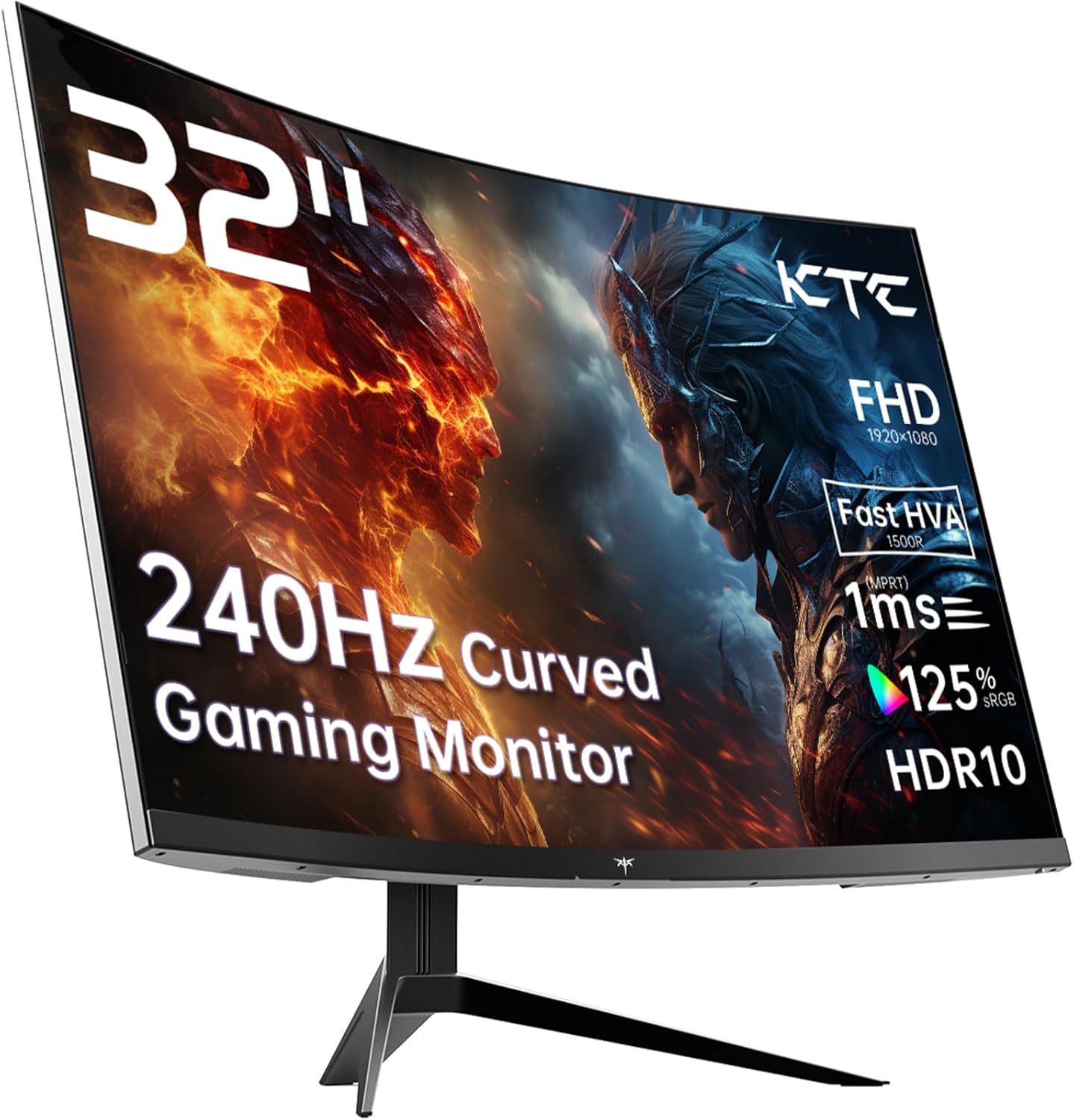
The KTC H32S17F is a 32-inch, 1080p, 240Hz curved gaming monitor aimed squarely at budget-conscious gamers who want high refresh rates without spending serious money. The headline strength is straightforward: you get a genuinely fast panel at a screen size most competitors charge considerably more for. The headline limitation is equally straightforward: 1920×1080 on a 32-inch panel is a pixel density that will be visible to anyone who sits close to it.
What you’ll actually experience day-to-day is a screen that feels fast and responsive in motion-heavy games, with the 1500R curve pulling the edges into your peripheral vision in a way that genuinely adds to immersion at this size. The VA panel brings a 3500:1 contrast ratio, which means blacks that IPS panels at this price bracket simply can’t match. Colours are broad at 125% sRGB. The tradeoff is that VA panels have viewing angle limitations — off-axis, contrast and colour accuracy drop off more than they would on IPS. If you’re gaming solo and sitting centred, that’s a non-issue.
This monitor is right for someone upgrading from a 60Hz or 75Hz panel who wants to feel the difference immediately without breaking the bank. It suits console players on PS5 or Xbox and PC gamers running mid-range hardware that can actually push high frame rates at 1080p. If you’re doing photo editing, design work, or you sit far enough back that pixel density genuinely matters to you, look elsewhere.
See the KTC H32S17F listing and current availability on Amazon.

What It’s Best For
Competitive and casual gaming. This is where the KTC H32S17F earns its place. A 240Hz refresh rate at 1080p means your GPU isn’t working nearly as hard as it would at higher resolutions — which means far more frames, far more of the time. If you’re playing shooters, racing games, or anything where motion clarity matters, you will feel the difference coming from a standard 60Hz screen. The 1ms marketed response time (the spec sheet lists 3ms as the measured figure, worth noting) and Adaptive Sync support mean tearing and judder are kept well in check. For a dedicated gaming setup where the screen is doing one job well, this is a genuinely capable option.
Console gaming. The two HDMI 2.0 ports mean you can have two consoles connected simultaneously without swapping cables — a small but genuinely useful detail. PS5 and Xbox Series X owners will find the 1080p 240Hz combination works well, though it’s worth noting that current-gen consoles favour 4K at lower refresh rates. At 1080p, many titles will hit much higher frame rates, which is a legitimate trade-off depending on your priorities. The 32-inch screen size adds presence to a console setup in a way a 27-inch panel simply doesn’t.
Home entertainment and media. The high contrast ratio from the VA panel pays genuine dividends in film and TV content. Deep blacks mean dark scenes actually look dark rather than washed out grey, and the HDR10 support — while not delivering true HDR performance at 350 nits peak brightness — does add a modest bump in highlight detail on compatible content. The 1500R curve at 32 inches wraps comfortably around your field of view from a normal desk distance, making it feel more cinematic than a flat panel of the same size.
The Specs That Really Matter
The panel type here deserves a proper explanation, because KTC markets this as an “HVA” panel. Strip away the branding and it’s a VA panel — specifically a fast-response variant aimed at closing the gap with IPS in terms of response time. Traditional VA panels struggle with ghosting in dark-to-dark transitions, and fast-VA variants are designed to address exactly that. The payoff you keep is VA’s strongest suit: that 3500:1 contrast ratio. IPS panels at this price tier typically land around 1000:1. That gap is meaningful — it’s the difference between genuine depth in dark game environments and a slightly washed-out look.
The 240Hz refresh rate is the headline number, and it’s worth knowing what it actually means in practice. At 1080p, your GPU has a fighting chance of consistently pushing frame rates high enough to make 240Hz meaningful. At 1440p or 4K, most mid-range cards struggle to hit anywhere near that ceiling. This monitor is spec’d intelligently for its resolution — the refresh rate and resolution pairing actually makes sense. Adaptive Sync covers both FreeSync and G-Sync Compatible modes, so both AMD and Nvidia GPU owners are covered without having to check compatibility first.
Resolution is where the trade-off is most visible, and it’s worth being direct about it. 1920×1080 across 32 inches gives you a pixel density of roughly 69 pixels per inch. For context, 27-inch panels at the same resolution sit around 82 PPI. The relationship between screen size and resolution matters at normal desk distances — you will notice individual pixels in text and fine UI detail if you sit within about 60cm. For gaming where you’re typically further back and motion is more important than sharpness, it’s a reasonable trade. For productivity work, it’s less comfortable for extended use. By 2026, the sub-£300 bracket at this size has moved meaningfully toward 1440p options — so it’s worth checking what alternatives exist before committing.
On connectivity, the DisplayPort 1.4 port is the right choice for getting full 240Hz from a PC — HDMI 2.0 can support 240Hz at 1080p but DP 1.4 gives you more headroom. There’s also a single USB 2.0 port, which is a minor addition for peripheral passthrough. The VESA 100×100 mount compatibility means wall mounting or an aftermarket arm is straightforward if the included stand’s adjustability — tilt only, based on the specs — doesn’t suit your setup. For a deeper look at what each port type supports, the connectivity guide covers it clearly.
Check the full spec sheet and buyer Q&As for the KTC H32S17F on Amazon.
What Buyers Are Saying
The KTC H32S17F carries a rating of 4.3 out of 5 from 1,999 Amazon customer reviews — a solid sample size that carries genuine weight. At close to 2,000 reviews, the patterns in the feedback are reliable rather than anecdotal, and the overall sentiment is clearly positive.
The most consistent praise centres on value relative to what’s on screen. Buyers upgrading from older 60Hz or standard HD monitors repeatedly mention how dramatic the step up to 240Hz feels in practice — particularly in fast-moving games. The curve and screen size combination earns repeated mentions as a setup upgrade that genuinely changes how gaming feels. Colour richness gets specific credit from buyers who weren’t expecting much at this price point, which aligns with what a 125% sRGB VA panel should theoretically deliver.
The more measured feedback clusters around two areas. First, text clarity at normal desk distances — a predictable consequence of 1080p at 32 inches, and buyers who mention it generally knew this going in. Second, the stand’s limited adjustability, with some buyers opting to pair it with a VESA arm fairly quickly. Neither of these is a surprise given the spec tier, and neither dominates the negative feedback. Build quality for a budget-bracket monitor draws broadly positive comments, with buyers noting it feels sturdier than the price would suggest.
Buyer Highlights
“The colours are genuinely vivid — much better than I expected for the money.” — A common reaction from buyers coming from older budget IPS panels.
“Setup was dead simple, had it running in under ten minutes straight out of the box.” — Consistent across multiple reviews, suggesting the out-of-box experience is well sorted.
“The curve makes a real difference at 32 inches — it feels much more immersive than my old flat screen.” — Recurring sentiment from buyers who hadn’t owned a curved monitor before.
“240Hz is a revelation if you’ve been on 60Hz. I can’t imagine going back.” — Typical feedback from buyers making their first high-refresh upgrade.
“Blacks are genuinely deep — dark game environments actually look dark, not grey.” — Specific praise that reflects what VA panel contrast ratios do well in practice.

Worth Knowing Before You Buy
The response time figure is worth unpacking before you commit. KTC markets the KTC H32S17F as a 1ms monitor, but the official spec sheet lists the measured response time as 3ms. That distinction matters — manufacturers frequently quote best-case overdrive figures that don’t reflect typical real-world performance. 3ms on a fast-VA panel is still very good for gaming, and most buyers won’t perceive the difference between that and a true 1ms OLED or TN result. But it’s worth knowing what you’re actually buying, especially if you’re coming from marketing headlines. For reference on how response time figures are measured and what they mean in practice, the specs explained guide covers this without the manufacturer spin.
The stand offers tilt adjustment only — no height or swivel adjustment according to the available data. If your desk setup requires height flexibility, you’ll want to factor in the cost of a VESA arm early. The 100×100 VESA compatibility means there’s no barrier to doing so, and at 8.2kg, most standard arms will handle it without issue. The HDR10 badge is also worth calibrating expectations around — at 350 nits peak brightness, this is entry-level HDR that adds a marginal improvement in highlights rather than transforming the image. It’s not fake HDR, but it’s not close to what a proper HDR600 or HDR1000 panel delivers either.
On the positive side, the 3-year manufacturer warranty is notably generous for a monitor at this price tier and gives meaningful peace of mind. Anti-flicker and blue light filter are included as standard — not unique features, but useful for long gaming or work sessions. If you’re choosing between this and a competitor without a clear warranty term, that three years is a genuine differentiator. A monitor buying guide will tell you the same: warranty length at budget price points is often where manufacturers quietly cut corners, so it’s a real mark in the KTC H32S17F’s favour.
View current stock levels and delivery options for the KTC H32S17F on Amazon.
Who Should Buy It (And Who Shouldn’t)
Buy If
- You’re upgrading from a 60Hz or 75Hz monitor and want the sharpest possible improvement in gaming motion clarity without stepping up to a flagship price bracket.
- You game primarily at 1080p and your GPU is optimised for that resolution — this screen will let you push the full 240Hz far more often than a 1440p or 4K panel would.
- You want a large curved screen for console or PC gaming where immersion and contrast matter more than pixel-perfect sharpness in text and UI.
- You need two consoles connected at once — dual HDMI 2.0 ports make that straightforward without an HDMI switch.
Avoid If
- You plan to use this as a primary productivity screen for text-heavy work — 1080p at 32 inches is a noticeably low pixel density at close desk distances and extended reading will feel soft.
- You’re serious about colour-accurate work or photo editing — VA viewing angle shift and the lack of factory calibration data make this unsuitable for anything where accurate off-axis colour matters.
- You need height and pivot adjustability from the included stand — tilt only means you’ll need a VESA arm to get the ergonomics right, which adds cost and effort.
The Bottom Line
The KTC H32S17F does what it sets out to do: deliver a large, fast, curved gaming screen without asking a premium price for it. The 240Hz VA panel with genuine 3500:1 contrast and 125% sRGB colour coverage is a strong combination for gaming and media at this tier. The 1080p resolution at 32 inches is the honest trade-off you’re making, and whether that matters depends entirely on what you’re using it for. For gaming and entertainment, it’s a reasonable call. For desk work, it’s a harder sell. Nearly 2,000 buyer reviews averaging 4.3 stars suggests most people who bought it for the right reasons came away satisfied — and a 3-year warranty from a brand that isn’t a household name goes a long way towards making that purchase feel less of a gamble.
Find the KTC H32S17F on Amazon and see what other buyers have said.
At The Monitor Expert, our approach is built on data transparency rather than simulated hands-on testing. We rigorously analyse official manufacturer specifications and aggregate verified customer sentiment to provide honest, straightforward buying advice that cuts through the marketing noise.
As an Amazon Associate, I earn from qualifying purchases.
Browse by Specification
Looking for something specific? Browse our analyses by hardware and feature below, or check all monitor analyses in the Gaming Monitors and Budget Monitors category archives.
[IPS Monitors] — [VA Monitors] — [TN Monitors] — [OLED Monitors]
Browse by Refresh Rate
[60Hz] — [75Hz] — [100Hz] — [120Hz] — [144Hz] — [165Hz] — [180Hz] — [200Hz] — [240Hz+] — [360Hz+]
Browse by Screen Size
[Small Screen] — [24-inch] — [27-inch] — [32-inch] — [Large Screen] — [Ultrawide]




