
KTC H32S17F Analysis: 240Hz at a Resolution Cost
My Honest Verdict
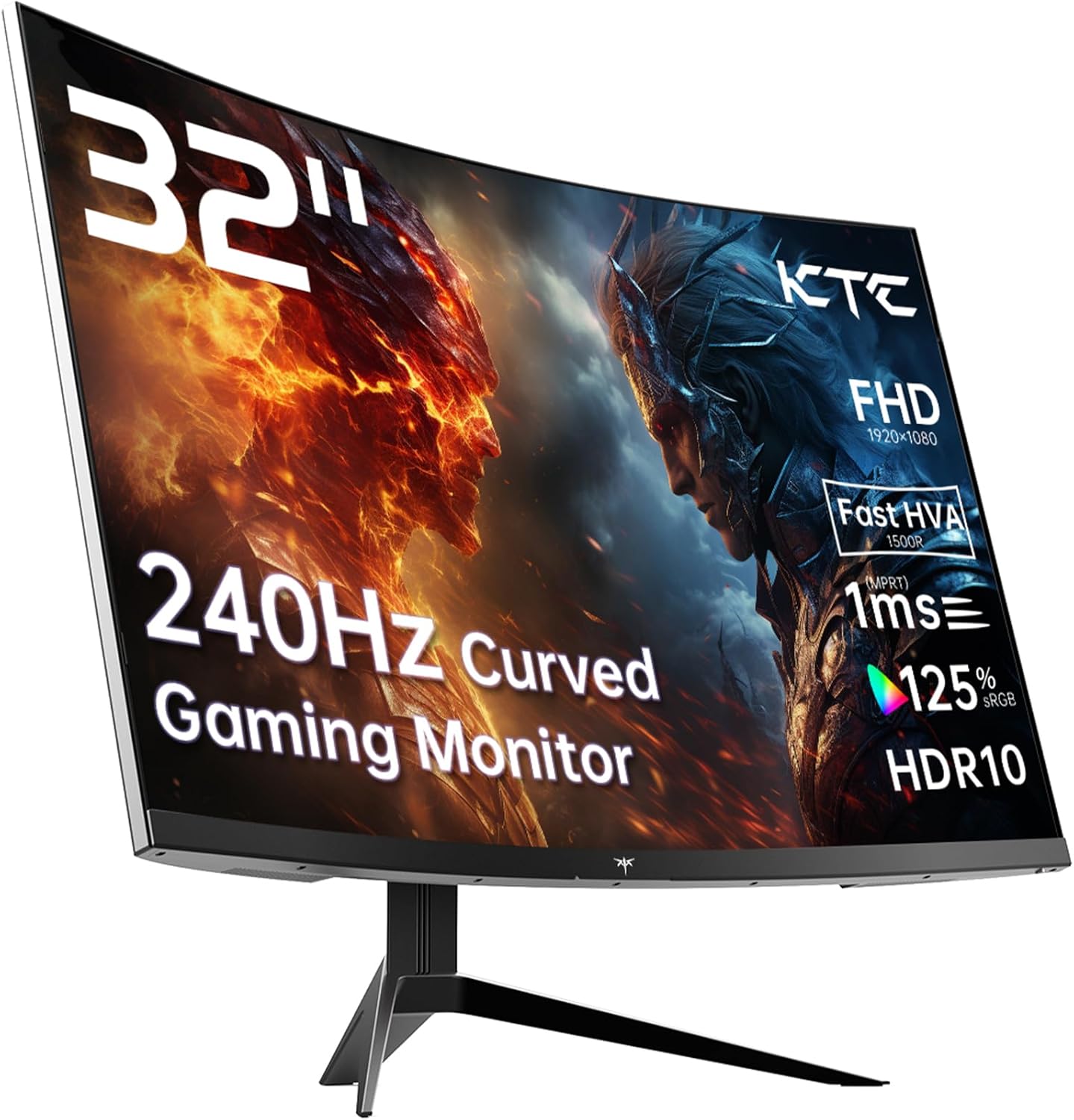
The KTC H32S17F is a 32-inch, 1080p curved gaming monitor running at 240Hz — and if that combination sounds like it shouldn’t exist at this end of the market, that’s essentially the point. KTC is pitching this at buyers who want a big, fast screen without spending serious money, and for that specific audience, the KTC H32S17F largely delivers. The headline limitation is equally specific: 1920×1080 across 32 inches is a low pixel density, and if sharp text or detailed productivity work matters to you, that will bother you every single day.
Day-to-day, what you’re getting is a wide, curved 1500R display that fills your field of view, with a refresh rate high enough to make fast-action gaming feel genuinely responsive. The VA panel delivers a 3500:1 contrast ratio, which means blacks look like blacks rather than the washed-out grey you get from most IPS screens. The 125% sRGB colour coverage adds warmth and saturation that budget panels rarely manage. The trade-off is pixel density — at roughly 69 PPI, individual pixels are visible if you sit close, and text rendering isn’t crisp the way it would be on a 1440p or 4K screen of the same size.
This is squarely for console gamers and PC players who prioritise frame rate and immersion over image sharpness, and who are coming from a 60Hz or 144Hz screen. If you’re a competitive multiplayer gamer, the jump to 240Hz at this size is a meaningful upgrade. If you do any serious creative work, spreadsheet analysis, or just care about legible small text, this isn’t the right tool — look at a 1440p alternative instead.
See the current listing and availability for the KTC H32S17F on Amazon.

What It’s Best For
Competitive and fast-action gaming is where the KTC H32S17F makes most sense. At 240Hz, the motion handling is leagues ahead of standard 60Hz or 75Hz monitors, and the 1ms marketed response time (spec sheet lists 3ms measured, so treat the 1ms figure as the optimistic end) means motion blur is kept in check for shooters and racing titles. The 1500R curve at 32 inches wraps the image around your peripheral vision in a way a flat screen simply can’t replicate — for games like open-world RPGs or flight sims, that immersive envelope genuinely adds something. Adaptive Sync compatibility with both FreeSync and G-Sync setups means you’re covered regardless of whether you’re on AMD or Nvidia.
Console gaming is a natural fit too. The KTC H32S17F carries HDMI 2.0 ports, so it’s compatible with PS5 and Xbox — though worth noting that HDMI 2.0 caps out at 1080p/240Hz or 4K/60Hz, and since this is a 1080p panel, you’re fine. PS5 outputs up to 120Hz at 1080p, so you won’t hit the full 240Hz from console — but you’re still getting a much smoother experience than a standard TV, and the 32-inch size from a typical couch-adjacent desk distance works well.
Home media and casual viewing benefit from the VA panel’s contrast. Dark scenes in films and TV shows look far better here than on comparable IPS monitors — shadow detail doesn’t collapse into a grey mess. The HDR10 support is entry-level given the 350 nit peak brightness, which falls short of anything that qualifies as proper HDR. Don’t buy this for HDR. But the native contrast from the VA panel does more for dark-scene viewing than the HDR badge suggests.
The Specs That Really Matter
The panel technology here is worth understanding properly before you commit. KTC markets this as an “HVA” panel — their branding for a fast VA variant — and if you want to know how that fits into the broader landscape of panel types, it’s essentially a VA with a tuned pixel response. Standard VA panels have historically suffered from slow pixel transitions causing ghosting in dark scenes. Fast VA variants improve on this, though they rarely fully close the gap with IPS in motion clarity. The upside you keep is VA’s trademark 3500:1 contrast ratio, which is roughly three to four times what most IPS panels offer. For anything involving dark content — night scenes, space games, dark UIs — that contrast difference is visible and meaningful.
The 240Hz refresh rate is the headline spec, and it does matter at this level — but not in the way marketing usually frames it. The practical difference between 144Hz and 240Hz is real but depends heavily on whether your hardware can push enough frames to use it. If you’re on a mid-range GPU that hits 150–200fps in your game of choice, you’re already benefiting. If you’re running a console capped at 120Hz, you’ll hit that ceiling before the monitor does. For a full breakdown of refresh rate versus response time and what actually changes in practice, that’s worth reading before you decide. One note: the spec sheet lists the response time as 3ms while the marketing says 1ms — this discrepancy is common and usually reflects different measurement methods. The real-world figure sits somewhere between the two.
Resolution and screen size interact in a way that’s important here — there’s a full explainer on display size and resolution if you want the detail — but the short version is that 1920×1080 on a 32-inch screen produces a pixel density of around 69 PPI. For comparison, a 27-inch 1080p monitor sits around 82 PPI, and a 27-inch 1440p at around 109 PPI. You will see individual pixels at normal sitting distances. For gaming with a higher field-of-view perspective, this matters less — your eye is tracking motion, not scrutinising detail. For anything text-heavy, it matters a lot. By 2026, 1440p at 32 inches has become the de facto standard at this screen size for productivity use, so if you’re not primarily gaming, that’s the tier to target.
Connectivity is covered adequately: 2x HDMI 2.0 and 1x DisplayPort 1.4, plus a USB 2.0 port. The DisplayPort 1.4 handles 1080p/240Hz without compression. The HDMI 2.0 ports do the same. For anyone connecting two sources simultaneously — say a PC and a console — dual HDMI inputs with one DisplayPort is a practical setup. There’s no USB-C here, which matters if you’re using a modern laptop. Check your source devices against these ports before buying — the connectivity guide covers what each standard can and can’t do.
Check the full spec sheet and buyer Q&As for the KTC H32S17F on Amazon.
What Buyers Are Saying
The KTC H32S17F holds a rating of 4.3 out of 5 from 2,006 Amazon customer reviews — a meaningful sample that carries real weight. A 4.3 at over 2,000 reviews is a genuinely good signal for a budget gaming monitor; it suggests the experience is consistently meeting expectations rather than just a few enthusiastic early buyers inflating the average.
The praise centres heavily on value perception — buyers repeatedly describe a sense of disbelief at getting a 32-inch 240Hz curved screen at this price point. Colour vibrancy gets called out often, which aligns with the 125% sRGB coverage doing its job. The contrast is mentioned positively by buyers coming from IPS alternatives, particularly in gaming and film contexts. Setup straightforwardness comes up consistently — this is a plug-in-and-it-works kind of monitor, which matters if you’re not technically inclined.
Recurring complaints are more muted but worth noting. A handful of buyers flag that the stand offers limited adjustability — tilt only, no height adjustment — which can be awkward for longer sessions. A smaller number mention the pixel density being lower than expected, particularly those coming from higher-resolution screens. These aren’t widespread complaints, but they’re consistent enough to take seriously.
Buyer Highlights
“The size and curve together make a massive difference for gaming — felt like a proper upgrade straight away.” — A common reaction from buyers moving up from smaller or flat screens.
“Colours are genuinely rich out of the box — didn’t expect that at this end of the market.” — Reflects the wider buyer consensus on the panel’s colour delivery.
“240Hz feels noticeably smoother than my old 144Hz — not imagining it, the difference is real.” — Consistent feedback from buyers upgrading from mid-range refresh rates.
“Works perfectly with PS5 — setup took about ten minutes and the image looks great.” — Frequently mentioned by console buyers pleased with the compatibility.
“The stand is a bit basic — would’ve liked height adjustment, but the screen itself is excellent.” — A recurring ergonomics note that doesn’t affect the core display quality.

Worth Knowing Before You Buy
The stand is a genuine ergonomic limitation. Tilt adjustment only — no height, no swivel, no pivot. For shorter gaming sessions this is fine, but if you’re sitting at this for hours at a stretch, particularly if your desk height doesn’t align well with the default stand height, you’ll feel it. A VESA mount arm solves this entirely since the monitor supports 100×100mm VESA, and many buyers go that route. If you’re planning a wall or arm mount anyway, this is a non-issue. If you’re relying on the stock stand and have specific ergonomic requirements, factor that in.
The HDR10 badge is on the box and it’s technically accurate — but 350 nit peak brightness is not enough to produce the high-contrast HDR pop you’d see on a proper HDR600 or HDR1000 certified display. The native VA contrast does the heavy lifting in dark scenes, not the HDR processing. Don’t buy this expecting true HDR. Enable HDR mode if it looks good to you, but don’t let it be a deciding factor.
KTC is a Chinese brand that doesn’t have the retail presence or reputation of LG, Samsung, or Dell — but the review volume here is substantial enough to give real confidence in consistency. The 3-year manufacturer warranty is a genuine positive at this tier, and buyers generally report no issues with build quality out of the box. There’s a modest amount of feedback about QA variation as there is with most budget monitor brands, but nothing indicating a systemic problem. If you’re risk-averse about less-known brands, that’s a fair consideration — the monitor buying guide covers how to weigh brand reliability against specs when making a budget decision.
View current stock levels for the KTC H32S17F on Amazon.
Who Should Buy It (And Who Shouldn’t)
Buy If
- You’re a PC gamer who can push enough frames to benefit from 240Hz and wants maximum screen real estate without jumping to ultrawide — the 32-inch 1500R curve delivers genuine immersion at a price point that reflects the resolution compromise.
- You’re a console gamer using PS5 or Xbox who wants a big, fast monitor rather than a TV — the dual HDMI 2.0 inputs, 32-inch size, and responsive panel make this a solid living-room desk setup.
- You’re upgrading from a 60Hz or 75Hz monitor and want the biggest visible improvement to your gaming experience — the jump to 240Hz with proper Adaptive Sync is one of the most noticeable hardware upgrades you can make.
- You primarily game in dark environments or play titles with lots of night scenes — the 3500:1 contrast ratio from the VA panel makes a meaningful visual difference over IPS alternatives at this price.
Avoid If
- You use your monitor heavily for work, reading, or any task requiring sharp, fine text — 1080p across 32 inches produces noticeably soft text rendering, and it won’t pass for a productivity screen if you care about legibility. A different monitor type suits that use case better.
- You need a monitor that doubles as a proper HDR display — the 350 nit brightness ceiling means HDR10 here is a checkbox spec, not a genuine feature.
- Height adjustment or monitor ergonomics are a priority — the tilt-only stand will require a third-party arm to fix.
The Bottom Line
The KTC H32S17F is a focused product that does exactly what it says it does. A 32-inch curved VA panel at 240Hz with strong contrast and wide colour coverage — for gaming use, that’s a compelling combination. The pixel density is the honest compromise you make to get here, and it’s a real one for anyone using this screen for more than gaming. For buyers who know what they’re buying and primarily play fast-action titles, this is a lot of monitor at this tier. The 2,006 reviews and 4.3-star average back that up.
Find the KTC H32S17F on Amazon and see what other buyers are saying.
At The Monitor Expert, our approach is built on data transparency rather than simulated hands-on testing. We rigorously analyse official manufacturer specifications and aggregate verified customer sentiment to provide honest, straightforward buying advice that cuts through the marketing noise.
As an Amazon Associate, I earn from qualifying purchases.
Browse by Specification
Looking for something specific? Browse our analyses by hardware and feature below, or check all monitor analyses in the Gaming Monitors and Budget Monitors category archives.
[IPS Monitors] — [VA Monitors] — [TN Monitors] — [OLED Monitors]
Browse by Refresh Rate
[60Hz] — [75Hz] — [100Hz] — [120Hz] — [144Hz] — [165Hz] — [180Hz] — [200Hz] — [240Hz+] — [360Hz+]
Browse by Screen Size
[Small Screen] — [24-inch] — [27-inch] — [32-inch] — [Large Screen] — [Ultrawide]




