
KTC H32S17F Analysis: 240Hz at a Real Trade-Off
My Honest Verdict
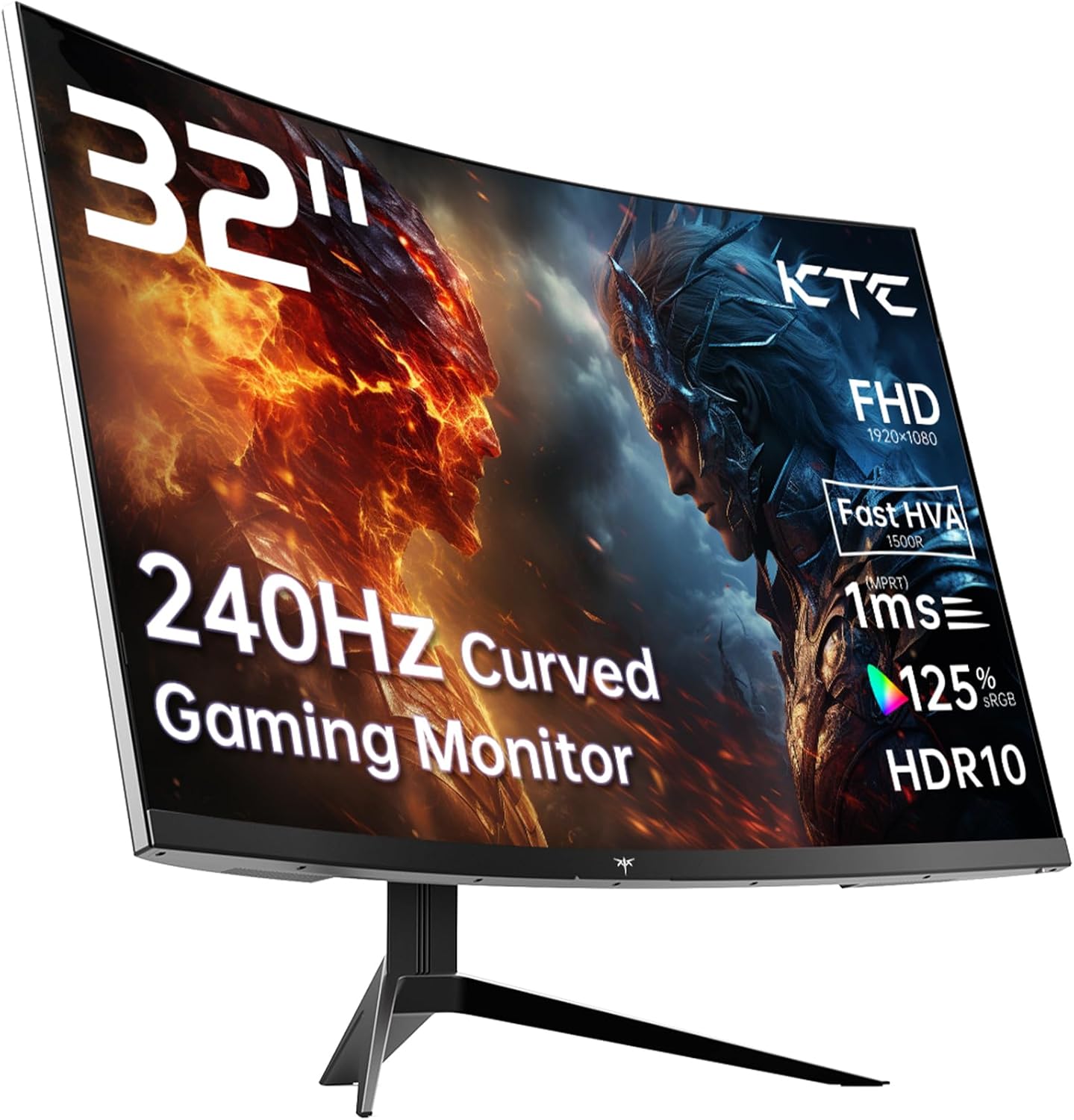
The KTC H32S17F is a 32-inch, 1080p, 240Hz curved gaming monitor aimed squarely at budget-conscious gamers who want high refresh rates without spending serious money. The headline strength is that refresh rate — 240Hz on a VA panel at this screen size is a genuinely unusual combination at this tier. The headline limitation is that pairing 1080p resolution with a 32-inch screen produces noticeably low pixel density, and that’s a real issue if image sharpness matters to you.
In everyday use, what you’ll actually notice is this: fast-moving games feel fluid and responsive in a way that cheaper 144Hz monitors simply can’t match. The 1500R curve wraps the screen around your field of view at this size, which works better for gaming than productivity. The VA panel delivers a 3500:1 contrast ratio, which means blacks look genuinely dark — a real advantage in dimly lit scenes. What you won’t get is razor-sharp text or fine detail. At 32 inches with only 1920 x 1080 pixels, individual pixels are visible up close, and reading small text for extended periods is less comfortable than it would be on a 27-inch screen at the same resolution.
This is the right monitor for a competitive gamer on a tight budget who cares more about frame rate than pixel density, or for someone running a mid-range GPU that can realistically push 240Hz at 1080p. It is not the right choice for anyone doing design work, handling spreadsheets all day, or expecting 4K-level sharpness. If you’re upgrading from a 60Hz or 75Hz screen and want the biggest visual improvement for the least money, the KTC H32S17F makes a credible case.
See the current availability and listing details for the KTC H32S17F on Amazon.

What It’s Best For
Competitive and Fast-Paced Gaming
This is where the KTC H32S17F earns its place. A 240Hz refresh rate means the screen redraws 240 times per second — every frame your GPU produces gets displayed almost instantly, with no queuing and no artificial delay. In practice, movement looks cleaner, enemy tracking feels more precise, and the time between your mouse input and the result on screen is genuinely shorter. Paired with Adaptive Sync support covering both FreeSync and G-Sync compatible setups, screen tearing disappears entirely when your frame rate fluctuates. For first-person shooters, battle royale titles, or anything where reaction time matters, this is a meaningful advantage over a 144Hz screen — and a massive leap over a standard 60Hz display. Understanding how refresh rate affects gaming responsiveness helps put that gap in context.
Console Gaming
The KTC H32S17F is explicitly compatible with PS5, Xbox Series X, and Switch, and it has two HDMI 2.0 ports — which means you can connect two consoles simultaneously and switch between them without unplugging cables. The 32-inch size at 1080p is actually a reasonable fit for console gaming when you’re sitting at a desk, because consoles already output at 1080p for many titles and the curved screen makes the experience feel more cinematic. The 3500:1 contrast ratio helps dark scenes in story-driven games look much better than they would on a flat IPS panel.
Home Media and Casual Streaming
The 1500R curvature and large screen size make films and streaming content feel more enveloping than a flat screen of the same size. HDR10 support is present, though with a peak brightness of only 350 cd/m² the HDR effect is entry-level at best — it adds a bit of extra contrast pop rather than the wide dynamic range you’d get from a proper HDR600 or HDR1000 certified display. For Netflix evenings and casual watching, it does the job without complaint. Just don’t expect Dolby Vision-level HDR impact.
The Specs That Really Matter
The panel technology KTC is marketing here as “HVA” is essentially a VA panel — specifically a fast-response VA variant. VA panels offer significantly better contrast than IPS by nature, and that 3500:1 contrast ratio is the real standout spec on the KTC H32S17F. In practical terms, dark scenes in games look richer, shadow detail is more visible, and the black levels are genuinely dark rather than the washed-out grey you get from an IPS panel in a dark room. The trade-off is that viewing angles are narrower — at 178 degrees the spec looks fine on paper, but VA panels typically show some colour shift at extreme off-axis angles. For a single user sitting directly in front, it’s a non-issue.
The 1920 x 1080 resolution on a 32-inch screen is the main practical concern with this monitor. Pixel density works out at roughly 69 pixels per inch — for comparison, the same resolution on a 27-inch screen gives you around 82 PPI. That difference is visible. Text and UI elements won’t look as crisp. For gaming, where you’re often looking at the scene rather than reading small text, it’s much less of a problem. But anyone who plans to use this for work, browsing, or reading will notice the softness fairly quickly. The relationship between screen size and resolution is something worth understanding before committing to a 32-inch 1080p panel. In 2026, where 1440p and even 4K panels are increasingly available at competitive prices, that pixel density gap is harder to overlook outside of pure gaming use.
The spec sheet lists a 1ms response time in marketing copy, but the actual specification data shows 3ms — which is the more likely real-world figure for this class of VA panel. That’s still perfectly fine for gaming at 240Hz, and it won’t cause visible ghosting under normal conditions. What matters more is that Adaptive Sync is confirmed to work with both AMD FreeSync and Nvidia G-Sync Compatible setups, covering the vast majority of gaming GPUs. Connectivity is solid for the price: 2 x HDMI 2.0 and 1 x DisplayPort 1.4. You’ll want to use DisplayPort 1.4 for a PC connection if you’re targeting 240Hz, as HDMI 2.0 has bandwidth limitations at that refresh rate with 1080p. There’s also a single USB 2.0 port listed, though its function in the OSD or hub setup isn’t specified in the available data. For a full breakdown of what these port versions actually mean, the monitor connectivity guide covers it clearly.
Colour coverage is listed at 125% sRGB, which is above average for a budget VA panel and suggests reasonably vivid, saturated colours in games and media. KTC also includes anti-blue light and flicker-free technology, both standard inclusions at this tier but worth noting for anyone who games in long sessions.
Check the full spec sheet and buyer Q&As for the KTC H32S17F on Amazon.
What Buyers Are Saying
The KTC H32S17F holds a 4.3 out of 5 rating from 2,004 Amazon customer reviews — that’s a meaningful sample size and a genuinely strong result. A 4.3 average across two thousand buyers is not something you achieve with luck or a wave of early positive reviews; it suggests a monitor that is consistently meeting expectations for the audience buying it.
The dominant praise themes centre on the visual impact of the 240Hz refresh rate for gaming, with buyers who upgraded from 60Hz or 75Hz screens repeatedly describing the difference as immediately noticeable. The 1500R curve and 32-inch screen size together generate a lot of positive feedback around the sense of immersion, particularly for racing games, shooters, and open-world titles. The colour richness relative to price is flagged frequently — the VA panel’s contrast does visible work here, and buyers who came from flat IPS panels comment on how much deeper blacks look. Setup and out-of-box experience also get consistent praise, with cable inclusions and build quality described as better than expected at this price tier.
Recurring criticisms are relatively minor at the population level. A subset of buyers note the pixel density issue at 32 inches and 1080p — predictably, most of these are buyers who use the monitor for mixed gaming and desk work rather than pure gaming. A handful mention the OSD menu as not the most intuitive to navigate, which is fairly common across budget monitor brands. The stand adjustment range is limited to tilt only, which some buyers flag as a frustration if they need height adjustment. None of these are surprising given the price tier, and none appear to be causing widespread returns or low ratings.
Buyer Highlights
“The difference from my old 60Hz screen is night and day — games feel completely different.” — The single most repeated sentiment across the review pool, from buyers making their first high-refresh-rate upgrade.
“Colours are richer than I expected, especially in darker game environments.” — A consistent reaction from buyers commenting on the VA panel’s contrast performance against similarly priced IPS alternatives.
“Curved 32-inch feels genuinely immersive at my desk — much more so than my old flat screen.” — Common feedback from buyers who were sceptical about the curve before it arrived.
“Text isn’t super sharp for office work, but for gaming it looks great and runs buttery smooth.” — An honest and recurring acknowledgement of the 1080p-at-32-inch trade-off from buyers who use it primarily for gaming.
“Build quality surprised me — feels sturdier than I was expecting for the money.” — Consistent across early buyers commenting on first impressions out of the box.

Worth Knowing Before You Buy
The stand offers tilt adjustment only — no height or pivot adjustment. For a 32-inch curved panel, this matters more than it might on a smaller screen, because the optimal viewing height for a curved monitor is fairly specific. If your desk setup doesn’t naturally put the screen at eye level, you’ll either need a monitor arm or you’ll be staring slightly upward or downward, which undermines the purpose of the curve. The good news is that VESA 100×100 mounting is supported, so a monitor arm is a straightforward solution. It’s worth factoring in the additional cost if you don’t already own one. Check the monitor buying guide if you’re unsure what to look for in stand and ergonomics at this tier.
On the response time front: the marketing materials claim 1ms, but the specification data lists 3ms as the actual figure. This is a common pattern in budget gaming monitors — the headline number is achieved under optimal conditions that don’t reflect typical use. At 3ms on a fast VA panel running at 240Hz, you’re unlikely to notice ghosting in normal gaming conditions, but it’s worth knowing the marketing claim and the spec sheet don’t fully agree. The HDR10 support is real, but with a peak brightness of 350 cd/m² it sits at the entry-level end of HDR capability — better than no HDR, but a long way from the experience a high-brightness OLED or mini-LED display delivers. Don’t buy this expecting transformative HDR. Finally, the three-year manufacturer warranty is a genuine positive — unusual at this price tier and worth keeping documentation for.
View current stock levels and delivery options for the KTC H32S17F on Amazon.
Who Should Buy It (And Who Shouldn’t)
Buy If
- You’re a competitive gamer upgrading from a 60Hz or 75Hz screen and want the responsiveness boost of 240Hz without spending heavily — this is one of the more affordable ways to reach that refresh rate on a large panel.
- You use a mid-range GPU (think RTX 3060, RX 6600 or similar) that can actually hit high frame rates at 1080p — the resolution is a genuine fit for GPUs that would struggle at 1440p.
- You want a dedicated gaming screen for console use where two HDMI inputs let you keep a PS5 and Xbox connected simultaneously without swapping cables.
- Deep blacks and rich contrast matter more to you than absolute pixel sharpness — the 3500:1 contrast ratio is a real strength that flat IPS panels at this tier can’t match.
Avoid If
- You plan to use this for desk work, browsing, or anything that involves reading text for extended periods — 1920 x 1080 at 32 inches produces noticeably soft text and will frustrate anyone who cares about sharpness outside of gaming. Understanding how to choose the right monitor for your use case can help clarify whether this is the right trade-off for you.
- You want a proper HDR experience — the 350 cd/m² peak brightness means HDR10 is present on paper but largely unremarkable in practice.
The Bottom Line
The KTC H32S17F does exactly what a monitor at this tier should: it delivers a high refresh rate, a high-contrast curved panel, and broad compatibility at a price that doesn’t require significant compromise on the specs that actually affect gaming. The 240Hz and 3500:1 contrast are the genuine strengths. The 1080p resolution at 32 inches is the genuine limitation — and it’s one worth being honest with yourself about before buying. If gaming is the primary purpose, the KTC H32S17F earns a straightforward recommendation. If it’s not, there are sharper options worth considering.
The KTC H32S17F is listed on Amazon with full specs and verified buyer reviews.
At The Monitor Expert, our approach is built on data transparency rather than simulated hands-on testing. We rigorously analyse official manufacturer specifications and aggregate verified customer sentiment to provide honest, straightforward buying advice that cuts through the marketing noise.
As an Amazon Associate, I earn from qualifying purchases.
Browse by Specification
Looking for something specific? Browse our analyses by hardware and feature below, or check all monitor analyses in the Gaming Monitors and Budget Monitors category archives.
[IPS Monitors] — [VA Monitors] — [TN Monitors] — [OLED Monitors]
Browse by Refresh Rate
[60Hz] — [75Hz] — [100Hz] — [120Hz] — [144Hz] — [165Hz] — [180Hz] — [200Hz] — [240Hz+] — [360Hz+]
Browse by Screen Size
[Small Screen] — [24-inch] — [27-inch] — [32-inch] — [Large Screen] — [Ultrawide]




