
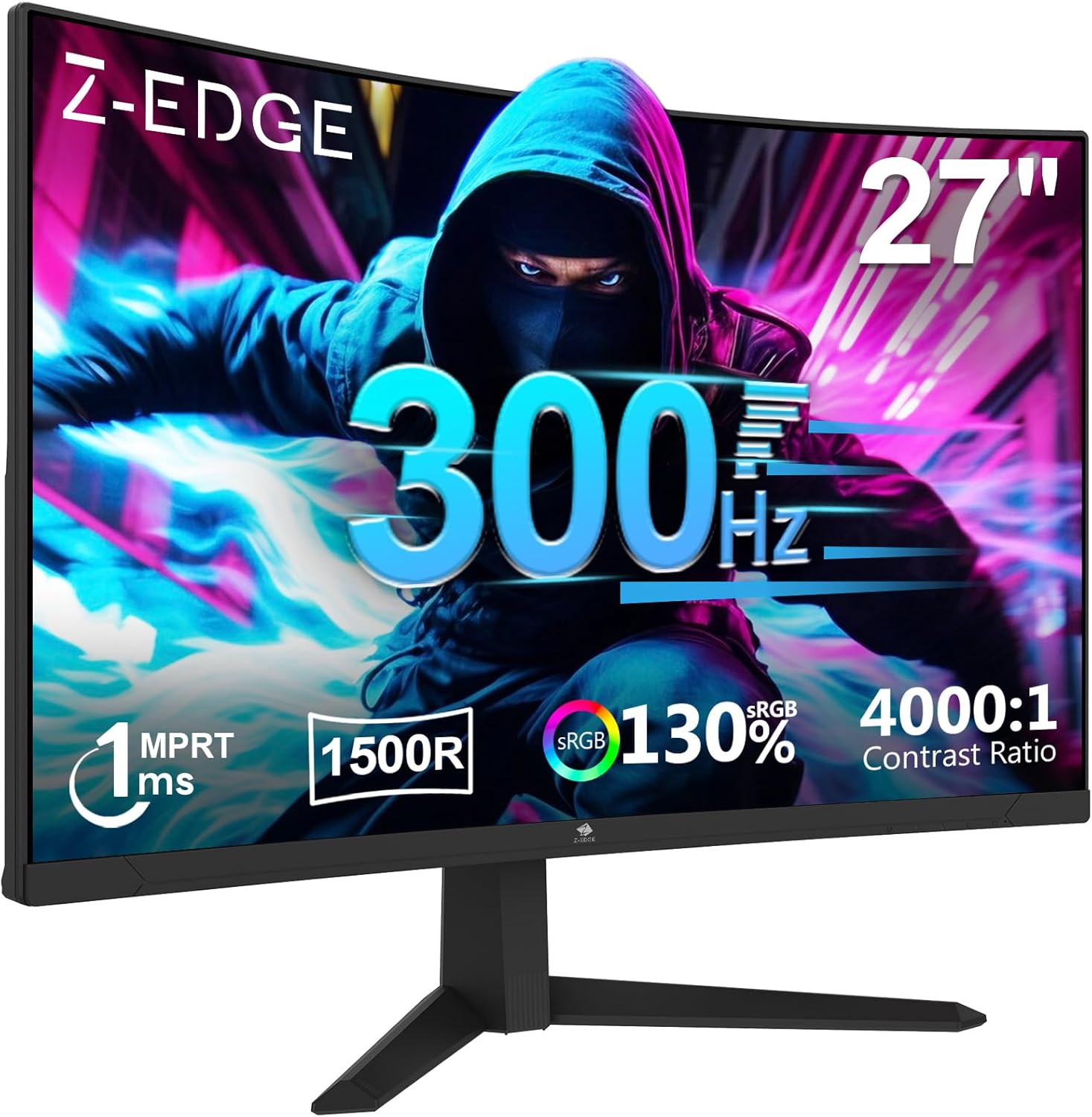
Z-Edge UG27S Analysis: 300Hz at a Real-World Price
My Honest Verdict
The Z-Edge UG27S is a 27-inch, 1080p curved gaming monitor with a 300Hz refresh rate over DisplayPort. That headline spec is genuinely rare at this price tier, and for competitive gamers who live and die by frame rate, it’s the main reason to consider this panel. The Z-Edge UG27S earns its place in the budget gaming space — but it earns it on one specific dimension, and you need to know what you’re trading off to get there.
That trade-off is pixel density. 1920 x 1080 spread across 27 inches gives you roughly 82 pixels per inch. That’s not catastrophic, but it’s noticeably soft compared to a 1440p panel at the same size. Text has soft edges. Fine detail in games looks slightly mushy at normal viewing distances. One buyer put it bluntly: don’t sit too close, or the pixelation becomes distracting. The VA panel compensates with deep blacks and a 1000:1 native contrast ratio — though the description also claims 4000:1, and there’s a discrepancy there worth noting. Either way, dark scenes look better here than on a comparable IPS at the same tier.
This is the right monitor for a competitive FPS or racing game player who wants the highest possible refresh rate without spending serious money, doesn’t sit unusually close to their screen, and can live without pin-sharp text for productivity work. If you’re doing anything detail-heavy — video editing, spreadsheets for hours, reading — look at a 1440p panel instead. The refresh rate won’t make up for the pixel density mismatch at this size for that kind of use.
See the Z-Edge UG27S listing and current availability on Amazon.

What It’s Best For
Competitive gaming is the obvious home for this monitor. At 300Hz via DisplayPort, you’re getting one of the highest refresh rates available at this price point — and in fast-paced shooters like CS2, Valorant, or Apex Legends, that translates to genuinely smoother motion and a marginal but real edge in reaction-time scenarios. The 1ms MPRT response spec keeps motion blur in check during fast movement. It’s not the same as a native GtG response figure, and that distinction matters — but for this use case, the result is clean enough that most players won’t notice the difference. If you’re playing games where raw fluidity matters more than visual fidelity, this is a sensible choice.
Console and multi-device setups get a decent deal here too. Two HDMI 2.0 ports and two DisplayPort 1.4 ports give you four inputs — which is genuinely useful if you want a PC and a console connected simultaneously. Worth being clear on one thing: HDMI caps at 240Hz on this panel, so your PC wanting the full 300Hz needs to be on DisplayPort. Console players won’t notice; their hardware doesn’t push anywhere near those frame rates anyway.
Secondary screen duties in a dual-monitor setup is another genuine fit. The ultra-slim bezel keeps the visual gap between two panels minimal, and the VESA 100x100mm mount compatibility means you’re not locked into the included stand if your desk setup has other ideas. Several buyers specifically mentioned using this alongside another screen without issue.
The Specs That Really Matter
The VA panel is the foundation of everything this monitor does well visually. VA sits between TN and IPS in most respects — better contrast than IPS, worse viewing angles than IPS, faster pixel transitions than older VA but still occasionally prone to smearing on very dark scenes. The deep blacks this technology produces are a genuine advantage in dark game environments and films. If you’re coming from a budget TN panel, the contrast improvement will be noticeable immediately. Worth understanding the differences between panel types before you commit, because panel choice shapes the experience more than most other specs.
The 300Hz refresh rate via DisplayPort is the headline, and it’s real — confirmed by multiple buyers who specifically tested it. The honest caveat is that the jump from 240Hz to 300Hz is considerably less impactful than the jump from 60Hz to 144Hz. Your GPU also needs to sustain frame rates close to 300fps in the titles you play to actually use that headroom — at 1080p, that’s achievable on mid-range to high-end cards in esports titles, less so in anything graphically demanding. If your card tops out at 180fps in your game of choice, the 300Hz ceiling doesn’t matter. The relationship between refresh rate and response time is worth understanding before assuming higher always means better for your setup.
FreeSync Premium adaptive sync covers the gap between your GPU’s actual output and the panel’s maximum. In practice, this eliminates screen tearing without the overhead of V-Sync’s input lag penalty. It’s a meaningful feature for anyone whose frame rate fluctuates — which is most people. The HDR10 label is present, but at 300 cd/m² peak brightness, don’t expect it to add much. True HDR needs sustained brightness of 600 nits or more to make a visible difference. Call this HDR10 in spec compliance only — functional HDR it is not. As 2026 panels push HDR standards forward, that gap becomes more obvious.
Connectivity is stronger than average for this tier. The combination of two DisplayPort 1.4 and two HDMI 2.0 inputs is a legitimate differentiator — most budget monitors give you one of each. There’s no USB-C here, so laptop users hoping to run a single cable setup will need to check their laptop has a full-size DisplayPort or HDMI output. Our monitor connectivity guide covers what each port standard actually supports in practice.
Check the full spec sheet and buyer Q&As for the Z-Edge UG27S on Amazon.
What Buyers Are Saying
The Z-Edge UG27S holds a 4.4 out of 5 rating across 310 customer reviews on Amazon. That’s a reasonably healthy sample with a consistently positive lean — the complaints that do surface are specific and knowable in advance, which is exactly what you want from buyer feedback.
The dominant praise theme is value relative to the refresh rate spec. Multiple buyers use language like “should be illegal at this price” and “superb quality” — which, given the source, is enthusiasm rather than objective analysis, but it does tell you buyers feel they got more than they expected. The out-of-box experience gets consistent mentions: setup is straightforward, the DP cable is included in the box (useful since that’s what you need for 300Hz), and the monitor runs as advertised from the first boot.
The one recurring technical gripe is the pixel density issue — a single reviewer flagged it clearly, noting that at 27 inches and 1080p, UI elements like small icons look jagged up close. This is a function of the resolution and size combination, not a manufacturing defect. It won’t bother everyone, but it’s real and it’s worth knowing. There’s also a note from a French buyer confirming the MPRT mode can shift colour accuracy slightly — easily corrected via the OSD, but worth having on your radar. One Spanish buyer reported a unit failure at eight months; Amazon’s warranty process resolved it without drama. For more on what the specifications actually mean in context, our monitor specs explained page breaks it down plainly.
Buyer Highlights
“Should be illegal at this price, superb quality, perfect size for gamers.” — A reaction that came up more than once from buyers who had calibrated expectations against the budget end of the market.
“It runs 300Hz on DP and 240Hz on HDMI.” — Direct confirmation from a buyer who specifically tested both connections, which is genuinely useful data.
“Don’t sit too close — it’s pixelated, but the 300Hz refresh rate is butter.” — An honest trade-off summary from a buyer who kept the monitor and adjusted their seating distance.
“Son uses this with another as a dual screen, very happy with it.” — The slim bezel makes it a natural fit alongside a second panel, and buyers using it this way report no complaints about the pairing.
“The 1500R curved VA panel offers deep blacks and a contrast ratio that makes dark game environments genuinely impressive.” — A paraphrase of French buyer feedback confirming the panel’s visual strengths after minor colour calibration.

Worth Knowing Before You Buy
The brightness ceiling of 300 cd/m² is worth factoring in if your room gets significant ambient light during the day. It’s not dim — it’s adequate for most indoor conditions — but in a bright room with sunlight hitting the screen, you may find yourself pushing brightness settings further than you’d like. The matte finish helps manage glare, which partially offsets the brightness limitation, but a sunlit desk setup will test it.
Stand adjustability is limited to tilt only. There’s no height adjustment or pivot. If you’re fussy about ergonomics — or taller than average — the VESA 100x100mm compatibility means a monitor arm is a sensible investment. Budget monitor stands are rarely good, and this one isn’t an exception. It’s functional, not flexible. Check our guide to choosing the right monitor if you’re also factoring in desk setup and ergonomics alongside the spec decision.
There are no built-in speakers — confirmed by a French buyer and consistent with the product listing. If you’re coming from a monitor that had them, factor in the cost and space of external audio. The warranty is one year manufacturer coverage — standard for this tier. The one failure report in the reviews was handled efficiently through Amazon’s returns process, which is worth knowing but not worth over-weighting from a single data point. The 1ms MPRT response time is a motion blur reduction figure, not a signal-to-pixel GtG measurement — the real-world result is good for gaming, but don’t compare it directly against GtG figures from other monitors when shopping. They’re measuring different things.
View current stock levels for the Z-Edge UG27S on Amazon.
Who Should Buy It (And Who Shouldn’t)
Buy If
- You play competitive esports titles — CS2, Valorant, Apex, racing sims — and want the highest achievable refresh rate at a budget price, with a GPU capable of sustaining near-300fps at 1080p.
- You need multiple video inputs: two HDMI and two DisplayPort simultaneously available is genuinely unusual at this price tier and makes multi-device setups straightforward.
- You’re building or expanding a dual-monitor setup and want a slim-bezel panel that sits flush alongside a second screen without an obvious gap.
- You sit at a normal or generous viewing distance from your monitor — roughly 60–80cm or more — where the 1080p pixel density at 27 inches won’t bother you.
Avoid If
- You use your monitor for detailed productivity work — spreadsheets, document editing, reading — where the soft pixel density of 1080p at 27 inches across several hours will become genuinely irritating. A 1440p panel at this size is the better call for mixed use.
- You need USB-C connectivity for a single-cable laptop setup — there’s no USB-C here, so you’ll need a laptop with a native HDMI or DisplayPort output, which not all modern thin-and-light models have.
- You want ergonomic flexibility — the stand is tilt-only, and if height adjustment matters to you, budget for a monitor arm before adding this to your desk.
The Bottom Line
The Z-Edge UG27S does exactly one thing at the highest level for its price: it delivers a genuine 300Hz refresh rate on a curved VA panel with solid connectivity and a clean out-of-box experience. The 1080p resolution at 27 inches is the known compromise, and it’s not a dealbreaker for competitive gaming — it’s a dealbreaker for detail-heavy work. If you know what you need this monitor for, the decision is straightforward. For fast-paced gaming on a tight budget, this earns a clear recommendation. For anything else, the spec mix doesn’t quite stack up.
Find the Z-Edge UG27S on Amazon and check current availability.
At The Monitor Expert, our approach is built on data transparency rather than simulated hands-on testing. We rigorously analyse official manufacturer specifications and aggregate verified customer sentiment to provide honest, straightforward buying advice that cuts through the marketing noise.
As an Amazon Associate, I earn from qualifying purchases.
Browse by Specification
Looking for something specific? Browse our analyses by hardware and feature below, or check all monitor analyses in the Gaming Monitors and Budget Monitors category archives.
[IPS Monitors] — [VA Monitors] — [TN Monitors] — [OLED Monitors]
Browse by Refresh Rate
[60Hz] — [75Hz] — [100Hz] — [120Hz] — [144Hz] — [165Hz] — [180Hz] — [200Hz] — [240Hz+] — [360Hz+]
Browse by Screen Size
[Small Screen] — [24-inch] — [27-inch] — [32-inch] — [Large Screen] — [Ultrawide]




