
CronusPro Z32B40 Analysis: 4K Without the Gaming Promise
My Honest Verdict
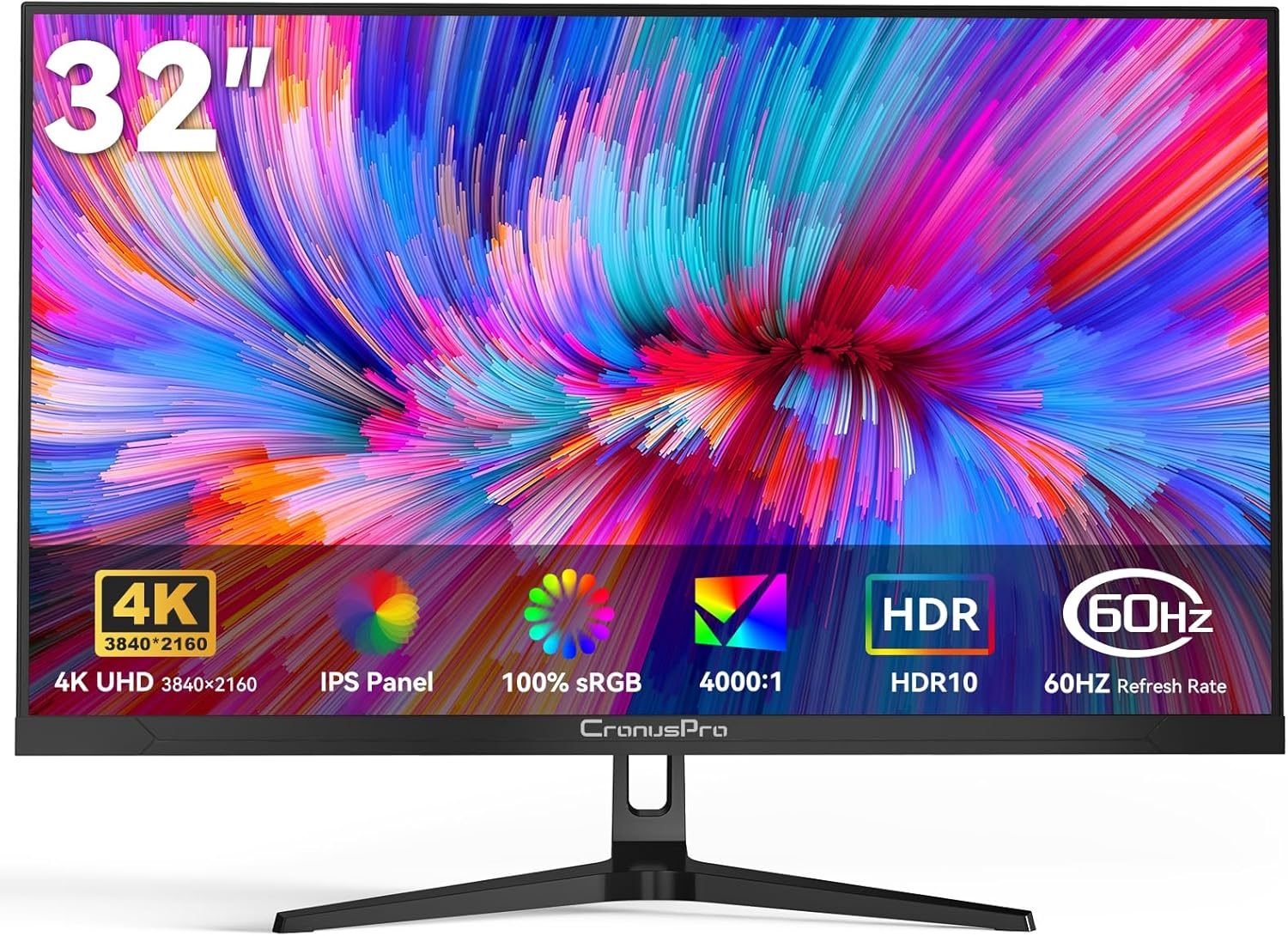
The CronusPro Z32B40 is a 32-inch, 4K IPS monitor aimed squarely at designers, work-from-home setups, and anyone who wants a genuinely large, sharp screen without chasing gaming specs. The headline strength is straightforward: 3840×2160 resolution on a 32-inch panel is a genuinely good combination — pixel density sits at a comfortable level where everything looks sharp without needing scaling gymnastics. The headline limitation is equally straightforward: 60Hz is the refresh rate, and if you play anything competitive, that ceiling will frustrate you.
What the specs translate to in practice is a monitor that renders text, photos, and fine detail with clarity that monitors at smaller sizes or lower resolutions simply can’t match. The IPS panel means colours stay consistent when you’re not sitting directly in front of it — useful in shared spaces or when you’re leaning back. The 4000:1 contrast ratio is higher than most IPS panels manage, which suggests better shadow depth, though IPS contrast figures from lesser-known brands should always be taken with a degree of scepticism until real-world use confirms them. The 100% sRGB coverage matters if you’re doing design or photo work where accurate colour representation is the point.
If you want a large, colour-accurate display for office work, creative work, or casual media consumption, the CronusPro Z32B40 makes a solid case for itself. If you’re a gamer — particularly one who plays anything faster than slow-paced RPGs or strategy titles — the 60Hz cap means you should look elsewhere. Check our monitor buying guide if you’re still working out what refresh rate actually matters for your use case.
See the current listing and availability for the CronusPro Z32B40 on Amazon.

What It’s Best For
Office and productivity work: This is where the CronusPro Z32B40 genuinely earns its keep. A 32-inch, 4K panel gives you enough real estate to have multiple windows open side by side without anything feeling cramped. Spreadsheets, documents, code, browser tabs — they all look sharper and more readable at 3840×2160 than they would at 1080p or even 1440p on the same size screen. The DC dimming and low blue light filtering aren’t just marketing — extended sessions in front of a 300 cd/m² IPS panel with these features active will cause less eye strain than a budget screen without them. Martin Williams put it well: upgrading from twin screens to a single large 4K panel can make your workspace substantially cleaner and more manageable.
Content creation and design work: The 100% sRGB coverage and 8-bit colour depth (with FRC) mean what you’re seeing on screen is a reasonably accurate representation of how your work will look elsewhere. That matters for designers, photo editors, and video creators who need to trust their display. The 178° viewing angle means colour doesn’t shift when you tilt your head or show someone else your work. A 4000:1 contrast ratio, if it holds up in practice, would also give you better shadow detail than the typical IPS figure of 1000:1 — useful for photographers working with dark images. Check our page on display size and resolution if you’re trying to work out whether 32-inch 4K is the right combination for your workflow.
Home media and streaming: Watching films at 4K on a 32-inch screen from normal desk distance is a genuinely good experience. The HDR10 support means compatible content will look richer than SDR, though this is entry-level HDR — the peak brightness isn’t high enough for dramatic HDR highlights. What you get is a more natural-looking image rather than the punchy, theatrical HDR you’d see on a proper HDR600 or HDR1000 panel. Decent enough for streaming Netflix or Disney+, and considerably better than a smaller screen for movie nights at a desk.
The Specs That Really Matter
The IPS panel is the most important decision here, and it’s the right call for this monitor’s intended audience. IPS delivers wide colour accuracy and consistent viewing angles — critical for anyone doing design or photo work. The alternative, VA, would give you deeper blacks but narrower viewing angles and slower pixel response in dark scenes. For creative work and office use, IPS is the sensible choice. The claimed 4000:1 contrast ratio is notably higher than the IPS norm of around 1000:1 — that’s either a genuine advantage of this particular panel or a marketing figure that real-world use won’t fully deliver. Buyer reports suggest the image looks good without complaint about washed-out blacks, which is encouraging.
The 60Hz refresh rate needs addressing plainly. For office work, design, video editing, and streaming, 60Hz is completely fine — you won’t notice the difference in those use cases. For gaming, it’s a limitation that becomes obvious the moment you try anything action-oriented. AMD FreeSync support helps eliminate screen tearing when your frame rate dips below 60, but it won’t give you the smoothness a 120Hz or 144Hz panel provides. The 3ms response time is reasonable and means you won’t see obvious ghosting, but response time matters far less when the refresh rate is already capped at 60. See our breakdown on refresh rate and response time if you want the full picture on what those numbers actually mean for different use cases.
Connectivity is worth understanding before you buy. The CronusPro Z32B40 ships with dual HDMI and dual DisplayPort inputs — two of each. That’s genuinely useful for multi-device setups: one input for a work laptop, one for a gaming console, one for a personal machine. No USB-C is listed, which matters if you want single-cable connection to a modern laptop. Check our connectivity guide if USB-C is important to your workflow. In 2026, most serious laptop users expect at least one USB-C display input at this size and resolution tier — its absence is a real gap worth knowing about before committing.
Check the full spec sheet and buyer Q&As for the CronusPro Z32B40 on Amazon.
What Buyers Are Saying
The CronusPro Z32B40 holds a 4.4 out of 5 rating from 102 reviews — a reasonable sample size that gives some genuine signal. The dominant theme from UK buyers is satisfaction at the value proposition: people upgrading from older or smaller monitors frequently note that the image quality exceeded their expectations given what they paid. Setup ease comes up repeatedly — most buyers report a plug-and-play experience with no fuss.
Specific praise lands on colour vibrancy, sharpness, and the general impression of a quality image. Several buyers mention gaming performance positively — which makes sense, as casual gaming at 60Hz with FreeSync active works well enough, particularly for slower-paced titles. One buyer upgraded from a 27-inch screen and found the extra real estate meaningfully improved how they used their PC for multi-tasking. Another was sceptical about the size before it arrived and found themselves converted quickly.
The complaints are specific rather than damning. One buyer found assembly frustrating with inadequate instructions — a legitimate gripe, and echoed in a German review that noted the manual was too small to read and didn’t describe the foot-attachment process clearly. A VESA mount user found the 75×75mm mount placement awkward inside a white mounting ring, making it incompatible with VESA 100 arms — worth checking before buying if you plan to wall-mount. One buyer noted the auxiliary audio output was notably quieter than their previous monitor. No reports of dead pixels, backlight bleed, or panel defects in the UK reviews.
Buyer Highlights
“I was pretty sceptical at the price, but it’s got a good picture and I’ve never had problems on it gaming.” — A recurring reaction from buyers who went in with low expectations and came out satisfied.
“Doesn’t take long for eyes to adjust to the extra real estate — it’s enhanced the quality of how I use a PC.” — Common from buyers moving up from 24-inch or 27-inch screens.
“Super smooth for work and casual gaming, no tearing at all.” — Consistent feedback on the FreeSync implementation at 60Hz.
“If you have a VESA 100 mount it will not fit — the mount is inside the white mounting ring.” — A practical warning from a buyer who found this out the hard way.
“No speakers, but I use conferencing speakers anyway — the screen itself is great for working from home.” — Practical perspective from a buyer who knew what they needed and got it.

Worth Knowing Before You Buy
The VESA situation is worth understanding properly. The specification lists VESA 75×75mm — not the more common 100×100mm that most third-party monitor arms use. A buyer confirmed that attempting to fit a VESA 100 arm didn’t work because of the mounting ring design. If wall-mounting or using a monitor arm is part of your plan, double-check your arm supports 75mm spacing before ordering. Most budget arms support both patterns, but it’s worth confirming. If you’re using the included stand, this is a non-issue.
Assembly caused one buyer genuine frustration, and a German buyer noted the manual failed to describe the foot-attachment process — you need to unscrew a plate first, which isn’t documented. This isn’t a dealbreaker, but if you’re not comfortable figuring things out as you go, expect to spend a bit of time on it. There are no speakers built in — the monitor has an auxiliary output but no internal drivers, and one buyer noted the output volume was lower than expected. If you need sound, plan for external speakers or headphones. The 1-year warranty from CronusPro is the minimum you’d expect at this tier — it’s not a long-term safety net, so factor that into your risk assessment if longevity is a concern. No patterns of defect or early failure appear in the current review pool, which is encouraging for a relatively new brand.
For buyers considering this as a monitor for photo or video work, it’s worth understanding what specs like sRGB and 8-bit colour actually mean in practice before assuming full professional-grade colour accuracy. The 100% sRGB coverage is genuine and useful; it does not cover P3 or AdobeRGB, so if your workflow demands those wider colour spaces, this monitor will fall short.
View current stock and delivery options for the CronusPro Z32B40 on Amazon.
Who Should Buy It (And Who Shouldn’t)
Buy If
- You want a large, sharp display for office work, multitasking, or creative work and don’t need high refresh rates — the combination of 32-inch size and 4K resolution is genuinely well-suited to these tasks.
- You’re upgrading from a 24-inch or 27-inch monitor and want more screen real estate without compromising on image quality — multiple buyers made exactly this jump and found it transformative for day-to-day PC use.
- You plan to use the included stand on a desk and don’t need a monitor arm — the 75×75mm VESA mount works fine with compatible arms, but the stand is where it’s most straightforward.
- You want to connect multiple devices simultaneously — dual HDMI and dual DisplayPort inputs make switching between a laptop, console, and desktop genuinely convenient without adapters.
Avoid If
- You play competitive or fast-paced games — 60Hz is the hard ceiling here, and no amount of FreeSync will change that. For gaming monitors worth considering instead, our use-case selector is a good starting point.
- You need USB-C connectivity for a single-cable laptop connection — it’s not offered, and at a 32-inch 4K tier in 2026, that’s increasingly a genuine omission rather than an acceptable trade-off.
- You use a standard 100×100mm VESA arm and aren’t willing to replace it — the 75×75mm pattern is the only option here.
The Bottom Line
The CronusPro Z32B40 is a well-specified work and creative monitor that does what it says: delivers a sharp, colour-accurate 32-inch 4K IPS image at a price point that undercuts most brand-name equivalents. The limitations are real — no USB-C, 60Hz only, VESA 75 rather than 100 — but none of them are hidden. If your use is office work, design, media consumption, or casual gaming and you’re not wedded to a monitor arm, this earns a straightforward recommendation. Go in knowing what it is, and it’s unlikely to disappoint.
Find the CronusPro Z32B40 and read the latest buyer feedback on Amazon.
At The Monitor Expert, our approach is built on data transparency rather than simulated hands-on testing. We rigorously analyse official manufacturer specifications and aggregate verified customer sentiment to provide honest, straightforward buying advice that cuts through the marketing noise.
As an Amazon Associate, I earn from qualifying purchases.
Browse by Specification
Looking for something specific? Browse our analyses by hardware and feature below, or check all monitor analyses in the Office Monitors and Budget Monitors category archives.
[IPS Monitors] — [VA Monitors] — [TN Monitors] — [OLED Monitors]
Browse by Refresh Rate
[60Hz] — [75Hz] — [100Hz] — [120Hz] — [144Hz] — [165Hz] — [180Hz] — [200Hz] — [240Hz+] — [360Hz+]
Browse by Screen Size
[Small Screen] — [24-inch] — [27-inch] — [32-inch] — [Large Screen] — [Ultrawide]




