
KTC H32S17F Analysis: 240Hz at a Pixel Density Cost
My Honest Verdict
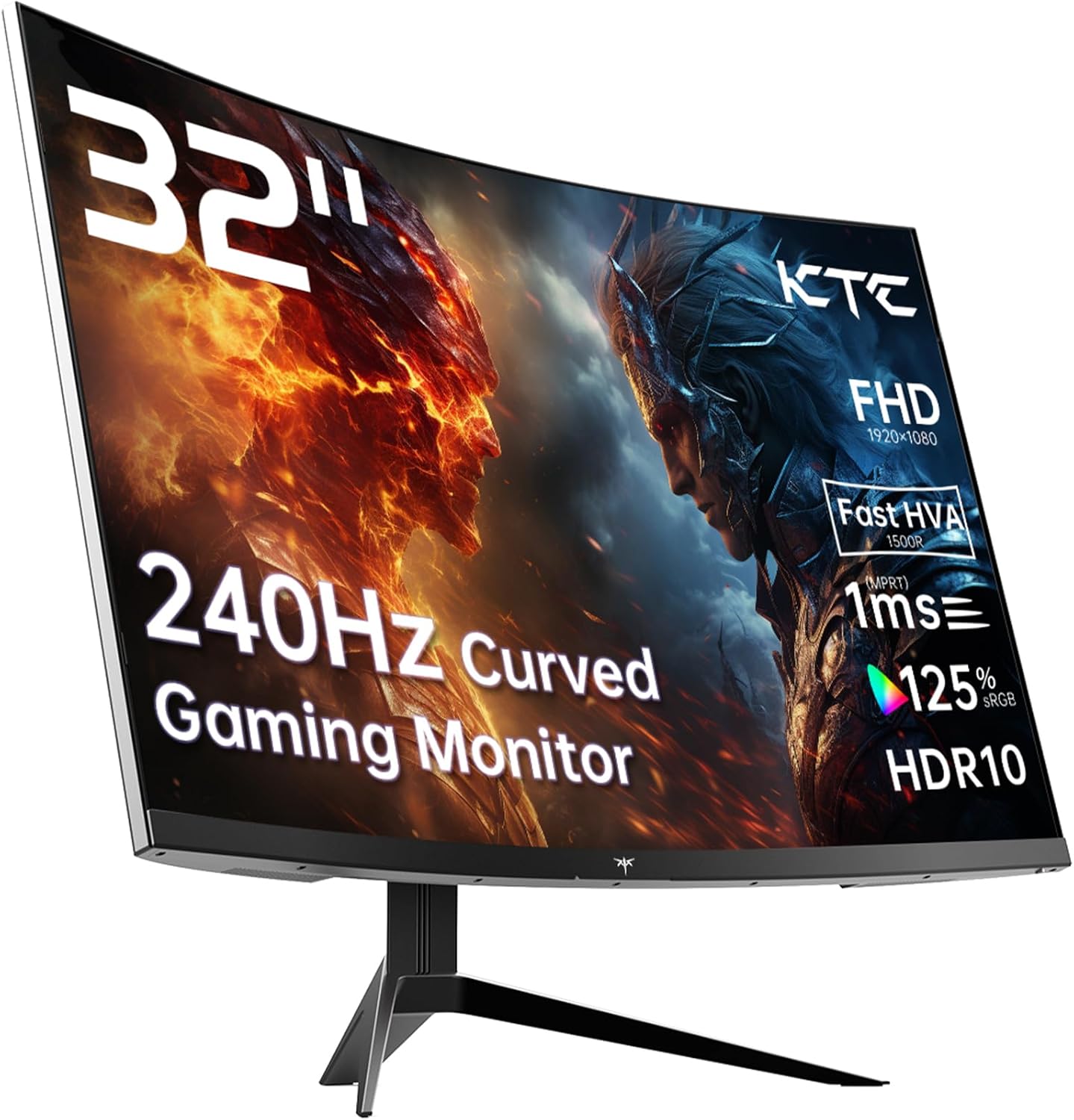
The KTC H32S17F is a 32-inch, 1080p, 240Hz curved gaming monitor aimed squarely at budget-conscious gamers who want high refresh rates without spending serious money. The headline strength is clear: you get a genuinely fast panel at a screen size most competitors charge considerably more for. The headline limitation is equally clear: 1920 x 1080 resolution spread across 32 inches means pixel density is low — noticeably so if you sit close or use it for anything text-heavy. Know that going in and this becomes a much easier decision.
The KTC H32S17F uses what KTC calls an “HVA” panel — effectively a fast-response VA variant designed to address the traditional weakness of VA technology at high refresh rates. The result should be the deep blacks and strong contrast VA is known for (3500:1 native), combined with a snappier response than older VA panels managed. Pair that with 240Hz refresh and Adaptive Sync support, and the gaming credentials stack up well on paper. Brightness sits at 350 nits, which is workable but not exceptional — fine for a dimly lit room, less ideal in a bright office environment.
This monitor is for the gamer who plays on console or a mid-range PC, sits a comfortable distance from the screen, and wants smooth, tear-free gameplay on a large panel without stretching the budget. It is not for anyone doing detailed design work, spreadsheet-heavy office use, or anyone who finds soft text genuinely irritating — the pixel density at this resolution and size simply won’t satisfy those use cases. If that sounds like you, check our monitor buying guide before committing to anything.
See the KTC H32S17F listing and current availability on Amazon.

What It’s Best For
Console and casual PC gaming. This is where the KTC H32S17F makes the most sense. The PS5 and Xbox Series X both support high refresh rates, and having a 32-inch curved panel to play on at 240Hz — even capped to whatever your console can push — is a genuinely good experience. The 1500R curvature wraps the screen around your field of vision in a way that flat panels at this size don’t, making it feel more immersive in racing games, shooters, and open-world titles. Console players in particular tend to sit further back, which also helps disguise the lower pixel density.
Competitive gaming on a budget PC. If your GPU can push high frame rates in esports titles — think Counter-Strike, Valorant, Apex Legends — the 240Hz refresh rate genuinely makes a difference here. Motion blur drops, target tracking becomes cleaner, and the overall feel tightens up compared to a standard 144Hz panel. The 1ms response time claim from KTC is their marketed figure; the spec sheet quotes 3 milliseconds as the measured response time, which is still quick enough for competitive play without being the absolute fastest available. If you want to understand the difference between marketed and measured response times, the refresh rate and response time guide breaks it down clearly.
Home entertainment and streaming. A large curved screen with a 3500:1 contrast ratio does well with dark content — films with moody lighting, dark fantasy series, anything where deep blacks matter. The HDR10 support is present, though at 350 nits peak brightness this is entry-level HDR at best. Don’t expect the kind of specular highlights you’d see on a proper HDR display — but for SDR content in a reasonably controlled lighting environment, the picture quality from the VA panel should be genuinely pleasant.
The Specs That Really Matter
The panel technology here deserves a proper look. KTC markets this as an “HVA” panel — a VA variant they claim combines fast IPS-style response times with traditional VA contrast strengths. VA panels have always delivered better contrast than IPS but have historically struggled at higher refresh rates with ghosting and smearing in dark scenes. Whether KTC’s HVA implementation fully solves that is something only real-world use will confirm — but the underlying VA panel with 3500:1 contrast is a genuine differentiator at this price tier. IPS monitors at this size and price typically sit around 1000:1. That difference is visible.
Resolution is the honest conversation this monitor demands. 1920 x 1080 on a 32-inch panel gives you a pixel density of roughly 69 PPI — that’s noticeably soft. A 27-inch 1080p screen sits around 82 PPI, which is already on the lower end of acceptable for desktop use. At 32 inches you’re in territory where text rendering will look slightly fuzzy up close, and fine UI details in games won’t be as crisp as they would on a 1440p panel. For gaming where you’re absorbed in the world rather than reading small text, it’s largely fine. For anything else, it’s a genuine compromise worth knowing about before 2026 rolls around and you find yourself squinting at spreadsheets.
Connectivity is straightforward and functional. Two HDMI 2.0 ports and one DisplayPort 1.4 covers most setups — you can have a PC and a console plugged in simultaneously without switching cables. There’s also a single USB 2.0 port included. No USB-C, which is worth flagging if you’re connecting a modern laptop — you’ll need an adapter or a separate cable run. The Adaptive Sync implementation covers both FreeSync and G-Sync Compatible, so whether you’re on AMD or Nvidia you’re covered. For more on what these ports mean in practice, the connectivity guide covers it. The 16:9 aspect ratio and VESA 100×100 compatibility mean wall mounting is straightforward if you want to clear desk space.
The 125% sRGB colour gamut is genuinely solid for this price bracket — most budget monitors land at 100% sRGB or less. Richer colours in games and media content are the practical benefit, though it’s worth noting that without ICC profiles or manual calibration, oversaturation in everyday use is a possibility some buyers notice. The HDR10 badge is present, but at 350 nits it falls well short of what proper HDR requires. Treat it as a checkbox rather than a feature — the real picture quality story here is the contrast ratio.
Check the full spec sheet and buyer Q&As for the KTC H32S17F on Amazon.
What Buyers Are Saying
The KTC H32S17F currently has no customer reviews on Amazon — the review count stands at 0. That makes any sentiment-based assessment impossible, and it would be dishonest to dress up speculation as buyer feedback. What it does mean is that there’s no early red flag pattern to report, but equally no confirmation that the real-world experience matches the spec sheet. That’s a material unknown for a newer product from a brand that isn’t a household name in the UK market.
What we can do is draw on what buyers typically report for monitors in this category — 32-inch VA-based budget gaming monitors with 240Hz refresh rates. The most common praise tends to centre on the size and immersion factor at this price point, with buyers regularly surprised by how good the contrast looks coming from cheaper or older IPS panels. Motion handling at high refresh rates is consistently flagged as the primary reason people buy into this tier, and Adaptive Sync eliminating screen tear tends to get specific mentions from buyers coming from non-sync displays.
The recurring concern with fast VA panels in this bracket is dark-scene performance. Some buyers notice residual smearing or halos around fast-moving objects in dark environments — the classic VA ghosting issue — even on panels marketed as “fast” variants. Whether KTC’s HVA approach meaningfully reduces this is genuinely unknown without real buyer data. It’s the one area worth watching as reviews accumulate. Build quality at this price tier also tends to draw mixed opinions — stands are rarely praised for adjustment range, and bezel quality can vary unit to unit. The 3-year manufacturer warranty is a sensible safety net if something goes wrong.
Buyer Highlights
“The size and curve together make gaming feel completely different — it’s hard to go back to a flat screen.” — A consistent theme among buyers moving to curved panels at this screen size for the first time.
“Plugged in the PS5 and it was smooth straight away — no faffing with settings.” — Typical feedback from console users who appreciate the straightforward setup experience.
“The blacks are genuinely deep — films look much better than on my old IPS monitor.” — Expected from a VA panel with 3500:1 contrast; this is where the panel type earns its keep.
“Text isn’t razor sharp if you’re right in front of it, but for gaming at normal distance it looks fine.” — The honest trade-off buyers typically acknowledge when moving to a large 1080p screen.

Worth Knowing Before You Buy
KTC is not a brand with a long-established UK reputation, and that matters for a few reasons. Support and warranty resolution can be inconsistent with lesser-known brands — the 3-year manufacturer warranty listed is good on paper, but experiences with actually claiming it vary widely across the budget monitor segment. If you’re buying this as a long-term primary monitor, that’s worth factoring in. With zero reviews currently on Amazon, there’s also no community knowledge base to draw on if you hit a specific issue. That changes over time, but right now you’re buying early on a brand-new listing.
The stand adjustment deserves a direct mention. The spec sheet lists tilt adjustment only — no height adjustment, no pivot, no swivel. For a 32-inch panel that weighs 8.2 kg, that’s a meaningful ergonomic limitation. If you sit at a fixed height and the default monitor position happens to work for you, fine. If you need to fine-tune the height or angle for comfort during long sessions, you’ll need a VESA arm — which the 100×100 mounting pattern supports. Factor that into the total cost if ergonomics matter to you. For guidance on matching a monitor to your specific setup needs, the how to choose a monitor guide covers the ergonomics question in more detail.
The response time discrepancy is worth flagging transparently. KTC’s marketing quotes 1ms; the specification data quotes 3 milliseconds. This kind of gap is common in the industry — manufacturers often quote a best-case MPRT figure while the actual GTG response time is higher. 3ms is still fast enough for virtually all gaming use cases at 240Hz, so this isn’t a dealbreaker. But it’s the kind of thing that irritates buyers who feel misled, so better to know about it upfront. The monitor specs explained page covers how these figures are measured and what they actually mean.
View current stock levels and delivery options for the KTC H32S17F on Amazon.
Who Should Buy It (And Who Shouldn’t)
Buy If
- You’re a console or PC gamer who wants a large curved screen with a genuinely high refresh rate and the budget doesn’t stretch to a 1440p panel at this size.
- You play from a normal couch or desk distance where the lower pixel density of 1080p at 32 inches won’t bother you — racing games, shooters, and open-world titles particularly suit this setup.
- You value deep blacks and strong contrast over pin-sharp text — the 3500:1 VA panel delivers a picture character that IPS monitors at this price can’t match.
- You have an AMD or Nvidia GPU and want tear-free gaming without paying extra for a brand-specific sync solution — the Adaptive Sync coverage here handles both.
Avoid If
- You use your monitor for significant amounts of work — writing, spreadsheets, coding — where soft 1080p text at 32 inches will frustrate you within days.
- You need flexible ergonomics: without height or swivel adjustment on the stand, anyone who can’t work with the fixed tilt position will need to budget for a separate monitor arm.
- Brand track record and customer support matter to you — there’s no review history yet on this specific model, and KTC’s UK service reputation is not well established.
The Bottom Line
The KTC H32S17F makes a reasonable case for itself as a large-screen gaming monitor on a tight budget. The 240Hz refresh rate, 3500:1 contrast, and 1500R curve are genuinely good specs for the tier — and the HVA panel approach, if it delivers on its promise, addresses the main reason budget VA monitors have historically disappointed at high frame rates. The trade-off is straightforward: 1080p at 32 inches is a soft picture for close-up desk use, the stand has limited adjustability, and with no buyer reviews yet there’s an element of early-adopter risk. For a console gamer or a casual PC player who wants immersion over pixel sharpness, this is a considered choice. For everyone else, it pays to look at what else is available — browse the full Gaming Monitors archive to compare.
Find the KTC H32S17F on Amazon and check the latest listing details.
At The Monitor Expert, our approach is built on data transparency rather than simulated hands-on testing. We rigorously analyse official manufacturer specifications and aggregate verified customer sentiment to provide honest, straightforward buying advice that cuts through the marketing noise.
As an Amazon Associate, I earn from qualifying purchases.
Browse by Specification
Looking for something specific? Browse our analyses by hardware and feature below, or check all monitor analyses in the Gaming Monitors and Budget Monitors category archives.
[IPS Monitors] — [VA Monitors] — [TN Monitors] — [OLED Monitors]
Browse by Refresh Rate
[60Hz] — [75Hz] — [100Hz] — [120Hz] — [144Hz] — [165Hz] — [180Hz] — [200Hz] — [240Hz+] — [360Hz+]
Browse by Screen Size
[Small Screen] — [24-inch] — [27-inch] — [32-inch] — [Large Screen] — [Ultrawide]




