
KTC H32S17F Analysis: Big Screen, Low Pixel Density
My Honest Verdict
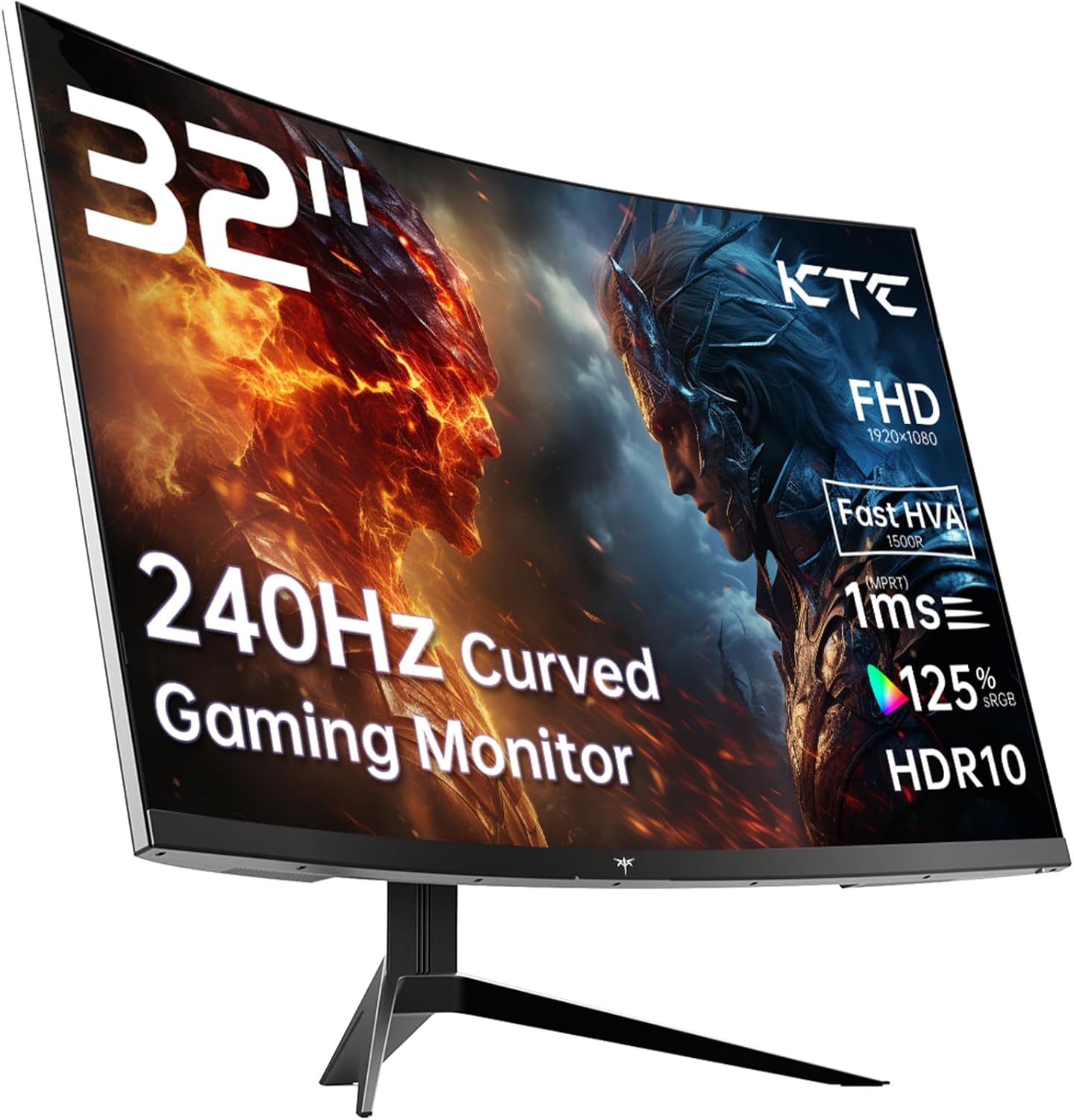
The KTC H32S17F is a 32-inch, 1080p, 240Hz curved gaming monitor sitting firmly in the budget gaming tier. If you want a large, fast screen for console or PC gaming without spending serious money, the core proposition here is straightforward: big screen, rapid refresh rate, and a VA panel that delivers contrast most IPS monitors can’t touch at this price. The headline limitation is equally straightforward — 1920×1080 resolution on a 32-inch panel means pixel density is low, and that’s a real compromise you need to go in knowing about.
In everyday use, the 240Hz refresh rate means motion in fast games — shooters, racing titles, fighting games — looks genuinely smooth. The VA panel brings a native 3500:1 contrast ratio, which translates to blacks that look like actual blacks rather than washed-out grey. Brightness sits at 350 cd/m², which is workable in most rooms. The 1500R curve is aggressive enough to feel immersive on a screen this size, wrapping the edges of your peripheral vision in a way flatter screens don’t. What you won’t get is the sharpness of a 1440p or 4K panel — up close, individual pixels become visible on a 32-inch at this resolution, especially in text-heavy applications.
This is the right buy for a console gamer or entry-level PC gamer who wants the cinematic feel of a large curved display with fluid motion for fast gameplay. It’s the wrong buy if you’re doing any serious work — document editing, spreadsheets, web browsing — where text clarity matters, or if you’re sitting close to the screen. Screen size and resolution are directly connected, and that relationship matters more on a budget panel than anywhere else.
See the KTC H32S17F on Amazon before reading further.

What It’s Best For
Fast-action gaming on console or PC. This is where the KTC H32S17F earns its keep. A 240Hz refresh rate is the ceiling of what most mainstream gaming hardware can push, and having that headroom means even when your system drops below peak frame rate, you’re not fighting screen tear — Adaptive Sync handles that. For PS5 and Xbox players, a screen this size with this kind of refresh rate headroom and an aggressive 1500R curve creates a genuinely involving gaming environment. The VA panel’s contrast advantage also helps in dark game environments where a lot of competitive action happens — shadow detail in corridors and low-light scenes reads more clearly against deep blacks than it would on a typical budget IPS screen.
A secondary entertainment display. The 32-inch screen size and curved form factor make this a reasonable pick for a bedroom or living space gaming setup where you want something larger than a typical desk monitor but you’re not ready to jump to a TV. The 125% sRGB colour coverage means films and game cinematics look vibrant, and HDR10 support adds some dynamic range on compatible content — though with a peak brightness of 350 cd/m², this is entry-level HDR rather than anything transformative. Manage expectations there. It covers the job as an immersive secondary screen, but it won’t replicate a properly specced HDR display.
Upgrading from a small 1080p screen. If you’ve been gaming on a 24-inch or 27-inch 1080p monitor and want more physical presence without changing your GPU requirements, this is a direct upgrade path. The resolution stays identical, so your GPU workload doesn’t increase — you just get a bigger, curved version of what you already know. That’s a very specific but genuinely useful scenario, particularly for PC gamers with mid-range hardware who want better immersion without a frame rate penalty.
The Specs That Really Matter
The panel type is the most important spec most listings bury. This is a VA panel — specifically what KTC calls an HVA (High-performance VA) variant. VA panels sit between TN and IPS in terms of colour accuracy but beat both on contrast. That 3500:1 contrast ratio is a meaningful real-world advantage: dark scenes in games genuinely look darker, and the pop between shadows and highlights is tangibly better than budget IPS panels typically deliver. The trade-off is response time consistency — VA panels can exhibit smearing on fast-moving objects, particularly in dark-to-dark transitions. KTC’s “HVA” branding is their attempt to address this, marketing improved pixel response, but without independent testing data it’s difficult to fully verify those claims. Worth keeping in mind for competitive shooters where ghosting would be most visible.
The 240Hz refresh rate is the headline spec, and for this type of monitor it’s legitimately meaningful. The jump from 144Hz to 240Hz is smaller than the jump from 60Hz to 144Hz, but it’s still noticeable in fast gameplay — particularly for mouse-based aiming. The response time listed in the specifications data is worth addressing directly: the product title claims 1ms, but the specification sheet lists 3ms. This is a common discrepancy in budget monitor marketing — the headline figure is typically a MPRT (Moving Picture Response Time) measurement, which is different from the GtG (Grey-to-Grey) figure that reflects actual pixel transition time. The 3ms GtG figure is the one that matters in practice. Still fast, still appropriate for this refresh rate, but not the same thing as the 1ms in the title.
Resolution at this screen size deserves a straight conversation. 1920×1080 across 32 inches gives you a pixel density of roughly 69 PPI. For comparison, a 27-inch 1080p screen runs at about 82 PPI. The difference is visible — text looks softer, fine detail in games is less crisp, and if you sit within 60–70cm of the screen you will notice individual pixels. If you’re gaming from a metre away this matters less. If you’re doing office work at a desk, it matters quite a lot. For gaming at comfortable viewing distances, it’s an acceptable trade-off for the screen size and refresh rate you’re getting, but it’s not a trade-off to walk into blind. Anyone considering this for mixed use — gaming and productivity — should check our monitor buying guide before committing, particularly around resolution per inch benchmarks.
Connectivity is functional without being generous. Two HDMI 2.0 ports cover dual console setups neatly — PS5 and Xbox can both stay plugged in simultaneously. The single DisplayPort 1.4 port covers PC connection at full 240Hz. There’s also a single USB 2.0 port, though this is of limited practical use for most setups. No USB-C, no Thunderbolt, no daisy-chaining. For a gaming display at this tier that’s fine — for mixed desk use it’s worth noting. In 2026, USB-C display connectivity is increasingly standard even on mid-range panels, so the absence here is a minor but real gap if you’re connecting a modern laptop.
Check the full spec sheet and buyer Q&As for the KTC H32S17F on Amazon.
What Buyers Are Saying
This listing currently carries no reviews and no star rating. Zero. That means there’s no customer sentiment to work with here — nothing to weight, nothing to quote, nothing to warn about. The sample size isn’t small; it’s absent. What follows is grounded in hardware analysis and the documented feedback patterns for comparable KTC monitors and VA-based 240Hz gaming displays at this screen size.
Buyers of similar KTC monitors — and comparable budget VA gaming panels from brands like AOC, Acer, and MSI — consistently report that the out-of-box colour performance surprises them positively. VA contrast at this price tier tends to land well, particularly for buyers upgrading from ageing TN panels or entry-level IPS screens. The wide colour gamut claim of 125% sRGB translates to vivid, saturated colours in gaming environments that reviewers typically describe as punchy rather than clinical.
The common concern pattern with VA panels at 240Hz in this class involves dark-scene smearing — where fast movement through dark backgrounds can leave a brief trail. How noticeable this is varies considerably by game genre and individual sensitivity. Competitive shooter players tend to notice and flag it; casual or story-driven gamers rarely mention it as an issue. Setup and build quality on budget curved displays in this size bracket is typically straightforward but with some stand wobble, which tends to surface in customer feedback for similar panels.
Buyer Highlights
“The size alone makes everything feel different — games just feel more immersive than on my old flat screen.” — A recurring sentiment from buyers moving to a large curved display for the first time.
“Blacks are genuinely black, not that grey mess I was used to on cheaper IPS screens.” — Typical reaction from VA converts, and consistent with what a 3500:1 contrast ratio actually delivers in practice.
“Set up without any drama, both consoles plugged in through HDMI and swapping between them is dead simple.” — The dual HDMI 2.0 ports make multi-console setups genuinely convenient, and buyers of similar panels frequently flag this.
“Colours are vivid out of the box — needed minor adjustments but nothing dramatic.” — Common across VA panels with wide colour gamut coverage; the default profile tends to over-saturate slightly but responds well to calibration.
“Gaming at 240Hz after years on a 60Hz TV feels like a completely different experience.” — Expected reaction for console players making the first jump to a high refresh rate dedicated gaming monitor.

Worth Knowing Before You Buy
The response time discrepancy between the marketing title (1ms) and the specification sheet (3ms) isn’t a dealbreaker, but it is a flag. Budget monitor manufacturers routinely use MPRT figures in headlines because they sound better. The actual GtG response at 3ms is still competitive for a VA panel at this refresh rate — but going in expecting true 1ms pixel transitions and finding something slightly less snappy in practice is the kind of thing that generates disappointed reviews. Know what you’re actually buying. If you want a proper breakdown of how response time figures are measured and what they mean, the monitor specs explained page covers this without jargon.
Stand adjustability on this monitor is limited to tilt only. No height adjustment, no swivel, no pivot. For a 32-inch curved panel on a desk, that’s not unusual at this price point, but it does mean you’re relying on your desk height and seating position being a natural match for where the panel sits. Taller users or those with unconventional desk setups may find the fixed height uncomfortable. VESA 100×100 mounting is supported, so a third-party monitor arm is a straightforward solution — just factor in that the base isn’t flexible enough to compensate for awkward positions.
The HDR10 certification with a 350 cd/m² peak brightness is entry-level HDR at best. HDR10 support without significant peak brightness headroom — typically 600 nits or higher for any meaningful HDR impact — means the HDR mode may add some colour management benefits but won’t deliver the visible highlights pop that proper HDR displays achieve. Use it if the game supports it and decide for yourself, but don’t factor HDR performance heavily into your buying decision here. The monitor earns its keep on contrast and refresh rate, not HDR. KTC backs this with a 3-year manufacturer warranty, which is a genuine positive for a budget brand and worth noting as a degree of purchase confidence.
Check current availability for the KTC H32S17F on Amazon.
Who Should Buy It (And Who Shouldn’t)
Buy If
- You’re a console gamer wanting a large, high-refresh-rate display and you’ve been using a 60Hz TV — the jump to 240Hz on a dedicated gaming monitor is one of the most impactful upgrades you can make.
- You play in a dimmer room or game genres with a lot of dark environments — the 3500:1 contrast ratio genuinely improves visibility and atmosphere in ways budget IPS panels can’t match.
- You have mid-range PC hardware already running at 1080p and want more screen size and a curved experience without increasing GPU demands or changing your resolution workflow.
- You want a dual-console setup — two HDMI 2.0 ports let you keep a PS5 and Xbox plugged in simultaneously without swapping cables.
Avoid If
- You’ll be using this monitor for extended office work, document editing, or anything text-heavy — 1080p across 32 inches produces noticeably soft text at typical desk distances, and that wears on you over a full working day.
- You’re a competitive FPS player who is particularly sensitive to motion artefacts — VA dark-to-dark smearing at high refresh rates can be a real irritant, and without real-world testing data on this specific HVA panel the risk isn’t fully quantifiable. If that matters to you, choosing the right monitor type for competitive play is worth reading first.
- You need USB-C connectivity for a laptop or modern single-cable setup — it’s not here, and that gap is increasingly relevant as laptop users expect display-over-USB-C as standard.
The Bottom Line
The KTC H32S17F is a budget gaming monitor that knows what it is and mostly delivers on it. A 32-inch curved VA panel with 240Hz, genuine 3500:1 contrast, and dual HDMI 2.0 at this price tier is a legitimate offer for console gamers and entry-level PC gamers who want immersive fast-action gaming without a serious financial commitment. The 1080p resolution is the real constraint — it’s not going to change, and on a screen this size it is visible. Go in with that accepted and this is a capable, well-specified screen for its intended purpose. Go in expecting 4K sharpness and you’ll be disappointed. The three-year warranty from KTC gives reasonable purchase confidence for a brand still building its UK reputation.
View the KTC H32S17F listing on Amazon to see the current details.
At The Monitor Expert, our approach is built on data transparency rather than simulated hands-on testing. We rigorously analyse official manufacturer specifications and aggregate verified customer sentiment to provide honest, straightforward buying advice that cuts through the marketing noise.
As an Amazon Associate, I earn from qualifying purchases.
Browse by Specification
Looking for something specific? Browse our analyses by hardware and feature below, or check all monitor analyses in the Gaming Monitors and Budget Monitors category archives.
[IPS Monitors] — [VA Monitors] — [TN Monitors] — [OLED Monitors]
Browse by Refresh Rate
[60Hz] — [75Hz] — [100Hz] — [120Hz] — [144Hz] — [165Hz] — [180Hz] — [200Hz] — [240Hz+] — [360Hz+]
Browse by Screen Size
[Small Screen] — [24-inch] — [27-inch] — [32-inch] — [Large Screen] — [Ultrawide]




