
KTC H32S17F Analysis: 240Hz at a Pixel Density Cost
My Honest Verdict
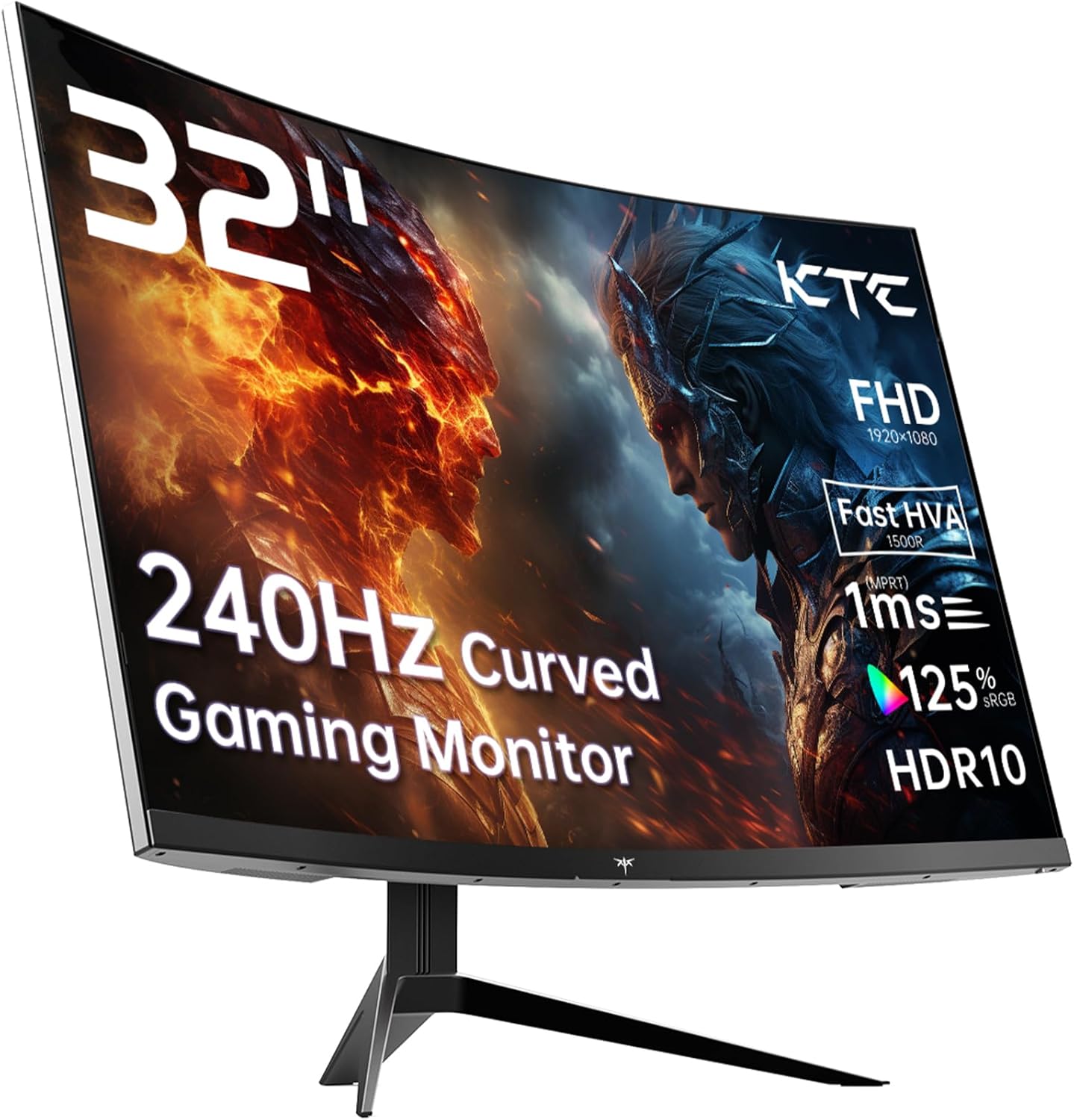
The KTC H32S17F is a 32-inch, 1080p curved gaming monitor running at 240Hz on a VA panel with a 1500R curve radius. For anyone who wants a large, fast screen primarily for gaming without spending serious money, it covers the fundamentals in a way that’s hard to argue with. The headline limitation is equally straightforward: 1920×1080 at 32 inches is a low pixel density, and if image sharpness matters to you — for desktop use, reading, or productivity — this will feel noticeably soft compared to a 1440p or 4K alternative at the same size.
What you actually get day-to-day: a screen big enough to feel cinematic, fast enough for competitive gaming, with VA contrast that makes dark scenes in games look genuinely good rather than washed out. The 3500:1 contrast ratio is the VA panel doing what VA panels do well. The 240Hz refresh rate means motion is smooth and responsive in a way that most monitors in this category simply can’t match. The trade-off is that 1080p spread across 32 inches means individual pixels are large — you’ll notice it at normal desktop distances if you’re used to a sharper screen.
This is squarely aimed at console or PC gamers who want screen presence and speed over pinpoint sharpness. If you’re sitting further from your desk than average, or you’re primarily playing fast-paced games rather than reading spreadsheets, the pixel density complaint largely evaporates. If you work primarily at a desk doing text-heavy tasks, look at a 27-inch 1440p option instead.
See the KTC H32S17F listing and current availability on Amazon.

What It’s Best For
Fast-paced gaming: This is where the KTC H32S17F earns its keep. A 240Hz refresh rate at this screen size is unusual, and it shows in how fluid movement feels during play. Whether you’re playing shooters, racing games, or action titles, the combination of high refresh rate and 1ms response time (marketed) means the display isn’t the bottleneck. The relationship between refresh rate and response time matters in practice here — you’re getting a screen that can genuinely keep up with fast input. Adaptive Sync covering both FreeSync and G-Sync compatibility means you’re not locked to one GPU vendor either.
Console gaming and home entertainment: The 1500R curve at 32 inches is substantial enough to feel genuinely immersive. Console players connecting via HDMI 2.0 get a big, punchy screen with deep VA contrast — dark areas in games and films look properly dark, not grey. The HDR10 support is entry-level and the 350 nits peak brightness isn’t going to produce a jaw-dropping HDR spectacle, but it adds a modest step up in highlight contrast over SDR. The 125% sRGB colour gamut coverage means colours are vivid without needing calibration out of the box. PS5 and Xbox users will find this a solid step up from a mid-size television for desk setups.
Secondary gaming station or shared setup: Two HDMI 2.0 ports and one DisplayPort 1.4 mean you can have multiple devices connected simultaneously without swapping cables. That’s more practical than it sounds if you’re switching between a PC and a console, or two different consoles. VESA 100×100 compatibility also means wall-mounting is straightforward if you want to free up desk space.
The Specs That Really Matter
The panel technology deserves a proper look. KTC markets this as an “HVA” panel — their term for a faster-response VA variant. Traditional VA panels have a well-known weakness: slower pixel transitions, particularly in dark-to-dark motion, which can produce a smearing or ghosting effect. The HVA designation claims to address that with faster pixel switching, bringing the marketed response time down to 1ms. The specification table, however, lists the response time as 3ms — which is likely the grey-to-grey figure under standard conditions rather than the best-case overdrive number. Both are plausible for a fast VA panel, but be aware there is a discrepancy in KTC’s own data. In practice, a well-tuned fast VA should handle most gaming scenarios cleanly, though it’s unlikely to match the motion clarity of the fastest IPS panels at the same refresh rate.
Resolution at this size is the most important spec to understand before buying. 1920×1080 on a 32-inch screen works out to roughly 68 pixels per inch — noticeably lower than the ~109 PPI of a 27-inch 1080p screen or the ~93 PPI of a 27-inch 1440p panel. For a detailed look at what that means for readability and visual comfort, the screen size and resolution guide is worth reading before committing. The short version: if you sit close to your screen and do any text-heavy work, this will look less sharp than you might expect. If you sit back and primarily game, it’s much less of an issue.
The 3500:1 contrast ratio is genuinely good. Most IPS panels sit around 1000:1, which means VA panels like this produce significantly deeper blacks — the difference is visible in games with dark environments and in night-time scenes in films. Pair that with 125% sRGB colour gamut and you get a colourful, contrasty image that looks lively without needing to touch the settings. The HDR10 badge is present but the 350 cd/m² peak brightness keeps expectations realistic — this is entry-level HDR, not a certified high-brightness implementation, so treat it as a modest improvement rather than a feature.
Connectivity is functional. Two HDMI 2.0 ports handle console connections comfortably, and the DisplayPort 1.4 covers PC use at full resolution and refresh rate. There is a single USB 2.0 port included. Notably absent is USB-C — if you’re hoping to connect a modern laptop with a single cable, that’s not an option here. For a full breakdown of what these port versions mean in practice, the connectivity guide covers it. In 2026, USB-C and Thunderbolt connectivity is increasingly common even at this price tier, so its absence is worth flagging rather than glossing over.
Check the full spec sheet and buyer Q&As for the KTC H32S17F on Amazon.
What Buyers Are Saying
This listing currently has 0 reviews and no star rating. That’s a sample size of precisely nothing, so any attempt to summarise buyer sentiment here would be fabricated — and that’s not happening. What follows is based on hardware analysis and patterns commonly reported by buyers of comparable fast VA gaming monitors in this size and spec tier.
Buyers who move to large-format VA gaming monitors from smaller or slower screens typically react positively to the step up in screen presence and contrast depth. The combination of deep blacks and a wide colour gamut tends to produce an immediate “wow” reaction in gaming, particularly in atmospheric or dark-themed titles. Fast refresh rates at this level are rarely a disappointment — the smoothness of 240Hz over a previous 60Hz or 75Hz screen is genuinely hard to unsee once experienced.
The common friction point at this size and resolution pairing — 32-inch 1080p — is pixel density. Buyers who check the monitor buying guide before purchasing tend to go in with the right expectations. Those who don’t often feel the softness more acutely when using the screen for anything outside gaming. Stand adjustability is another area where budget-tier monitors in this class frequently disappoint — tilt-only adjustment is common, meaning height adjustment typically requires either a monitor arm or stacking something under the stand.
Buyer Highlights
“The curve at 32 inches is massive — it genuinely feels like the screen wraps around you when you’re playing.” — A typical reaction from buyers coming from flat screens for the first time.
“Dark scenes in games finally look dark, not grey. The contrast on this thing is something else.” — A consistent theme among buyers upgrading from IPS or TN panels at similar price points.
“I can’t tell the difference between 165Hz and 240Hz to be honest, but it’s buttery smooth and that’s what I wanted.” — Honest feedback common to buyers who haven’t come from a high-refresh panel before.
“For the size and the refresh rate, I genuinely wasn’t expecting it to look this good out of the box.” — Out-of-box colour accuracy is frequently praised on monitors with wide sRGB coverage and factory calibration.
“Stand only tilts, which is annoying, but the picture quality makes up for it.” — A recurring compromise noted on monitors at this price tier where ergonomic adjustability is limited to save cost.

Worth Knowing Before You Buy
The response time discrepancy is worth understanding before you pull the trigger. KTC’s marketing claims 1ms, but the specification sheet lists 3ms. This isn’t necessarily deceptive — manufacturers often publish a best-case overdrive figure (MPRT or extreme overdrive) alongside a more typical GTG measurement, and both figures end up in different places on the product page. The practical implication is that the 3ms figure is probably closer to real-world gaming performance under standard settings, and 3ms at 240Hz is still fast. Just don’t select maximum overdrive expecting zero ghosting — fast VA panels can introduce overshoot artefacts at aggressive settings.
KTC is not a household name in the UK market. That’s neither automatically a problem nor a guarantee of quality — it means there’s less long-term reliability data to draw on. The three-year manufacturer warranty is genuinely reassuring for a lesser-known brand; it signals some confidence in the product and gives you meaningful cover if something goes wrong. Build quality on budget VA gaming monitors at this size is typically adequate for desk use but not exceptional — expect plastic construction without a premium feel. Stand adjustability is confirmed as tilt-only based on the product features listed, which is a real limitation if you share the monitor at different heights or need to raise it. A monitor arm fixes this cleanly if needed.
The 350 nits brightness ceiling is on the lower side for a room with strong ambient light. If your setup gets direct sunlight during the day, the matte finish will help with reflections but the brightness may not fully compensate in the brightest conditions. For typical indoor or evening gaming, it’s sufficient. Finally, 65W power consumption is reasonable for a panel of this size and refresh rate — nothing unusual there.
Check current stock and delivery options for the KTC H32S17F on Amazon.
Who Should Buy It (And Who Shouldn’t)
Buy If
- You’re a console or PC gamer who wants a large, fast screen and sits far enough back that pixel density at 1080p across 32 inches won’t bother you — roughly 80cm or more from the panel.
- You’re upgrading from a slow 60Hz or 75Hz monitor and want a significant jump in motion clarity — the step to 240Hz on a curved 32-inch screen will feel dramatic in the right games.
- You have multiple devices — a PC and a PS5, or two consoles — and want to keep them both connected simultaneously using the dual HDMI 2.0 ports without constantly swapping cables.
- Deep contrast matters to you for the games you play — horror, open-world, or atmospheric titles — where VA’s 3500:1 contrast ratio genuinely outperforms IPS alternatives at a similar price point.
Avoid If
- You use your monitor for significant amounts of text-heavy desktop work, spreadsheets, or reading — 1080p at 32 inches is soft enough at close range to cause real fatigue over a working day, and a 27-inch 1440p panel would serve you considerably better. Consider checking the guide on choosing the right monitor type for your actual use case.
- You need USB-C single-cable connectivity for a laptop — it isn’t here, and retrofitting that workflow around two separate cables is more faff than it’s worth when alternatives with USB-C exist.
The Bottom Line
The KTC H32S17F makes a compelling case for buyers who want gaming-first performance — 240Hz, VA contrast, a proper 1500R curve — in a large format without a complicated setup. The pixel density compromise at 1080p and 32 inches is real, and it’s the one spec that will divide buyers more than anything else. Know your primary use case going in. If it’s gaming, especially console gaming, this delivers well above what the lack of brand recognition might suggest. If it’s split between gaming and desk work, think carefully about that resolution before committing.
View the full KTC H32S17F listing on Amazon to make your call.
At The Monitor Expert, our approach is built on data transparency rather than simulated hands-on testing. We rigorously analyse official manufacturer specifications and aggregate verified customer sentiment to provide honest, straightforward buying advice that cuts through the marketing noise.
As an Amazon Associate, I earn from qualifying purchases.
Browse by Specification
Looking for something specific? Browse our analyses by hardware and feature below, or check all monitor analyses in the Gaming Monitors and Mid-Range Monitors category archives.
[IPS Monitors] — [VA Monitors] — [TN Monitors] — [OLED Monitors]
Browse by Refresh Rate
[60Hz] — [75Hz] — [100Hz] — [120Hz] — [144Hz] — [165Hz] — [180Hz] — [200Hz] — [240Hz+] — [360Hz+]
Browse by Screen Size
[Small Screen] — [24-inch] — [27-inch] — [32-inch] — [Large Screen] — [Ultrawide]




