
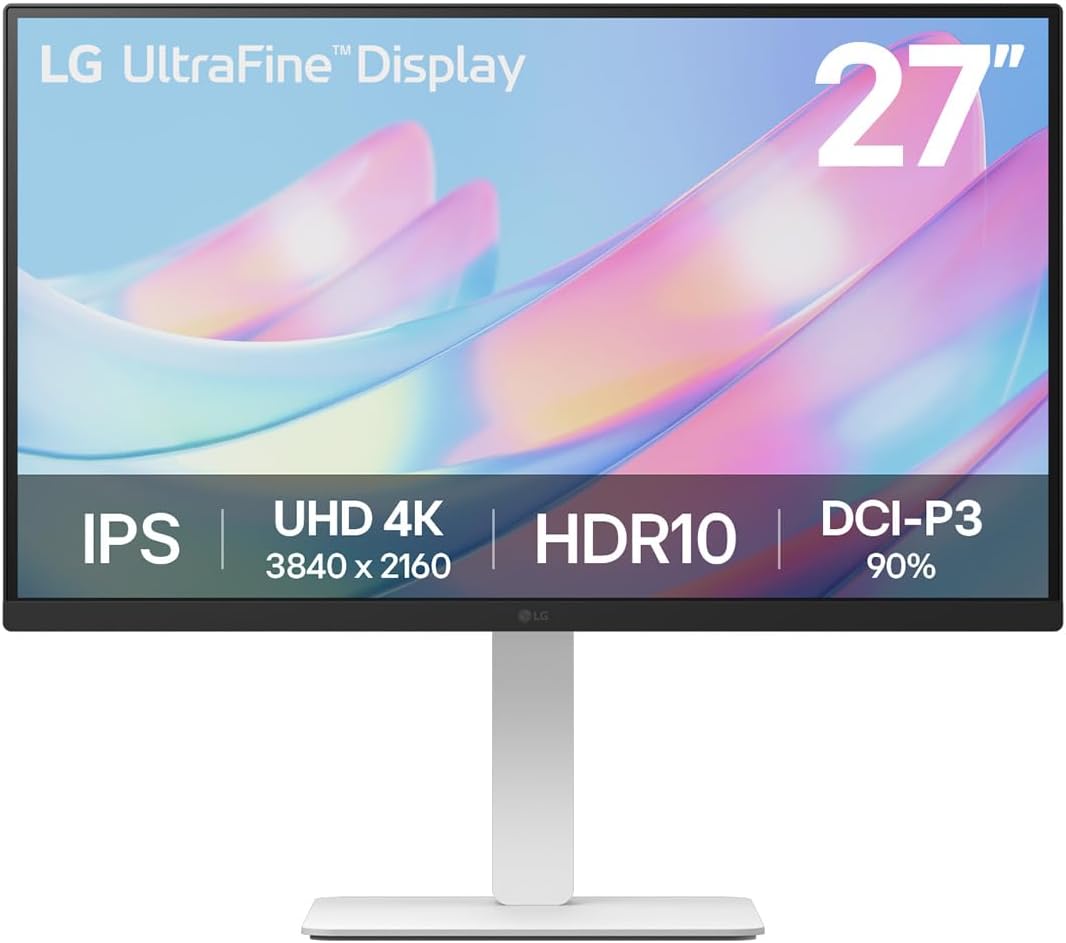
LG UltraFine 27US550 Analysis: 4K Colour Without Compromise
My Honest Verdict
The LG UltraFine 27US550 is a straightforward, well-executed 4K office monitor that delivers exactly what LG promises and nothing it doesn’t. If you work with images, design, photography, or video editing and want accurate colour reproduction on a 27-inch screen without spending a fortune, this is a genuinely strong choice. The headline limitation is equally clear: 60Hz makes it a non-starter for anyone who cares about gaming responsiveness.
What you actually get day-to-day is a 4K UHD (3840×2160) IPS panel with 90% DCI-P3 colour coverage — that’s not marketing fluff, it’s a meaningful spec for colour work. Text is razor-sharp at this resolution and size, the IPS panel keeps colours accurate from wide angles, and the ergonomic stand covers height, tilt, swivel, and pivot adjustment. For anyone spending eight hours in front of a screen, the stand flexibility alone is worth noting.
This is built for designers, photographers, content creators, and office workers who want accurate colour and crisp 4K detail in a clean white-accented package. If you’re a competitive gamer or need USB-C connectivity — the LG UltraFine 27US550 has neither a high refresh rate nor a USB-C port, which rules it out immediately for those buyers. Everyone else should read on.
See the LG UltraFine 27US550 listing and current availability on Amazon.

What It’s Best For
Creative and colour-accurate work — This is the primary use case and it’s a good fit. 90% DCI-P3 coverage puts the LG UltraFine 27US550 comfortably above the sRGB-only panels that dominate the office monitor market. Illustrators and photographers will notice the difference in how skintones render and how saturated colours hold detail without looking overblown. The 4K resolution at 27 inches gives a pixel density that makes fine linework and typography genuinely sharp — no squinting at soft edges. If you’re serious about which type of monitor suits your workflow, colour gamut coverage matters more than most buyers realise until they’ve worked on a screen that actually has it.
Office productivity and WFH — 4K at 27 inches means you can run more content on screen at once without it feeling cramped. Two documents side by side, a spreadsheet plus a browser, or a video call alongside your main workspace — it all fits comfortably. The LG Switch app adds window management functionality (split up to six zones, hotkey-mapped video call launches) which is a genuine productivity tool rather than a marketing gimmick. The ergonomic stand means you can get the screen at the right height and angle for long sessions, which matters more than people admit until their neck starts complaining.
Console and casual gaming — The 60Hz refresh rate and 5ms response time won’t satisfy anyone who wants a competitive edge, but for single-player gaming, streaming, or PlayStation use at 4K, the image quality is excellent. One buyer specifically mentions gaming on PlayStation at 4K 60Hz without any issues. Treat it as a productivity monitor that also handles casual gaming reasonably well — not the other way around.
The Specs That Really Matter
The panel type is the foundation of everything here. The LG UltraFine 27US550 uses an IPS panel, which means wide 178-degree viewing angles and consistent colour reproduction whether you’re looking straight on or slightly off-axis. IPS doesn’t give you the deep blacks of a VA panel — the 1000:1 contrast ratio confirms that — but for colour accuracy and off-angle consistency it’s the right choice for design and office work. If you want a fuller breakdown of how IPS compares to VA and other panel types, that’s worth reading before you decide.
Resolution and screen size interact directly. At 3840×2160 on a 27-inch panel, you’re getting around 163 pixels per inch — genuinely sharp, noticeably better than 1440p at the same size, and the difference is visible in fine detail work. Some buyers run this at native 4K, others use scaling; both are viable. For more on how screen size and resolution affect clarity in practice, the relationship is worth understanding before buying. The short version: 27-inch 4K is a sweet spot for desk use.
The 60Hz refresh rate is the spec that defines this monitor’s audience. For office work, creative applications, and casual media consumption, 60Hz is completely adequate. For competitive gaming or fast-action gaming where frame rate matters, it isn’t. There’s no ambiguity here — if smooth motion in games matters to you, look elsewhere. The 5ms response time is fine for the target user. It’s not a gaming-spec response time, but for the workflows this monitor is designed for, it won’t cause visible issues. For more context on what refresh rate and response time figures actually mean in everyday use, it’s worth a quick read if you’re unsure which side of the line you fall on.
Connectivity is functional but limited. You get DisplayPort 1.4 and HDMI — that’s it. No USB-C, no USB hub, no Thunderbolt. For most desktop users that’s fine, but laptop users expecting a single-cable setup will need an adapter. One buyer specifically flagged this and solved it with a DisplayPort-to-USB-C adapter for a few pounds — workable, but worth knowing upfront. For a full picture of what the port options mean for your setup, our monitor connectivity guide covers cable types and what you actually need.
The HDR10 certification with 300 nits brightness is entry-level HDR. It’s better than nothing — you’ll get some expanded colour volume in HDR content — but don’t expect the kind of HDR impact you’d get from a high-brightness OLED or a monitor with a proper local dimming backlight. This is worth knowing in 2026 when HDR marketing is everywhere and the quality range is enormous. The 1000:1 static contrast ratio limits how dramatic the HDR effect can be in practice.
Check the full spec sheet and buyer Q&As for the LG UltraFine 27US550 on Amazon.
What Buyers Are Saying
The LG UltraFine 27US550 holds a rating of 4.3 out of 5 from 55 customer reviews at time of writing. That’s a reasonable sample — not huge, but enough to identify consistent patterns. The sentiment is strongly positive overall, with specific praise clustering around image quality, build quality, and value. Complaints are limited to a small number of specific issues rather than systemic problems.
Colour accuracy and image sharpness dominate the positive feedback. Buyers working in illustration, design, and photography consistently single out the display quality as better than expected. Several mention the upgrade experience — coming from older or lower-resolution monitors and being genuinely surprised by the improvement. The white stand design also gets specific praise, particularly from home office setups where aesthetics matter alongside function.
The stand’s ergonomics draw positive attention, though one buyer reported that the swivel function on their unit stopped working over time — worth noting, though it’s a single report rather than a pattern. The OSD joystick at the bottom of the screen is described as “fiddly” by multiple buyers; it works, but it’s not the most elegant control interface. The absence of built-in speakers is flagged by two buyers, though both note they use external audio anyway and it didn’t affect their overall satisfaction. One buyer received a unit with a dead pixel in the corner — an unfortunate but not unusual occurrence with any IPS panel, and LG’s two-year warranty should cover it.
The LG Switch app gets a mixed mention: straightforward on macOS, but one Windows user found Norton Security interfered with installation and needed a workaround. Not a dealbreaker, but worth being aware of if you’re running security software and plan to use the app.
Buyer Highlights
“The display quality is fantastic — I bought it for illustration and design work and I’m really happy with it.” — Consistent sentiment from creative buyers who bought specifically for colour work.
“Sharp image and good colours — 60Hz is sufficient for most tasks, though competitive gamers might want something faster.” — A clear-eyed summary from a buyer who understood the spec tradeoffs before purchasing.
“I’ve been using it every day for three months with no problems whatsoever.” — Reliability feedback that lines up across multiple long-term owners.
“The white stand blends into my background beautifully and gives a minimal look — exactly what I was after.” — Home office buyers specifically mention the aesthetic as a factor in their satisfaction.
“Easily game at 4K 60Hz on PlayStation — it’s faultless for that.” — Useful for console users considering the LG UltraFine 27US550 as a dual work-and-play screen.

Worth Knowing Before You Buy
The absence of USB-C is the single most important thing to check against your setup before buying. If you’re a MacBook or laptop user expecting to run a single cable for both video and power, this monitor won’t do it. You’ll need a separate cable, either a DisplayPort-to-USB-C adapter or a direct HDMI connection depending on what ports your laptop has. It’s a solvable problem for a few pounds, but it’s not something you want to discover after the monitor arrives. Check your laptop’s video output options first — the specs explained guide covers what different port types can and can’t do if you’re unsure.
The OSD joystick control is functional but divisive. Multiple buyers describe it as fiddly, and it’s positioned underneath the front bezel rather than on the side or back — which can make it awkward to locate without looking. You’ll get used to it, but if you frequently adjust brightness or input sources, it’s not as quick as a dedicated button array. It’s a minor ergonomic annoyance rather than a real problem.
One buyer reported the swivel function on the stand failing after a period of use. This is an isolated report rather than a pattern in the review data, but it’s worth being aware of — LG’s two-year manufacturer warranty should cover stand mechanical failures if it does occur. The overall build quality feedback is positive: sturdy, well-assembled, not flimsy. The dead pixel report from one buyer is an unfortunate but known risk with any IPS panel; LG’s warranty policy should be your first call if that happens to you. For general buying considerations before committing to any screen, the monitor buying guide covers what to check at delivery and in the return window.
View current stock and availability for the LG UltraFine 27US550 on Amazon.
Who Should Buy It (And Who Shouldn’t)
Buy If
- You work in design, illustration, photography, or video editing and need accurate colour reproduction — 90% DCI-P3 at this price tier is a genuine advantage over sRGB-only alternatives.
- You want a 4K productivity monitor with a fully ergonomic stand — height, tilt, swivel, and pivot adjustment in a single package that won’t fight your posture.
- You use a desktop PC or a console and don’t need USB-C — the DisplayPort 1.4 and HDMI outputs handle 4K 60Hz cleanly without adapters.
- You care about the aesthetics of your workspace — the white stand and minimal design are genuinely distinctive in a market full of black plastic.
Avoid If
- You game competitively or want smooth high-frame-rate gaming — 60Hz is a hard ceiling and no amount of image quality compensates for that in fast-action games.
- Your laptop or MacBook relies on USB-C for video output and you don’t want to deal with adapters — there is no USB-C port on this monitor and no workaround that avoids extra hardware.
- You want impactful HDR — the 300-nit brightness cap and 1000:1 contrast ratio mean HDR10 support here is limited in practice; it won’t look like HDR on a high-end display.
The Bottom Line
The LG UltraFine 27US550 is a focused, honest monitor that does exactly what its spec sheet suggests. 4K IPS with 90% DCI-P3, a fully adjustable stand, and clean design — for designers, photographers, and office workers who want accurate colour at a sensible size, it earns its place without needing any caveats beyond the ones it wears openly. No USB-C, no high refresh rate, no surprise. If those limitations don’t apply to you, this is a well-made screen that buyers consistently come away satisfied with.
The LG UltraFine 27US550 is available to order directly on Amazon.
At The Monitor Expert, our approach is built on data transparency rather than simulated hands-on testing. We rigorously analyse official manufacturer specifications and aggregate verified customer sentiment to provide honest, straightforward buying advice that cuts through the marketing noise.
As an Amazon Associate, I earn from qualifying purchases.
Browse by Specification
Looking for something specific? Browse our analyses by hardware and feature below, or check all monitor analyses in the Office Monitors and Mid-Range Monitors category archives.
[IPS Monitors] — [VA Monitors] — [TN Monitors] — [OLED Monitors]
Browse by Refresh Rate
[60Hz] — [75Hz] — [100Hz] — [120Hz] — [144Hz] — [165Hz] — [180Hz] — [200Hz] — [240Hz+] — [360Hz+]
Browse by Screen Size
[Small Screen] — [24-inch] — [27-inch] — [32-inch] — [Large Screen] — [Ultrawide]




