
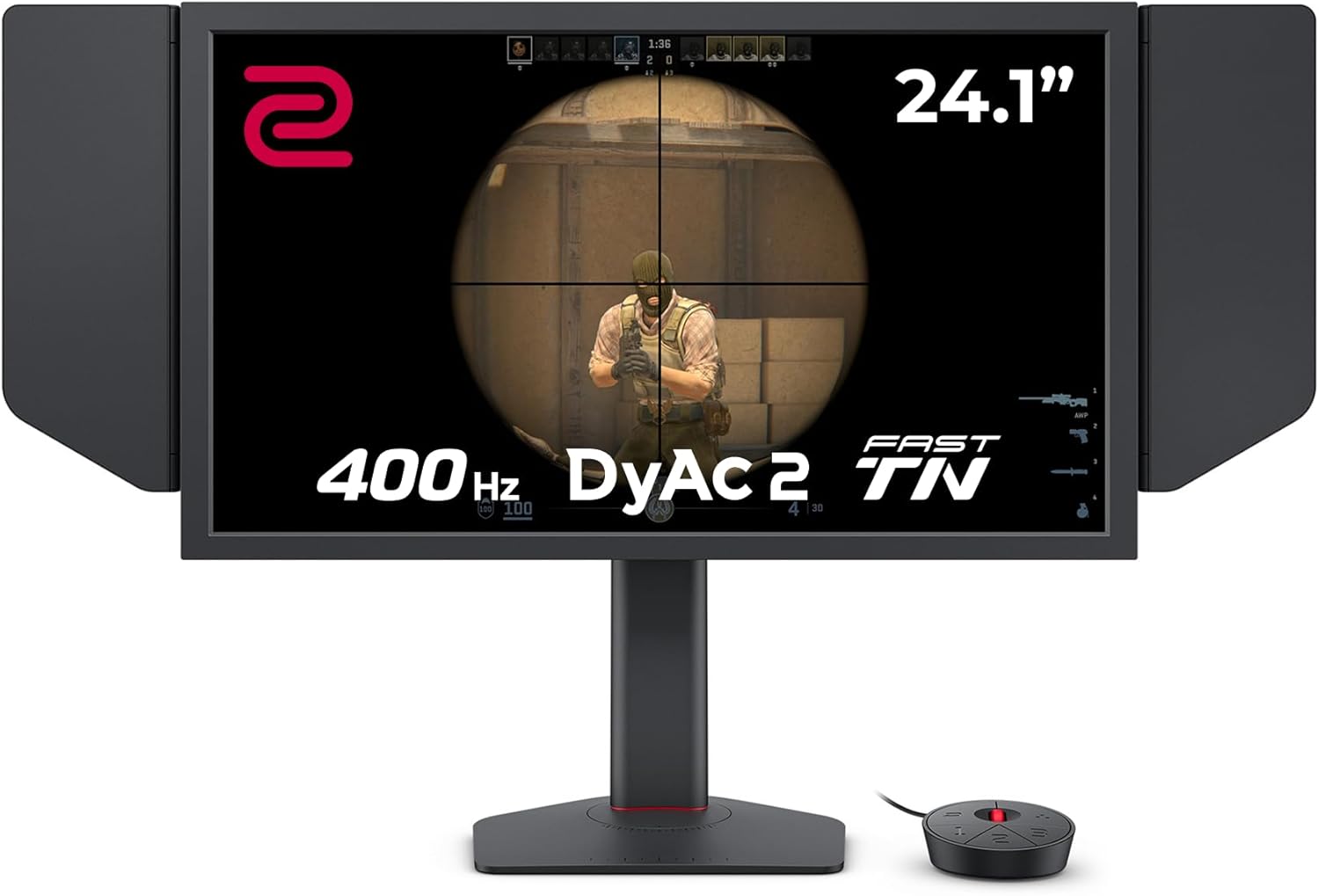
BenQ ZOWIE XL2566X+ Analysis: 400Hz for Serious Players
My Honest Verdict
The BenQ ZOWIE XL2566X+ is a monitor built for one thing: winning. Not cinematic immersion, not colour-accurate design work, not casual browsing — winning in competitive FPS games. If that’s your world, this is about as targeted a tool as the monitor market produces. The 400Hz refresh rate combined with BenQ’s DyAc 2 blur reduction technology makes motion tracking in games like CS2 and VALORANT feel genuinely different from anything below 240Hz. That’s not marketing puff — it’s physics.
In everyday use, what you’ll notice first is how surgical everything feels. Enemies don’t smear across the screen during fast turns. Crosshair tracking feels locked in. The Fast TN panel with its 1ms response time is part of why — TN panels have always been the speed kings, and BenQ has pushed this generation further than previous iterations. What you won’t notice is depth of colour. TN is TN: viewing angles are limited, contrast sits at a standard 1000:1, and 320 cd/m² peak brightness isn’t going to dazzle you. None of that matters if your priority is competitive performance.
This is a monitor for dedicated competitive gamers — the kind who play CS2 at 1280×960 stretched, grind ranked queues, and want every frame-level advantage available. If you want something that doubles as a media monitor or looks good from the sofa, look elsewhere. The BenQ ZOWIE XL2566X+ doesn’t pretend to be that monitor, and that’s exactly why serious players trust it.
See the current listing for the BenQ ZOWIE XL2566X+ on Amazon.

What It’s Best For
Competitive FPS gaming is the only use case you need to think about here. CS2, VALORANT, Apex Legends, Overwatch 2 — any game where your framerate regularly exceeds 240Hz and where motion clarity at high speeds determines whether you see the enemy first. DyAc 2 works by strobing the backlight in sync with the panel, cutting perceived blur during fast horizontal movement. Combined with the 400Hz panel, the result is a level of visual sharpness during gameplay that IPS and VA panels at equivalent refresh rates simply can’t match. BenQ’s own spec sheet leans on the comparison with other panel types deliberately — and in this specific context, they’re right to.
Structured tournament and ranked play is where the XL Setting to Share feature becomes genuinely useful. It lets you save and load colour and visual profiles — so you can match a pro player’s settings exactly, or keep your own optimised setup consistent across sessions. The S Switch controller sits on your desk and lets you cycle through profiles without touching the OSD. For serious players who fine-tune settings obsessively, this isn’t a gimmick. It’s a workflow improvement. The included shielding hood is a similar story — it blocks ambient light and peripheral distraction, which matters more than people expect in bright rooms or during long sessions.
Console and multi-device setups are supported reasonably well for a gaming-focused display. Three HDMI 2.0 ports mean you can have a PC, a PS5, and a third device all plugged in simultaneously without swapping cables. You won’t hit 400Hz from HDMI — that requires DisplayPort 1.4 — but for console use at standard frame rates, the port selection is genuinely convenient.
The Specs That Really Matter
The panel type is the most important single fact about this monitor, so let’s be direct about it. This is a Fast TN panel — a newer generation of TN that BenQ has developed specifically for speed. If you want to understand what that means across panel types generally, the panel type guide covers it properly. The short version: TN trades colour depth and viewing angles for response speed. From straight ahead, the XL2566X+ looks clean and sharp at 1920×1080 on a 24.1-inch screen. From an angle, colours shift and contrast falls off. That’s not a bug — it’s the physics of TN. For a competitive player sitting dead-centre, it’s irrelevant. For anyone else in the room, it’s immediately obvious.
The 400Hz refresh rate is real and it does matter — but not in the way marketing typically implies. The perceptible difference between 360Hz and 400Hz is small for most people. What matters more is that BenQ has paired the high refresh rate with DyAc 2, which actively reduces motion blur rather than just increasing frame delivery speed. The combination is what competitive players are actually paying for. For context on refresh rate and response time and what the numbers mean in practice, that breakdown is worth reading before committing. The claimed 1ms response time here is a grey-to-grey figure, but Fast TN panels genuinely are among the fastest available — this isn’t a case of massaged numbers hiding a mediocre panel.
Connectivity is practical rather than extravagant. Three HDMI 2.0 ports cover multi-device households. One DisplayPort 1.4 port handles the full 400Hz output from a PC. There’s no USB-C, no Thunderbolt, and no built-in USB hub — those buyers should check the connectivity guide for alternatives. Adaptive sync is present as FreeSync. NVIDIA G-Sync compatibility isn’t officially listed in the spec data, though FreeSync monitors often work with G-Sync Compatible mode — worth confirming with BenQ directly if that matters to your setup. There is no meaningful HDR here. The spec data doesn’t list an HDR certification, and with 320 cd/m² brightness and 1000:1 contrast, there wouldn’t be a case for one. As we head into 2026, that’s increasingly a differentiating factor for buyers who want one monitor to do everything — this one doesn’t.
Check the full spec sheet and buyer Q&As for the BenQ ZOWIE XL2566X+ on Amazon.
What Buyers Are Saying
The BenQ ZOWIE XL2566X+ holds a rating of 4.1 out of 5 from 129 reviews on Amazon. That’s a reasonable sample. The picture it paints is broadly positive with a small but notable cluster of quality control complaints.
The dominant praise theme is exactly what you’d expect: motion clarity and competitive feel. CS2 players in particular call it out by name — one buyer described it as the “best CS2 monitor I’ve ever played on.” A high-ranked Faceit and Premier player noted that while the jump from 360Hz to 400Hz wasn’t dramatically perceptible in isolation, the combination of DyAc 2 and fast AMA settings produced unmatched picture clarity during play. Multiple reviewers mentioned upgrading from 240Hz panels and noticing a tangible difference in fast-movement scenarios. The build quality and ergonomics draw consistent praise too — the height adjustment mechanism feels smooth, the stand is described as stable, and the no-RGB, matte-black aesthetic gets specific approval from players who want a distraction-free setup.
Colour performance comes up in mixed ways. Several buyers acknowledge the TN trade-off — dialling in good colour settings takes some effort. One buyer noted plainly that finding the right colour configuration for games takes time, though ultimately settled on a positive overall verdict. That’s an honest and accurate summary of TN ownership: the defaults aren’t going to wow you, but the panel responds well to calibration for competitive use.
The quality control complaints are worth naming. Two UK buyers received units with visible issues — one with stuck pixels requiring a return, another with the display panel noticeably off-centre within the bezel. One buyer received a box that arrived already opened and missing cables. These aren’t widespread patterns at 129 reviews, but they’re recent enough to warrant care when inspecting the unit on delivery. BenQ offers a 3-year manufacturer warranty, which covers stuck pixels depending on their policy — worth confirming before purchase.
Buyer Highlights
“Best CS2 monitor I’ve ever played on.” — Consistent sentiment from competitive FPS players, particularly those running the game at lower stretched resolutions.
“DyAc 2 genuinely reduces perceived motion blur better than other monitors I’ve used.” — Frequently cited by buyers upgrading from previous-generation 240Hz panels.
“The colour clarity when identifying enemies is noticeably improved.” — Several reviewers specifically mentioned enemy visibility as a measurable in-game benefit.
“No coil whine, no screen coating issues — very happy with the unit.” — Positive quality control experience reported by buyers outside the UK, with units arriving clean and problem-free.
“The panel gap on the bezel is noticeably uneven — for a monitor at this price, I expected better consistency.” — A specific complaint from at least one UK buyer; not widespread, but worth checking on arrival.

Worth Knowing Before You Buy
Quality control is the main practical risk here. The sample of reviews showing cosmetic defects — uneven bezel gaps and stuck pixels — isn’t large enough to call a systemic issue, but it’s recent and it’s specific enough to take seriously. Inspect the unit carefully on arrival. Check the bezel alignment from multiple angles. Run a stuck pixel test within the return window. BenQ’s 3-year warranty is a genuine asset and should cover pixel defects depending on their threshold policy — look that up before unboxing if it matters to you. The opened-box incident with missing accessories is likely an Amazon fulfilment issue rather than a BenQ manufacturing problem, but it reinforces the point: check everything on delivery day.
The Fast TN panel limits who this monitor works for beyond competitive gaming. Viewing angles are a known constraint — the spec sheet lists 170 degrees, but TN panels degrade noticeably before you hit that number in practice. If you share your screen with someone else in the room, or watch content from off-axis, colours and contrast will shift. The 1080p resolution on a 24.1-inch screen is sharp enough for the intended use case, but buyers accustomed to 1440p or 4K panels will notice the difference in text and UI clarity outside of games. This is a focused tool, not a general-purpose display — the use case guide is worth a read if you’re deciding between a specialist and an all-rounder. There’s no USB-C connectivity, no built-in speakers, and no hub — lean setups only. The S Switch and XL Setting to Share features require their own setup but are well-regarded by the users who engage with them.
View current availability for the BenQ ZOWIE XL2566X+ on Amazon.
Who Should Buy It (And Who Shouldn’t)
Buy If
- You play competitive FPS games seriously — CS2, VALORANT, Apex — and regularly push framerates above 240Hz where the 400Hz panel and DyAc 2 blur reduction will make a tangible difference.
- You’ve done the research on buying a gaming monitor and you know TN is the right trade-off for speed — you’re not expecting IPS-level colour from this panel and you’re fine with that.
- You want a tournament-grade setup with practical competitive features — profile sharing via XL Setting to Share, the S Switch desk controller, and the shielding hood are purpose-built tools that serious players actually use.
- You have a multi-device setup and want three HDMI 2.0 ports without a switch box — the port layout is genuinely useful for console-plus-PC households.
Avoid If
- You want one monitor for both competitive gaming and everything else — media, content creation, browsing — because the TN panel’s colour depth and viewing angle limitations will frustrate you daily outside of game sessions.
- Your PC can’t sustain framerates well above 240Hz in the games you play — the 400Hz advantage requires the frames to back it up, and if you’re regularly running below that, the performance delta over a good 240Hz panel narrows considerably.
The Bottom Line
The BenQ ZOWIE XL2566X+ is exactly what it says it is: a purpose-built competitive gaming monitor with no pretensions toward anything else. The 400Hz Fast TN panel with DyAc 2 delivers the fastest, clearest motion in competitive FPS play that money currently buys at this screen size. The ergonomics, connectivity, and pro-focused feature set are all properly thought through. The trade-offs — limited colour depth, no HDR, constrained viewing angles — are real but irrelevant to the buyer this monitor was made for. If that buyer is you, the BenQ ZOWIE XL2566X+ earns a straightforward recommendation.
Find the BenQ ZOWIE XL2566X+ on Amazon and see the current listing details.
At The Monitor Expert, our approach is built on data transparency rather than simulated hands-on testing. We rigorously analyse official manufacturer specifications and aggregate verified customer sentiment to provide honest, straightforward buying advice that cuts through the marketing noise.
As an Amazon Associate, I earn from qualifying purchases.
Browse by Specification
Looking for something specific? Browse our analyses by hardware and feature below, or check all monitor analyses in the Gaming Monitors and Premium Monitors category archives.
[IPS Monitors] — [VA Monitors] — [TN Monitors] — [OLED Monitors]
Browse by Refresh Rate
[60Hz] — [75Hz] — [100Hz] — [120Hz] — [144Hz] — [165Hz] — [180Hz] — [200Hz] — [240Hz+] — [360Hz+]
Browse by Screen Size
[Small Screen] — [24-inch] — [27-inch] — [32-inch] — [Large Screen] — [Ultrawide]




