
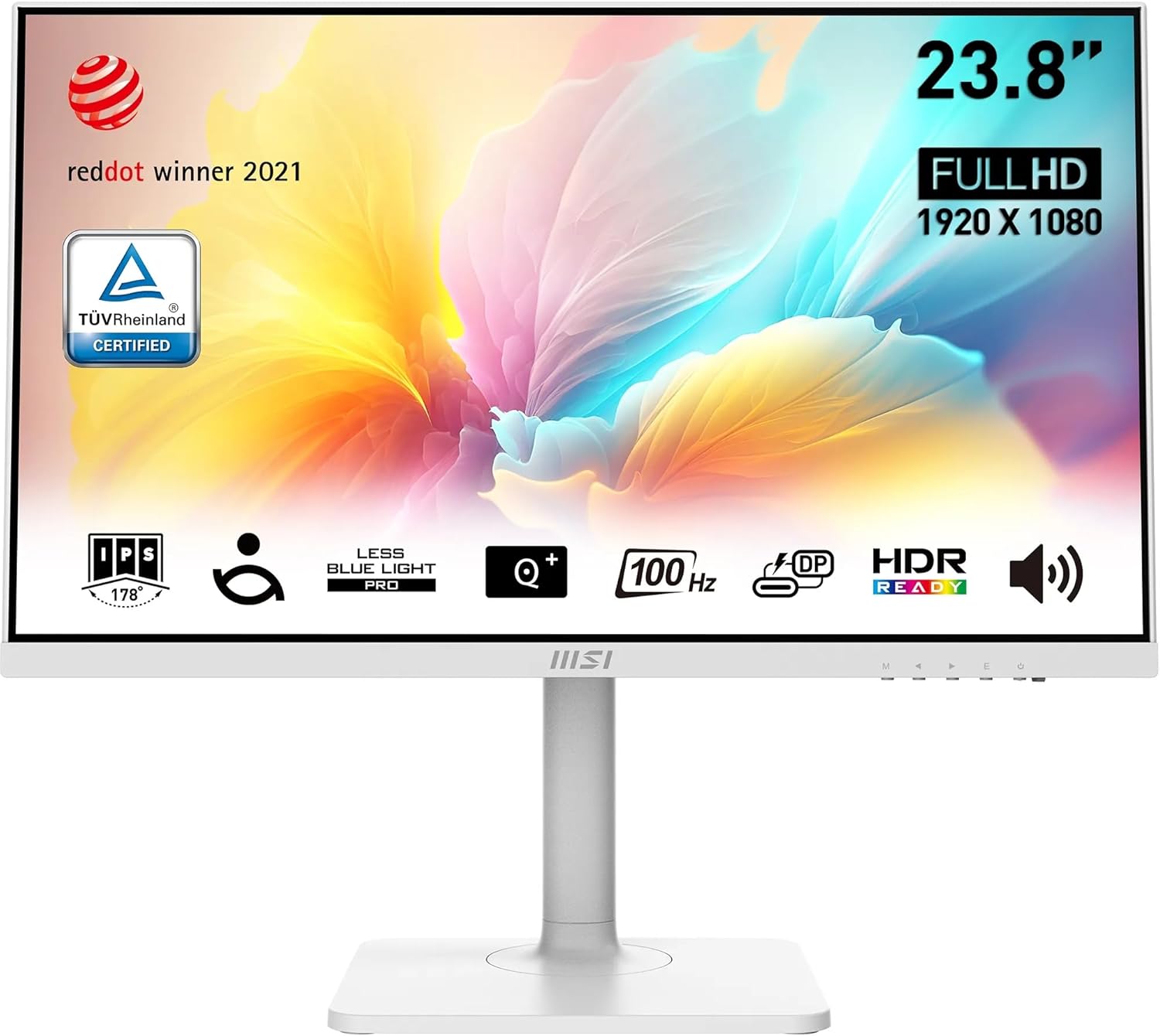
MSI Modern MD2412PW Analysis: Ergonomics Done Right
My Honest Verdict
The MSI Modern MD2412PW is a 23.8-inch office monitor that gets the fundamentals right without pretending to be something it isn’t. It’s aimed squarely at desk workers, home office setups, and anyone who spends long hours in front of a screen and wants something that looks good, adjusts properly, and doesn’t cost a fortune. The headline strength is the ergonomics — a genuine 4-way adjustable stand at this price tier is rarer than it should be. The headline limitation is equally honest: the built-in speakers are borderline useless for anything beyond the odd notification sound.
In day-to-day use, the IPS panel means colours look accurate and consistent whether you’re sitting directly in front of it or at an angle — useful if you regularly turn the screen to show a colleague something. The 100Hz refresh rate won’t change your life, but it makes scrolling through documents and web pages noticeably smoother than the generic 60Hz monitors that still fill office supply catalogues. The 1920 x 1080 resolution on a 23.8-inch screen lands at a comfortable pixel density — everything is sharp at normal viewing distances without needing to fiddle with display scaling. The USB Type-C port adds genuine daily convenience: one cable from a laptop handles both video and 15W power delivery simultaneously.
If you want a well-built, white-finish office monitor with proper ergonomics, clean connectivity, and a panel that won’t strain your eyes after eight hours, this is a strong choice. If you’re after anything serious for gaming or colour-critical creative work — or if you were counting on those built-in speakers — look elsewhere.
See the MSI Modern MD2412PW on Amazon and check current availability.

What It’s Best For
Office and home working. This is where the MSI Modern MD2412PW earns its keep. The IPS panel delivers consistent colour across the full 178-degree viewing angle, so the image doesn’t shift or wash out when you move around. The 4ms response time is more than adequate for spreadsheets, document editing, and video calls. The 4-way adjustable stand — tilt, height, swivel, and pivot — means you can actually set it up for your body rather than sitting at whatever angle the fixed stand allows. That matters a lot more than most buyers realise until they’ve used a properly adjustable screen for a week. One reviewer with chronic pain specifically called out the height adjustment as something that made a meaningful difference to their working day. That’s not marketing — that’s just good ergonomic design doing its job.
Laptop users and multi-device setups. The USB Type-C port with DisplayPort alternate mode is a genuine differentiator at this tier. Plug one cable into a compatible laptop and you get video output plus 15W charging in one hit. No separate charger cluttering the desk, no hunting for a spare HDMI cable. Several buyers specifically mentioned using it with ThinkPads and other work laptops with exactly that setup. The connectivity on offer here — USB-C, HDMI, and DisplayPort — means you can switch between a work laptop and a desktop without swapping cables constantly. That’s a practical daily benefit, not a bullet-point feature.
Eye strain-sensitive users. The TÜV Rheinland-certified Less Blue Light PRO filter is hardware-based, not just a software overlay that tints everything orange. Combined with the flicker-free backlight, this is a monitor that’s been genuinely designed with long-hours use in mind. One buyer with ADHD and visual processing difficulties wrote a detailed account of how the brightness and colour adjustment range made a real difference to their ability to work comfortably. That’s consistent with what a well-implemented IPS panel with proper blue light filtering can actually do. If you’re sensitive to screen fatigue, this deserves serious consideration.
The Specs That Really Matter
The IPS panel is the right choice for this type of monitor and MSI haven’t cut corners there. IPS gives you accurate colours, wide viewing angles, and consistent brightness across the screen. The contrast ratio sits at a typical 1000:1 for IPS — nothing remarkable, but entirely adequate for office work and general use. Blacks won’t be as deep as a VA panel, but you won’t notice that writing emails. What you will notice is that the image looks the same whether you’re sitting directly in front of it or viewing it from the side — which matters in shared workspaces.
The 100Hz refresh rate is worth a brief note. It’s not going to make a meaningful difference for competitive gaming, but that’s not the point here. The real benefit at 100Hz versus 60Hz is in everyday use — scrolling through web pages, moving windows around, watching video. Everything just feels slightly more fluid. It’s a small thing until you go back to a 60Hz screen and wonder why it feels sluggish. The 4ms response time is the manufacturer’s GtG figure, which is fine for office use. The 1ms MPRT figure mentioned in the description refers to a different measurement method — don’t use that as your comparison point if you’re evaluating this for gaming.
The 1920 x 1080 resolution on a 23.8-inch screen is a sensible match. At this screen size, 1080p lands at roughly 93 pixels per inch, which is sharp enough for comfortable reading and general work without needing display scaling. Going to 1440p at this size starts to feel excessive for most office tasks, and it would push the price up. The 114% sRGB colour gamut (6-bit + FRC) is enough for general content consumption and office work — it’s not a colour-accurate production monitor, but MSI aren’t claiming it is. Peak brightness of 400 nits is on the brighter side for an office IPS panel, which helps in rooms with natural light. FreeSync adaptive sync is present — useful if you do occasionally push the monitor into lighter gaming, though it’s not the reason to buy this.
Heading into 2026, USB-C with DisplayPort alt mode remains one of the most practical features on any desk monitor targeted at laptop users, and the MSI Modern MD2412PW including it at this tier is genuinely appreciated. The port selection — HDMI 1.4b, DisplayPort, and USB Type-C — covers most scenarios. The three-year manufacturer warranty is worth noting too; that’s a better warranty than some competitors offer at this price point.
Check the full spec sheet and buyer Q&As for the MSI Modern MD2412PW on Amazon.
What Buyers Are Saying
The MSI Modern MD2412PW holds a rating of 4.7 out of 5 from 78 verified customer reviews. That’s a high score from a sample size that’s meaningful enough to draw genuine conclusions from — not a handful of early reviews that could skew either way. The sentiment is consistently positive, with particular enthusiasm around the stand adjustability, the clean design, and the display quality for the price.
The ergonomic stand comes up repeatedly and specifically — buyers who’ve tried fixed or tilt-only monitors at similar prices clearly notice the difference. The pivot function enabling portrait orientation gets a specific mention, as does the height range. Several buyers also highlight the USB-C connectivity as something that simplified their desk setup in a tangible way. The white finish and overall build quality generate genuine appreciation, with multiple reviewers noting it looks considerably more polished than its category suggests.
The one consistent complaint — and it appears in multiple reviews without prompting — is the built-in speakers. “Tinny” and “useless for music or videos” are the actual words buyers use. One reviewer specifically advised others not to bother paying extra for the speaker-equipped version. That’s direct and worth heeding. The speakers are adequate for a notification beep or a muted Teams call, and not much more. The French reviews flag a UK power plug being supplied — that’s a fulfilment issue specific to the French market and doesn’t affect UK buyers.
Buyer Highlights
“The configurable arm is totally worth it and rare in this price range — the display quality is good for what you pay.” — A recurring theme from buyers who prioritised ergonomics over raw specs.
“The range of brightness and colour adjustment is brilliant — I can adjust it easily depending on how my vision is that day.” — Consistent feedback from buyers who use this for extended daily office work, including those with specific visual sensitivities.
“Speakers are poor quality, very tinny, useless for music or videos — better to buy external speakers.” — The single most commonly repeated concern, coming up across multiple independent reviews.
“Works fine with my ThinkPad work laptop as a second screen — I can move windows across with no flickering or lag.” — Common reaction from buyers using this as a single-cable laptop companion via USB-C.
“Very nice design, sturdy stand, the picture quality is brilliant — looks great on a VESA mountable arm too.” — Buyers who went with a VESA arm setup note the monitor sits cleanly without the stand.

Worth Knowing Before You Buy
The speakers deserve their own paragraph of warning. Multiple buyers have called them out independently, and the description is consistent: tinny, low volume, not suitable for music or video content. If you’re planning to rely on built-in audio for anything beyond the occasional system alert, factor in the cost of a compact speaker or headphones. This isn’t unusual for monitors at this level — built-in speakers are almost universally an afterthought — but the MSI Modern MD2412PW’s are below average even by that low bar. The headphone-out jack is there if you want to use your own headphones instead.
The IPS panel means you won’t get the deep blacks of a VA panel — if you watch a lot of dark films in a dim room, you’ll notice the backlight glow in black scenes. That’s a fundamental characteristic of IPS technology, not a defect specific to this monitor. For office work and general use, it’s entirely irrelevant. The 1920 x 1080 resolution is also worth acknowledging honestly — if you regularly work with multiple documents side by side or use design tools that benefit from more screen real estate, a 1440p or larger panel might serve you better. Worth checking our monitor buying guide if you’re still weighing up which spec tier suits your workflow.
Build quality feedback is reassuring — the stand base is described as heavy and solid, the metal construction is noted, and assembly is consistently described as straightforward and tool-free. The three-year warranty adds a reasonable backstop. The Red Dot Design Award is from 2021, which is worth contextualising — it’s not a performance certification, it’s a design prize. Nice to have on the shelf, but it doesn’t affect how the monitor actually performs. The VESA 75mm mount means you can ditch the stand entirely and go arm-mounted if your desk setup suits that — buyers who’ve done this report it works cleanly.
View current stock levels for the MSI Modern MD2412PW on Amazon.
Who Should Buy It (And Who Shouldn’t)
Buy If
- You work long hours at a desk and need proper ergonomic adjustability — height, tilt, swivel, and portrait pivot are all included, which is genuinely uncommon at this price point.
- You connect a laptop to an external monitor and want to run everything off a single USB-C cable — video plus 15W charging from one port is a real daily convenience.
- You’re sensitive to eye strain or screen fatigue — the hardware-based blue light filter and flicker-free backlight are TÜV Rheinland certified, not just a software tint.
- You prefer a clean white-finish aesthetic and want a monitor that looks considered rather than generic black plastic.
- You’re considering a VESA arm setup — the 75mm mount is standard and buyers report a clean result without the stand.
Avoid If
- You need audio from the monitor itself — the built-in speakers are consistently described as inadequate for anything beyond basic notification sounds. Budget for external audio separately.
- You’re a regular gamer looking for a gaming-first monitor — 100Hz and 4ms are fine for casual use, but if you want to know which monitor suits your specific use case, a dedicated gaming screen will serve you better.
- You need the pixel density for detailed design work or work regularly with colour-critical output — this is an office IPS panel, not a production display.
The Bottom Line
The MSI Modern MD2412PW is a well-thought-out office monitor that earns its high rating without relying on inflated specs or marketing tricks. The IPS panel, 100Hz refresh rate, proper ergonomic stand, and USB-C connectivity all combine into a package that makes daily desk work noticeably more comfortable than most alternatives at this tier. The speakers are genuinely poor and should be ignored entirely. Everything else does exactly what it says, built well enough to last, and backed by a three-year warranty. If a white-finish, eye-friendly, ergonomically complete office monitor is what you’re after, this is a confident recommendation.
Find the MSI Modern MD2412PW on Amazon and see the current listing.
At The Monitor Expert, our approach is built on data transparency rather than simulated hands-on testing. We rigorously analyse official manufacturer specifications and aggregate verified customer sentiment to provide honest, straightforward buying advice that cuts through the marketing noise.
As an Amazon Associate, I earn from qualifying purchases.
Browse by Specification
Looking for something specific? Browse our analyses by hardware and feature below, or check all monitor analyses in the Office Monitors and Budget Monitors category archives.
[IPS Monitors] — [VA Monitors] — [TN Monitors] — [OLED Monitors]
Browse by Refresh Rate
[60Hz] — [75Hz] — [100Hz] — [120Hz] — [144Hz] — [165Hz] — [180Hz] — [200Hz] — [240Hz+] — [360Hz+]
Browse by Screen Size
[Small Screen] — [24-inch] — [27-inch] — [32-inch] — [Large Screen] — [Ultrawide]




