
AOC CU34G2XPD/BK Analysis: Ultrawide Without the Fuss
My Honest Verdict
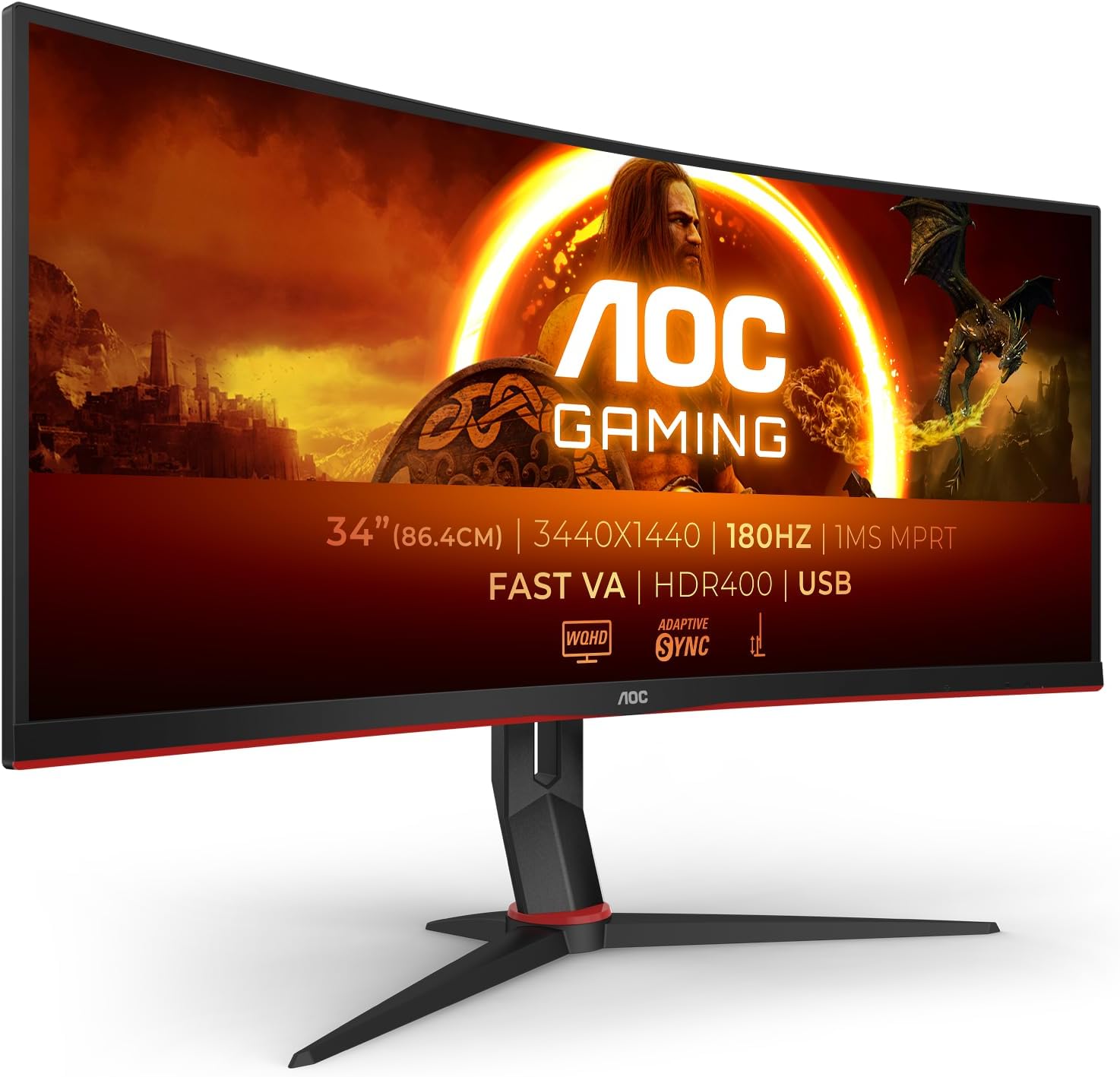
The AOC CU34G2XPD/BK is a 34-inch ultrawide curved gaming monitor that does the hard part well: it gives you 3440×1440 resolution, a 180Hz refresh rate, and a 1500R curved VA panel at a price point that doesn’t require a lengthy internal debate. For casual-to-mid-level gamers who want the step up from a standard widescreen without spending serious money on an ultrawide, this is a genuinely sensible option. The headline limitation is connectivity — there’s no USB-C, and the HDMI spec situation in the product data is inconsistent, which is worth understanding before you buy.
That 180Hz refresh rate on a VA panel is the core selling point here, and it’s legitimate. You’ll notice it. Motion looks smoother, scrolling feels cleaner, and fast-paced games benefit meaningfully compared to a standard 60Hz screen. The 3440×1440 resolution at 34 inches hits a pixel density that makes text sharp and game environments genuinely detailed without demanding the GPU horsepower of 4K. The 1ms MPRT response time is a motion-blur-reduction mode rather than a native grey-to-grey figure — worth knowing, but not a reason to dismiss the panel. VA panels at this spec tier typically deliver richer blacks and better contrast than IPS alternatives, which matters for dark game environments.
This is the right monitor if you want an entry-level ultrawide for gaming and everyday use and aren’t doing colour-critical creative work. If you need USB-C passthrough, are a competitive esports player who needs the absolute fastest response times, or want genuine HDR performance rather than the entry-level HDR400 certification this carries — look elsewhere. Everyone else: read on.
See the AOC CU34G2XPD/BK listing and current availability on Amazon.

What It’s Best For
Gaming is the obvious primary use case, and the AOC CU34G2XPD/BK earns that label honestly. The 180Hz refresh rate keeps motion fluid whether you’re in a competitive shooter, an open-world RPG, or a racing title. The built-in presets for FPS, RTS, and racing games are a minor convenience rather than a revelation, but having them there costs nothing. FreeSync Premium adaptive sync means screen tearing is off the table when your GPU is in range, and the wide 21:9 format expands peripheral vision in most titles that support ultrawide. Multiple buyers specifically mentioned pairing it with a PS5 — the console handles the wider format with minimal fuss, which is a useful data point for console players.
Productivity and multitasking is where the ultrawide format earns its keep just as much as in gaming. At 3440×1440 on a 34-inch screen, you can comfortably run two full-width applications side by side without either feeling cramped. Spreadsheets, documents, browser windows, OBS Studio layouts — several buyers mentioned using this as a streaming and content-management screen for exactly this reason. If you routinely switch between gaming and work, the AOC CU34G2XPD/BK covers both without compromise. Worth checking the monitor selection guide if you’re juggling multiple use cases and want to make sure ultrawide is the right format for your workflow.
Media consumption is a genuine bonus. Films shot in 21:9 play without letterboxing, which is one of those things you don’t realise matters until you’ve seen it. The 1000:1 native contrast ratio from the VA panel delivers deeper blacks than a typical IPS screen at this size, which makes dark scenes more watchable. This isn’t a cinema-grade display, but for streaming and casual film watching it performs well above its price bracket.
The Specs That Really Matter
The VA panel is one of the most important decisions embedded in this product. VA gives you better contrast — rated at 1000:1 here — and deeper blacks than IPS panels at the same price. The trade-off is that VA can show slower pixel transitions in very dark scenes, occasionally manifesting as a subtle smearing effect. At 180Hz with a Fast VA designation, AOC has tuned the panel specifically to reduce this, and buyer feedback doesn’t raise it as a significant concern. If you’re comparing panel types and want to understand the full picture, the panel types breakdown covers this in detail. For gaming and mixed use at this price, VA is a solid call over IPS here.
The 180Hz refresh rate is genuine and matters. Note that it doesn’t ship defaulting to 180Hz — one buyer flagged this specifically and you’ll need to set it manually in your display settings or GPU software on first use. The difference between 144Hz and 180Hz is subtle in practice, but 180Hz versus a standard 60Hz panel is immediately and unmistakably noticeable. For anyone still on a 60Hz screen, this will feel like a significant upgrade. The 1ms MPRT response time figure refers to Motion Picture Response Time — a backlight strobing method that reduces perceived blur, not the native pixel response speed. This is standard marketing practice for VA panels. For most gaming and general use it’s fine; competitive esports players chasing the fastest possible pixel transitions should look at native GtG figures before committing. More on how refresh rate and response time interact in practice.
Resolution and screen size work together here in a way worth understanding. At 3440×1440 across 34 inches, you’re getting around 109 pixels per inch — noticeably sharper than a 1080p ultrawide of the same size, and far more manageable for a mid-range GPU than 4K. This is the sweet spot for ultrawide gaming resolution in 2026: enough detail to look genuinely good, not so demanding that you need high-end hardware to hit playable frame rates. The relationship between screen size and resolution matters more than either spec in isolation, and this pairing gets it right. One Dutch buyer noted the lack of 4K — fair, but that’s not what this monitor is — and this resolution tier is the correct call at this size and price.
On connectivity: the product title lists 2x HDMI 2.0 and 2x DisplayPort 1.4, but the features section lists 2x HDMI 1.4 and 1x DisplayPort 1.2, and the specifications show just one HDMI port and two video-out ports total. The discrepancy is notable. What’s confirmed: multiple video inputs are present, and buyers report no issues running at full spec via DisplayPort. Check the current Amazon listing for the definitive port specification before purchasing, particularly if you’re planning to connect multiple sources. There is no USB-C on this monitor — confirmed by spec and flagged by buyers as an omission. The USB hub (USB 3.0) is present and well-received, but it sits on the back, which makes it slightly awkward to reach.
The HDR400 certification: this is the entry-level VESA HDR tier, and it’s worth being honest about what it means. At 400 cd/m² peak brightness with no local dimming, you won’t see the punchy highlights and deep shadows of true HDR. It provides mild contrast improvement over SDR in compatible content. It’s not a reason to buy this monitor, and it’s not a reason to avoid it either. Just don’t buy this expecting HDR performance — that’s not what this tier delivers.
Check the full spec sheet and buyer Q&As for the AOC CU34G2XPD/BK on Amazon.
What Buyers Are Saying
The AOC CU34G2XPD/BK holds a rating of 4.6 out of 5 from 431 Amazon reviews — a meaningful sample, and the sentiment is consistently positive. The dominant themes are image quality exceeding expectations at this price, the smoothness of the high refresh rate in daily use, and the practical benefit of the built-in USB hub. Several buyers are repeat AOC customers or upgraders from older ultrawide panels who wanted the 180Hz jump.
The praise around the 3440×1440 image quality is consistent across gaming and productivity users alike. Words like “crystal clear” and “vibrant” appear repeatedly without prompting. The curved form factor gets notably positive mentions from first-time curved panel buyers who were initially uncertain — multiple buyers said the curve was less dramatic than they feared and adapted quickly. The ultrawide format specifically draws praise from streamers and multi-window productivity users, with OBS Studio getting a specific mention as a workflow beneficiary.
Complaints are relatively few. The OSD navigation buttons are mentioned as fiddly by more than one buyer — a common gripe with budget ultrawide monitors that use physical rear-mounted controls. Height adjustment range comes up: one buyer found the maximum height insufficient for their desk setup and noted they’d need a monitor arm. The USB hub positioning on the rear of the panel is practical once set up, but inconvenient for frequently swapping devices. The absence of speakers is noted by one buyer, though at this price point and size category that’s entirely expected. One buyer received a “like new” unit with a loosely packed monitor — worth noting if ordering through third-party sellers, though that’s a fulfilment issue rather than a product issue, and their monitor arrived undamaged.
Buyer Highlights
“The high refresh rate is brilliant and has smoothed out my PC usage — I haven’t noticed any ghosting or flickering even when gaming or aggressively scrolling.” — A recurring theme from buyers who upgraded from standard 60Hz panels.
“The USB hub is awesome to have, but a USB-C port should be entirely expected nowadays, even at this price.” — Consistent sentiment from buyers who wanted to keep their setup cable-light.
“Plugging a PS5 into the monitor required exceedingly little effort and the console immediately detected a higher quality monitor.” — Console users specifically called out how friction-free the setup was.
“I love this brand, size and quality so much I bought the same company version again — now the 180Hz version.” — From a returning AOC customer who had previously owned an older model for four years.
“It has genuinely changed my life — the screen space alone is worth it and I am still smiling after about a year of use.” — Buyers who made the jump to ultrawide for the first time were consistently the most enthusiastic.

Worth Knowing Before You Buy
The port specification discrepancy between the product title and the features section is the single biggest thing to clarify before purchasing. The title claims 2x HDMI 2.0 and 2x DisplayPort 1.4; the features list claims 2x HDMI 1.4 and 1x DisplayPort 1.2. These are not minor differences — HDMI version affects maximum resolution and refresh rate combinations, and DisplayPort 1.2 caps out at lower bandwidth than 1.4. Buyers report running the monitor at full spec without issues, but you should cross-reference the current Amazon listing or AOC’s own spec page before buying, particularly if you’re depending on a specific port for high refresh rate input. The connectivity guide explains what each port version can actually handle if you need to work through the implications.
The 130mm height adjustment range is real but comes with a caveat: at least one buyer found the maximum height insufficient for their desk and sitting position. If your monitor position typically sits high — or if you’re planning to use this without a monitor arm — check the dimensions carefully. The stand is removable and VESA 100×100 compatible, so a monitor arm is a straightforward solution, but factor in that cost if ergonomics are a concern. The OSD control buttons are rear-mounted and require some initial patience to navigate — once your settings are dialled in you won’t touch them often, but the first-time setup process is reportedly clunky.
No speakers. That’s worth being explicit about — there’s no audio output beyond a headphone jack. If you don’t already have external audio sorted, factor that in. The 3-year manufacturer warranty is genuinely competitive at this price tier and provides reasonable peace of mind. As for the Fast VA designation: this is AOC’s description of an optimised VA panel tuned for lower response times. It performs well at 180Hz based on buyer feedback, but if you’re comparing this to an IPS panel specifically for viewing angle consistency, VA will show more colour shift at extreme angles — normal for the technology, not a defect. For desk use at arm’s length in a standard sitting position, it’s a non-issue. Buyers want to read through the full monitor buying guide before committing to ultrawide for the first time — it’s a format decision as much as a spec decision.
View current stock and availability for the AOC CU34G2XPD/BK on Amazon.
Who Should Buy It (And Who Shouldn’t)
Buy If
- You want an entry-level ultrawide gaming monitor at a price that doesn’t require justification — the 3440×1440 resolution and 180Hz refresh rate combination is genuinely competitive at this tier.
- You’re coming from a standard 60Hz or 75Hz screen and want a noticeable daily improvement in motion smoothness across gaming, productivity, and general use.
- You use a mid-range GPU and want ultrawide resolution without the headroom demands of 4K — this pairing suits cards that can comfortably push frame rates in the 180Hz range at 1440p wide.
- You’re a console gamer, particularly on PS5, and want a larger curved ultrawide that sets up without hassle.
- You do a lot of multitasking — the 21:9 format genuinely earns its place when you’re running multiple applications side by side.
Avoid If
- You need USB-C connectivity for a laptop or single-cable setup — this monitor doesn’t have it, and that’s a genuine workflow limitation in 2026.
- You’re a competitive esports player who needs the fastest possible native pixel response times — the 1ms MPRT figure here is a motion blur reduction spec, not a native GtG measurement, and dedicated fast-TN or fast-IPS panels will outperform this in that specific metric.
- You’re expecting meaningful HDR — the HDR400 certification here is the lowest rung and won’t deliver the contrast range that makes HDR worth having.
The Bottom Line
The AOC CU34G2XPD/BK delivers where it matters most for its target buyer: a large, curved ultrawide gaming panel with a fast refresh rate, respectable resolution, and a price that makes the format accessible. The VA panel brings genuine contrast advantages over cheaper IPS alternatives. Buyers are consistently satisfied — a 4.6 rating across 431 reviews is hard to argue with. The port spec confusion is annoying, the missing USB-C is a real gap, and the HDR400 certification means nothing in practice — but none of those are surprises at this price point. If you want your first ultrawide or an upgrade from an older 60Hz panel and aren’t building a professional creative workstation, the AOC CU34G2XPD/BK is a straightforward recommendation.
Find the AOC CU34G2XPD/BK on Amazon and check the latest buyer questions.
At The Monitor Expert, our approach is built on data transparency rather than simulated hands-on testing. We rigorously analyse official manufacturer specifications and aggregate verified customer sentiment to provide honest, straightforward buying advice that cuts through the marketing noise.
As an Amazon Associate, I earn from qualifying purchases.
Browse by Specification
Looking for something specific? Browse our analyses by hardware and feature below, or check all monitor analyses in the Gaming Monitors category archive.
[IPS Monitors] — [VA Monitors] — [TN Monitors] — [OLED Monitors]
Browse by Refresh Rate
[60Hz] — [75Hz] — [100Hz] — [120Hz] — [144Hz] — [165Hz] — [180Hz] — [200Hz] — [240Hz+] — [360Hz+]
Browse by Screen Size
[Small Screen] — [24-inch] — [27-inch] — [32-inch] — [Large Screen] — [Ultrawide]




