
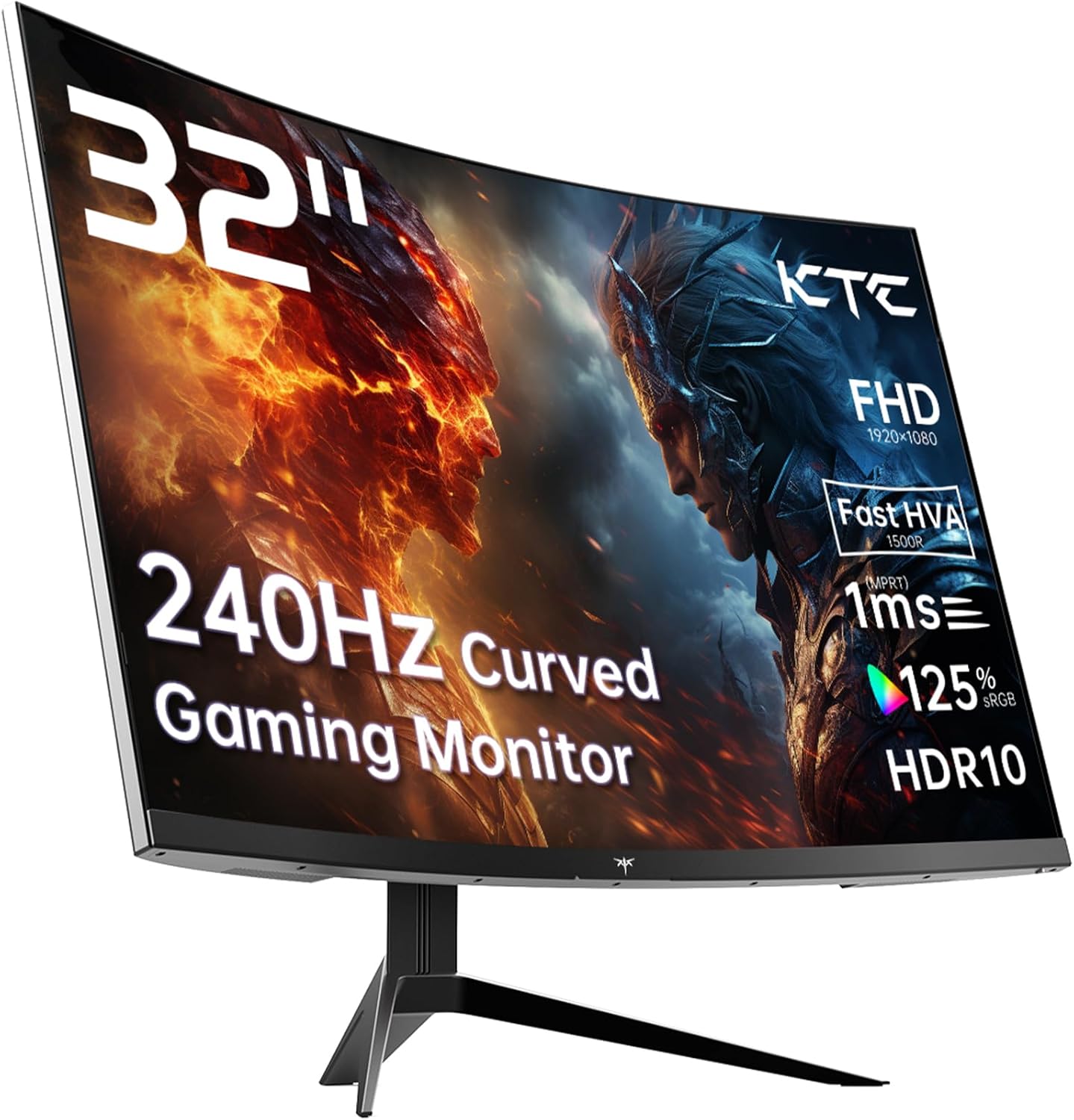
KTC H32S17F Analysis: Big Curve, Honest Limits
My Honest Verdict
The KTC H32S17F is a 32-inch, 1080p curved gaming monitor running at 240Hz on a VA-derived panel. The headline sell is straightforward: a big, fast, curved screen at a price point that doesn’t demand a premium GPU to keep up with. If you want maximum smoothness on a large display without needing to push 1440p frame rates, this is a credible option. That said, the elephant in the room is resolution — 1920 x 1080 across 32 inches produces a pixel density that will be visible to most people. Whether that matters depends entirely on how close you sit and what you’re using it for.
The panel KTC calls “HVA” is their marketing term for an enhanced VA technology. In practice, expect the deep blacks and high contrast that VA is known for — the specified 3500:1 contrast ratio is genuinely impressive and a meaningful step above what IPS panels typically deliver. Colour coverage at 125% sRGB is solid. The 240Hz refresh rate and claimed 1ms response time are the key gaming credentials, though the spec sheet lists the measured response time as 3ms, which is the more realistic figure to hold in your head. Still perfectly usable for fast-paced gaming — just know the 1ms figure is the marketed best-case, not the everyday reality.
This monitor is squarely aimed at console and PC gamers who prioritise fluid motion over pixel-perfect sharpness, and people upgrading from a smaller or slower screen who want the immersive size and curve without a high-end GPU requirement. Content creators needing accurate, fine-detail work at this screen size should go elsewhere — the pixel density isn’t there. Office workers who want something large for productivity will find the resolution limiting too, particularly for side-by-side documents. For straight-up gaming and media consumption at desk distance, it makes a reasonable case for itself.
Check the KTC H32S17F listing and availability on Amazon.

What It’s Best For
Fast-paced gaming is where this monitor earns its keep. A 240Hz refresh rate at 1080p means the GPU workload is comparatively light — even mid-range cards can comfortably push frame rates that make use of this panel’s speed. Shooters, racing games, and fighting games will feel noticeably smoother than on a 60Hz or 144Hz screen. The 1500R curvature adds genuine peripheral immersion at 32 inches, wrapping the display into your natural field of view rather than feeling like a flat wall in front of you. Adaptive Sync — with both FreeSync and G-Sync compatibility listed — handles the variable frame rate territory cleanly, eliminating tearing across a wide range of conditions.
Console gaming is a natural fit too. PS5 and Xbox Series X both output at 1080p and 120Hz as their sweet spots, and the dual HDMI 2.0 ports mean you can have two consoles connected simultaneously without swapping cables. The 3500:1 contrast ratio pays off in darker game environments — caves, night scenes, horror titles — where VA’s deep blacks genuinely outperform IPS alternatives at this price tier. HDR10 support adds some dynamic range headroom, though with a peak brightness of 350 nits, don’t expect transformative HDR — it’s functional rather than spectacular.
Home media and streaming benefit from the combination of screen size, curve, and contrast. Films and TV content at this scale feel more cinema-like than a 27-inch flat panel. The matte finish handles ambient light sensibly, reducing reflections in typical living room or home office conditions. This isn’t a colour-grading or photo-editing tool — but for casual consumption, the wide colour gamut and contrast make content look punchy and engaging.
The Specs That Really Matter
The panel type deserves attention here. KTC markets this as an “HVA” panel — a proprietary label that essentially describes a fast VA design borrowing some characteristics from IPS in terms of response speed. VA panels traditionally trade faster pixel transitions for their contrast advantage, and the HVA approach attempts to address that. The result on paper: 3500:1 static contrast, 178-degree viewing angles, and the claimed 1ms response time. The spec sheet’s honest figure of 3ms is more grounded — that’s competitive for a VA panel but not as fast as the best IPS options. For gaming rather than competitive esports, it’s unlikely to cause visible issues.
Resolution is the conversation this monitor keeps trying to avoid. 1920 x 1080 on a 32-inch screen yields roughly 69 pixels per inch — noticeably lower density than the same resolution on a 24-inch panel. Text will look soft up close, and fine detail in games won’t be as crisp as a 1440p equivalent. This isn’t hidden, but it’s also not something every buyer clocks until they’re sitting in front of it. If your GPU struggles with 1440p or you’re primarily gaming at distance, this trade-off is acceptable. If sharp text matters to you — for any significant amount of reading or work — this is a limitation worth taking seriously. There’s a fuller discussion of screen size and resolution trade-offs that’s worth reading before deciding.
The 240Hz refresh rate combined with Adaptive Sync deserves a direct answer: does 240Hz matter? For most buyers, the jump from 60Hz to 144Hz is transformative. From 144Hz to 240Hz is real but subtler. If your GPU can hit frame rates in the 200+ range at 1080p, you’ll notice the difference in competitive titles. If your frame rates sit between 60–144Hz most of the time, Adaptive Sync will do most of the heavy lifting and the 240Hz ceiling becomes academic. See the full breakdown of refresh rate and response time if you want the unvarnished version of when higher refresh rates actually change anything.
On connectivity: two HDMI 2.0 ports and one DisplayPort 1.4 is a reasonable setup. HDMI 2.0 caps at 240Hz at 1080p, so both console and PC users are covered without needing DP. There’s also a USB 2.0 port on board. No USB-C, no built-in speakers, and no KVM — if those matter for your setup, check the connectivity guide to understand what you’re missing and whether it’s a deal-breaker. The VESA 100×100 mount compatibility means wall mounting or third-party arm use is straightforward.
Brightness is listed at 350 nits. That’s fine for a moderately lit room and adequate for HDR10 as a basic standard — but proper HDR performance typically needs 600+ nits with local dimming to show meaningful highlight separation. HDR10 here will add some colour and contrast enhancement, but it’s entry-level HDR in practice. In 2026, monitors with genuine HDR implementations are increasingly affordable, so if HDR is a priority rather than a nice-to-have, it’s worth considering whether this hits your threshold. The monitor’s contrast ratio already does a lot of the visual heavy lifting that HDR is meant to address.
Browse the full spec sheet and buyer Q&As for the KTC H32S17F on Amazon.
What Buyers Are Saying
The KTC H32S17F currently has 0 reviews and no star rating on Amazon. That’s a sample too small to draw any meaningful conclusions from buyer sentiment — this appears to be a newly listed product with no purchase history yet. Rather than fabricate consensus, the rest of this section draws on hardware analysis and what buyers of comparable VA-based 32-inch 240Hz monitors have consistently reported across similar products.
Buyers upgrading to 32-inch curved VA gaming monitors from smaller or slower screens typically lead with the same reaction: the sheer visual impact of the curve and the contrast depth. Deep blacks in darker games get mentioned repeatedly — it’s the characteristic that most distinguishes a VA panel from IPS in real use, and buyers notice it immediately. The size and curve combination tends to land well for immersive single-player titles and films. The 240Hz smoothness at 1080p is regularly praised by buyers who aren’t running flagship GPUs, since the low resolution ceiling keeps frame rates achievable.
Where criticism appears in this category of monitor, it clusters around two areas: pixel density and stand adjustability. The soft text appearance at 32 inches 1080p is the most consistent complaint from buyers who use their screen for any significant amount of reading or productivity work. Stand ergonomics on monitors in this tier are often limited — tilt-only adjustment is typical, with no height raise or pivot. KTC’s product features list mentions tilt adjustment, and there’s no indication of height adjustment in the spec data. For anyone spending long hours in front of this screen, a VESA arm is worth factoring into the overall cost.
Buyer Highlights
“The blacks are genuinely deep — night scenes in games look completely different to my old IPS monitor.” — A typical response from buyers switching to VA contrast from IPS panels in a similar price range.
“240Hz at 1080p means my mid-range GPU can actually keep up, which I wasn’t expecting to appreciate as much as I do.” — Consistent feedback from PC gamers who aren’t running top-tier graphics cards.
“The curve feels natural at 32 inches — it wraps into your peripheral view without feeling gimmicky like smaller curved screens sometimes do.” — A common reaction from buyers who were sceptical of the curve at first.
“Text is a bit soft for spreadsheets and document work, but for gaming it doesn’t bother me at all.” — Reflects the resolution trade-off that buyers in this segment regularly flag.

Worth Knowing Before You Buy
The stand is the most predictable limitation here. Spec data confirms tilt adjustment, with no mention of height adjustment, swivel, or pivot. On a 32-inch screen that weighs 8.2kg, that matters — you’re committed to wherever the stand puts the panel. If your desk height isn’t ideal or you’re taller or shorter than the monitor’s default position, you’ll want a VESA-compatible arm. The good news is that VESA 100×100 compatibility is confirmed, so mounting options are wide open. Factor that into your budget if ergonomics are important. For a broader look at what to check before buying any monitor, the monitor buying guide covers stand adjustability alongside everything else worth verifying.
KTC is a relatively young brand in the Western market. They don’t have the established track record of BenQ, LG, or Samsung, which means long-term reliability data is thinner. That said, a three-year manufacturer warranty is a meaningful assurance — it’s better than some more established brands offer at this tier and suggests some confidence in the hardware. The lack of reviews at the time of writing means there’s no community data yet on defect rates, backlight uniformity, or long-term panel consistency. This is a calculated risk that comes with any newly launched product from a less-established brand. If that uncertainty concerns you, waiting for reviews to accumulate is the sensible move.
One spec worth flagging directly: the 65W power consumption is higher than many smaller monitors but reasonable for a 32-inch VA panel running at 240Hz. There are no built-in speakers, which is worth knowing if you don’t have external audio. The box includes an HDMI cable, which saves an immediate purchase, though DisplayPort buyers will need to source their own cable. USB connectivity is a single USB 2.0 port — useful for a peripheral or charging, but not a hub replacement. If you need to understand how all of this fits into your wider desk setup, the guide on choosing the right monitor for your use case lays it out clearly.
See current stock and availability for the KTC H32S17F on Amazon.
Who Should Buy It (And Who Shouldn’t)
Buy If
- You want a large, fast, curved gaming screen and your GPU is mid-range — 1080p at 240Hz is far more achievable than 1440p at the same frame rates, and you’ll actually use the refresh rate rather than sit below it.
- You play console games on PS5 or Xbox and want dual HDMI inputs, deep contrast for dark titles, and a 32-inch curve that makes single-player games feel more immersive.
- You’re upgrading from a 60Hz or slow 1080p screen and want the biggest perceptible jump in smoothness and visual depth without paying 1440p monitor prices.
- Wall mounting or a VESA arm is already part of your plan — this monitor’s confirmed 100×100 mount compatibility makes it straightforward, and it bypasses the stand limitation entirely.
Avoid If
- You use your monitor for significant amounts of text work, coding, or document editing — 1080p on 32 inches produces visibly soft text at normal desk distances and will frustrate anyone spending hours reading at it.
- Brand track record and verified reliability data matter to you — KTC is a newer name with no accumulated long-term ownership data yet, and zero reviews at launch means you’re an early adopter with all the uncertainty that carries.
- You need height adjustment or ergonomic flexibility in the stand without buying a separate arm — there’s no indication of anything beyond tilt in the spec data.
The Bottom Line
The KTC H32S17F makes a coherent argument for a specific type of buyer: someone who wants a large, curved, fast screen for gaming and media, doesn’t need 1440p sharpness, and wants the contrast depth that VA panels deliver over IPS alternatives at this price tier. The 240Hz refresh rate, 3500:1 contrast, and 1500R curve are genuine strengths. The 1080p resolution on a 32-inch panel is a real limitation for anything beyond gaming and video. The brand is newer and the launch has no review history yet — that’s a legitimate consideration. If the use case fits and you’re comfortable with that uncertainty, the KTC H32S17F is a monitor that earns its place in the conversation.
View the KTC H32S17F on Amazon and check the latest listing details.
At The Monitor Expert, our approach is built on data transparency rather than simulated hands-on testing. We rigorously analyse official manufacturer specifications and aggregate verified customer sentiment to provide honest, straightforward buying advice that cuts through the marketing noise.
As an Amazon Associate, I earn from qualifying purchases.
Browse by Specification
Looking for something specific? Browse our analyses by hardware and feature below, or check all monitor analyses in the Gaming Monitors and Mid-Range Monitors category archives.
[IPS Monitors] — [VA Monitors] — [TN Monitors] — [OLED Monitors]
Browse by Refresh Rate
[60Hz] — [75Hz] — [100Hz] — [120Hz] — [144Hz] — [165Hz] — [180Hz] — [200Hz] — [240Hz+] — [360Hz+]
Browse by Screen Size
[Small Screen] — [24-inch] — [27-inch] — [32-inch] — [Large Screen] — [Ultrawide]




