
KTC H32S17F Analysis: Big Curve, Low Pixel Density
My Honest Verdict
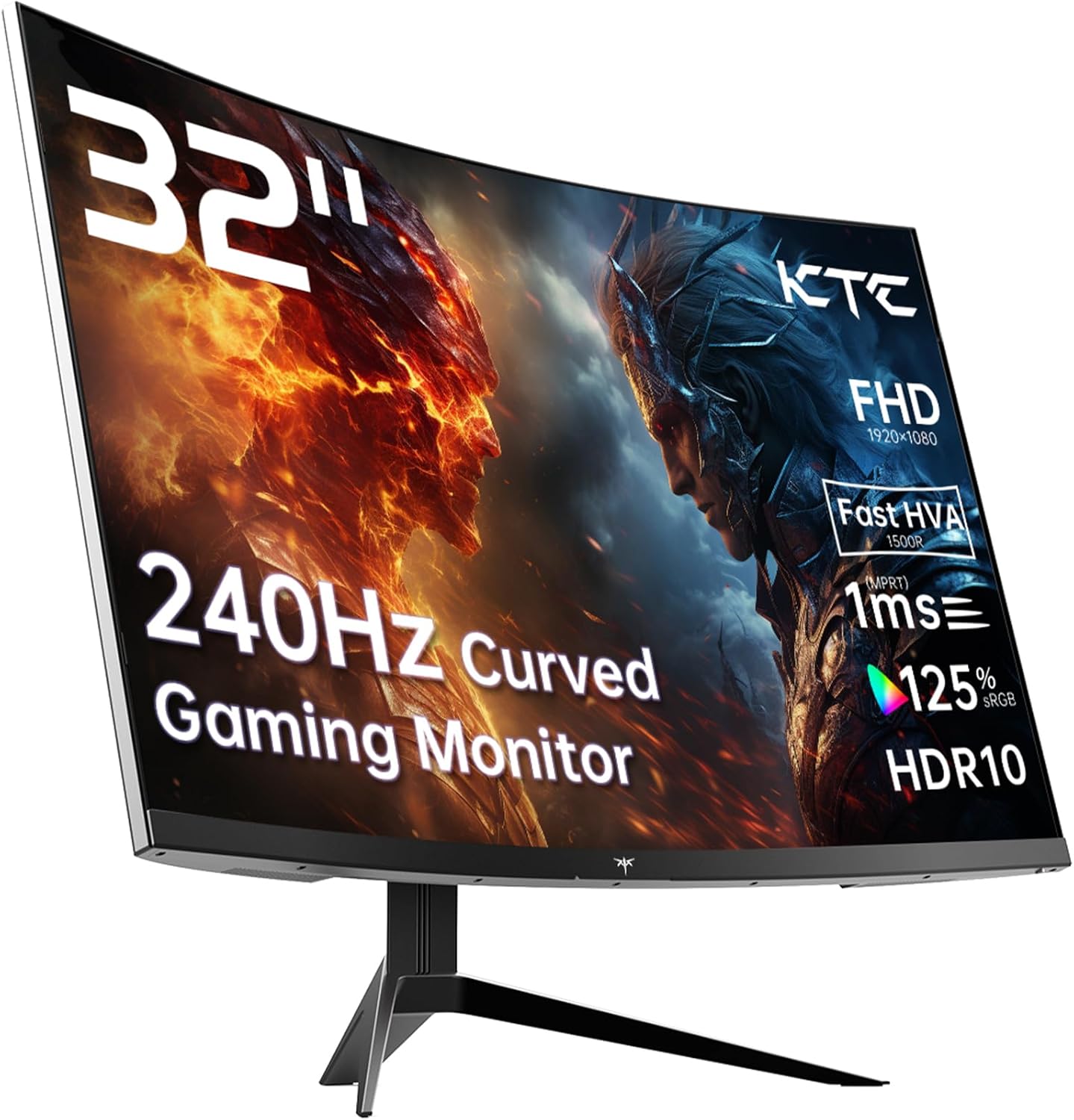
The KTC H32S17F is a 32-inch, 1080p, 240Hz curved gaming monitor that punches well above its price bracket in terms of raw visual impact. The headline strength is the combination of size, refresh rate, and colour output — 125% sRGB coverage and a 3500:1 contrast ratio from a VA panel make this look genuinely good in a way that cheaper IPS screens in this tier often don’t. The headline limitation is straightforward: 1920×1080 on a 32-inch screen is a low pixel density, and if you’re sitting close, you’ll see it.
Day to day, what that spec sheet actually means is this: games look punchy and saturated, dark scenes have real depth thanks to that contrast ratio, and motion at 240Hz is genuinely smooth rather than theoretically smooth. The 1500R curve at this size feels natural rather than aggressive — it pulls you in without distorting straight lines. Brightness sits at 350 cd/m² which is adequate for most rooms, and the HDR10 support here is entry-level, but the contrast ratio means it actually does something visible, unlike monitors where HDR is purely a badge.
This is built for console and PC gamers who want a big, immersive screen with fast refresh at a sensible outlay — and who aren’t doing pixel-peeping productivity work at close range. If you’re a graphic designer, a spreadsheet worker, or someone who sits within 60cm of their screen, the pixel density will bother you. If you’re gaming from a normal desk distance or further back on a console setup, it’s a compelling option in the 240Hz curved gaming space.
See the current listing and availability for the KTC H32S17F on Amazon.

What It’s Best For
Competitive and casual gaming is where this monitor earns its keep. A 240Hz refresh rate and 1ms advertised response time (the spec sheet lists 3ms measured, which is the more honest figure — worth understanding the difference via our refresh rate and response time guide) mean fast-moving content stays sharp and tear-free with Adaptive Sync enabled. The 1500R curve draws you into the action without demanding a multi-monitor setup. For shooters, racing games, and anything action-heavy, the combination of size and speed is hard to argue with at this tier.
Console gaming is a strong secondary use case. The KTC H32S17F ships with 2× HDMI 2.0 ports, which covers PS5 and Xbox connections cleanly. The large screen and curved format suit a relaxed seating position, and the HDR10 implementation — backed by genuine VA contrast rather than a flat IPS panel pretending — means console HDR content looks noticeably better than average. Note that HDMI 2.0 caps at 4K/60Hz or 1080p/240Hz, so PS5 users will be running at 1080p, which suits this monitor’s native resolution anyway.
Home entertainment and media gets a natural benefit from the VA panel’s deep blacks. Streaming dark cinematic content — anything where shadow detail matters — looks considerably better here than on a standard IPS at equivalent price. The 32-inch screen size with the 1500R curve makes it feel more like a cinema experience than a monitor, particularly in a dimly lit room.
The Specs That Really Matter
The panel technology here deserves a proper explanation. KTC markets this as an “HVA” panel — a VA variant with improved pixel response. VA panels traditionally suffer from slower pixel transitions, which shows as smearing in dark scenes. The HVA designation is KTC’s way of saying they’ve addressed that. It’s not the same as a fast IPS panel for motion clarity, but it’s meaningfully better than older VA panels in the same scenario. What you get in return is a 3500:1 contrast ratio that IPS panels at this price point simply cannot match. For dark games and moody content, that trade is absolutely worth it. For a broader breakdown of panel types and what they mean in practice, that’s worth a read before committing.
The 240Hz refresh rate at 1080p is a legitimately useful combination for competitive gaming. Your GPU doesn’t need to push nearly as hard as it would at 1440p or 4K to sustain frame rates that actually use this refresh rate — a mid-range GPU can hit 200+ fps in most popular titles at 1080p. Adaptive Sync covers both FreeSync and G-Sync compatible setups, so AMD and Nvidia card owners are both covered. The 1ms headline figure in the marketing is the MPRT (moving picture response time) measurement — the spec sheet’s 3ms GtG figure is the more directly comparable one, and 3ms is genuinely decent for a VA panel in 2026.
Resolution and screen size is where you need to be honest with yourself. 1920×1080 on a 32-inch panel gives you approximately 68 pixels per inch. That’s noticeably softer than 1080p on a 24-inch, or 1440p on a 27-inch. For gaming at a typical desk distance of 60–80cm it’s acceptable, though some buyers will find it soft. For anything text-heavy or detail-critical, it’s a genuine limitation. If screen size and resolution matching is something you want to think through carefully, our display size and resolution guide lays out the options clearly. The HDR10 support here isn’t DisplayHDR 600 or above — it’s entry-level — but the VA contrast ratio gives it more teeth than the certification alone suggests.
Connectivity is functional rather than generous. 2× HDMI 2.0 and 1× DisplayPort 1.4 covers most setups. There’s no USB-C, no Thunderbolt, and the USB is a single USB 2.0 port — useful for a peripheral but not a hub. If your setup relies on USB-C connectivity, check our monitor connectivity guide — this won’t serve you there.
Check the full spec sheet and buyer Q&As for the KTC H32S17F on Amazon.
What Buyers Are Saying
The KTC H32S17F carries a rating of 4.3 out of 5 across 1,981 reviews — a reasonably sized sample with a skew toward positive sentiment. The dominant praise themes are brightness, colour vibrancy, and value relative to comparable options in the curved gaming segment. Multiple buyers describe the HDR performance as punching above expectation for an entry-level certification, with one buyer reporting peak brightness subjectively around 1400 nits in HDR mode — higher than the 350 cd/m² SDR spec would suggest, consistent with VA panels that use local contrast boosting in HDR mode.
The stand draws consistent criticism. Several buyers called it flimsy or wobble-prone, and more than one recommended pairing it with a monitor arm from the outset. Given that the display itself earns good marks, the stand is the clearest weak point in the package — worth factoring into your setup plans. Viewing angles come up regularly as a limitation, which is expected VA panel behaviour. Buyers sitting directly in front report no issues; those using it at an angle notice greying quickly. That’s a trade-off for the contrast ratio, not a defect.
The one meaningful negative pattern involves after-sales support. One buyer reported a DP port developing graphical artefacts after about a month, and described a frustrating experience trying to get a response from KTC’s support team. It’s a single report, but it aligns with the brand’s smaller support infrastructure compared to established names. The 3-year manufacturer warranty is a positive signal on paper — whether the support process delivers on it in practice is harder to verify from this data. If after-sales reliability matters to you, weigh this alongside the brand’s relative novelty in the UK market.
Buyer Highlights
“The HDR makes the sun in games look genuinely blinding — had to cover my eyes like it was the real thing.” — A recurring reaction from buyers enabling HDR for the first time on this monitor.
“The stand is flimsy, but the screen itself is great — glad I had a monitor arm ready.” — Consistent feedback that the display earns its marks but the bundled stand doesn’t match it.
“Viewing angles aren’t amazing, but sitting directly in front it looks fantastic.” — Buyers who position it correctly as a primary screen report no issues with the VA panel’s angle limitations.
“You’d genuinely struggle to find better for the money in this size and refresh rate class.” — A common conclusion from buyers who compared alternatives before purchasing.
“Colours are vibrant and the contrast is noticeably deeper than my old IPS — dark scenes actually look dark.” — Typical feedback from buyers upgrading from standard IPS panels at a similar price.

Worth Knowing Before You Buy
The stand situation is worth repeating plainly: budget for a monitor arm unless you’re fine with limited adjustability and some wobble. The display itself does not tilt, swivel, or height-adjust beyond basic tilt — confirmed by the product features listing “Tilt Adjustment” only. On a 32-inch curved panel, getting your eye level right matters more than on a smaller screen. A decent monitor arm solves this entirely and removes the stand from the equation, which several buyers describe as the right approach anyway. If you want to understand what adjustability options to look for, our monitor buying guide covers ergonomics as a key factor.
VA panel glow is a real consideration in dark rooms. The high contrast ratio delivers genuinely deep blacks in the centre of the screen, but VA panels produce a characteristic glow around the edges in very dark scenes — particularly visible in dark room gaming. It’s not unique to this monitor; it’s inherent to VA technology at this price point. Worth being aware of if you play in complete darkness and sit close. In normally lit rooms, it’s a non-issue.
The response time marketing deserves a note. KTC advertises 1ms prominently — this is the MPRT figure, which is a backlight strobing measurement rather than a pixel transition measurement. The spec sheet lists 3ms GtG, which is the more relevant figure for understanding how the panel performs in gaming. 3ms GtG on a VA panel is genuinely good in 2026 by class standards, so the actual performance isn’t the problem here — it’s the marketing framing. Understanding what monitor specs actually mean saves you from being misled by this kind of presentation.
KTC is a less-established brand in the UK market. The 3-year warranty is a meaningful commitment, but the one documented support case in the reviews paints a concerning picture of responsiveness. This doesn’t make the monitor a bad purchase, but it does mean you’re taking a slightly higher risk on the after-sales experience compared to buying from a brand with a mature UK support operation.
View current stock and availability for the KTC H32S17F on Amazon.
Who Should Buy It (And Who Shouldn’t)
Buy If
- You want a large curved screen with genuinely fast refresh for gaming and your GPU can sustain high frame rates at 1080p — this is the sweet spot the KTC H32S17F is built for.
- You’re connecting a PS5 or Xbox and want a bigger, more immersive screen than a typical 27-inch gaming monitor — the 32-inch curve suits a relaxed console gaming position.
- You value contrast depth over pixel sharpness — the VA panel’s 3500:1 ratio genuinely improves dark game environments and cinematic content in ways a standard IPS at this tier can’t match.
- You already own or plan to buy a monitor arm — the display itself earns its reputation but the stand doesn’t, and an arm removes that limitation cleanly.
Avoid If
- You sit within 50–60cm of your screen and do text-heavy work — 1080p on a 32-inch panel is noticeably soft at close range, and no amount of gaming performance compensates for that in a productivity context.
- After-sales security is a deciding factor — KTC’s support responsiveness has question marks based on available evidence, and if you’d rather have a brand with proven UK warranty handling, spend up for an established name.
- You need USB-C or Thunderbolt connectivity — the port selection doesn’t include either, and there’s no workaround here.
The Bottom Line
The KTC H32S17F delivers a genuinely strong combination of screen size, refresh rate, and colour performance for its position in the market. The VA panel’s contrast ratio gives HDR content and dark scenes real punch, the 240Hz refresh is meaningfully fast for competitive gaming, and the 1500R curve makes 32 inches feel enveloping rather than overwhelming. The limitations are real but specific: pixel density is low for close-range use, the stand underdelivers, and KTC’s support track record is unproven. If you’re buying this as a gaming and entertainment screen and you know what you’re getting into, it’s a well-considered purchase. If any of the caveats hit your use case directly, step back and match the monitor to your actual needs first using our guide to choosing the right monitor.
Find the KTC H32S17F on Amazon and check the current listing details.
At The Monitor Expert, our approach is built on data transparency rather than simulated hands-on testing. We rigorously analyse official manufacturer specifications and aggregate verified customer sentiment to provide honest, straightforward buying advice that cuts through the marketing noise.
As an Amazon Associate, I earn from qualifying purchases.
Browse by Specification
Looking for something specific? Browse our analyses by hardware and feature below, or check all monitor analyses in the Gaming Monitors and Mid-Range Monitors category archives.
[IPS Monitors] — [VA Monitors] — [TN Monitors] — [OLED Monitors]
Browse by Refresh Rate
[60Hz] — [75Hz] — [100Hz] — [120Hz] — [144Hz] — [165Hz] — [180Hz] — [200Hz] — [240Hz+] — [360Hz+]
Browse by Screen Size
[Small Screen] — [24-inch] — [27-inch] — [32-inch] — [Large Screen] — [Ultrawide]




