
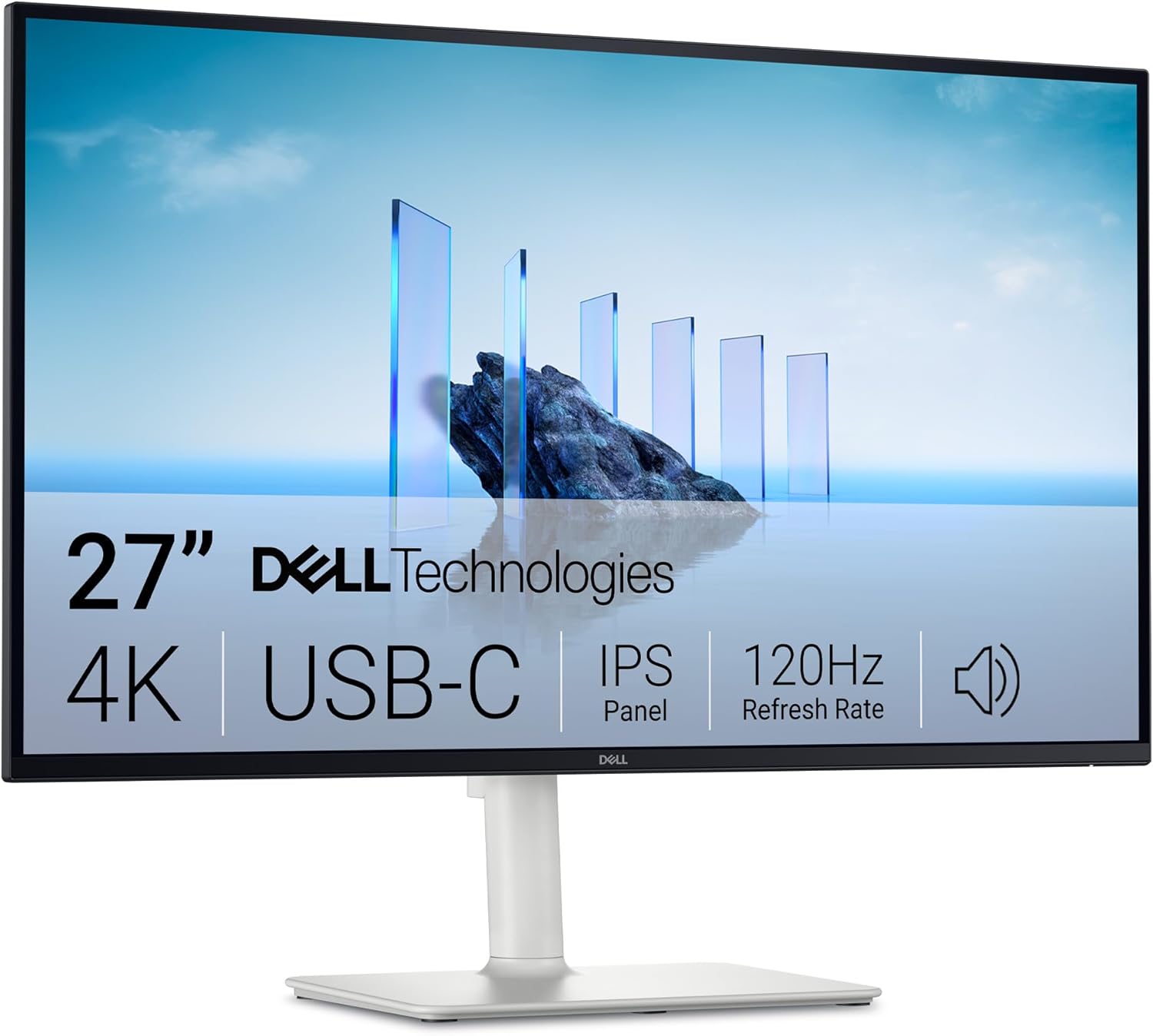
Dell 27 Plus USB-C Monitor S2725QC Analysis: Mac-Ready 4K
My Honest Verdict
The Dell 27 Plus USB-C Monitor S2725QC is a genuinely strong all-rounder for anyone who wants 4K resolution, a clean single-cable desk setup, and reliable colour accuracy — without paying OLED money. At 27 inches with a native 3840 x 2160 panel and 120Hz refresh rate, it sits comfortably in the sweet spot for Mac users, creative professionals, and hybrid workers who want one screen to do everything. The headline limitation is straightforward: this is not a monitor for competitive gaming. The refresh rate is good, the adaptive sync is there, but serious PC gamers pushing frame rates well north of 120 will want to look elsewhere.
In everyday use, 4K on a 27-inch screen means genuinely sharp text — no scaling fatigue, no pixel aliasing on fine UI elements. That pixel density matters more than people give it credit for when you’re staring at a screen for eight hours. The 120Hz refresh brings perceptible smoothness that you won’t get from a standard 60Hz panel, and it’s a spec you’ll actually use rather than just quote. The IPS panel delivers wide viewing angles and consistent colour across the screen — a non-negotiable for creative work and a genuine comfort improvement over VA alternatives. The single USB-C cable solution — handling video, data, and 65W power delivery simultaneously — is the kind of feature that sounds like marketing copy until you actually use it and wonder why you ever had four cables behind your desk.
This is the right monitor if you’re a Mac user wanting a proper external display that just works, a creative professional who needs accurate colour without a specialist panel price tag, or a hybrid worker who wants a tidy, ergonomic desk setup. It’s the wrong choice if you’re a competitive gamer chasing high frame rates, or if you need HDR that actually looks like HDR rather than a checkbox on a spec sheet.
See the current listing and availability for the Dell 27 Plus USB-C Monitor S2725QC on Amazon.

What It’s Best For
Mac users and single-cable desk setups. This is where the Dell 27 Plus USB-C Monitor S2725QC earns its reputation fastest. Plug one USB-C cable into a MacBook Pro or Mac Mini and you get 4K output, charging, and USB hub access in one go. No dongles. No separate power brick. No HDMI adapter hunting. Multiple buyers with M1, M4 Pro, and Mac Mini M4 setups specifically called this out — the compatibility just works, and the result is a noticeably cleaner desk. Mac users should note: connect via USB-C to get the full 120Hz refresh rate. HDMI from a Mac caps you at 30Hz, which makes the screen feel sluggish — one reviewer flagged this clearly and it’s worth knowing upfront. For guidance on getting the most from your connectivity options, the monitor connectivity guide covers this in detail.
Office work, productivity, and long sessions. The TÜV Rheinland 4-star Eye Comfort certification is not just a badge. The ComfortView Plus low blue light implementation — reducing harmful blue light to ≤35% — is done at the hardware level, which means you’re not sacrificing colour accuracy to get it. Several buyers specifically mentioned extended sessions without eye fatigue. The height-adjustable stand adds genuine ergonomic value for people spending eight or more hours at a desk. The front-accessible USB hub — a retractable pod rather than rear ports — is a small but genuinely useful design decision for anyone frequently plugging in USB drives or peripherals. If you’re weighing this against other monitor types for productivity use, the IPS panel and single-cable connectivity make this a strong candidate.
Creative work and content consumption. The 99% sRGB colour gamut coverage is accurate and consistent across the IPS panel, which matters for photo editing and video work where colour fidelity has real consequences. This is not a wide-gamut DCI-P3 panel, so professional print or cinema colour grading workflows will want something more specialist — but for web content creators, photographers working in sRGB, and video editors doing standard deliverables, it’s more than adequate. The 1,500:1 contrast ratio for an IPS panel is a step above average, adding depth to images and video that flat IPS panels often lack.
The Specs That Really Matter
The IPS panel is the right choice for this monitor’s intended audience. IPS panels give you consistent colour accuracy across wide viewing angles — 178 degrees horizontal and vertical here — which means the image doesn’t shift or wash out when you’re not sitting dead-centre. For desk setups where you occasionally lean to one side, or where a second person is looking at the screen, this matters. VA panels offer higher contrast but narrower sweet spots and worse colour consistency at angles. TN panels are faster but look awful off-axis. For a productivity and creative monitor, IPS is the correct call.
The 120Hz refresh rate on a 4K panel is genuinely worth calling out — most 4K monitors in this category still default to 60Hz, and the jump to 120Hz is noticeable in day-to-day scrolling and UI interactions, not just gaming. Combined with AMD FreeSync Premium adaptive sync, the screen stays tear-free during variable frame rate content. The listed response time in the spec sheet shows 8ms, though the product description references a 4ms figure — likely the faster GtG mode. Either way, for this monitor’s primary audience, response time is not the deciding factor. If you want to understand what these numbers actually mean in practice, refresh rate and response time explained covers the nuances clearly.
Connectivity is a genuine strength of the Dell 27 Plus USB-C Monitor S2725QC and worth unpacking. You get two HDMI 2.1 ports, one USB-C upstream port with DisplayPort 1.4 Alt Mode and 65W Power Delivery, one USB-C downstream port with 15W Power Delivery, and two USB-A ports — one of which is accessible via the front retractable pod alongside the downstream USB-C. That front access point is a practical detail that disappears from spec sheets but genuinely changes how you use the monitor day to day. Two HDMI 2.1 inputs also means you can connect a laptop and a games console simultaneously without cable swapping.
The HDR claim deserves a plain-English flag. Dell describes this as “HDR ready” rather than certifying a specific HDR tier. At 350 nits typical brightness, this panel cannot produce the peak brightness required for a meaningful HDR experience — proper HDR starts at HDR600 and above. HDR readiness here means it can accept an HDR signal, not that it renders HDR content in a way you’ll notice. Don’t buy this monitor expecting HDR to look impressive. Buy it for its 4K clarity and 99% sRGB accuracy — those are real. As we move into 2026, the gap between genuine HDR panels and HDR-ready marketing claims is something worth scrutinising carefully on any mid-range monitor. Our monitor specs explained guide breaks down what HDR tiers actually mean.
Check the full spec sheet and buyer Q&As for the Dell 27 Plus USB-C Monitor S2725QC on Amazon.
What Buyers Are Saying
The Dell 27 Plus USB-C Monitor S2725QC currently holds a rating of 4.5 out of 5 from 344 customer reviews — a meaningful sample with a strong lean toward positive sentiment. The praise themes are consistent and specific, which is usually a good sign: it means buyers are experiencing the same things rather than leaving generic five-star responses.
The single most repeated theme is Mac compatibility and the single-cable USB-C setup. Buyers with Mac Mini M4, MacBook Pro M1, and MacBook Pro M4 Pro setups all specifically noted that the connection works cleanly, with full resolution and refresh rate over USB-C. One buyer compared the experience favourably to Apple’s own display at a fraction of the cost — which is a bold claim, but the sentiment echoes across multiple independent reviews. Picture quality and colour accuracy come in a close second. Buyers upgrading from lower-resolution or older displays consistently describe the sharpness as a genuine surprise.
The built-in speakers divide opinion. Several reviewers rate them highly — one buyer with a Mac Mini M4 gave them an enthusiastic endorsement — while at least one reviewer described them as muffled and underwhelming for serious audio use. The honest read: dual 5W speakers will serve casual video calls and background music without embarrassing themselves, but audiophiles should budget for external speakers. One reliability concern appeared in the reviews — a single buyer reported the unit failing after six months. With a sample of 344 reviews, one failure report doesn’t indicate a pattern, but it’s worth knowing the warranty is positioned as a 1-Year Advanced Exchange Service with Premium Panel Exchange rather than the 3-year figure mentioned in the product title, so check the current warranty terms carefully before purchasing.
The stand wobble is a minor recurring note — a couple of buyers mentioned the screen moves slightly when reaching for the retractable front port. Nothing reported as structurally concerning, and one buyer put it in context directly: if you’re not shaking your desk, it’s a non-issue. The OSD navigation uses a D-pad style control which buyers found more accessible than joystick-only setups on competing monitors. A small number of buyers reported initial audio or display artefacts that were resolved by switching to a quality HDMI cable — worth keeping in mind if you’re not using the included cable.
Buyer Highlights
“Just one cable to my MacBook and it handles everything — video, charging, the lot. My desk has never been this clean.” — A consistently repeated experience from Mac users across multiple independent reviews.
“The 120Hz really does make a noticeable difference. Everything’s sharp and smooth — couldn’t go back to 60Hz now.” — Common reaction from buyers who hadn’t used a high-refresh 4K panel before.
“Wasn’t expecting this quality at this price point. The picture honestly blew me away.” — Typical response from buyers upgrading from older or budget displays.
“Been sitting in front of it for hours and my eyes don’t feel wrecked at the end of the day. That’s genuinely new for me.” — Recurring feedback from buyers doing long office or creative work sessions.
“Mac Mini M4 compatibility was my main concern and it just worked perfectly out of the box.” — Specific feedback from several buyers who had researched compatibility issues before purchasing.

Worth Knowing Before You Buy
The Mac HDMI limitation is the most practically significant thing to understand before ordering. If you connect a Mac via HDMI, the refresh rate is capped at 30Hz due to how macOS handles HDMI negotiation — the screen will feel noticeably sluggish. The fix is straightforward: use USB-C. But if your Mac or setup doesn’t have a USB-C or Thunderbolt port available, this becomes a problem worth solving before the monitor arrives. Windows PCs connected via HDMI don’t face the same limitation. For anyone running a non-Mac setup using HDMI, the two HDMI 2.1 ports will serve full 120Hz at 4K without issue.
The stand wobble noted by a couple of buyers is linked specifically to the retractable front USB port — plugging or unplugging cables from the front can cause the screen to sway. It’s a minor ergonomic gripe, not a structural defect, but if you’re frequently hot-swapping USB devices you’ll notice it. The stand itself adjusts for height which is a meaningful plus over fixed-height competitors. VESA mounting is supported if you’d prefer a third-party arm. Build quality across the majority of reviews reads as solid — one buyer specifically called out no coil whine, which is worth mentioning because coil whine on IPS panels at high refresh rates is a known nuisance that sometimes shows up on cheaper panels.
Brightness at 350 nits is adequate for typical indoor environments but will be overwhelmed in a bright room with direct sunlight hitting the screen. The matte screen finish handles reflections well, which partially compensates — but if your desk faces a window, it’s still worth considering. The 1,500:1 contrast ratio is decent for IPS but won’t match a VA panel for deep blacks in dark content. If you’re primarily watching films in a dark room and want cinematic contrast, a VA or OLED panel would serve that specific use case better. For everything else — productivity, creative work, general use — the IPS trade-off is the right one here. Our display size and resolution guide covers how these trade-offs play out at different size and resolution combinations.
View current stock and availability for the Dell 27 Plus USB-C Monitor S2725QC on Amazon.
Who Should Buy It (And Who Shouldn’t)
Buy If
- You use a MacBook or Mac Mini and want a single USB-C cable to handle video, data, and laptop charging without dongles or adapters cluttering your desk.
- You need accurate colour reproduction for photo editing, content creation, or design work at the sRGB standard — the 99% sRGB coverage and IPS panel deliver consistent, trustworthy colour without a specialist display price.
- You spend long hours at a desk and want eye comfort features that don’t compromise image quality — the TÜV Rheinland 4-star certification and hardware-level blue light reduction are substantive, not cosmetic.
- You want a dual-purpose monitor for both productivity and moderate gaming — the 120Hz refresh rate and AMD FreeSync Premium make this genuinely capable for casual to mid-level gaming on top of daily work use.
Avoid If
- You’re a competitive PC gamer who regularly pushes frame rates above 120Hz and needs a panel with sub-4ms grey-to-grey response across all transitions — this monitor is not built around that use case.
- You’re expecting meaningful HDR performance: at 350 nits brightness, the “HDR ready” label here is a signal acceptance feature, not a genuine HDR viewing experience — don’t let the marketing mislead you on this one.
- Your Mac setup only has HDMI available and you can’t route a USB-C connection — the 30Hz cap via HDMI on Mac hardware makes the monitor’s headline specs effectively inaccessible in that configuration.
The Bottom Line
The Dell 27 Plus USB-C Monitor S2725QC earns its 4.5-star rating. It’s a well-executed 27-inch 4K IPS monitor that does the things its buyers actually need: sharp, accurate colour, a genuinely useful 120Hz refresh, and a USB-C implementation that simplifies desk setups without compromise. The Mac compatibility is a practical strength that goes beyond spec-sheet alignment. It won’t satisfy hardcore gamers or anyone expecting real HDR performance, and the HDR marketing deserves the scepticism it gets. But for office professionals, creatives, and Mac users wanting a capable, ergonomic external display, this is a monitor that justifies the purchase and then gets out of the way. If you’re still comparing options, the monitor buying guide will help you confirm whether this is the right spec tier for your needs.
Find the Dell 27 Plus USB-C Monitor S2725QC on Amazon and check the current listing details.
At The Monitor Expert, our approach is built on data transparency rather than simulated hands-on testing. We rigorously analyse official manufacturer specifications and aggregate verified customer sentiment to provide honest, straightforward buying advice that cuts through the marketing noise.
As an Amazon Associate, I earn from qualifying purchases.
Browse by Specification
Looking for something specific? Browse our analyses by hardware and feature below, or check all monitor analyses in the Office Monitors and Mid-Range Monitors category archives.
[IPS Monitors] — [VA Monitors] — [TN Monitors] — [OLED Monitors]
Browse by Refresh Rate
[60Hz] — [75Hz] — [100Hz] — [120Hz] — [144Hz] — [165Hz] — [180Hz] — [200Hz] — [240Hz+] — [360Hz+]
Browse by Screen Size
[Small Screen] — [24-inch] — [27-inch] — [32-inch] — [Large Screen] — [Ultrawide]




