
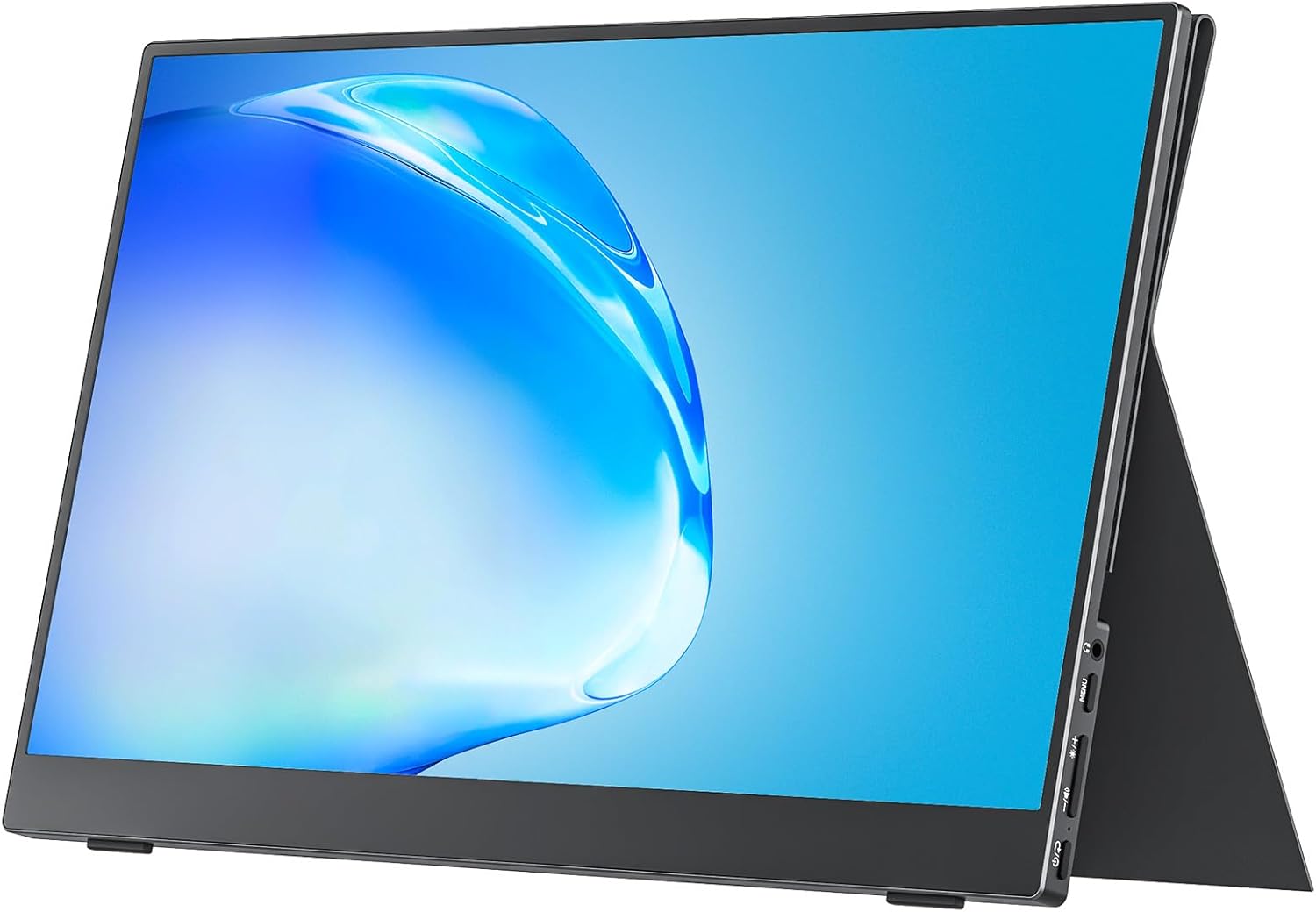
cocopar Portable Monitor 15.6 Inch Analysis: One Cable, Two Screens
My Honest Verdict
The cocopar Portable Monitor 15.6 Inch is a sensible, no-nonsense second screen for anyone who works across multiple locations and doesn’t want to lug a full desktop setup around. It’s built around a 15.6-inch IPS panel running at 1920×1080 resolution, and at 670g it genuinely earns the portable label. The headline strength here is the combination of dual USB-C ports, a mini HDMI port, and a cover that doubles as a stand — meaning you can be up and running pretty much anywhere with a single cable. The headline limitation is equally simple: 60Hz is the ceiling, so competitive gaming was never the brief.
In everyday use, 1080p on a 15.6-inch screen hits the sweet spot for pixel density — text is sharp, images look clean, and you’re not losing workspace to oversized UI elements. The IPS panel delivers 178° viewing angles, which matters when you’re sharing a screen in a meeting or working from an awkward desk setup. 85% sRGB colour coverage and 300 nits brightness are both modest numbers, but they’re honest ones for this size and price tier. This isn’t a colour-grading workstation. It’s a productivity extender that happens to look decent.
If you’re a remote worker, frequent traveller, or someone who just wants a second screen for a home office setup without spending serious money, the cocopar Portable Monitor 15.6 Inch makes a compelling case. If you need high refresh rates, professional colour accuracy beyond 85% sRGB, or a screen you’ll be gaming on competitively — look at something else. This monitor knows what it is, and it delivers on that brief. For everyone else reading our monitor use case guide, this one fits a specific slot cleanly.
See the cocopar Portable Monitor 15.6 Inch listing and current availability on Amazon.

What It’s Best For
Remote work and home office productivity. This is the core use case, and it fits well. A second screen for your laptop transforms how you handle documents, spreadsheets, video calls, and anything involving more than one window at a time. The cocopar Portable Monitor 15.6 Inch slots into that workflow without requiring a desk full of cables. One USB-C cable handles both power and video if your laptop supports DisplayPort Alt Mode. The cover stand sets it up at a usable angle in seconds. You’re not hunting for a power outlet. It just works.
Travel and on-the-go use. At 670g and 4mm thin at its slimmest, this is one of the lighter options in the portable monitor category. The included cover doubles as a stand, so there’s no separate accessory to forget. Whether it’s a hotel desk, a client’s office, or a co-working space, the setup footprint is minimal. The VESA mount compatibility also means it can be fixed to a monitor arm at home if that’s more useful — a flexibility that most portable monitors at this tier don’t bother with.
Console gaming on the go. The mini HDMI port means you can hook up a PS4, PS5, Xbox, or Nintendo Switch directly. At 60Hz and 1080p with a 3ms response time, it’s perfectly serviceable for casual console play. The built-in speaker means you don’t need headphones for basic audio. Nobody’s winning esports tournaments on this screen, but for hotel gaming sessions or LAN parties where space is tight, it does the job without complaint.
The Specs That Really Matter
The IPS panel is the most important spec here. IPS gives you consistent colour and brightness across wide viewing angles — that 178° figure isn’t marketing fluff on IPS, it actually translates to a viewable image from almost any position. You can have someone sitting beside you looking at the same screen without the colours washing out. Compare that to a TN panel, where you’d notice colour shift if you move even slightly off-centre. For a screen that’s often being used in shared or awkward environments, IPS is the right call. More on panel types and what they mean in practice if you want to go deeper on that.
The 60Hz refresh rate is worth being clear-eyed about. For productivity, document work, video calls, and streaming it is completely fine — you’ll never notice the difference between this and a 120Hz screen while writing emails or watching YouTube. For competitive gaming it’s a genuine ceiling. The 3ms response time is a reasonable figure at this tier, though manufacturers often measure this in ways that flatter the result — if you want to understand how response times are actually measured, the refresh rate and response time guide breaks that down honestly. For the target use case here, none of that matters.
1920×1080 on a 15.6-inch screen gives you a pixel density of around 141 PPI. That’s sharp enough that text looks clean and icons aren’t jagged. It’s the same resolution as most 15.6-inch laptop displays, which means your extended desktop will match your primary screen without any scaling weirdness. The 85% sRGB colour coverage is accurate and honest — it’s not 100% sRGB, so if you’re colour-matching work for print or professional media production this isn’t the right tool. For everything else, it looks fine. The 300 nits brightness means it’s best used indoors — direct sunlight will wash it out. Worth understanding how screen size and resolution interact before you commit to any portable monitor purchase.
On connectivity: the dual full-featured USB-C ports with pass-through charging and the mini HDMI port cover most scenarios cleanly. The important caveat is that USB-C video only works if your laptop’s port supports Thunderbolt 3/4 or USB 3.1 DisplayPort Alt Mode — not all USB-C ports do, and a lot of buyers trip over this. If your device only has a charging-only USB-C port, you’ll need HDMI. The connectivity guide explains the distinction clearly if you’re unsure. The included box covers the basics: a mini HDMI cable, a USB-A to USB-C cable, a USB-C display cable, and a 5V 3A power adapter. FreeSync adaptive sync is listed in the specs — useful for console use where frame rates fluctuate, even at 60Hz.
Looking ahead to 2026, the portable monitor market is moving toward higher refresh rates and better colour gamut figures at similar weight — but at this tier, the cocopar Portable Monitor 15.6 Inch still represents a sensible configuration for the price bracket it occupies.
Check the full spec sheet and buyer Q&As for the cocopar Portable Monitor 15.6 Inch on Amazon.
What Buyers Are Saying
The cocopar Portable Monitor 15.6 Inch carries a rating of 4.8 out of 5 across 5,879 customer reviews on Amazon — that’s a substantial sample and the rating is unusually consistent for a product in this category. Portable monitors tend to attract complaints about connectivity edge cases and build quality concerns, so holding a 4.8 with nearly 6,000 reviews suggests the majority of buyers are getting exactly what they expected.
The most frequently praised aspects are the ease of setup and the image quality relative to what buyers were expecting at this price point. Reviewers repeatedly highlight that the single-cable USB-C connection worked first time with compatible laptops, and that the cover stand is more rigid and useful than they anticipated. The matte screen finish gets specific praise from buyers using the monitor in brightly lit rooms or near windows — it cuts glare without killing the image quality the way some anti-glare coatings do.
The recurring complaints are predictable and worth flagging. Some buyers connected via USB-C without first checking whether their laptop’s port supported video output and ran into trouble — this isn’t a product fault, but it’s a common source of one-star reviews that don’t reflect the hardware itself. A smaller number of buyers noted the built-in speaker is functional rather than impressive, which is fair and expected at this form factor. Flicker reports appear occasionally, with Cocopar’s own documentation noting this is typically resolved by using the included power adapter rather than a third-party charger.
Buyer Highlights
“Plug and play with my MacBook — one cable and the screen just came on immediately.” — A recurring reaction from buyers with Thunderbolt-equipped laptops who found setup genuinely straightforward.
“The picture quality is much better than I expected for a portable screen — colours look natural and the matte finish is great in a bright room.” — Consistently mentioned across reviews, particularly from buyers who had previously owned lower-quality portable monitors.
“It’s light enough that I genuinely forget it’s in my bag until I need it.” — Reflects the weight and form factor landing well with frequent travellers and commuters.
“Used it with my PS5 in a hotel and it worked perfectly — the HDMI connection was solid and the built-in speaker was enough for casual gaming.” — A specific use case that appears multiple times in the review pool, validating the console compatibility claims.
“Bought it for working from home and it’s changed how I use my laptop — having two screens makes everything faster.” — Common sentiment from buyers new to dual-screen setups who weren’t expecting the productivity difference to be as significant as it was.

Worth Knowing Before You Buy
The USB-C connectivity requirement is the single most important thing to verify before ordering. Your laptop or device needs a port that supports Thunderbolt 3, Thunderbolt 4, or USB 3.1 DisplayPort Alt Mode. A lot of devices have USB-C ports that only handle charging or data — those won’t output video, and no cable upgrade will fix that. If you’re unsure, check your laptop’s spec sheet or use the mini HDMI port instead. Cocopar’s own product page addresses this clearly, which is more forthcoming than most manufacturers manage, but it’s still worth double-checking before you unbox anything. The monitor buying guide covers the key questions worth answering before any monitor purchase.
The build quality is described by buyers as solid for the weight class — the cover stand in particular gets more credit than typical at this tier. That said, 670g and 4mm thin means the chassis isn’t going to survive being sat on. It’s a portable monitor, not a rugged field device. The stand cover positions the screen at a fixed angle rather than offering height or tilt adjustment — fine for most desk scenarios, but if you need precise ergonomic positioning you’ll want to factor in a separate stand or use the VESA mount compatibility with an arm.
The 300 nits brightness figure is enough for indoor use but will struggle in strong direct light. The matte finish helps, but this is genuinely an indoor and controlled-environment screen. Also worth knowing: iPhone compatibility requires iPhone 15 or 16 (excluding the 16e) via USB-C, or an Apple Lightning Digital AV Adapter for older models. Android phone compatibility is limited to specific Samsung models via USB-C — other Android devices will need an HDTV adapter. These aren’t dealbreakers for the primary use case, but if phone-to-monitor connectivity is your main reason for buying, check the compatibility list carefully. The 2-year manufacturer warranty is a genuine positive — longer than most competitors at this tier offer.
View current stock and delivery options for the cocopar Portable Monitor 15.6 Inch on Amazon.
Who Should Buy It (And Who Shouldn’t)
Buy If
- You work remotely or travel frequently and want a reliable second screen that sets up in under a minute with a single cable — the dual USB-C plus mini HDMI combination covers almost every laptop or console scenario without needing adapters.
- You’re building a home office dual-screen setup on a tight budget and your primary screen is a laptop — 1080p at 15.6 inches matches standard laptop resolution exactly, so there’s no scaling mismatch between your main display and this one.
- You want a portable console screen for a PS4, PS5, Xbox, or Switch — the mini HDMI port, built-in speaker, and VESA mount compatibility make it genuinely flexible in ways most portable monitors at this size aren’t.
- You need something lightweight enough to carry daily without noticing — 670g and the integrated cover stand means no separate accessories to lose or forget.
Avoid If
- You play competitive games where refresh rate matters — 60Hz is a hard ceiling, and if you’re used to 144Hz or higher you’ll feel the difference immediately in fast-paced titles.
- Your work involves colour-critical output for print or professional media — 85% sRGB is adequate for general use but falls short of what photo editing, colour grading, or pre-press work requires.
- Your laptop’s USB-C port doesn’t support video output and you don’t have a mini HDMI connection available — verify this before ordering, or you’ll be in the common trap of a one-star return that isn’t the monitor’s fault.
The Bottom Line
The cocopar Portable Monitor 15.6 Inch is a well-executed portable screen for a clearly defined audience. Nearly 6,000 reviews at a 4.8 rating isn’t noise — it reflects a product that consistently delivers what it promises. The IPS panel, single-cable USB-C setup, integrated cover stand, and honest 1080p image make it one of the more practical options in its class. It doesn’t pretend to be a gaming screen or a colour-accurate workstation, which is exactly the right attitude for something this size and weight. If a second screen that travels with you is what you need, this one earns the recommendation without much hesitation.
Find the cocopar Portable Monitor 15.6 Inch on Amazon and check current availability.
At The Monitor Expert, our approach is built on data transparency rather than simulated hands-on testing. We rigorously analyse official manufacturer specifications and aggregate verified customer sentiment to provide honest, straightforward buying advice that cuts through the marketing noise.
As an Amazon Associate, I earn from qualifying purchases.
Browse by Specification
Looking for something specific? Browse our analyses by hardware and feature below, or check all monitor analyses in the Portable Monitors and Budget Monitors category archives.
[IPS Monitors] — [VA Monitors] — [TN Monitors] — [OLED Monitors]
Browse by Refresh Rate
[60Hz] — [75Hz] — [100Hz] — [120Hz] — [144Hz] — [165Hz] — [180Hz] — [200Hz] — [240Hz+] — [360Hz+]
Browse by Screen Size
[Small Screen] — [24-inch] — [27-inch] — [32-inch] — [Large Screen] — [Ultrawide]




