
KTC H27T22C Analysis: 200Hz 1440p Without the Price Tag
My Honest Verdict
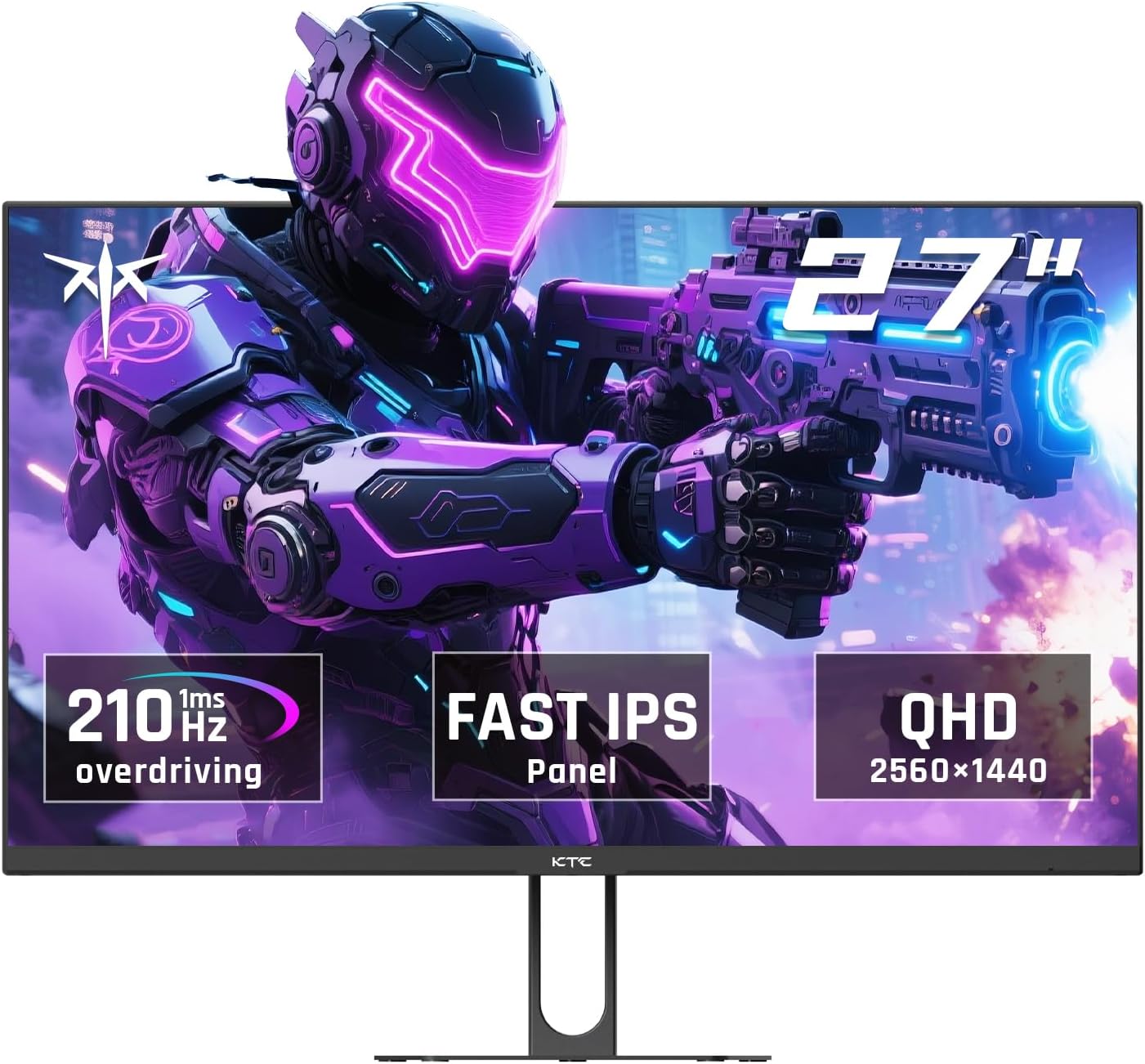
The KTC H27T22C is a 27-inch, 1440p gaming monitor running a Fast IPS panel at 200Hz native — with an overclock option to 210Hz. For a monitor at this price tier, that spec sheet is genuinely competitive. KTC isn’t a household name, but the KTC H27T22C has quietly built a strong following among buyers who want QHD gaming without paying flagship prices, and the 4.3-star rating across over 2,000 Amazon reviews backs that up.
In everyday use, 2560×1440 at 27 inches hits a pixel density sweet spot — noticeably sharper than 1080p at the same size, without the GPU overhead of 4K. The 200Hz refresh rate means gaming feels fluid whether you’re chasing frames in a competitive shooter or just doing open-world stuff on a mid-range GPU. Fast IPS means you get the wide viewing angles and colour accuracy that VA and TN can’t match at this level, with a 1ms MPRT response time keeping motion reasonably clean.
This is squarely aimed at PC gamers who want a step up from 1080p on a budget, and people who work from home and want one screen that handles spreadsheets and gaming sessions equally well. If you’re chasing OLED contrast, pro-grade colour grading tools, or a height-adjustable stand, look elsewhere. But if the goal is a capable QHD gaming panel that doesn’t embarrass itself on general use, this earns a genuine recommendation.
See the current listing and availability for the KTC H27T22C on Amazon.

What It’s Best For
Competitive and casual gaming. A 200Hz Fast IPS panel at 1440p is a legitimately good gaming setup. The jump from 60Hz to 200Hz is not subtle — motion feels completely different, especially in fast-paced shooters and racing games. The 1ms MPRT response time keeps ghosting manageable, though it’s worth understanding that MPRT figures are measured differently from GtG — more on that shortly. The 210Hz overclock option is a minor bonus rather than a selling point, but it’s there if you want to push it. Adaptive Sync support covering both FreeSync and G-Sync means this works cleanly with both AMD and Nvidia GPUs, which matters if you ever swap graphics cards.
Day-to-day work and productivity. Fast IPS panels are genuinely pleasant to work on. The wide 178-degree viewing angles mean the image stays consistent if you’re glancing off-axis, which matters when you’re working for hours at a time. The 2560×1440 resolution gives you meaningfully more screen real estate than 1080p — useful for multi-window workflows, spreadsheets, or having a browser and document open side by side. The built-in 2W speakers won’t replace a decent audio setup, but they’re adequate for video calls and background audio without running a cable to an external speaker. Whether gaming or productivity is your priority changes which specs matter most — here, the KTC H27T22C covers both without obvious compromise.
Colour-conscious general use. The claimed 101% DCI-P3 and 131% sRGB coverage with a ΔE<2 colour accuracy figure is strong on paper for a budget gaming panel. That level of colour accuracy isn’t going to satisfy a professional photo editor who needs hardware-calibrated output, but for content consumption, video editing at a hobbyist level, and general creative work, it’s a better starting point than most monitors in this category. The 450 cd/m² brightness is solid — enough to stay usable in a well-lit room.
The Specs That Really Matter
The Fast IPS panel is one of the better decisions KTC made here. Standard IPS panels at this price tier sometimes struggle with motion clarity; Fast IPS variants are optimised to reduce pixel response times, which makes a visible difference in gaming. You get the strong colour accuracy and wide viewing angles that IPS is known for — the 178-degree viewing angle claim holds up as a meaningful advantage over VA panels, which tend to shift colour noticeably off-axis. If you want a deeper understanding of how panel technology shapes the buying decision, the panel types guide breaks it down without the jargon.
The 200Hz native refresh rate is the headline spec, and it genuinely matters for gaming. The gap between 144Hz and 200Hz is smaller than the jump from 60Hz to 144Hz, but it’s not nothing — you’ll notice smoother motion in fast scenes if your GPU can push the frames to match. The 1ms response time is quoted as MPRT, which measures how long a pixel remains visible during a backlight strobe, rather than the actual time a pixel takes to change state (GtG). MPRT and GtG are not the same figure, and manufacturers lean on MPRT because it produces a more flattering number. In practice, Fast IPS response is still good — just don’t treat the 1ms figure as a literal GtG measurement.
The HDR400 certification deserves a mention, specifically to manage expectations. HDR400 requires a minimum peak brightness of 400 cd/m² — this monitor exceeds that at 450 cd/m² — but HDR400 does not include local dimming, and the contrast improvement over SDR is minimal. With a static 1000:1 contrast ratio, you won’t see the deep blacks that make HDR content look genuinely different on premium panels. Call it HDR-adjacent rather than proper HDR. Use it if a game supports it and see for yourself, but don’t factor it into the buying decision as a meaningful feature. As we move into 2026, HDR400 is increasingly the baseline entry point that reputable reviewers flag as more of a checkbox than a feature — and that’s exactly what it is here.
Connectivity is functional rather than generous. You get one DisplayPort 1.4 and two HDMI 2.0 ports, which covers the basics — PC via DP, console via HDMI, with a spare port for a second device. No USB-C, no Thunderbolt, and the single USB 2.0 port is for peripherals only, not power delivery. For most gaming and home use setups that’s fine, but if you were hoping to run a laptop via USB-C, this isn’t the one. The connectivity guide covers what to check before committing to a port configuration.
The 100×100mm VESA mount support is worth noting — it means you’re not locked to the stock stand if the ergonomics don’t work for your setup. The tilt range is -5° to 15°, which is standard, but there’s no height adjustment on the stand. If you sit higher or lower than the default position, a VESA arm is the practical fix.
For a fuller picture of what these numbers mean in plain English before committing to a purchase, the specs explained guide is worth five minutes of your time.
Check the full spec sheet and buyer Q&As for the KTC H27T22C on Amazon.
What Buyers Are Saying
The KTC H27T22C holds a 4.3-star rating from 2,068 Amazon customer reviews — a meaningful sample size that reflects real-world use across a range of setups. The picture that emerges is broadly positive, with consistent praise for image quality and build, and a handful of quality control concerns in the minority.
The most repeated praise is the visual quality relative to price. Buyers coming from 1080p or older 60Hz panels consistently describe the upgrade as significant — more screen real estate, noticeably sharper image, and smoother motion. Several UK reviewers specifically mentioned the out-of-box colour reproduction as a pleasant surprise. One buyer described the picture as vivid enough to be mistaken for OLED, which is a bit of a stretch but reflects genuine enthusiasm rather than marketing copy. Setup feedback is strong — the monitor ships with a DisplayPort cable included, which multiple buyers flagged as unusual and helpful, and assembly of the stand is described as straightforward.
The negative reviews are worth understanding clearly. Two UK buyers reported quality control issues: one received a monitor with a broken power button, another experienced a green line and yellow discolouration on the panel within minutes of unboxing. These are individual unit failures rather than systemic design flaws, but they’re genuine failures. KTC’s 3-year manufacturer warranty is the relevant safety net here — if you receive a faulty unit, you have a clear route to resolution. It’s also worth noting that some reviewer comments in the dataset appear to describe different KTC models entirely, which suggests a few reviews may have been submitted to the wrong listing — treat the general sentiment rather than specific model callouts from those entries.
The tilt-only stand comes up occasionally as a limitation, particularly from buyers who work at this screen for extended periods. No widespread complaints about the OSD controls or colour accuracy out of box, which is a reasonable sign the factory calibration is decent for a budget panel.
Buyer Highlights
“Went from 60Hz 1080p to 200Hz 1440p and the difference is massive — would definitely recommend for the price.” — A recurring theme from buyers making their first meaningful monitor upgrade.
“Came with a DisplayPort cable in the box, which was a first for me and genuinely useful.” — Several buyers flagged this as a small but appreciated touch that most competitors skip.
“Stand feels solid, monitor doesn’t wobble — better build quality than I expected at this price.” — Common reaction from buyers who were sceptical about a lesser-known brand.
“Colours are vibrant after a bit of tweaking — you genuinely couldn’t tell it wasn’t OLED.” — Enthusiastic but consistent feedback from buyers upgrading from older budget IPS screens.
“Mine arrived with a faulty power button — annoying, but the return process was straightforward.” — Isolated QC issue; not the majority experience, but worth knowing it has occurred.

Worth Knowing Before You Buy
The stand offers tilt adjustment only — -5° to 15°. No height, no swivel, no pivot. For casual gaming that’s often fine, but if you’re using this for long work sessions or your desk setup puts the screen at an awkward height, you’ll want to factor in a VESA arm from the start. The 100×100mm VESA mount is confirmed, so the option is there — just budget for it separately if ergonomics matter to you. The screen size and positioning guide covers viewing distance and height recommendations worth checking before you finalise your desk setup.
Quality control appears solid overall, but the review data includes clear examples of units arriving with panel defects and hardware faults. This isn’t unique to KTC — it’s a reality across budget panel manufacturers — but it does mean you should inspect the screen carefully within the first few days of use and test the controls immediately. The 3-year warranty is a genuine positive and covers more ground than many competitors at this price point. If anything is wrong, the warranty gives you a proper resolution path rather than leaving you stuck with a faulty unit.
The built-in 2W speakers are genuinely basic. They’ll handle a Teams call or YouTube video without embarrassing you, but they won’t replace even a modest desk speaker setup for music or immersive gaming audio. Manage expectations going in and you won’t be disappointed. Similarly, the single USB 2.0 port is a peripheral hub in name only — it won’t charge anything meaningful and doesn’t support data transfer at modern speeds. If USB passthrough matters to your workflow, this isn’t the monitor for it.
The HDMI 2.0 ports are worth flagging for console users. PS5 and Xbox Series X both support 4K at 60Hz or 1080p at 120Hz via HDMI 2.1. This monitor tops out at 1440p and uses HDMI 2.0, so console users won’t get the full high-frame-rate benefit that HDMI 2.1 would unlock. For PC gaming via DisplayPort, that limitation doesn’t apply.
View current stock and delivery options for the KTC H27T22C on Amazon.
Who Should Buy It (And Who Shouldn’t)
Buy If
- You’re upgrading from a 1080p or 60Hz screen and want a meaningful step up in both sharpness and smoothness without paying flagship prices — 1440p at 200Hz on Fast IPS is a genuine upgrade that you’ll notice immediately.
- You use an AMD or Nvidia GPU and want adaptive sync that works properly with both — FreeSync and G-Sync compatibility means no screen tearing regardless of which camp you’re in.
- You want one monitor for gaming and daytime work — the Fast IPS panel handles both without the colour shift or contrast issues you’d see on a budget VA at the same size.
- You’d prefer to mount this on a VESA arm from day one — the 100×100mm mount is confirmed and saves you being locked to the stock stand.
Avoid If
- You’re a PS5 or Xbox Series X player who wants high-frame-rate output from your console — HDMI 2.0 caps you out and you’ll lose the benefit that HDMI 2.1 would provide; look for a monitor with HDMI 2.1 instead.
- You need a height-adjustable stand and don’t want to buy a separate arm — this stand only tilts, and there’s no ergonomic adjustment otherwise.
- You want genuine HDR performance with deep blacks and visible contrast improvement — HDR400 with a static 1000:1 contrast ratio won’t deliver that; you’d need a panel with local dimming or OLED for meaningful HDR. The monitor buying guide covers what to look for if HDR is a genuine priority.
The Bottom Line
The KTC H27T22C is a well-specced budget gaming monitor that delivers where it counts — 1440p, 200Hz, Fast IPS, adaptive sync across both AMD and Nvidia, and a colour output that genuinely punches above its price tier. The stand is basic, the HDR is entry-level only, and the HDMI ports are version 2.0 rather than 2.1, but none of those are surprises at this price point and the monitor is honest about what it is. Over 2,000 buyers and a 4.3-star average says the experience matches the spec sheet for most people. If a capable, smooth-feeling QHD gaming monitor without a lot of fuss is what you’re after, this is a sensible place to land.
Find the KTC H27T22C on Amazon and check current availability.
At The Monitor Expert, our approach is built on data transparency rather than simulated hands-on testing. We rigorously analyse official manufacturer specifications and aggregate verified customer sentiment to provide honest, straightforward buying advice that cuts through the marketing noise.
As an Amazon Associate, I earn from qualifying purchases.
Browse by Specification
Looking for something specific? Browse our analyses by hardware and feature below, or check all monitor analyses in the Gaming Monitors and Budget Monitors category archives.
[IPS Monitors] — [VA Monitors] — [TN Monitors] — [OLED Monitors]
Browse by Refresh Rate
[60Hz] — [75Hz] — [100Hz] — [120Hz] — [144Hz] — [165Hz] — [180Hz] — [200Hz] — [240Hz+] — [360Hz+]
Browse by Screen Size
[Small Screen] — [24-inch] — [27-inch] — [32-inch] — [Large Screen] — [Ultrawide]




