
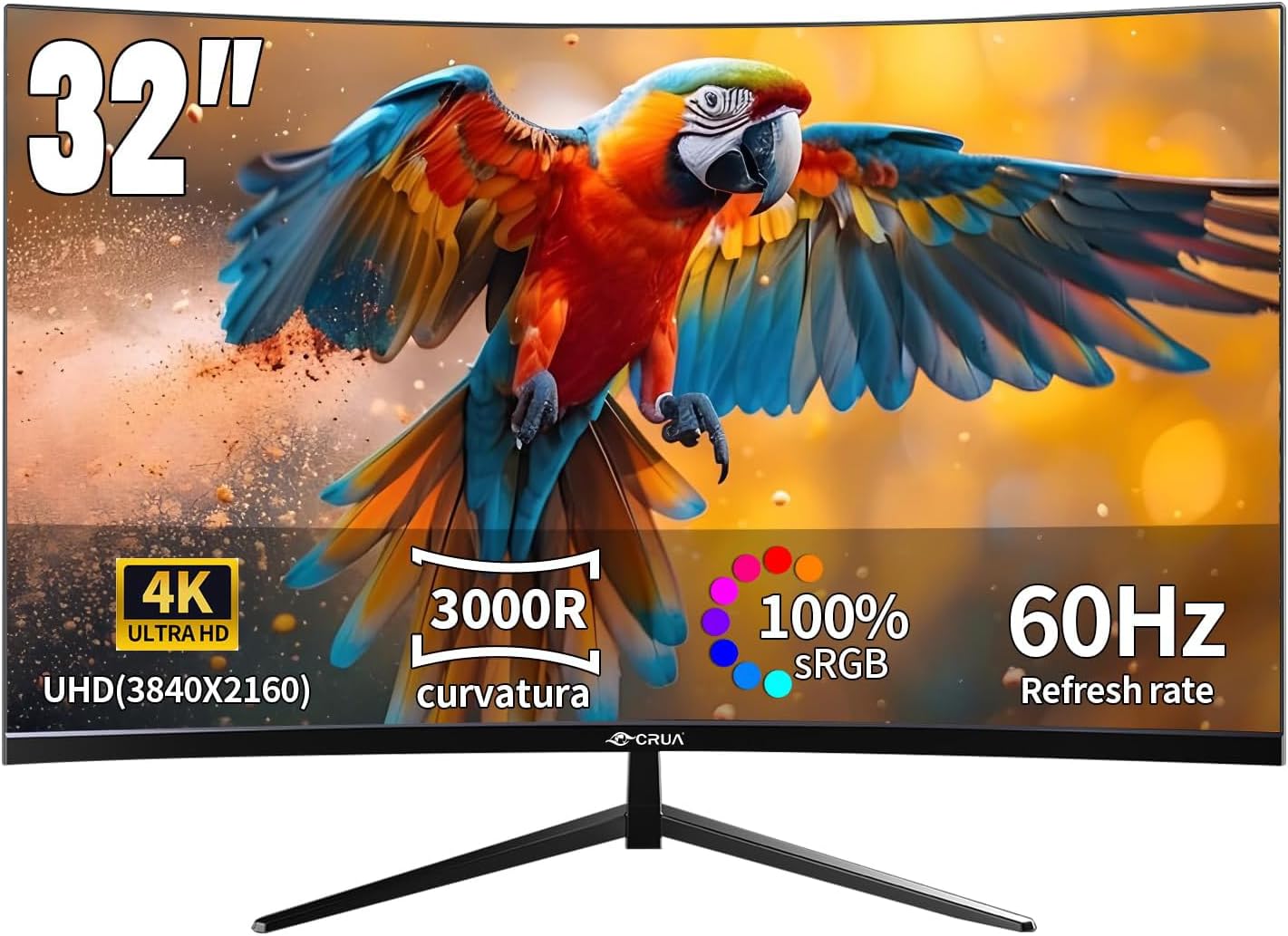
CRUA CR320QC Analysis: 4K VA at a Cautious Glance
My Honest Verdict
The CRUA CR320QC is a 32-inch, 4K curved monitor aimed squarely at buyers who want a large, sharp screen for everyday work, media, and casual gaming without spending a lot of money. The headline strength is straightforward: 3840×2160 resolution on a VA panel with a 3000R curve and a 3000:1 contrast ratio. That combination genuinely delivers deep blacks and a solid sense of visual depth that cheaper IPS monitors at this size simply can’t match.
What does that mean day-to-day? Text is crisp at 32 inches because the pixel density keeps fine detail sharp rather than blocky. The VA panel’s contrast means dark scenes in films have actual shadow detail rather than washed-out grey. The 3000R curve is subtle enough that it doesn’t feel gimmicky on a 16:9 screen — it just reduces edge distortion slightly. Where you will feel the limitation is the 60Hz refresh rate. For the tasks this monitor is genuinely built for — spreadsheets, trading dashboards, web browsing, movie nights — that’s fine. For competitive gaming or anything fast-paced, it isn’t.
This is a monitor for the person who wants a large, sharp, comfortable screen for work or home use and doesn’t care about high frame rate gaming. If you’re a competitive gamer, look elsewhere — the 60Hz cap rules this out. There’s also one verified buyer complaint worth flagging upfront: at least one unit was reported as shipping at 2560×1440 rather than 3840×2160. That’s a serious quality control concern worth keeping in mind. For non-gamers who receive the correct unit, this looks like a genuinely solid option.
See the current listing and availability for the CRUA CR320QC on Amazon.

What It’s Best For
Office and productivity work. This is where the CRUA CR320QC makes the most sense. A 32-inch screen at 3840×2160 gives you a lot of usable workspace — multiple windows, spreadsheets, documents side by side — without the text looking pixelated. One buyer uses it specifically for trading and notes stable, accurate image reproduction. The matte screen finish handles reflections sensibly in typical office lighting. If you’re staring at a screen for eight hours a day, the Flicker-Free and Low Blue Light features are legitimate quality-of-life additions, not just marketing bullet points.
Home media and streaming. VA panels are good for film watching. The 3000:1 contrast ratio means dark scenes actually look dark, which is the single biggest visual difference between a decent VA and most budget IPS screens. The 3000R curve at 32 inches wraps the image around your peripheral vision just enough to feel immersive without being disorienting. The HDR10 support adds some highlight punch on compatible content — though given there’s no brightness spec published, don’t expect the kind of HDR impact you’d get from a certified HDR600 or HDR1000 display. It’ll look better than SDR on HDR-flagged content. That’s the honest ceiling here.
Casual gaming. The CRUA CR320QC works for slower-paced or story-driven games where frame rate isn’t the priority. The VA panel delivers strong colour and contrast for open-world environments and cinematic scenes. Adaptive Sync via FreeSync keeps things tear-free within the supported range. At 60Hz, fast-twitch competitive titles like shooters or fighting games will feel sluggish compared to a 144Hz display — but for RPGs, strategy, or sim games, it’s entirely adequate. If you want to understand how refresh rate affects your gaming experience in practical terms, the gap between 60Hz and higher refresh rates is genuinely significant in fast genres.
The Specs That Really Matter
The VA panel is the right choice at this price tier for non-gaming use. VA delivers better native contrast than IPS — the 3000:1 contrast ratio here is a solid example of what VA does well. You get genuine deep blacks and punchy colours without needing to push brightness hard. The trade-off with VA is viewing angle: colours shift slightly when viewed off-axis. At a single-user desk setup, that’s rarely noticeable. For anyone wanting a deeper understanding of how panel technology affects image quality, our panel types guide covers this in plain terms. The 100% sRGB coverage is a useful callout for anyone doing colour-sensitive work — photo editing, content creation — because it means what you see on screen maps accurately to standard colour profiles.
The 3840×2160 resolution at 32 inches gives a pixel density that keeps text and UI elements looking sharp without needing to scale aggressively. This is a meaningful improvement over 1080p at the same size, where individual pixels become noticeable. The practical upside is that you can run multiple applications side by side and still have enough pixel real estate to read comfortably. The potential downside: 4K content demands from your GPU — if you’re gaming at native resolution, your graphics card needs to push four times the pixels of 1080p. For office use and video, any modern integrated GPU handles it fine. For more context on how screen size and resolution interact, our display size and resolution guide is worth a read, especially if you’re weighing this against a 27-inch 1440p alternative.
The 60Hz refresh rate is the most important spec to be clear-eyed about going into 2026. For work, browsing, and media, 60Hz is perfectly smooth. For gaming, it is the limiting factor. The advertised 1ms response time sounds fast — and technically it may be — but response time claims at this tier are frequently measured using the most favourable methodology available rather than typical grey-to-grey values. Treat it as directionally positive rather than a precise figure. The Adaptive Sync (FreeSync) implementation helps within the supported frame range, eliminating tearing for games running below 60fps. Connectivity is HDMI and DisplayPort — two total ports. No USB-C, which limits flexibility for laptop users. If your setup involves modern laptops or creative workstations, that’s worth checking against your own ports. Our connectivity guide covers what to look for here.
Check the full spec sheet and buyer Q&As for the CRUA CR320QC on Amazon.
What Buyers Are Saying
The CRUA CR320QC holds a 4.3 out of 5 rating from 1,239 customer reviews on Amazon. That’s a meaningful sample size, and the overall picture is positive — particularly for buyers using the monitor for non-gaming purposes. The recurring themes in positive reviews are image quality, ease of setup, and perceived value. Multiple buyers mention being pleasantly surprised by colour accuracy and sharpness straight out of the box.
The stand is the most consistent criticism. Multiple buyers note it’s fixed — no height adjustment, no swivel — and that it sits low, angling the screen downward toward the desk. This isn’t a minor issue for extended use; ergonomics matter over a long working day. The VESA mount compatibility at 100×100mm is the practical workaround — a third-party arm solves the problem entirely, but it’s an added cost and inconvenience. The monitor also has no built-in speakers, which some buyers flag, though most treat external audio as standard at this tier.
The most serious complaint in the reviews is a single verified report of a unit arriving with a native resolution of 2560×1440 rather than the advertised 3840×2160. The buyer confirmed the model number matched. Whether this is a production batch issue, a mislabelled unit, or an isolated case isn’t clear from the available data — but it’s a real complaint from a real buyer and worth flagging. Most other buyers report receiving the correct 4K specification without issue, but it’s the kind of thing you want to verify as soon as the box is open.
Buyer Highlights
“Good stable image and colours — works great for trading.” — Reflects a consistent theme from buyers in productivity and finance roles who value colour accuracy over refresh rate.
“The screen is fantastic but the stand is very disappointing — fixed with no adjustment, points at the desk.” — The stand limitation comes up repeatedly and is the single most mentioned practical frustration.
“Lovely crisp picture, came well packaged, and the screen is tiltable.” — Out-of-box experience consistently described positively, with tilt adjustment noted as a basic but functional saving grace.
“My first monitor — it’s super smooth, the size is perfect, the colours are awesome.” — Common reaction from first-time buyers stepping up from laptop screens or smaller displays.
“This wasn’t 4K — it arrived at 2560×1440, not the advertised resolution.” — An isolated but serious quality control report that warrants checking immediately on arrival.

Worth Knowing Before You Buy
The stand situation is the most practical concern. It’s a fixed-height mount with tilt only — no height adjustment, no swivel. Buyers report it sits noticeably low, which creates neck strain during extended sessions. If you’re planning to use this as a primary work monitor for full days, factor in either a monitor arm or a riser from the start. The VESA compatibility at 100×100mm is a genuine saving grace here — arms are widely available and not expensive. Our monitor buying guide covers ergonomics and stand features as a key buying factor, particularly for extended desk use.
The resolution discrepancy complaint deserves direct acknowledgement. One buyer received a unit running at 2560×1440 despite the listing and model number both specifying 3840×2160. This could be a one-off fulfilment error or something more systemic — the data doesn’t allow a firm conclusion either way. What it does mean is: check your display settings immediately on setup and confirm native resolution before anything else. If it’s wrong, Amazon’s returns process should handle it straightforwardly. The HDR10 support is also worth contextualising honestly — HDR10 is an entry-level certification, and without a published peak brightness figure, it’s difficult to know how much of a practical difference it makes. Expect a mild improvement over SDR, not a dramatic HDR transformation. The 1-year warranty from CRUA is standard for the category; CRUA is a relatively new brand with limited long-term reliability data compared to established names. That’s not a disqualifier, but it’s fair context for a purchase decision in early 2026.
View current stock and availability for the CRUA CR320QC on Amazon.
Who Should Buy It (And Who Shouldn’t)
Buy If
- You want a large 32-inch 4K screen for productivity work, trading, or media consumption and don’t need high refresh rates — the combination of resolution and VA contrast delivers genuine visual quality at this use case.
- You’re planning to use a monitor arm or VESA mount anyway — the stand limitation becomes irrelevant and you get full ergonomic control without paying a premium for a tilt-swivel-height stand built into the monitor itself.
- You’re coming from a 1080p or 1440p screen at the same size and want noticeably sharper text and more desktop real estate for multi-window workflows — the pixel density jump at 4K on a 32-inch panel is genuinely noticeable. Our guide on choosing the right monitor for your use case is worth checking if you’re still deciding between resolutions.
Avoid If
- You’re primarily a competitive or fast-paced gamer — the 60Hz refresh rate is a hard ceiling and no amount of Adaptive Sync changes how fluid the motion feels compared to a 144Hz or higher panel.
- You need USB-C connectivity for a modern laptop or want a single-cable docking solution — there is no USB-C port on this monitor, which limits its usefulness in a streamlined laptop-centric setup.
The Bottom Line
The CRUA CR320QC makes a reasonable case for itself as a large-format work and media screen. 4K resolution on a 32-inch VA panel with a 3000:1 contrast ratio delivers a genuinely sharp, visually rich image that suits productivity, film watching, and slower-paced gaming. The stand is a real ergonomic weakness, and the isolated resolution discrepancy report means you should verify your unit on arrival. But for the buyer who wants a big, sharp screen for work and home use and plans to mount it properly — this earns a measured recommendation.
Find the CRUA CR320QC on Amazon and check current availability.
At The Monitor Expert, our approach is built on data transparency rather than simulated hands-on testing. We rigorously analyse official manufacturer specifications and aggregate verified customer sentiment to provide honest, straightforward buying advice that cuts through the marketing noise.
As an Amazon Associate, I earn from qualifying purchases.
Browse by Specification
Looking for something specific? Browse our analyses by hardware and feature below, or check all monitor analyses in the Office Monitors and Mid-Range Monitors category archives.
[IPS Monitors] — [VA Monitors] — [TN Monitors] — [OLED Monitors]
Browse by Refresh Rate
[60Hz] — [75Hz] — [100Hz] — [120Hz] — [144Hz] — [165Hz] — [180Hz] — [200Hz] — [240Hz+] — [360Hz+]
Browse by Screen Size
[Small Screen] — [24-inch] — [27-inch] — [32-inch] — [Large Screen] — [Ultrawide]




