
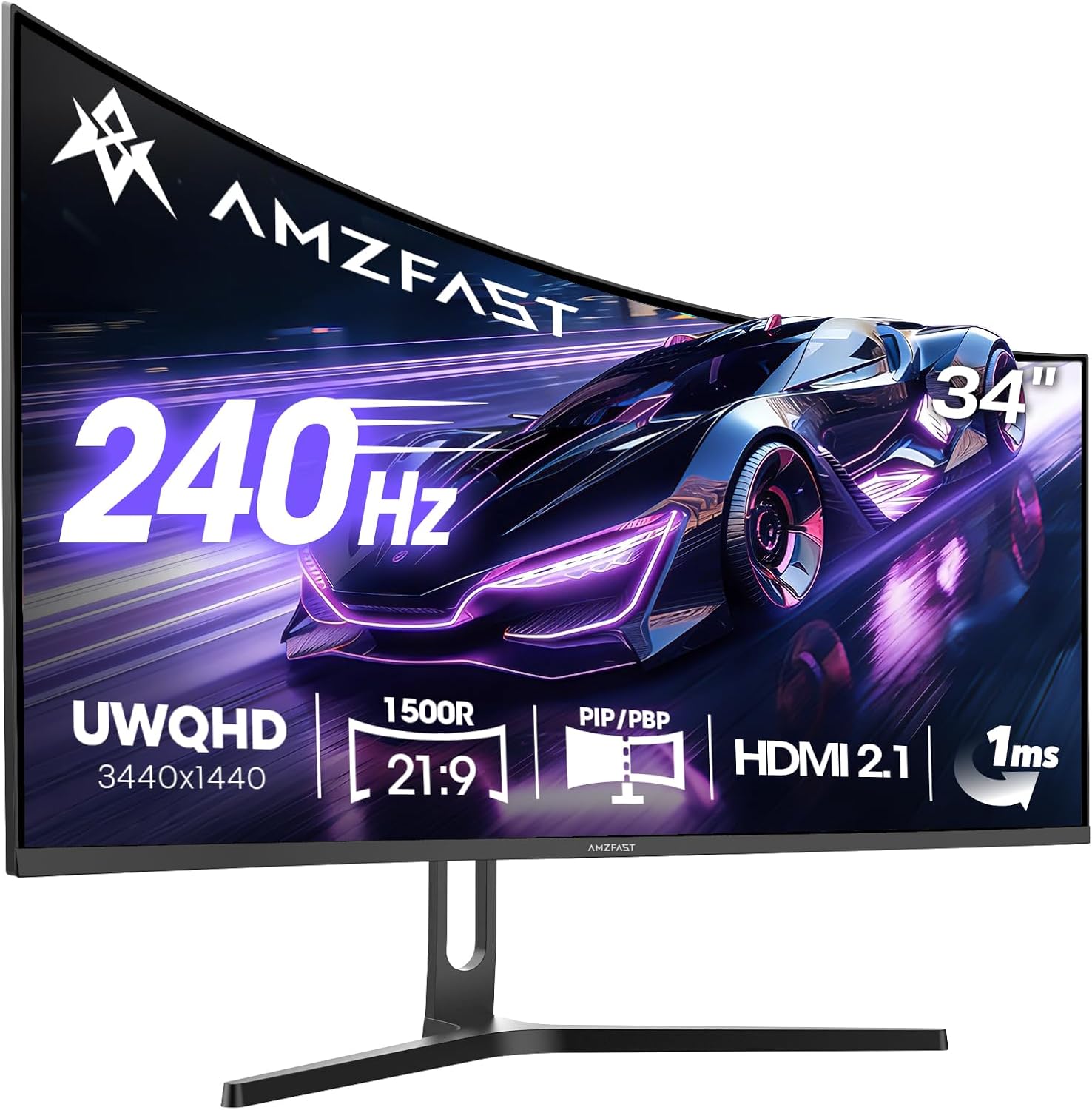
Amzfast AMZG34C5QPro Analysis: 240Hz Ultrawide Gaming Experience
My Honest Verdict
The Amzfast AMZG34C5QPro is a 34-inch ultrawide gaming monitor that punches well above what you’d expect from a brand you’ve probably never heard of. It pairs a 3440×1440 resolution with a 240Hz refresh rate and a VA panel — a combination that, on paper, costs significantly more from established names. The headline limitation is that Amzfast is an unknown quantity in terms of long-term reliability, and one buyer had a genuinely bad experience. That needs to be weighed honestly. But the majority verdict from people who bought it is clear: this delivers.
What you’re actually getting in daily use is a wide, curved screen that makes games feel genuinely immersive, with the kind of contrast VA panels produce that IPS screens simply can’t match. Deep blacks, punchy colours, a fast-moving picture that stays sharp. The 1500R curvature wraps the edges into your peripheral vision without feeling gimmicky at this size. The 21:9 aspect ratio means more horizontal real estate — useful for games that support ultrawide, and genuinely useful for productivity layouts too.
This is squarely aimed at PC gamers who want an ultrawide at 240Hz without paying flagship prices, and at productivity users who need two logical workspaces on one screen. Console buyers should read the PS5 caveat below first — it’s relevant. If you’re after a monitor with a proven five-year track record from a brand with a UK service network, look elsewhere. If you’re prepared to buy from a newer name on the strength of what the specs and buyer feedback actually say, this is a serious option.
See the Amzfast AMZG34C5QPro listing and current availability on Amazon.

What It’s Best For
PC Gaming: This is where the AMZG34C5QPro makes its strongest case. At 240Hz on a 34-inch ultrawide, fast-paced games — shooters, racing titles, action RPGs — feel noticeably fluid. The VA panel’s 3000:1 native contrast ratio means dark environments actually look dark, not washed-out grey. Buyers specifically mention titles like Doom: The Dark Ages and COD feeling strong on this screen. The 1ms MPRT response time keeps motion sharp enough for competitive play. Adaptive Sync handles the variable frame rate side, so screen tearing isn’t something you’ll need to think about once it’s configured.
Productivity and Multi-Source Work: The 21:9 format gives you enough horizontal space to comfortably run two application windows side by side without either feeling cramped. The Picture-by-Picture (PBP) mode takes this further — multiple buyers specifically called it out as a reason they bought this over alternatives. One buyer runs a MacBook and a Surface Pro simultaneously on the same screen, switching between inputs via customisable shortcut buttons on the OSD. That’s a genuinely useful feature that costs meaningfully more on branded competitors. The HDMI 2.1 and DP 1.4 port combination means you’re not compromising on connectivity to pull it off.
Home Media and Ultrawide Content: Ultrawide films look the way they were shot — no black bars. At 34 inches with a 1500R curve and a 3000:1 contrast ratio, cinema content is a different experience to a flat 27-inch. Buyers mention ultrawide wallpapers and videos looking genuinely striking. If you occasionally use your monitor for streaming or films and don’t want a separate TV setup, this makes a reasonable case for itself in that role too.
The Specs That Really Matter
The VA panel is the most important thing to understand before buying. VA sits between IPS and TN in most respects — better contrast than IPS, worse off-axis viewing than IPS, faster pixel response than older VA designs. The 3000:1 native contrast ratio is the real benefit here: blacks are genuinely black, not the milky grey that IPS panels often show in dark room conditions. For gaming, particularly in darker game environments, this is a meaningful visual difference. The trade-off is that viewing angles aren’t as forgiving as IPS — if you’re regularly viewing the screen at a sharp angle, colours will shift. Sitting directly in front of a curved screen, as most people do, this isn’t a practical issue. If you want to understand how panel types affect your daily experience, the full breakdown of VA, IPS, TN and OLED differences is worth reading before deciding.
The 240Hz refresh rate is the headline number, and it’s delivered via DP 1.4 — you need to use the DisplayPort connection to hit it. The included cable is 1.5m DP, so you’re ready out of the box. Over HDMI 2.1 you can still push high frame rates, but one buyer flagged that using a standard 60Hz HDMI cable caused the picture to look blurry — use a proper high-speed cable. At 3440×1440 resolution on a 34-inch screen, pixel density sits around 110 PPI, which is sharp enough that you won’t see individual pixels at normal viewing distance. Understanding what resolution actually means at different screen sizes is something worth looking at in more detail if you’re comparing options — the display size and resolution guide covers this clearly.
The HDR implementation here is listed as HDR10 with 300 nits brightness. That’s entry-level HDR territory — it meets the basic standard but won’t produce the specular highlight pop of proper HDR600 or HDR1000 implementations. Buyers who activated it without enabling it in the monitor’s OSD as well as Windows found it looked bad; once both are configured it contributes positively to the picture. Don’t buy this expecting OLED-grade HDR performance. The 130% sRGB colour gamut is a strong point though — wider gamut than most screens at this tier, and buyers consistently comment on colours looking vivid and well-saturated. By 2026 standards, the colour performance here sits above what this price bracket normally delivers.
The relationship between refresh rate and response time is worth understanding for gaming monitors specifically. The 1ms MPRT figure is a motion blur reduction metric, not a traditional grey-to-grey response time — it tells you about the pixel backlight strobe behaviour, not raw panel speed. In practice, at 240Hz with Adaptive Sync active, motion is genuinely clean for the vast majority of gaming scenarios.
Check the full specification sheet and buyer Q&As for the Amzfast AMZG34C5QPro on Amazon.
What Buyers Are Saying
The Amzfast AMZG34C5QPro currently holds a 4.4 out of 5 rating from 106 customer reviews on Amazon. That’s a reasonable sample size and the distribution is telling: the overwhelming majority are four or five stars, with praise that’s specific and consistent rather than vague. One one-star review stands out and deserves honest acknowledgement.
The dominant themes in positive feedback are colour quality, the out-of-box experience, and value relative to established brands. Multiple buyers mention being genuinely surprised by the picture quality — particularly the vividness and contrast. The stand assembly consistently gets praised for being tool-free and straightforward. The PBP/PIP functionality gets specific attention from productivity users, particularly those running multiple computers through a single screen. Gaming buyers mention titles by name and describe the ultrawide field of view as a meaningful upgrade.
The single one-star review raises concerns about hazy picture quality, flickering, limited Hz over PS5 and PC, and an absent manual. These are specific enough to take seriously. It’s worth noting that no other buyer mentions flickering, and multiple buyers mention sharp, bright picture quality — suggesting either a defective unit or a configuration issue. The PS5 limitation is real and corroborated elsewhere: the PS5 doesn’t natively output to ultrawide resolutions, so the screen typically either stretches or adds black bars. That’s not a monitor fault, but it’s relevant if you’re primarily a console buyer. One buyer reports it working well with PS5 — this is likely because the PS5 outputs a compatible signal that the monitor handles correctly, just not at full ultrawide. Check the connectivity setup carefully if this matters to you; the monitor connectivity guide explains how HDMI versions and bandwidth interact with resolution and refresh rate.
Buyer Highlights
“Absolutely stunning display and colours — makes game colours pop and has many modes.” — Consistent across gaming-focused buyers, particularly those running story-driven or visually rich titles.
“Picture by picture is spot on — I can run my Mac and Surface Pro on the same screen simultaneously.” — Specific praise from productivity buyers running multi-device setups, where this feature typically costs more on branded competitors.
“Almost matching the quality and brightness of my MSI monitor, which was significantly more expensive.” — A direct comparison from a buyer with a named premium reference point, which gives this more weight than a standalone five-star rating.
“HDR looks horrible at first — you need to activate it in the monitor’s own menu as well as Windows.” — Not a complaint, more of a setup note that saved at least one buyer from returning a working monitor.
“Make sure you use a proper high-speed HDMI cable, otherwise the screen looks fuzzy.” — A practical cable quality note that’s worth passing on before someone blames the panel.

Worth Knowing Before You Buy
Amzfast is a newer brand and that cuts both ways. The specs and certifications listed (ISO 9001, CE, UL) are legitimate quality indicators, and the buyer feedback is broadly positive. But the long-term reliability data simply doesn’t exist yet — established brands have years of failure rate data that Amzfast doesn’t. The warranty is one year, which is standard for this tier but worth noting. If you’re the kind of buyer who needs the reassurance of a brand with a UK support infrastructure and a track record, factor that in. If you’re comfortable buying on the evidence available, the evidence is reasonably strong. Before committing, the monitor buying guide covers what to look for in warranty and brand support at different price points.
The stand assembly is consistently praised as tool-free and simple, which is worth noting for buyers who’ve wrestled with flatpack monitor stands before. The monitor is VESA 75×75mm compatible, and at least one buyer is using it on a gas arm without issues — useful if you want to free up desk space or need height and tilt flexibility beyond what the stand offers, since stand ergonomic range isn’t specified in the data. There are no built-in speakers, which surprises some buyers despite it being stated in the product description — make sure you have audio sorted separately. The OSD menu received one criticism around usability, but multiple buyers praised the customisable shortcut buttons for quick input switching. HDR needs to be enabled in both the monitor’s OSD and your operating system settings to work correctly — skipping one side of that will produce a noticeably worse picture than with HDR off entirely.
Console buyers specifically: the PS5 does not output ultrawide natively. You’ll get a picture, but not the full 3440×1440 ultrawide experience the screen is designed for. If a PC is your primary use case, this isn’t relevant. If you’re primarily a console buyer who’s hoping to use this as an ultrawide gaming screen for a PS5, you’ll likely be disappointed with the native output. Choosing the right monitor for a specific use case is worth thinking through carefully — the how to choose a monitor guide covers gaming, productivity and console setups separately.
View current stock and availability for the Amzfast AMZG34C5QPro on Amazon.
Who Should Buy It (And Who Shouldn’t)
Buy If
- You’re a PC gamer who wants a 34-inch ultrawide at 240Hz and the established-brand equivalent is outside your budget — the spec-to-cost ratio here is genuinely strong.
- You run multiple computers or input sources and want PBP functionality that lets you display two sources side by side on one screen without a KVM switch.
- You’re upgrading from a flat 1080p or 1440p monitor and want a meaningful step up in both immersion and workspace width — the 21:9 ultrawide format is a noticeable change in daily use.
- You’re planning to wall-mount or use a monitor arm — VESA 75×75mm compatibility is confirmed, and the stand being tool-free means assembly is low-friction either way.
Avoid If
- Your primary use case is PS5 gaming and you specifically want the ultrawide field of view — the PS5 doesn’t output native ultrawide, so you won’t get the full 21:9 experience from a console.
- You need a monitor from a brand with a proven multi-year UK support track record and documented failure rates — Amzfast doesn’t have that history yet, and the one-year warranty reflects that tier.
- You need colour-critical work accuracy — the 130% sRGB coverage is wide but the monitor isn’t factory-calibrated, and professional colour work needs verified Delta-E figures that aren’t available here.
The Bottom Line
The Amzfast AMZG34C5QPro is a genuinely capable ultrawide gaming monitor that delivers a spec sheet — 34-inch VA, 3440×1440, 240Hz, HDMI 2.1 and DP 1.4, PBP/PIP — that would cost considerably more from a name-brand manufacturer. The buyer feedback is broadly positive and specific enough to be credible. The unknowns are brand longevity and long-term reliability, which are real considerations and not marketing noise. If you’re a PC gamer or multi-source productivity user who wants the most screen for the budget and is comfortable with those trade-offs, this is a serious option worth considering.
Find the Amzfast AMZG34C5QPro on Amazon and read the latest buyer questions and answers.
At The Monitor Expert, our approach is built on data transparency rather than simulated hands-on testing. We rigorously analyse official manufacturer specifications and aggregate verified customer sentiment to provide honest, straightforward buying advice that cuts through the marketing noise.
As an Amazon Associate, I earn from qualifying purchases.
Browse by Specification
Looking for something specific? Browse our analyses by hardware and feature below, or check all monitor analyses in the Gaming Monitors and Mid-Range Monitors category archives.
[IPS Monitors] — [VA Monitors] — [TN Monitors] — [OLED Monitors]
Browse by Refresh Rate
[60Hz] — [75Hz] — [100Hz] — [120Hz] — [144Hz] — [165Hz] — [180Hz] — [200Hz] — [240Hz+] — [360Hz+]
Browse by Screen Size
[Small Screen] — [24-inch] — [27-inch] — [32-inch] — [Large Screen] — [Ultrawide]




