
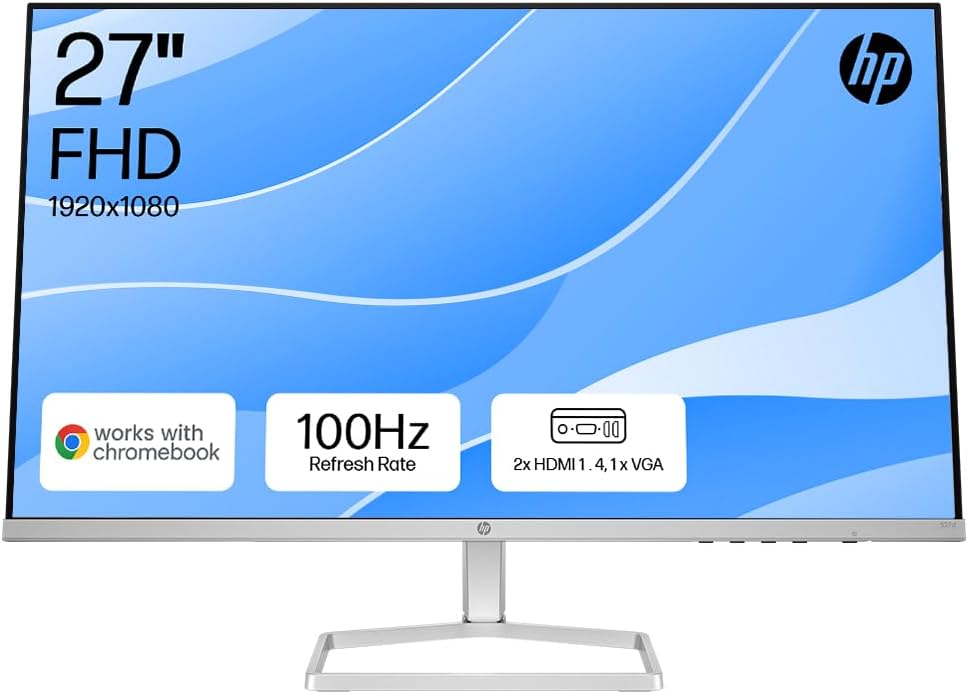
HP Series 5 27-inch FHD Monitor (527sh) Analysis: IPS at This Size
My Honest Verdict
The HP Series 5 27-inch FHD Monitor (527sh) is a competent, no-fuss office screen aimed squarely at people who want something decent for everyday work without overcomplicating the decision. The headline strength is a genuine IPS panel with 99% sRGB coverage and a 1500:1 contrast ratio — those are solid numbers for this tier. The headline limitation is equally simple: 1920 x 1080 resolution on a 27-inch screen is a stretch. Pixel density takes a hit, and anyone used to sharper displays will notice.
In everyday use, the HP Series 5 27-inch FHD Monitor (527sh) delivers colours that look natural and consistent across a wide viewing angle — that’s the IPS panel doing its job. The 100Hz refresh rate won’t turn heads in gaming circles, but it makes casual use and light gaming feel noticeably smoother than the 60Hz panels that still dominate this segment. Brightness sits at 300 nits, which is adequate for a well-lit room but won’t cope with direct sunlight. The 5ms response time is fine for productivity and casual gaming — don’t expect it to handle fast-paced titles at a serious level, but that’s not what this monitor is for.
If you’re kitting out a home office, a study desk, or a secondary workstation and want an IPS screen that won’t embarrass itself on colour accuracy, this is a reasonable pick. If you’re a content creator who needs pixel-level precision, or a gamer who wants high refresh with sharp visuals, look elsewhere. The resolution-to-size ratio is the one thing worth sitting with before you commit.

What It’s Best For
Office and productivity work is where the HP Series 5 27-inch FHD Monitor (527sh) earns its keep. The IPS panel means colours stay consistent when colleagues lean over to look at your screen, spreadsheets don’t look washed out from an angle, and long-session eye strain is reduced compared to a TN alternative. The built-in blue light reduction with Eyesafe certification is a genuine addition for people spending eight hours a day in front of a screen — not a marketing checkbox. The height and tilt adjustability means you can actually set it up properly, which matters more than most buyers give credit for until they’ve sat at a badly positioned monitor for six months.
Casual and light gaming gets a reasonable showing here. The 100Hz refresh rate with FreeSync adaptive sync means you won’t see tearing during everyday titles, and the step up from 60Hz is genuinely visible during fast motion — scrolling, cursor movement, video playback all feel more fluid. For anyone who plays older titles, indie games, or less demanding modern games at 1080p, this setup works without complaint. Just don’t come in expecting competitive shooter performance — the 5ms response time and FHD resolution at this size aren’t targeting that crowd.
Dual-screen setups are worth calling out specifically. The three-sided ultra-thin bezel makes the gap between two screens genuinely small, and the dual HDMI ports mean you can have two sources plugged in simultaneously without swapping cables. For anyone running a laptop alongside a desktop, or switching between a work machine and a personal one, that’s a practical convenience that saves daily frustration.
The Specs That Really Matter
The IPS panel is the most important spec here and it’s not front-and-centre in the marketing. IPS gives you consistent colour and brightness across a wide 178-degree viewing angle — if you’ve used a TN panel before and noticed colours shift when you tilt your head, this is the fix. For anyone who works with documents, images, or video on a daily basis, the visual consistency is noticeably better. There’s a fuller breakdown of what panel types mean in practice if you want to go deeper on this.
Resolution is the spec that needs the most honest treatment. 1920 x 1080 on a 27-inch screen gives you a pixel density that some people will find fine and others will find visibly soft, particularly on text. At 24 inches, 1080p looks sharp. At 27 inches it starts to show its limits — individual pixels become discernible at normal viewing distances. If most of your use is video content, spreadsheets, or casual browsing, you’ll adapt quickly. If you’re editing photographs or reading dense text all day, the softness may start to grate. Worth understanding what screen size and resolution trade-offs look like in real use before committing.
The 100Hz refresh rate lands in a useful middle ground. The jump from 60Hz to 100Hz is genuinely noticeable for everyday use — scrolling, window dragging, video playback all feel more fluid. The jump from 100Hz to 144Hz is less dramatic, especially outside of gaming. FreeSync support means compatible AMD GPUs and some consoles can sync their frame output to the display, eliminating screen tearing without needing to hit a fixed target. The 5ms response time is adequate for the intended use cases — casual gaming and productivity — though it wouldn’t survive scrutiny in a competitive gaming context. More on what these figures actually mean in practice over at the refresh rate and response time guide.
Connectivity on the HP Series 5 27-inch FHD Monitor (527sh) is functional but limited. Two HDMI ports and one VGA port covers most scenarios for home and office use, but there’s no DisplayPort and no USB-C. That rules out direct connection to modern laptops that rely on USB-C for display output without an adapter. If your setup depends on those connections, factor in a dongle or check your available ports first. The connectivity guide covers what to look for and why it matters depending on your hardware.
As of 2026, this spec tier — IPS, 1080p, 100Hz — represents the sensible floor for a new office monitor purchase. Going below this, you’re likely trading the IPS panel for TN, or dropping to 60Hz, neither of which is worth saving a few pounds over.
Check the full spec sheet and buyer Q&As for the HP Series 5 27-inch FHD Monitor (527sh) on Amazon.
What Buyers Are Saying
The HP Series 5 27-inch FHD Monitor (527sh) holds a rating of 4.5 out of 5 from 184 customer reviews on Amazon — a meaningful sample size, and the sentiment is consistently positive with a small number of specific complaints worth flagging.
Colour accuracy is the most praised quality across the reviews. Multiple buyers independently highlight the vibrancy and accuracy of the display, with several noting it exceeded their expectations for this tier. The 99% sRGB coverage translates into something buyers actually notice — this isn’t a spec that’s disappearing into background noise. The 100Hz refresh rate gets frequent praise too, with buyers noting the improvement over their previous 60Hz screens for both daily use and casual gaming.
Ergonomics get a mixed but mostly positive response. The height adjustment mechanism is specifically called out by one long-term buyer as genuinely useful — it’s not just a tilt stand. Build quality reads as light but functional, and setup is consistently described as quick and straightforward. Several buyers purchased a second unit after being satisfied with the first, which is a credible signal of satisfaction.
The notable complaints fall into two categories. First, one buyer reported a cracked screen after the monitor was stored flat rather than left set up — the ultra-thin panel design requires more care in handling and storage than a conventional screen. This isn’t a manufacturing defect in the traditional sense, but it’s worth knowing if you’re the type to pack your monitor away regularly. Second, one buyer flagged a mismatch between the stand shown in product photos and what arrived — they had selected this specific model for its height-adjustable stand, and felt the physical unit didn’t match the visual presentation in the listing.
Buyer Highlights
“Bought a second one for another workstation — that tells you everything.” — A recurring pattern among satisfied buyers who found it reliable enough to duplicate.
“The colours are genuinely vibrant and accurate, not what I expected at this level.” — Common reaction from buyers upgrading from older or lower-spec screens.
“The slide mechanism to change monitor height is really useful — wish more monitors had this.” — Specific praise for the stand adjustability from a buyer who’d used it for nearly a year.
“Super easy to set up, everything just worked straight out of the box.” — Consistent feedback across multiple buyers on the out-of-box experience.
“Screen is wide, sharp, and comfortable to look at — versatile cable options too.” — Reflects the general tone from buyers who found the practical experience matched what the spec sheet suggested.

Worth Knowing Before You Buy
The thin panel design is genuinely striking but comes with a practical caveat. One buyer cracked their screen after storing it flat when not in use — within a week of doing so repeatedly. The HP Series 5 27-inch FHD Monitor (527sh) is not designed to be packed away regularly. If your setup means the monitor gets moved, stored, or transported frequently, the slim chassis is more fragile than a conventional build. Keep it set up and stationary and it appears to hold up without issue — but handle it accordingly.
The stand warrants attention before purchase. One buyer was disappointed to find the physical stand differed from what was shown in the listing photos. The monitor does include height adjustment, which is a genuine feature and buyers who receive the described unit are positive about it. That said, if stand aesthetics matter to you — or if you planned to use a VESA monitor arm — note that one buyer specifically flagged the lack of VESA mount points as a dealbreaker for them. Confirm compatibility with your setup before ordering. If you’re still working out what setup suits you, the monitor buying guide covers what to check for ergonomics and desk setup.
There’s no DisplayPort or USB-C here. That’s fine for most desktop setups, but if you’re connecting a modern laptop, check whether it has HDMI output — many thin laptops have dropped the full-size HDMI port in favour of USB-C or Thunderbolt. An adapter will solve it, but it’s worth confirming rather than assuming. The VGA port is there for legacy hardware and not much else at this point. Finally, the screen surface is listed as glossy, which means reflections in bright rooms. If your desk gets direct window light, that’s worth factoring in.
View current stock and availability for the HP Series 5 27-inch FHD Monitor (527sh) on Amazon.
Who Should Buy It (And Who Shouldn’t)
Buy If
- You’re setting up a home office or study desk and want an IPS panel with honest colour accuracy without stepping into mid-range pricing — the 99% sRGB at this tier is genuinely above average.
- You’re running a dual-monitor setup and need a screen with a slim bezel and dual HDMI inputs to keep cable management and source-switching simple.
- You’re coming from a 60Hz screen and want a noticeable everyday improvement — the 100Hz refresh with FreeSync makes a real difference to how smooth the experience feels during normal use.
- You want a monitor that stays put on a desk, looks clean, and handles long working sessions without causing eye strain — the height adjustment and Eyesafe-certified blue light reduction are practical rather than just spec-sheet padding.
Avoid If
- You’re connecting via USB-C or DisplayPort — neither is available here, and adapters add friction to setups that shouldn’t need it.
- You need a VESA-compatible stand for a monitor arm — one buyer confirmed this is not supported, and if desk space is tight or ergonomics require arm mounting, this won’t work for you.
- You want sharp text and fine detail at close range — 1080p on a 27-inch screen is visibly less crisp than the same resolution on a 24-inch, and if you’re doing detailed design work or reading dense text all day, it’s worth considering whether a higher-resolution option is worth the difference. The choosing the right monitor guide covers this trade-off in more detail.
The Bottom Line
The HP Series 5 27-inch FHD Monitor (527sh) is a solid, no-drama office screen that delivers where it matters most for its target buyer: honest colour accuracy from an IPS panel, a 100Hz refresh that improves everyday use, and ergonomic adjustability that most monitors in this tier skip. The resolution-to-size trade-off is real and worth acknowledging, the lack of DisplayPort and USB-C is a limitation for modern laptop users, and the thin chassis needs treating with a bit more care than a typical budget screen. None of that is unusual at this tier — and the buyer sentiment backs up the on-paper spec argument. If a reliable, well-specced home office monitor is what you’re after, this earns a straightforward recommendation.
At The Monitor Expert, our approach is built on data transparency rather than simulated hands-on testing. We rigorously analyse official manufacturer specifications and aggregate verified customer sentiment to provide honest, straightforward buying advice that cuts through the marketing noise.
As an Amazon Associate, I earn from qualifying purchases.
Browse by Specification
Looking for something specific? Browse our analyses by hardware and feature below, or check all monitor analyses in the Office Monitors and Budget Monitors category archives.
[IPS Monitors] — [VA Monitors] — [TN Monitors] — [OLED Monitors]
Browse by Refresh Rate
[60Hz] — [75Hz] — [100Hz] — [120Hz] — [144Hz] — [165Hz] — [180Hz] — [200Hz] — [240Hz+] — [360Hz+]
Browse by Screen Size
[Small Screen] — [24-inch] — [27-inch] — [32-inch] — [Large Screen] — [Ultrawide]




