
Dell 34 Plus USB-C Monitor S3425DW Analysis: One Cable Does It
My Honest Verdict
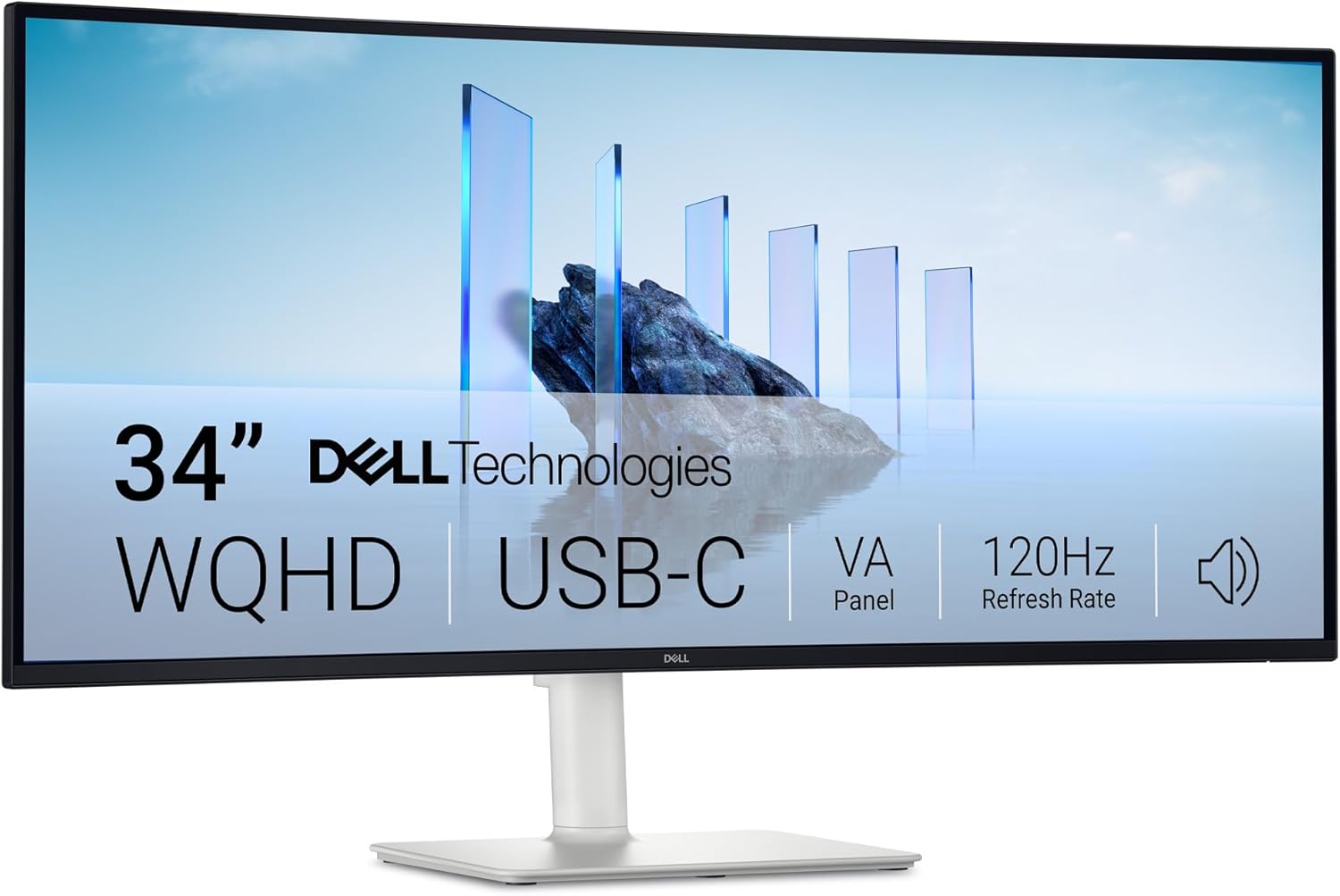
The Dell 34 Plus USB-C Monitor S3425DW is a well-considered ultrawide for professionals who want a single cable to rule their desk. The headline strength is practical connectivity — USB-C with 65W power delivery that genuinely runs a MacBook Pro without a separate charger. The headline limitation is that this is not a dedicated gaming monitor, and if you’re treating it as one, you’ll want to look at alternatives. The Dell S3425DW sits comfortably in the productivity and home office space, and it earns its place there without much qualification.
The 34-inch 3440×1440 VA panel at 120Hz with a 3000:1 contrast ratio is a combination that looks genuinely rich in everyday use. The high contrast means dark scenes stay dark, text pops on white backgrounds, and colour-heavy workloads benefit from the 99% sRGB and 95% DCI-P3 coverage. Brightness sits at 300 nits — perfectly workable in a typical office or home environment, not trying to punch through direct sunlight. The 21:9 aspect ratio gives you screen real estate that two 24-inch monitors would match in width but couldn’t match in continuity.
If you’re a laptop worker — Mac or Windows — who wants one cable to dock to a large screen, this is one of the more sensible options available. If you’re a competitive gamer who needs 144Hz or above, or someone who prioritises pixel-sharp accuracy for print-grade colour work, this isn’t aimed at you. But for the professional who wants a practical, good-looking ultrawide that doesn’t require a drawer full of adapters, the Dell S3425DW makes a compelling case.
See the Dell 34 Plus USB-C Monitor S3425DW listed on Amazon before reading further.

What It’s Best For
Office and productivity work. This is where the S3425DW is most at home. The 21:9 format at 3440×1440 gives you room to have a document, a spreadsheet, and a browser open side by side without any of them feeling cramped — something you simply cannot replicate on a standard 16:9 screen of similar size. Dell’s Easy Arrange software lets you tile windows into pre-set partitions without fussing about window management manually. Combined with the USB-C dock functionality, this is the monitor that removes the cable clutter from a work-from-home desk in one move.
Home media and streaming. The VA panel’s native 3000:1 contrast ratio is legitimately good for film watching. Blacks stay black rather than turning grey, which matters enormously when watching anything with dark scenes — horror, space, night-time action. The 21:9 curve means most cinema-ratio films fill the screen without letterboxing. The built-in dual 5W speakers are reported by multiple buyers as genuinely useful rather than an afterthought, which is not something you can say about most monitor speakers. For a monitor you’re also using to catch up on series in the evenings, the audio situation here is better than you’d expect.
Light gaming. The 120Hz refresh with AMD FreeSync Premium adaptive sync handles casual and mid-tier gaming comfortably. Open-world games, RPGs, strategy titles — all benefit from the wide screen and the smooth, tear-free frame delivery. Anyone playing competitive shooters who wants every frame advantage should look at higher refresh options, but this is far from a gaming liability. It’s a capable secondary or light-use gaming screen that doesn’t need to compromise your productivity setup to be one.
The Specs That Really Matter
The VA panel is the right choice for this use case, and it’s worth understanding why. VA panels sit between TN and IPS on most measures: they’re slower than IPS but offer significantly better native contrast, and they handle dark content better than either. The 3000:1 contrast ratio here is not a manufacturer exaggeration — it’s what VA panels genuinely deliver, and it’s the reason this screen looks richer than an equivalent IPS monitor in mixed lighting conditions. The trade-off is that VA panels can show some colour shift at extreme viewing angles — not an issue if you’re the only person looking at this screen, which describes most desk setups. For anyone who found IPS glow distracting on a previous monitor, VA eliminates that entirely.
The 120Hz refresh rate sits in an interesting spot for 2026. It’s not the highest available at this screen class, but it’s a meaningful step above 60Hz for anything involving motion — scrolling through documents feels smoother, video is more fluid, and games benefit from reduced judder. The response time figure listed varies between the product title (1ms) and the specification sheet (5ms). The 1ms figure almost certainly refers to an MPRT motion blur reduction metric — which is a different measurement to the grey-to-grey response time of 5ms that reflects real-world pixel transitions. Neither figure is a reason to avoid this monitor for its intended use, but if response time is a critical factor for your gaming setup, keep that discrepancy in mind.
Connectivity is genuinely a selling point here, not just a bullet point. Two USB-C ports — one upstream delivering up to 65W power delivery, one downstream at 15W — combined with two HDMI ports means this can serve as a hub for a two-device setup without an external dock. The pop-out front USB ports for quick peripheral access are a practical design decision that buyers consistently call out positively. The one honest gap is the absence of an ethernet port and limited rear USB-A ports, which means heavier-duty hub users will want a supplementary hub. Understanding what each port actually does helps here — USB-C isn’t a single standard, and this implementation is the good kind.
HDR10 support is present. 300 nits peak brightness is below the threshold where HDR becomes a visually transformative experience — proper HDR performance generally requires 400 nits at minimum, and ideally considerably more. Treat HDR10 here as a compatibility tick rather than a feature you’ll actively use, and you won’t be disappointed. It won’t hurt anything, but it’s not a reason to buy this monitor.
Check the full spec sheet and buyer Q&As for the Dell 34 Plus USB-C Monitor S3425DW on Amazon.
What Buyers Are Saying
The Dell S3425DW carries a rating of 4.5 out of 5 from 108 reviews on Amazon. That’s a meaningful sample, skewing strongly positive, and the pattern in the feedback is consistent enough to be reliable. The dominant theme is the USB-C single-cable setup — multiple buyers explicitly mention it as the reason they bought this and the thing they’re most pleased with. MacBook Pro compatibility comes up repeatedly and positively, with buyers confirming the 65W delivery handles real-world laptop loads without issue.
The speakers attract genuine praise, which is unusual for monitor speakers and worth flagging. Several buyers describe being surprised by the bass response and overall volume, with one calling them “surprisingly loud.” For a monitor-integrated speaker in a work-from-home context — video calls, background music, casual media — the consensus is that they’re adequate enough to replace a separate speaker for most people. That’s a low bar, but the fact that buyers are commenting positively rather than just ignoring the speakers tells you something.
The most consistent complaint is port selection on the rear — specifically the absence of ethernet and limited USB-A ports for a full peripheral setup. One well-reasoned review makes the point that a supplementary USB hub resolves this without much fuss or expense. A single reviewer noted that the KVM function causes momentary mouse lag when switching inputs — worth knowing if KVM switching is part of your workflow. One buyer commented that image quality is “just okay” for photo editing and gaming, which is a fair characterisation of a 300 nit VA panel in those specific use cases — though it sits at odds with the majority of feedback, which is overwhelmingly positive on image quality for office and everyday use.
Buyer Highlights
“The USB-C port is able to totally power a MacBook Pro — works well switching across multiple inputs.” — A recurring confirmation from Mac users specifically, appearing across multiple independent reviews.
“The speakers are surprisingly loud and have far more bass than expected — totally fine across most uses.” — Consistent sentiment from buyers who weren’t expecting much from built-in monitor audio.
“I’ve simplified my cabling down from twin monitors and a dock — the single wide screen is just more practical.” — Common feedback from buyers who switched from dual-monitor setups and haven’t looked back.
“The clarity of text and spreadsheets is excellent on both my Windows laptop and MacBook Pro.” — Specific callout from a buyer running two devices, which underlines the dual-input USB-C use case.
“It’s missing an ethernet port and could use more rear USB ports, but a cheap hub solves that easily enough.” — The main recurring concern, and the same buyer notes it doesn’t affect their overall recommendation.

Worth Knowing Before You Buy
The stand adjustability is solid for this class. Height adjustment up to 130mm, tilt, and swivel are all present — this is the full ergonomic setup rather than a cut-down tilt-only stand. That matters for an office monitor you’re using for eight-plus hours a day. The matte screen finish handles ambient light well without adding visible grain, which is the right call for a desk-facing display in a home or office environment. VESA mounting is supported for those who want an arm.
The warranty situation in the specification data deserves a mention. The box lists a 3-year warranty in the product title, while the specification sheet notes “1-Year Advanced Exchange Service & Premium Panel Exchange.” Dell has historically offered the Premium Panel Exchange across its business monitor range, which replaces panels with visible defects including single stuck pixels — that’s a better deal than most manufacturers offer. Confirm the exact warranty terms applicable to your purchase on the Amazon listing, as terms can vary. If you’re working through a buying decision on a monitor at this price point, warranty terms are worth checking before you commit.
The KVM mouse lag issue flagged by one reviewer is a known quirk in some multi-input USB-C monitors — it’s not universal based on the available reviews, but if seamless KVM switching between two machines is central to your workflow, it’s worth checking the current buyer Q&As on Amazon for the most recent feedback. One buyer also notes that DisplayPort to USB-C doesn’t function — only native USB-C or HDMI connections are confirmed to work, which may matter if your source device lacks those outputs. Given this monitor is targeting a 21:9 productivity audience in 2026, USB-C and HDMI cover the overwhelming majority of modern laptops, but it’s still worth verifying your specific device.
Check current stock and availability for the Dell 34 Plus USB-C Monitor S3425DW on Amazon.
Who Should Buy It (And Who Shouldn’t)
Buy If
- You work primarily from a laptop — especially a MacBook Pro — and want a single USB-C cable to deliver display, data, and charging without a separate dock.
- You’re switching from a dual-monitor setup and want to consolidate into a single screen with genuine width — the 3440×1440 resolution at 34 inches gives you the space without the gap in the middle.
- Film and TV viewing is part of your use case alongside work — the VA panel’s 3000:1 contrast genuinely improves the experience over most IPS alternatives at this size.
- You want a monitor with usable built-in audio that handles calls and casual media without needing a separate speaker setup on your desk.
Avoid If
- Competitive gaming is your primary use — the 120Hz ceiling and 5ms real-world response time are fine for casual play but won’t satisfy anyone who benchmarks frame latency. If gaming is your priority, the spec profile points elsewhere.
- You need a full-featured USB hub with ethernet, multiple USB-A ports, and a headphone jack built into the monitor — this isn’t that, and you’ll be supplementing it from day one.
The Bottom Line
The Dell 34 Plus USB-C Monitor S3425DW is a monitor that knows what it is and delivers it well. The USB-C single-cable setup is genuinely convenient rather than just a marketing point, the VA panel’s contrast makes everyday work and evening viewing look noticeably richer than the IPS competition at this tier, and the built-in speakers clear a bar most monitor speakers don’t bother attempting. The port selection has real gaps that power users will want to fill with a hub, and the 300 nit HDR10 is cosmetic rather than functional. Neither of those is a reason to walk away for the productivity-focused buyer this is clearly built for. If you want a clean desk, one cable, and a wide screen that earns its keep all day, the Dell S3425DW is a straightforward recommendation.
View the Dell 34 Plus USB-C Monitor S3425DW on Amazon and read the latest buyer questions.
At The Monitor Expert, our approach is built on data transparency rather than simulated hands-on testing. We rigorously analyse official manufacturer specifications and aggregate verified customer sentiment to provide honest, straightforward buying advice that cuts through the marketing noise.
As an Amazon Associate, I earn from qualifying purchases.
Browse by Specification
Looking for something specific? Browse our analyses by hardware and feature below, or check all monitor analyses in the Office Monitors and Mid-Range Monitors category archives.
[IPS Monitors] — [VA Monitors] — [TN Monitors] — [OLED Monitors]
Browse by Refresh Rate
[60Hz] — [75Hz] — [100Hz] — [120Hz] — [144Hz] — [165Hz] — [180Hz] — [200Hz] — [240Hz+] — [360Hz+]
Browse by Screen Size
[Small Screen] — [24-inch] — [27-inch] — [32-inch] — [Large Screen] — [Ultrawide]




