
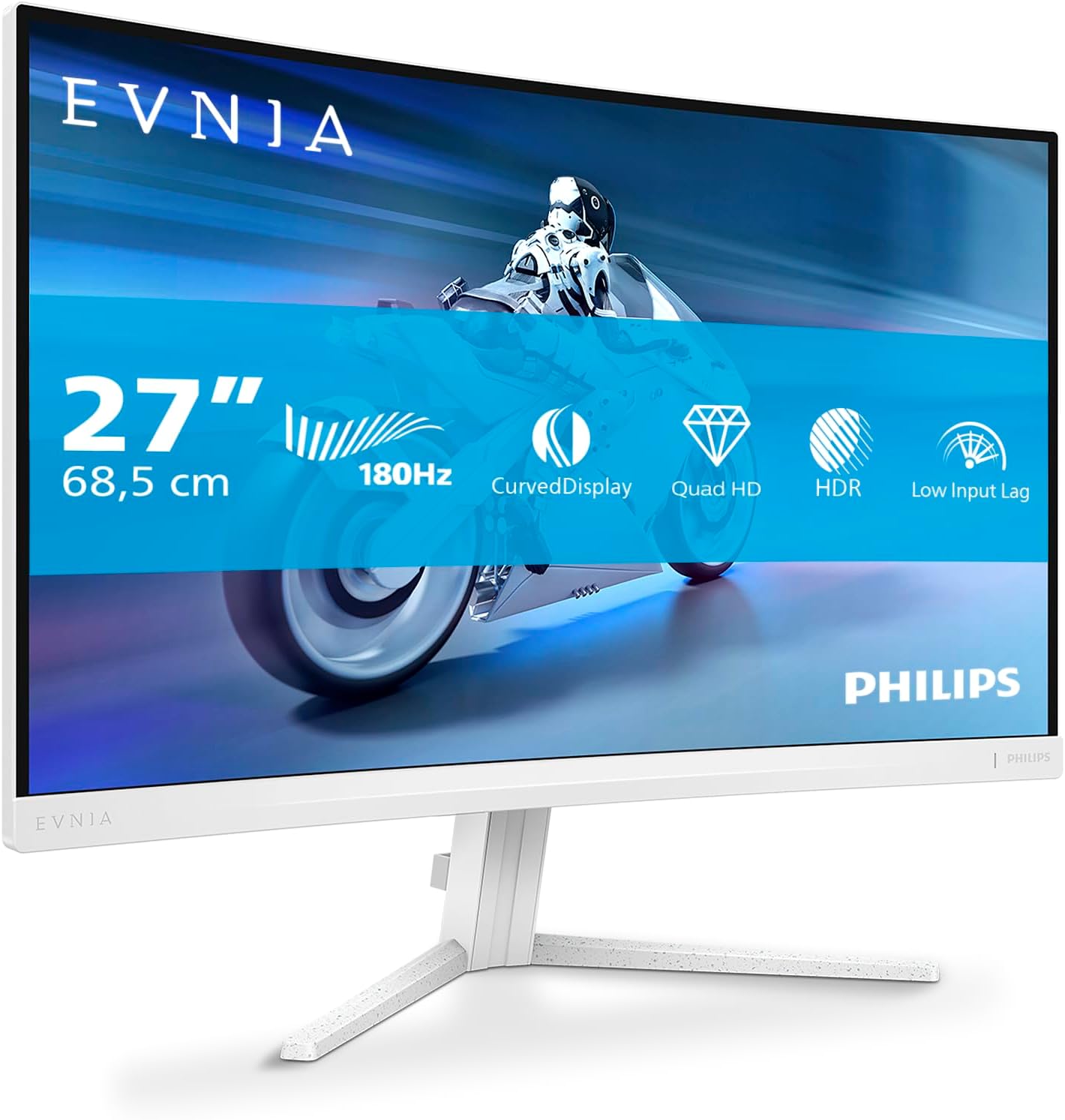
Philips Evnia 27M2C5501 Analysis: Fast VA Done Right
My Honest Verdict
The Philips Evnia 27M2C5501 is a curved Fast VA gaming monitor that earns its place in the mid-range without needing to oversell itself. 27 inches, 2560 x 1440 resolution, 180Hz refresh rate, and Ambiglow rear lighting that buyers consistently call out as a genuine surprise — not a gimmick. For a white-chassis gaming monitor at this spec level, the competition is thinner than you’d expect, and Philips has used that gap well.
What you’re getting in practice: a screen sharp enough that QHD at 27 inches looks genuinely crisp, motion that stays smooth well past what most mid-range buyers will ever push their hardware to, and a curved panel that adds depth without feeling theatrical. The brightness ceiling of 720 cd/m² typical (with an HDR peak of 1400 cd/m²) is the headline spec — it’s a legitimately high number for a VA panel at this tier, and it backs up the HDR claims in a way that HDR400 badges never do.
If you’re building or upgrading a gaming setup and you want something that looks good on the desk and performs honestly at the spec sheet — PS5, Xbox Series X, or a mid-to-high-end gaming PC — this is a strong pick. If you need speakers built in or you’re a colour-accuracy professional who needs a calibrated IPS or OLED panel, look elsewhere. But for the target audience, this monitor makes a lot of sense.
See the current listing and availability for the Philips Evnia 27M2C5501 on Amazon.

What It’s Best For
Console gaming is where this monitor hits its stride most naturally. Multiple buyers have confirmed it pairs well with PS5 and Xbox Series X — one reviewer specifically notes the Series X locks to 2K at 120Hz with VRR when you keep the console’s 4K setting disabled. The curved screen pulls you in just enough to make a difference without needing a widescreen setup, and the 180Hz panel ensures console players are nowhere near the ceiling. The FreeSync Premium adaptive sync handles frame rate variation cleanly, which is exactly what you want for open-world games where frame delivery isn’t perfectly consistent.
PC gaming benefits even more directly. A mid-to-high-end GPU at 2560 x 1440 is a sweet spot for current hardware — demanding enough that it’s not wasted, achievable enough that you can regularly push past 144Hz in competitive titles where every frame matters. The VA panel’s contrast characteristics mean dark scenes genuinely look darker than they would on a budget IPS, which matters in shooters and atmospheric titles. The built-in ShadowBoost feature and FPS/Racing/RTS preset modes are the sort of thing most buyers ignore, but they’re there if you want them.
Everyday desktop use is more comfortable than the gaming branding implies. The height-adjustable stand, matte screen finish, and 178-degree viewing angles make this a reasonable all-rounder for someone who games in the evening and works from home during the day. No speakers, though — budget for a soundbar or headset from the start.
The Specs That Really Matter
Panel type first, because it’s always buried in the small print and it always matters. The Philips Evnia 27M2C5501 uses a Fast VA panel. VA panels deliver deeper blacks and higher native contrast than IPS, which is why this monitor can quote a brightness of 720 cd/m² typical with genuine HDR peaks up to 1400 cd/m² — figures that would be unusual on a standard IPS at this tier. The trade-off historically has been slower pixel response, but Fast VA addresses that directly. Philips quotes 0.5ms response time using Smart MBR (Motion Blur Reduction). To be clear, that’s a boosted figure achieved with the MBR mode active — it’s not the native grey-to-grey figure you’d compare directly against IPS competitors — but it means motion handling is in a different league from older VA panels. Understanding the difference between these figures matters before you take any manufacturer’s response time claim at face value.
The 180Hz refresh rate is the right number at this moment. It’s comfortably above the 144Hz floor you’d expect at this tier and gives you genuine headroom for competitive play without the diminishing-returns territory of 240Hz and above. For most buyers — especially those on console or a mid-range GPU — the practical experience of 180Hz versus 165Hz is marginal, but having the ceiling higher costs nothing and means this monitor won’t feel outdated quickly. Heading into 2026 and beyond, QHD at 180Hz is the kind of spec combination that ages well.
Connectivity is functional. You get 2x HDMI 2.0 and 1x DisplayPort 1.4. The HDMI 2.0 limitation is worth flagging: it caps output at 144Hz at QHD, so if you want the full 180Hz you need to use DisplayPort 1.4. One reviewer noticed this and confirmed the DisplayPort connection made a visible difference to the gaming experience. Console players running HDMI will be capped below the panel’s ceiling — worth knowing before you assume you’re getting everything the spec sheet promises. For a fuller breakdown of what cable and port choice means in practice, the monitor connectivity guide covers this clearly. No USB-C or Thunderbolt here, which is fine for a gaming-first display — just don’t expect to run a laptop over a single cable.
The 1500R curve radius and 16:9 aspect ratio at 27 inches is about as mild a curve as you can get — enough to be noticeable without being disorienting on a standard desk setup. It’s a measured choice rather than a dramatic one, and buyers consistently respond well to it. Screen size and resolution choices interact meaningfully at this range, and 2560 x 1440 on 27 inches gives you a pixel density that’s noticeably sharper than 1080p without the GPU overhead of 4K.
Check the full spec sheet and buyer Q&As for the Philips Evnia 27M2C5501 on Amazon.
What Buyers Are Saying
The Philips Evnia 27M2C5501 carries a rating of 4.7 out of 5 from 215 verified buyers — a genuinely strong result at this sample size, not a small-pool anomaly. The vast majority of reviews are five-star, and the themes across them are unusually consistent: picture quality lands above expectations, the Ambiglow rear lighting surprises people who weren’t expecting it, and the white chassis appeals to buyers who’ve struggled to find quality monitors that aren’t black.
The image quality praise is specific rather than vague. Buyers mention vibrant colours, sharp detail in fast-moving games like Battlefield and Call of Duty, and clear improvement over whatever they were using before. The curved screen gets credit for feeling immersive without being overwhelming. Several console-specific buyers note the PS5 and Xbox pairings work well out of the box. The stand gets called out positively too — sturdy, height-adjustable with a simple push mechanism — which matters because a wobbly stand is a common complaint at this tier that doesn’t show up here.
The recurring limitation is the absence of built-in speakers. Multiple buyers flag it, though most concede it’s standard for the category and they prefer a soundbar anyway. Bezel width comes up once as slightly thicker than expected — not a dealbreaker for any buyer, just an observation. The OSD joystick takes a few minutes to get comfortable with but isn’t widely criticised. One buyer found a wall mount bracket question unanswered in the listing, which suggests VESA compatibility information could be clearer — worth checking specifications before assuming wall-mount compatibility.
Buyer Highlights
“The lights on the back were a complete surprise — I had no idea it had them and they actually look great.” — A common reaction from buyers who discovered the Ambiglow feature after setup rather than before purchase.
“Switching to DisplayPort made such a difference — I hadn’t realised HDMI was holding me back.” — Consistent feedback from PC gamers who initially connected via HDMI and later upgraded the cable.
“Finding a white monitor at this quality and spec level was genuinely difficult — this one ticks every box.” — Reflects a clear gap in the market that this monitor fills for buyers who care about aesthetics as much as specs.
“The stand is rock solid and adjusts easily — I was expecting something a bit flimsy at this price.” — Stand quality is called out positively across multiple reviews, which isn’t always the case at this price tier.
“Picture is sharp, colours are vivid, and it only took a few minutes to set up from the box.” — Out-of-box experience is consistently smooth, with no reports of dead pixels or calibration issues.

Worth Knowing Before You Buy
The HDMI 2.0 cap is the most practically important thing to know before ordering. Two HDMI ports sounds generous, but both are HDMI 2.0, which limits you to roughly 144Hz at 2560 x 1440. To get the full 180Hz, you need DisplayPort 1.4. If you’re a PC gamer and you want everything this panel can deliver, use DisplayPort. If you’re a console player, you’ll be HDMI-bound at 120Hz — still excellent, but not the headline figure. The panel itself is more capable than the HDMI spec allows. This isn’t unusual at this price point, but it’s worth understanding before you assume you’re automatically getting 180Hz from day one. For anyone uncertain about which cable does what, the monitor buying guide covers the basics without assuming prior knowledge.
No speakers. This is consistent across the category, and most buyers seem fine with it — but if you’re coming from an all-in-one setup expecting audio out of the box, you won’t get it here. Budget for external audio before you order. The matte screen finish is worth noting positively: no glare, no distracting reflections, and buyers working in naturally lit rooms consistently appreciate it. The Ambiglow rear lighting requires activation through the OSD menu — it doesn’t stay on by default after the initial startup animation. One German buyer noted that Ambiglow can feel chaotic during fast scrolling on the desktop, which is fair, and recommends using it on a static colour or reserving it for gaming and video — good practical advice. The three-year manufacturer warranty is a genuine plus at this tier and covers you well beyond what budget alternatives typically offer.
View current stock and availability for the Philips Evnia 27M2C5501 on Amazon.
Who Should Buy It (And Who Shouldn’t)
Buy If
- You want a white gaming monitor at QHD resolution and 180Hz — the market for this specific combination is genuinely limited and this is one of the stronger options in it.
- You’re gaming on PS5, Xbox Series X, or a mid-to-high-end PC and want a monitor that won’t become the bottleneck for the next few years.
- You care about contrast and dark-scene performance — the Fast VA panel delivers noticeably deeper blacks than IPS alternatives at this tier, which pays off in atmospheric games and films.
- You want something that looks good in a gaming setup beyond just displaying an image — the Ambiglow rear lighting and white chassis are genuinely distinctive without being over the top.
Avoid If
- You need built-in audio — there are no speakers, and that’s not going to change with a firmware update.
- You’re a colour-critical professional (photographer, video editor, designer) who needs a factory-calibrated panel suited to that workflow — a VA gaming monitor is not the right tool for that job regardless of how good the picture looks to the eye.
- You want maximum refresh rate over HDMI — if your setup is HDMI-only and 180Hz is non-negotiable, you’ll need DisplayPort hardware to support it.
The Bottom Line
The Philips Evnia 27M2C5501 is the sort of monitor that doesn’t need excuses made for it. Strong contrast from a Fast VA panel, QHD resolution that looks genuinely sharp at 27 inches, 180Hz that covers everything from casual console play to competitive PC gaming, and a white design that actually looks good rather than just being a colour option. The HDMI 2.0 cap and absent speakers are the two things to sort before you order — one by using DisplayPort, one by pairing it with external audio. Beyond that, this is a well-rounded gaming monitor from a brand with a decent support record, and buyers are consistently pleased with what arrives at the door.
Find the Philips Evnia 27M2C5501 and read the latest buyer questions on Amazon.
At The Monitor Expert, our approach is built on data transparency rather than simulated hands-on testing. We rigorously analyse official manufacturer specifications and aggregate verified customer sentiment to provide honest, straightforward buying advice that cuts through the marketing noise.
As an Amazon Associate, I earn from qualifying purchases.
Browse by Specification
Looking for something specific? Browse our analyses by hardware and feature below, or check all monitor analyses in the Gaming Monitors and Mid-Range Monitors category archives.
[IPS Monitors] — [VA Monitors] — [TN Monitors] — [OLED Monitors]
Browse by Refresh Rate
[60Hz] — [75Hz] — [100Hz] — [120Hz] — [144Hz] — [165Hz] — [180Hz] — [200Hz] — [240Hz+] — [360Hz+]
Browse by Screen Size
[Small Screen] — [24-inch] — [27-inch] — [32-inch] — [Large Screen] — [Ultrawide]




