
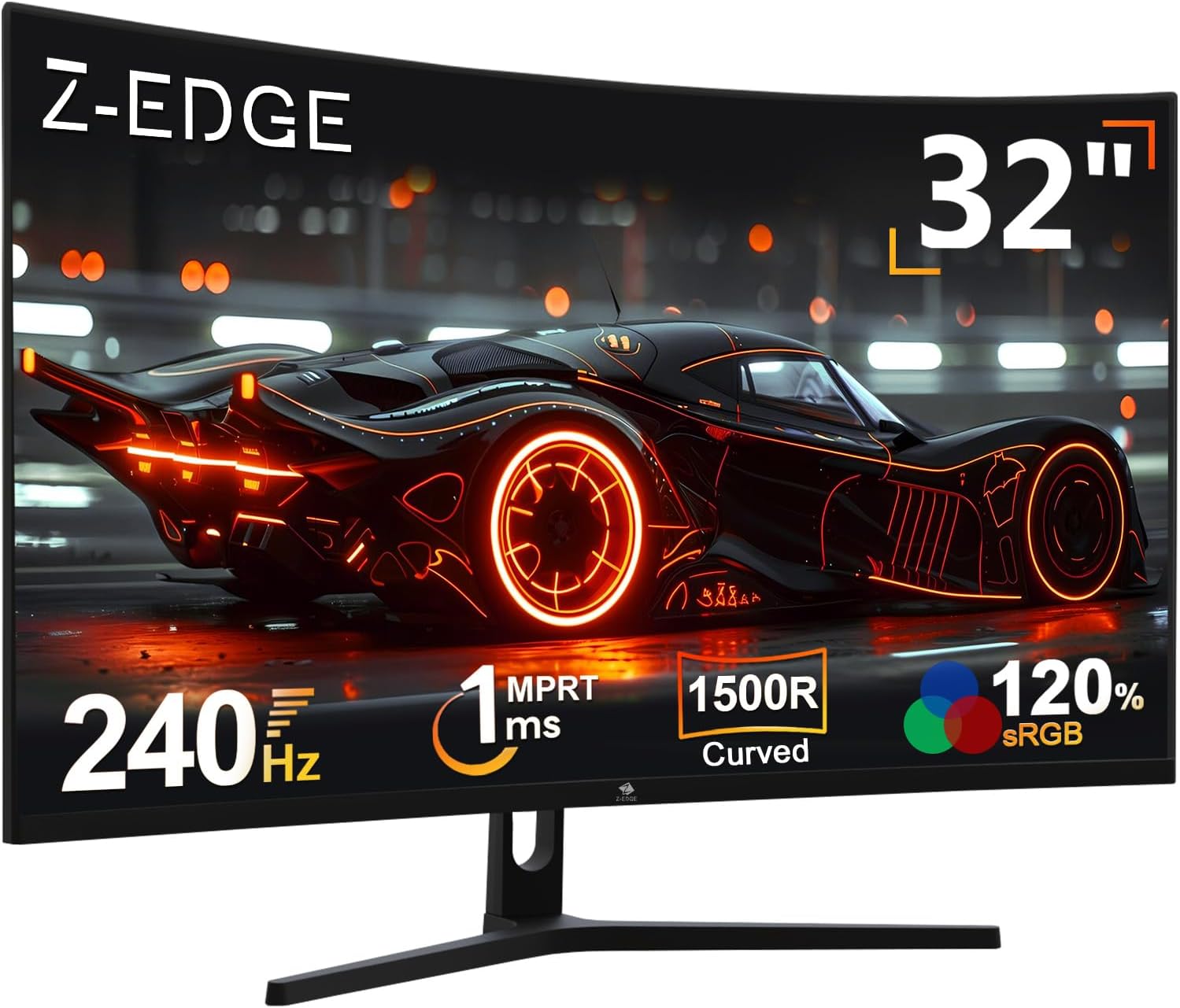
Z-Edge 32 Inch Curved Gaming Monitor UG32P Analysis: Big Screen, Real Trade-Offs
My Honest Verdict
The Z-Edge UG32P is a 32-inch, 240Hz curved gaming monitor aimed squarely at buyers who want a large, fast screen without spending serious money. The Z-Edge 32 Inch Curved Gaming Monitor UG32P delivers on its headline numbers — the refresh rate is real and the screen is genuinely big — but you’re trading pixel density and panel pedigree to get there. That’s not a hidden gotcha. It’s just the deal at this end of the market.
The key thing to understand upfront: 1920×1080 across 32 inches is a meaningful compromise. At this size, pixel density is lower than it would be on a 27-inch screen running the same resolution, and some buyers will notice it, particularly in text-heavy applications. For gaming and video at normal viewing distances, it’s far less of an issue. The 1500R curve is noticeable and genuinely adds to immersion at this screen width. The 240Hz refresh rate and 1ms MPRT response time make this a legitimately quick display for the money.
This is for console and PC gamers who want a big, fast screen and aren’t pixel-peeping. It is not for anyone doing photo or video editing, or anyone sensitive to lower pixel density on large panels. If that’s you, read the resolution section before committing.
See the Z-Edge UG32P listing and current availability on Amazon.

What It’s Best For
Console gaming. Multiple buyers specifically mention using this with Xbox and PlayStation setups, and it makes sense. Consoles typically output at 1080p, so the resolution limitation disappears entirely — you’re getting exactly what the console is pushing. The 32-inch panel is a meaningful upgrade from a typical TV viewing position on a desk, and the 1500R curve pulls the edges into your peripheral vision in a way that flat screens at this size don’t. FreeSync Premium compatibility is a bonus here, though not all consoles take full advantage of it.
PC gaming, particularly fast-paced titles. At 240Hz, frame transitions are genuinely smooth — this is where the refresh rate earns its place. Competitive shooters and racing games benefit most, where the visual advantage of higher refresh rates is tangible rather than marginal. If your GPU can push frame rates north of 144Hz in the games you play, the step up to 240Hz is something you’ll actually see. If you’re mostly sitting below that, you’re still getting a fast panel with room to grow. The relationship between refresh rate and response time is worth understanding before you decide how much headroom you actually need.
Casual home media and streaming. The 32-inch curved screen makes films and TV content feel more enveloping than a flat panel of the same size. The 3000:1 contrast ratio — typical of VA-class panels — gives noticeably deeper blacks than IPS at this price, which helps with darker content. Don’t expect HDR to add much here — the listing mentions HDR but without verified peak brightness specifications, treat it as a marketing checkbox rather than a meaningful feature.
The Specs That Really Matter
Panel type isn’t listed explicitly in the specification data, but the combination of a 3000:1 contrast ratio and the price tier strongly suggests a VA panel. That’s worth knowing. VA panels punch above their weight on contrast — blacks look genuinely dark rather than washed-out grey — but they carry a trade-off: viewing angles are narrower than IPS, and some VA panels exhibit ghosting on fast-moving content despite low MPRT figures. The 1ms MPRT here is a strobe-backlight measurement, not a grey-to-grey transition time. It tells you the motion clarity when using that mode, not the panel’s inherent pixel response speed. Worth being clear-eyed about.
The 240Hz refresh rate is the standout number and it’s legitimately useful if your hardware can feed it. This is a spec that will serve you well into 2026 and beyond as GPU performance continues to climb at the mid-range. FreeSync Premium does real work here — it keeps the frame rate and refresh rate synchronised even when your GPU dips below the monitor’s maximum, which eliminates tearing without the latency hit of V-Sync. Two HDMI ports and one DisplayPort give you reasonable flexibility. Worth checking the HDMI version your devices need before assuming any port supports 240Hz — the specification states all ports support up to 240Hz, but you’ll want to confirm with your GPU’s output capabilities.
Resolution is where you need to be honest with yourself. 1920×1080 on a 32-inch panel gives you a pixel density of roughly 69 PPI. For comparison, the same resolution on a 27-inch screen sits around 82 PPI. That gap is visible in text and fine detail at close viewing distances. For gaming and video it’s less critical, but it is there. If pixel sharpness matters to you, this resolution at this screen size may frustrate you. If you’re primarily gaming and streaming, you’ll likely not think about it twice.
Check the full Z-Edge UG32P spec sheet and buyer Q&As on Amazon.
What Buyers Are Saying
The Z-Edge UG32P holds a rating of 4.4 out of 5 across 1,309 customer reviews — that’s a meaningful sample, and it skews clearly positive. The recurring themes in praise are consistent: buyers are repeatedly struck by how much screen they’re getting, and most come away satisfied with the image quality for gaming use. Several mention it specifically alongside Xbox and PC gaming setups, and the general sentiment is that it performs well above what they expected at this price point.
That said, the negative reviews surface a couple of patterns that are worth taking seriously. One reviewer reported significant panel faults appearing within the first 24 hours — flickering, grainy output, and black bars that worsened over time. Another had persistent HDMI signal issues that were only resolved by switching to DisplayPort using the supplied cable. These aren’t majority experiences, but they’re not isolated oddities either. Build quality at this price tier is what it is, and Z-Edge’s customer service appears to respond, which moderates some of the risk. The warranty is listed as one year manufacturer.
Colour accuracy gets a mixed but fair reception. Several buyers praised the colours outright, but one noted the colour grading isn’t the best — which tracks for a VA panel at this price. It’s not bad, it’s just not calibrated or wide-gamut. If you understand that going in, it won’t disappoint.
Buyer Highlights
“Great monitor fantastic picture perfect for xbox.” — A common reaction from console users who find the resolution and screen size a natural pairing with their setup.
“The colour quality is excellent and refresh rate is the best I’ve seen.” — Typical of buyers upgrading from slower, older panels who are experiencing 240Hz for the first time.
“I could not get it to work properly on HDMI — switching to DisplayPort fixed it.” — A specific pattern worth noting: several buyers found DisplayPort more reliable than HDMI on this unit.
“Quite a large monitor with sufficient curve, great for what you’d pay for it.” — Captures the overall buyer consensus: solid for the money, not without compromises.
“Very very happy with it, as was he — hubby said it was very good price for the quality.” — Reflects the typical gifting experience, where perceived value lands well on first use.

Worth Knowing Before You Buy
The HDMI signal reliability issue flagged by buyers is specific enough to flag clearly. More than one reviewer independently encountered signal drops and reconnection loops using HDMI — one of them tried two separate cables before switching to DisplayPort and finding it stable. If your primary connection is HDMI (PS5 users, this applies to you), that’s a risk worth factoring in. Consoles are HDMI-only, so if you’re buying this for a PlayStation setup and HDMI proves unreliable on your unit, you’ve got a problem. It doesn’t affect every unit — the majority of buyers don’t mention it — but it’s not a one-off fluke either. Z-Edge’s customer service appears to have handled complaints reasonably, based on buyer accounts, which at least means returns and exchanges seem to be handled with less friction than some budget brands.
Stand adjustability is likely minimal at this price tier — the specification data doesn’t detail tilt, swivel, or height adjustment, and budget curved monitors rarely offer more than basic tilt. VESA mounting is confirmed, which is the practical solution if ergonomics matter to you. The monitor consumes 48 watts in operation, which is standard for a panel of this size and type. There are no built-in speakers — the listing states this explicitly, so factor in external audio if you need it. If you’re new to buying a monitor and want a broader framework for evaluating specs like these, the monitor buying guide covers the decision points worth thinking through before committing.
One more thing: the HDR label in the spec sheet shouldn’t be taken at face value. No peak brightness figure is confirmed in the data, and without a certified HDR400 spec at minimum — let alone anything higher — HDR here is a software flag rather than a meaningful visual feature. Don’t factor it into your decision.
View current stock levels and delivery options for the Z-Edge UG32P on Amazon.
Who Should Buy It (And Who Shouldn’t)
Buy If
- You’re a PC gamer whose GPU can push above 144fps and you want a large, fast panel that actually uses those frames — 240Hz at 32 inches is a real upgrade over budget 144Hz alternatives.
- You’re setting this up for console gaming where 1080p is the native output — the resolution limitation becomes a non-issue and the size and curve genuinely add to the experience.
- You want a big screen with strong contrast for darker games and films, and you’re happy with VA-style black performance over IPS-style colour accuracy.
- You need VESA compatibility — wall mounting or an aftermarket arm solves the stand limitations and can make ergonomics much more workable.
Avoid If
- You’re buying this primarily for a PS5 or any HDMI-only device and can’t use DisplayPort as a fallback — the HDMI signal reliability pattern in buyer feedback is specific enough to be a genuine concern for console-only setups.
- You work with text, spreadsheets, or fine detail at close range — 1080p across 32 inches will look noticeably soft compared to higher-density alternatives, and that will irritate you daily.
- You’re expecting HDR to look like it does on a high-end TV or OLED — it won’t, and the spec data doesn’t support HDR as a real feature on this panel.
The Bottom Line
The Z-Edge UG32P is a straightforward trade: you get a genuinely large, genuinely fast gaming monitor — 32 inches, 240Hz, 1500R curve, FreeSync Premium — and you accept that resolution, panel pedigree, and build tolerances reflect the price tier. For PC and console gaming, particularly at the living-room-desk crossover where screen size matters more than pixel sharpness, it earns its place. The HDMI reliability pattern is the one thing to go in with eyes open about. If you’re happy running DisplayPort, or willing to test and return if HDMI proves flaky on your unit, this is a lot of monitor for the money.
Find the Z-Edge UG32P on Amazon and check what’s currently in stock.
At The Monitor Expert, our approach is built on data transparency rather than simulated hands-on testing. We rigorously analyse official manufacturer specifications and aggregate verified customer sentiment to provide honest, straightforward buying advice that cuts through the marketing noise.
As an Amazon Associate, I earn from qualifying purchases.
Browse by Specification
Looking for something specific? Browse our analyses by hardware and feature below, or check all monitor analyses in the Gaming Monitors and Budget Monitors category archives.
[IPS Monitors] — [VA Monitors] — [TN Monitors] — [OLED Monitors]
Browse by Refresh Rate
[60Hz] — [75Hz] — [100Hz] — [120Hz] — [144Hz] — [165Hz] — [180Hz] — [200Hz] — [240Hz+] — [360Hz+]
Browse by Screen Size
[Small Screen] — [24-inch] — [27-inch] — [32-inch] — [Large Screen] — [Ultrawide]




