
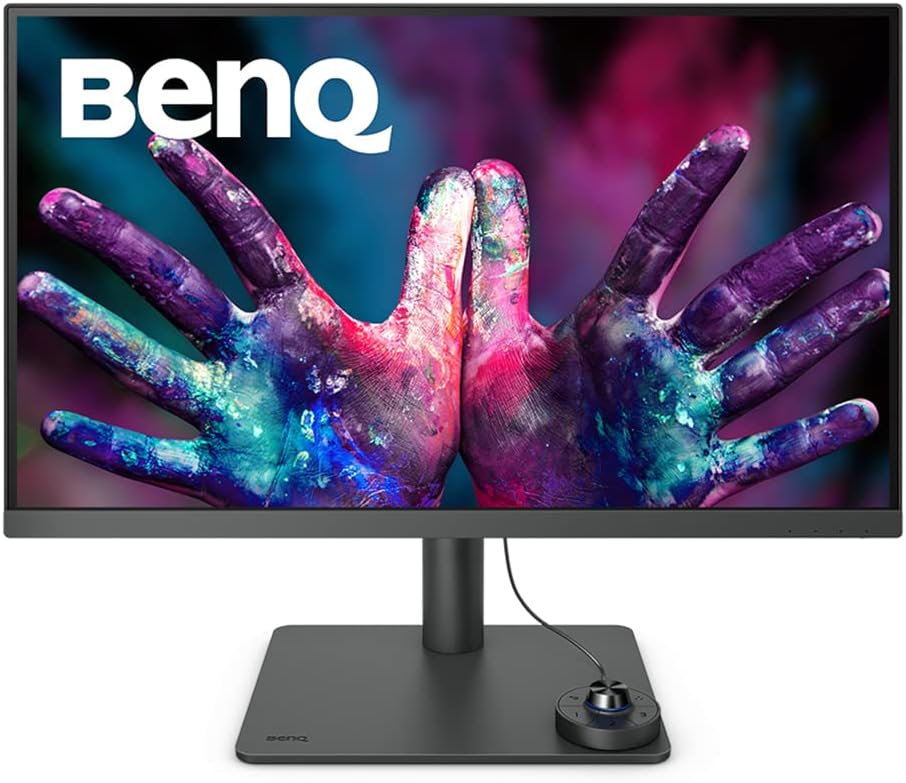
BenQ PD2705U Analysis: Colour Accuracy Delivered
My Honest Verdict
The BenQ PD2705U is a 27-inch 4K IPS monitor built specifically for designers and creative professionals who need accurate colour out of the box without paying for a dedicated calibration service. That’s its core value proposition, and it delivers on it honestly. Factory-calibrated 99% sRGB and 99% Rec. 709 coverage with a Delta E ≤ 3 accuracy guarantee is a real, measurable commitment — not a vague marketing claim. If colour fidelity matters to your workflow, this is where the BenQ PD2705U earns its place.
In everyday use, 3840 x 2160 resolution on a 27-inch panel gives you genuine sharpness — text is crisp, fine detail in illustrations or photo edits reads clearly, and you get real screen real estate for multi-window workflows. The 60Hz refresh rate is the honest limitation here: this is not a gaming monitor, and BenQ isn’t pretending otherwise. The 5ms response time is adequate for design work but irrelevant at 60Hz for anyone chasing smooth motion. USB-C with 65W power delivery means one cable connects a MacBook and charges it simultaneously — which, based on buyer feedback, is exactly how most people are using this.
Buy this if you’re a graphic designer, photographer, video editor, or developer who spends hours looking at a screen and cares whether what you’re seeing is accurate. It’s also a strong pick for anyone running a dual-machine setup — the built-in KVM switch is genuinely useful rather than a checkbox feature. Avoid it if you game, want high refresh rates, or need daisy-chaining via DisplayPort — there’s no DP out on this panel.
Check the BenQ PD2705U listing and current availability on Amazon.

What It’s Best For
Design and colour-critical work is where this monitor was built to live. Factory calibration with Delta E ≤ 3 means the colours you’re seeing when you open an image or vector file are actually accurate — not close, not “good enough for most people,” but verifiably within tolerance. BenQ’s AQCOLOR system also includes corner uniformity correction, which matters more than most people realise: an uncorrected monitor can have noticeably different brightness and colour in the corners versus the centre, which skews visual judgement on large layouts. For anyone working across Illustrator, Lightroom, Premiere, or similar tools, that consistency is worth paying for.
Mac-centric workstation setups are an obvious fit. The single USB-C cable workflow — image, data, and 65W charging all in one connection — genuinely simplifies desk management for MacBook users. The BenQ PD2705U also includes M-Book mode, ICCsync (which auto-syncs ICC profiles when switching colour modes), and Display ColorTalk for matching colours between a MacBook display and this monitor. Multiple buyers running M1 and M2 MacBooks alongside this screen specifically called out the colour-matching capability as a deciding factor.
Dual-machine productivity is the third genuine use case. The built-in KVM switch lets you run two computers — a Mac and a Windows PC, for instance — through one monitor, one keyboard, and one mouse. The Hotkey Puck G2 hardware controller that ships in the box means switching between them is a one-button action rather than a trip around the back of the desk. For anyone hot-desking, working across work and personal machines, or running a hybrid setup, this is a real workflow improvement rather than a gimmick.
The Specs That Really Matter
The IPS panel is the right choice for a colour-accurate design monitor, full stop. IPS gives you wide 178-degree viewing angles with minimal colour shift when you move your head — crucial when you’re showing work to someone beside you or working at an angle. The 1200:1 contrast ratio is typical for IPS, which means deep blacks aren’t this panel’s strength. If you’re doing heavy video work where shadow detail is critical, that’s worth knowing. For everything else — design, illustration, photo editing, document work — it’s more than adequate. If you want a deeper understanding of how panel types affect colour and contrast, the panel type guide covers this in plain English.
The 3840 x 2160 resolution at 27 inches lands at a pixel density that produces genuinely sharp output — noticeably so compared to a 1440p panel at the same size. One buyer flagged that native 4K can make UI elements and text quite small at 100% scaling, and found 3008 x 1692 a more comfortable day-to-day resolution with better legibility. That’s a fair point — on Windows especially, 4K scaling behaviour can be inconsistent across applications. On macOS, HiDPI scaling handles this cleanly. Worth understanding before you buy, particularly if you’re on Windows. For more context on how resolution and screen size interact, the display size and resolution guide is worth a look.
Connectivity is a genuine selling point here rather than an afterthought. USB-C with 65W power delivery handles the one-cable MacBook setup most buyers are after. There’s also HDMI and DisplayPort input for connecting additional machines or a console. The side-panel ports — a downstream USB-C, a USB-A, and a headphone jack — function as a basic hub for peripherals and charging. The one gap: there is no DisplayPort output, so daisy-chaining a second monitor via DP is not possible on the BenQ PD2705U. For anyone planning a multi-monitor chain, that’s a hard stop. The connectivity guide covers what these port types mean in practice if you’re still sorting out your cable setup.
The 60Hz refresh rate and 5ms response time aren’t relevant to this monitor’s target buyer. If you want a broader view of what refresh rate and response time actually mean in practice — and when they do and don’t matter — that’s worth reading before dismissing this panel for the wrong reasons. For design and productivity in 2026, 60Hz is entirely sufficient. HDR10 support is present, but at typical IPS brightness levels without local dimming, it won’t transform your HDR preview experience — treat it as a useful checkbox for video editors who need a rough HDR reference, not as a true HDR display.
Browse the full spec sheet and buyer Q&As for the BenQ PD2705U on Amazon.
What Buyers Are Saying
The BenQ PD2705U holds a 4.6 out of 5 rating across 884 customer reviews — a meaningful sample that paints a consistent picture. The dominant themes in positive feedback are colour accuracy, the USB-C one-cable workflow, and the KVM switch. Mac users specifically are enthusiastic: multiple buyers call out seamless operation with both Intel and Apple Silicon MacBooks, and several mention the M-Book mode and ICC colour matching as features they actively use rather than ignore.
The Display Pilot 2 software comes up repeatedly in a positive light. One buyer was initially frustrated with the out-of-box colour matching against a MacBook Pro’s Mini LED screen — which is fair, since no external monitor is going to match Apple’s XDR display — but found that spending time with Display Pilot 2 got the results close enough for professional design and video work. That’s honest feedback worth heeding: if colour matching between the BenQ PD2705U and a MacBook Pro is critical to your workflow, the software side requires some investment.
Criticism is minimal and specific. One buyer flagged the absence of DisplayPort output for daisy-chaining — no workaround for that, it’s a hardware limitation. Another noted the cable management cover around the stand can be fiddly to reattach once removed. Neither is a quality issue. One buyer mentioned brightness as a potential concern for very bright environments — at typical IPS brightness levels, this monitor may not cope well in a room with strong natural light directly on the screen. The Hotkey Puck G2 gets consistent praise for making input switching feel natural rather than clunky.
Buyer Highlights
“My first 4K monitor and the quality is brilliant — it has a MacBook mode which is perfect for maximising colour performance.” — A common first impression from buyers upgrading from 1080p or 1440p panels.
“The puck switch lets me flip between MacBook and Windows PC without reaching around the back of the monitor each time.” — Consistent praise for the Hotkey Puck G2 in dual-machine setups.
“Stick with it, customise the settings yourself using Display Pilot and you’ll find it a great monitor.” — Recurring sentiment from buyers who persisted past initial setup friction, particularly on Mac.
“KVM switch works well and is very useful — I have both a PC and a Mac connected simultaneously.” — Frequently cited as a key purchasing reason by buyers running mixed setups.
“I use it for photo and video editing and the results are very faithful — I trust the colour range it gives me.” — Direct feedback from creative professionals on colour reliability in production workflows.

Worth Knowing Before You Buy
The brightness ceiling is worth understanding before you commit. The BenQ PD2705U is an IPS panel without a high-brightness mode or local dimming, and one buyer in a sun-lit environment noted having to close the window to get comfortable editing conditions. If your workspace gets strong direct sunlight, this monitor will struggle — the anti-glare coating helps, but it doesn’t compensate for raw luminance limitations. This isn’t a flaw unique to the BenQ PD2705U, it’s an IPS category reality at this tier.
The ergonomics are well-sorted. The stand supports height adjustment, tilt, swivel, and pivot, and buyers describe it as stable and well-built. The monitor’s overall build quality draws consistent positive remarks — it’s described as professional, sturdy, and appropriately weighty for a desktop fixture. The cable management channel through the stand is a thoughtful inclusion, though reassembling the cover after routing cables is apparently fiddly enough that a couple of buyers mentioned it. Minor annoyance, not a problem.
If you’re on Windows and planning to run this at native 4K, test your application scaling before committing to a workflow. Not every Windows application handles HiDPI gracefully, and UI elements can appear tiny at 100% scaling at 3840 x 2160. macOS handles this cleanly through its own HiDPI system; Windows is more variable. The monitor itself is doing nothing wrong here — it’s a Windows OS limitation — but it’s worth knowing so you’re not surprised. If you’re still working out whether this panel type suits your needs, the monitor selection guide helps narrow it down by use case.
The two-year manufacturer warranty is standard for the category. No red flags in the reviews around early failure or dead pixels, which is reassuring at this price point and consistent with BenQ’s general quality control reputation.
Check current stock and fulfilment options for the BenQ PD2705U on Amazon.
Who Should Buy It (And Who Shouldn’t)
Buy If
- You’re a designer, photographer, or video editor who needs verified colour accuracy — factory calibration with Delta E ≤ 3 and 99% sRGB/Rec. 709 coverage is a genuine spec, not a marketing number.
- You use a MacBook as your primary machine and want a one-cable desk solution — USB-C with 65W charging, ICC colour sync, and M-Book mode are all built for exactly this workflow.
- You run two computers side by side and want to control both from one keyboard and mouse — the built-in KVM switch and Hotkey Puck G2 make this practical rather than awkward.
- You want a 27-inch 4K IPS display with a full ergonomic stand — height, tilt, swivel, and pivot are all present, which isn’t guaranteed at this size and spec tier.
Avoid If
- You game or need high refresh rates — 60Hz is the hard ceiling here, and no amount of colour accuracy makes up for that if smooth motion matters to you.
- You need DisplayPort daisy-chaining — there is no DP output on this monitor, so a multi-monitor chain via DisplayPort is not possible.
- Your workspace has strong direct sunlight and you can’t control it — the brightness levels on this panel won’t win that fight comfortably.
The Bottom Line
The BenQ PD2705U is one of the more honest value propositions in the 27-inch 4K design monitor space. It doesn’t try to be a gaming monitor or pretend its HDR is something it isn’t — it’s a factory-calibrated, colour-accurate IPS panel with a genuinely useful connectivity suite built around the Mac workflow and dual-machine productivity. The 60Hz refresh rate is a real limit, and the absence of DP output will matter to some, but for its intended buyer — a creative professional or detail-oriented home worker who needs accurate colour and a clean desk setup — it earns its recommendation without reservation. If you’re working out how it compares to other options at this size and spec level, the monitor buying guide is a good starting point.
See the BenQ PD2705U on Amazon and read the latest buyer questions and answers.
At The Monitor Expert, our approach is built on data transparency rather than simulated hands-on testing. We rigorously analyse official manufacturer specifications and aggregate verified customer sentiment to provide honest, straightforward buying advice that cuts through the marketing noise.
As an Amazon Associate, I earn from qualifying purchases.
Browse by Specification
Looking for something specific? Browse our analyses by hardware and feature below, or check all monitor analyses in the Office Monitors and Mid-Range Monitors category archives.
[IPS Monitors] — [VA Monitors] — [TN Monitors] — [OLED Monitors]
Browse by Refresh Rate
[60Hz] — [75Hz] — [100Hz] — [120Hz] — [144Hz] — [165Hz] — [180Hz] — [200Hz] — [240Hz+] — [360Hz+]
Browse by Screen Size
[Small Screen] — [24-inch] — [27-inch] — [32-inch] — [Large Screen] — [Ultrawide]




