
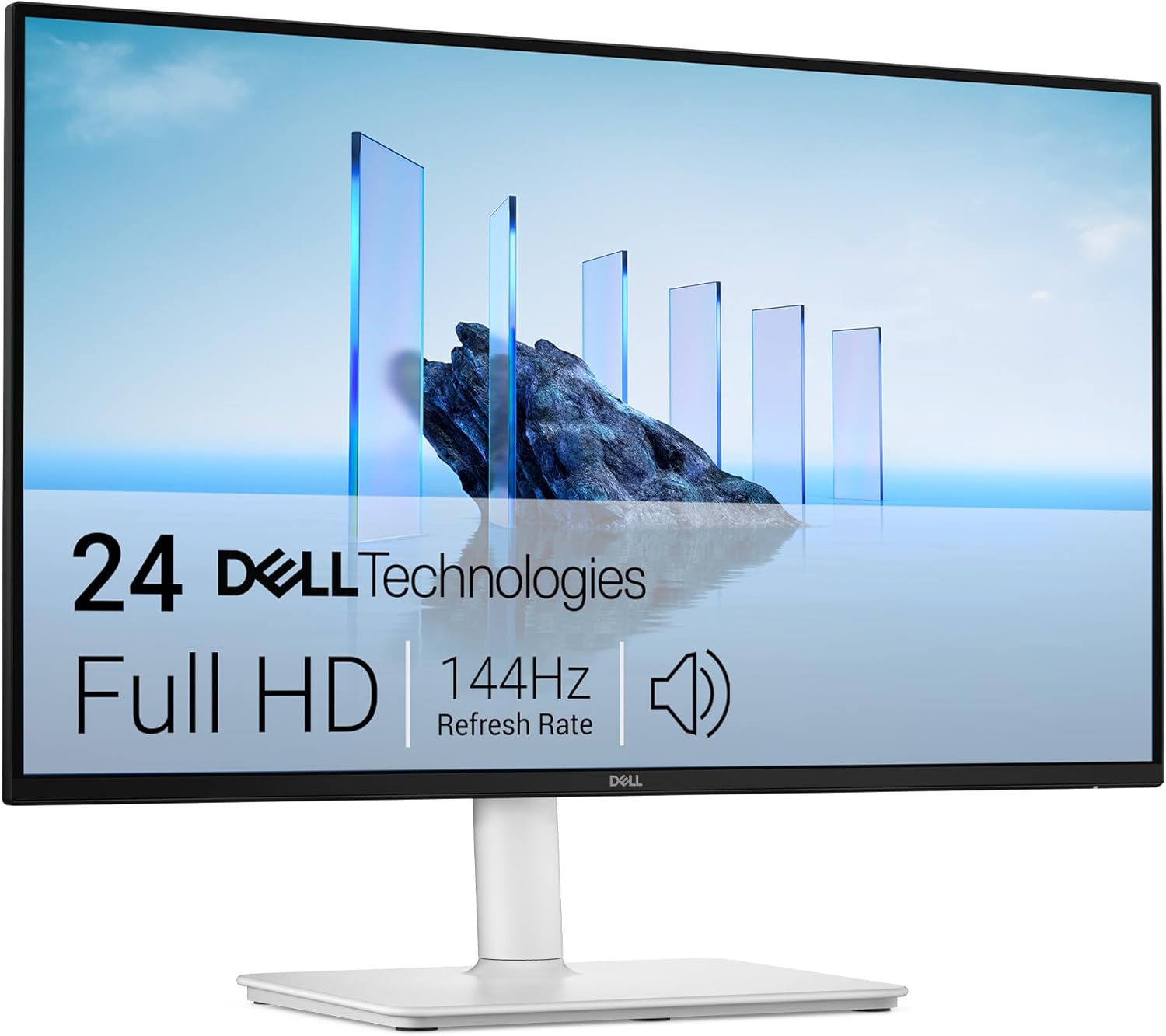
Dell S2425HSM Analysis: Full Stand, Real 144Hz
My Honest Verdict
The Dell S2425HSM is a 23.8-inch Full HD IPS monitor with a 144Hz refresh rate, full ergonomic stand adjustability, and Dell’s three-year warranty — all in a white finish that’s still relatively unusual at this end of the market. For anyone upgrading from a basic office screen or an older 60Hz panel, this is a genuinely capable step up without requiring a painful compromise on build quality or brand support.
The Dell 24 Plus Monitor S2425HSM sits in a crowded space, but a few things pull it ahead of the generic competition. The IPS panel means accurate colours and wide viewing angles — not a given at this size and spec level. The 99% sRGB coverage is honest and useful for anyone doing light creative work alongside gaming or general use. And the full stand — height, tilt, swivel, pivot — is something a lot of similarly priced screens quietly drop to cut costs.
Who should look elsewhere? If you’re a serious competitive gamer who needs 240Hz or faster, this isn’t the monitor for you. If you need USB-C connectivity or DisplayPort, the port selection here — dual HDMI only — will frustrate you. And if you’re after a 27-inch or larger screen, you’ll want to look at the size and resolution tradeoffs before committing to a 24-inch panel. For everyone else — home office workers, casual to mid-level gamers, Mac mini or console users — this hits a genuinely sweet spot.
See the Dell S2425HSM listing and availability on Amazon.

What It’s Best For
Home Office and Everyday Computing
This is where the Dell 24 Plus Monitor S2425HSM earns its keep most convincingly. The IPS panel with 178° viewing angles means colour doesn’t shift when you’re not sitting dead-centre — useful if you’re on calls, sharing your screen with someone nearby, or just moving around a desk. The 99% sRGB coverage means documents, photos, and web content render with accurate, natural colour rather than the slightly washed-out look you get from cheaper panels. The built-in dual 3W speakers and five audio presets remove the need for a separate speaker on a tidy desk setup — they won’t win any audiophile awards, but they’re functional for calls and background music. Dell’s Easy Arrange software for window tiling is a small but genuinely useful bonus for multitasking workflows.
Casual and Mid-Level Gaming
At 144Hz with 1ms MPRT response time and AMD FreeSync, this screen is properly set up for gaming — not just spec-sheet gaming, but actual smooth, tear-free play. The jump from 60Hz to 144Hz is one of the most visible upgrades in PC gaming; anyone who hasn’t experienced it before will notice it immediately. FreeSync keeps frames in sync with your GPU to eliminate tearing without the input lag of V-Sync. You can learn more about how refresh rate and response time interact in practice if you want the full picture. This isn’t built for 300fps esports tournaments, but for most games at most settings on mid-range hardware, it’s more than capable.
Console and Mac Mini Use
The dual HDMI port setup — both capable of driving 1920 x 1080 at 144Hz per the HDMI 1.4 spec — makes this a natural fit for a living room desk setup with a console and a PC sharing the same screen, or a Mac mini paired with a second source. One reviewer specifically confirmed it works with the Mac mini 4 without any configuration headaches. Two HDMI inputs mean no manual cable swapping when switching between devices.
The Specs That Really Matter
The panel type is IPS, and that matters more than most manufacturers want to discuss openly. IPS panels deliver consistently accurate colour across wide viewing angles — something TN panels can’t match and VA panels handle inconsistently. The 1,500:1 contrast ratio is decent for IPS — most IPS panels sit around 1,000:1, so this is a slight step up. Don’t expect the deep blacks of a VA or OLED panel, but for a well-lit desk environment, this contrast level is perfectly competent.
Resolution at 1920 x 1080 on a 23.8-inch screen gives you a pixel density that’s sharp enough for everyday use without looking soft. Some buyers moving from a 1440p or 4K screen will notice the step down, but for anyone coming from a standard 1080p setup or a laptop display, this is clean and comfortable. The 300 cd/m² brightness is adequate for indoor use — not HDR-capable in any meaningful sense, and there’s no HDR certification listed here, which is fine. Marketing fake HDR400 at this tier would be worse than simply not mentioning it.
Connectivity is the area to think about carefully before buying. The S2425HSM ships with dual HDMI ports only — no DisplayPort, no USB-C. For most home users this is fine, but if your PC has a newer GPU and you want to take full advantage of the refresh rate, check that your graphics card has an HDMI output. Laptops with USB-C only ports will need an adapter. The connectivity guide covers this in more detail if you’re unsure what ports your hardware has. What the box does include: an HDMI cable and UK power cable, so you’re not hunting for accessories out of the box.
As monitors head into 2026, the full ergonomic stand — 110mm height adjustment, ±30° swivel, ±90° pivot — is worth calling out as genuinely above-average for this price tier. A lot of competing screens offer tilt only. Getting the monitor into the right position for your desk and chair setup reduces fatigue over long sessions, and Dell has included the full package here. VESA compatibility is not confirmed in the data, so if you’re planning to mount this on an arm, verify that before purchasing.
Check the full spec sheet and buyer Q&As for the Dell S2425HSM on Amazon.
What Buyers Are Saying
The Dell 24 Plus Monitor S2425HSM holds a rating of 4.4 out of 5 from 87 customer reviews on Amazon. That’s a respectable score but the review count is still on the lower side, so individual outliers carry more weight than they would on a product with hundreds of ratings. The overall pattern is strongly positive, with only one notable negative in the available sample.
Praise themes cluster around three things: image clarity, stand quality, and the out-of-box experience. Multiple buyers comment on how sharp the screen looks, and the adjustable stand gets specific positive mentions — it’s clearly something buyers notice and appreciate when they’ve dealt with tilt-only stands before. One buyer working with a Mac mini 4 flagged compatibility as a non-issue, which is useful to know given Apple’s sometimes awkward display behaviour. The built-in speakers get a lukewarm mention — functional, not remarkable — which aligns with what you’d expect from a pair of 3W drivers built into a monitor chassis.
The single one-star review in the dataset is from an Australian buyer who received a non-functioning unit that also came with a non-Australian plug. That’s a logistics and regional distribution issue rather than a product fault, and not something UK buyers should weight heavily when evaluating this monitor.
Buyer Highlights
“Output is sharp for a 23.8-inch monitor — no dead pixels, and the integrated speakers are a nice bonus.” — A common reaction from buyers who weren’t expecting much from the built-ins and were pleasantly surprised.
“Works perfectly with my Mac mini 4, no issues at all.” — Useful confirmation for Apple users considering this screen alongside compact desktop setups.
“The screen is very clear, I’m really pleased with it.” — Consistent feedback from buyers upgrading from older or lower-spec displays.
“Sound quality isn’t great, but for the price it’s perfectly acceptable.” — Measured, honest take from a buyer who clearly had expectations set correctly going in.
“The stand isn’t super heavy but the adjustability is a genuine plus.” — Practical observation from a buyer who values ergonomics over chunky aesthetics.

Worth Knowing Before You Buy
The port situation is the clearest practical limitation here. Dual HDMI only means no DisplayPort and no USB-C — if you’re buying this for a laptop that outputs exclusively over USB-C, you’ll need an adapter. That’s not a dealbreaker for most buyers, but it’s worth checking your source device’s outputs before ordering. The HDMI ports are rated to the HDMI 1.4 spec, which supports 1920 x 1080 at 144Hz — so you’re not losing anything in terms of the advertised refresh rate, but it’s worth knowing this isn’t a more capable HDMI 2.0 or 2.1 implementation. If you’re thinking about using this with a newer console at higher refresh rates, 1080p at 144Hz is the ceiling here. The monitor buying guide covers port considerations in more depth if you want to map this against your specific setup.
Build quality appears solid based on buyer feedback — the stand draws positive comments and the monitor itself hasn’t flagged as flimsy in any review. The ash white finish is clean and consistent with the current trend toward lighter-coloured desk setups, but it’s worth knowing this is the only colour option — if you’re in a dark-themed setup, it’ll stand out. The three-year warranty is genuinely worth something. Dell’s support infrastructure is well-established, and having that coverage on a monitor you’re planning to use daily is a meaningful value-add over no-name alternatives. TÜV 4-Star Eye Comfort certification with flicker-free and low blue light is also legitimately useful for anyone spending long hours in front of this screen — not just marketing language in this case.
There’s no HDR certification on this monitor — that’s fine, and arguably better than a misleading HDR400 badge that contributes almost nothing in practice. The 300 cd/m² brightness is sufficient for a standard indoor environment but won’t hold up in a very bright room with strong direct light. If your desk gets a lot of sunlight, a matte finish (which this has) helps, but brightness headroom is still limited compared to higher-spec panels.
View current stock and availability for the Dell S2425HSM on Amazon.
Who Should Buy It (And Who Shouldn’t)
Buy If
- You’re upgrading from a 60Hz or older 75Hz office screen and want a genuine step up in smoothness for both gaming and everyday use without leaving the 24-inch form factor.
- You need a fully ergonomic stand — height, tilt, swivel, and pivot — and don’t want to spend extra on a monitor arm to get comfortable positioning.
- You’re running a dual-source setup (console and PC, or two computers) and want two HDMI inputs that both support 144Hz without a switcher.
- You want Dell’s three-year warranty and a known brand’s support network behind your purchase rather than rolling the dice on a grey-market alternative.
- The white finish fits your desk setup and you want something that doesn’t look like every other black plastic monitor on the market.
Avoid If
- Your laptop or PC outputs exclusively over USB-C or DisplayPort — there’s no USB-C input and no DisplayPort on this monitor, and adapters introduce their own complications.
- You’re a competitive gamer who needs 240Hz or above for fast-paced titles where frame rate headroom genuinely matters at the highest level of play.
- You’re stepping down from a 1440p or 4K screen and expect equivalent pixel density — 1080p on a 24-inch panel is sharp enough, but the difference from higher-res panels is noticeable once you’ve lived with them.
The Bottom Line
The Dell 24 Plus Monitor S2425HSM is a well-constructed, honestly specced 24-inch IPS monitor that delivers where it needs to — clean colour, smooth 144Hz gaming, full ergonomic adjustability, and solid brand backing with a three-year warranty. The HDMI-only connectivity is a real limitation for some, and the speakers are functional rather than impressive, but neither of those things undermines what this monitor actually is: a reliable, no-nonsense screen from a manufacturer that won’t leave you stranded if something goes wrong. If a 24-inch 1080p IPS panel at 144Hz fits your use case, this is a genuinely good pick. If you need to understand what to look for in your specific situation, the guide to choosing a monitor is worth a read before committing.
Find the Dell S2425HSM on Amazon and check current availability.
At The Monitor Expert, our approach is built on data transparency rather than simulated hands-on testing. We rigorously analyse official manufacturer specifications and aggregate verified customer sentiment to provide honest, straightforward buying advice that cuts through the marketing noise.
As an Amazon Associate, I earn from qualifying purchases.
Browse by Specification
Looking for something specific? Browse our analyses by hardware and feature below, or check all monitor analyses in the Gaming Monitors and Budget Monitors category archives.
[IPS Monitors] — [VA Monitors] — [TN Monitors] — [OLED Monitors]
Browse by Refresh Rate
[60Hz] — [75Hz] — [100Hz] — [120Hz] — [144Hz] — [165Hz] — [180Hz] — [200Hz] — [240Hz+] — [360Hz+]
Browse by Screen Size
[Small Screen] — [24-inch] — [27-inch] — [32-inch] — [Large Screen] — [Ultrawide]




