
KTC H32S17F Analysis: Big Screen, Real Limits
My Honest Verdict
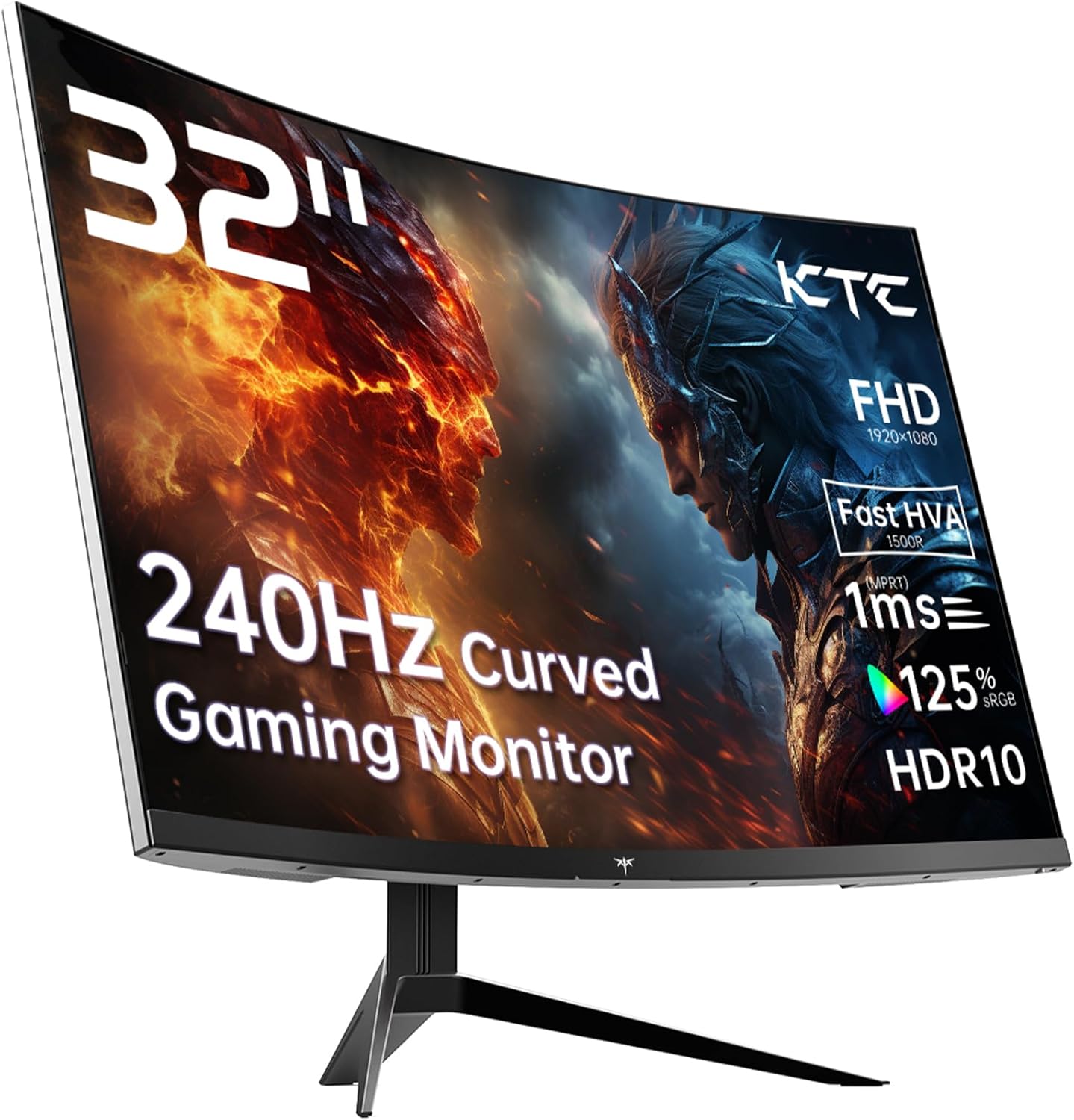
The KTC H32S17F is a 32-inch, 1080p curved gaming monitor running at 240Hz on a VA panel. For buyers who want a large, fast screen on a tight budget and are happy to sit directly in front of it, this delivers more than you’d reasonably expect at this price point. The headline limitation is equally straightforward: Full HD resolution on a 32-inch screen produces a pixel density that anyone used to sharper displays will notice immediately, and the VA panel’s viewing angles mean it genuinely only works well from dead centre.
In practice, what you’re getting is a monitor that prioritises motion fluidity and colour punch over pixel sharpness. The 240Hz refresh rate and 1ms advertised response time (the spec sheet lists 3ms — more on that shortly) means fast-paced gaming feels genuinely smooth. The 3500:1 contrast ratio is a real strength of VA technology — blacks look properly dark, and colours pop with a vividness that flat IPS panels at this tier can’t match. Buyers specifically mention HDR performance that surprised them, with brightness peaks that made them blink. The 1500R curve radius on a 32-inch panel does create a sense of immersion that wider radii don’t.
This is a monitor for console gamers, casual PC players, and anyone wanting a large second screen where content looks vivid and motion is smooth. It is not the right call if you do any close-up productivity work that demands sharpness, or if you need to share your screen from an off-angle position. If you want a sharper picture from a 32-inch panel, you need to be looking at 1440p — and that will cost you more. For what this monitor actually is, though, it earns its rating.
See the KTC H32S17F listing and current availability on Amazon.

What It’s Best For
Console and casual PC gaming is where this monitor makes the most sense. Connecting a PS5 or Xbox to a 32-inch curved screen with a 240Hz ceiling and Adaptive Sync support produces noticeably smooth, tear-free gameplay. The curve pulls peripheral content into view without requiring you to pan your eyes — at 1500R on a 32-inch display, the effect is tangible rather than gimmicky. The deep contrast from the VA panel makes darker game environments look genuinely atmospheric in a way that budget IPS panels simply don’t achieve. One buyer described the HDR brightness as making in-game sunlight feel physically uncomfortable — which is a slightly chaotic compliment, but tells you something real about the panel’s output.
Home entertainment and streaming gets a lot out of this configuration. Films and TV series on a 32-inch curved screen with strong contrast and HDR10 support look noticeably better than on a flat, lower-contrast alternative. The matte finish handles ambient light well, and the 125% sRGB colour gamut means content looks saturated and rich rather than washed out. The screen is large enough to be a legitimate room display while still fitting on a standard desk.
Budget-conscious upgraders moving off an old 60Hz TV or an ageing flat monitor will find the jump here dramatic. The combination of size, curve, refresh rate, and contrast ratio at this price tier is difficult to match from more established brands. Buyers routinely mention that it performs above what they expected for the money — and that reaction is consistent enough across reviews to be credible.
The Specs That Really Matter
The panel technology here is marketed as “HVA” — KTC’s branding for what is, underneath, a fast VA panel. VA panels deliver higher contrast ratios than IPS, which is why the 3500:1 figure here is achievable and not marketing fiction. The trade-off is narrower viewing angles — the KTC H32S17F’s 178-degree spec is a maximum figure measured under ideal conditions; in real use, colour accuracy shifts meaningfully once you’re more than about 30 degrees off-axis. Sit directly in front of it and it looks excellent. Share it with someone sitting beside you and it’s going to look greyed out to them. Buyers confirm this directly.
The 240Hz refresh rate is the headline spec, and it’s a genuine differentiator for gaming — though worth understanding what you actually need to drive it. At 1920 x 1080 resolution, most mid-range GPUs can push close to or beyond 240 frames per second in less demanding titles, so the spec is usable. For refresh rate and response time context: the jump from 60Hz to 144Hz is dramatic and everyone notices it; the jump from 144Hz to 240Hz is real but more subtle, and most players feel it in competitive FPS gaming rather than general play. The response time situation needs flagging: the marketing says 1ms, but the specification sheet lists the response time as 3ms. KTC’s “1ms” figure is likely a Motion Blur Reduction or overdrive measurement rather than standard GtG. 3ms GtG is still fast enough for comfortable gaming at this refresh rate — but buyers should go in with accurate expectations rather than assuming the marketing figure is the whole story.
Resolution and screen size is the key tension in this monitor’s spec sheet. 1920 x 1080 across a 32-inch panel produces roughly 69 pixels per inch. That’s low by current standards — you will see individual pixels if you sit close, and text won’t have the crispness you’d get from a 27-inch 1080p or any 1440p alternative. For gaming at distance this matters less, because the immersive curve and motion fluidity offset the softness. For spreadsheets and document work at normal desk distance, it’s a genuine limitation. Understanding screen size and resolution trade-offs before buying is worth five minutes of your time if you’re undecided. By 2026 standards, 1440p at 32 inches is increasingly the expected baseline for productivity — this monitor makes a conscious trade downward in resolution to achieve higher refresh at a lower price point.
Connectivity is functional rather than generous. Two HDMI 2.0 ports and one DisplayPort 1.4 input cover most setups — PC and one console simultaneously, for instance. One USB 2.0 port is included. There is no USB-C input, no built-in hub beyond that single USB port, and the HDMI version caps bandwidth at what HDMI 2.0 allows — adequate for 1080p at 240Hz but not a connection worth future-proofing concerns about. Full details on what each port means in practice are covered in the monitor connectivity guide. Adaptive Sync covers both FreeSync and G-Sync Compatible, which means it works smoothly with both AMD and Nvidia graphics cards.
Check the full spec sheet and buyer Q&As for the KTC H32S17F on Amazon.
What Buyers Are Saying
The KTC H32S17F holds a rating of 4.3 out of 5 from 1,925 customer reviews — a meaningful sample that consistently supports a picture of a monitor that overdelivers on visual impact and falls short only in well-defined areas. The praise is louder and more frequent than the complaints, which is the right way round.
Brightness and HDR performance come up repeatedly as genuine surprises. Multiple buyers describe HDR output that they didn’t expect to work as well as it does at this price, with one noting peaks that made in-game sunlight feel almost physical. The colour vibrancy gets consistent credit — the 125% sRGB gamut coverage produces saturation that stands out against blander alternatives. Ease of setup gets strong mentions: buyers describe connecting cables and having it working within minutes, with no fiddly configuration required.
The stand is the most consistent complaint. It is described as flimsy by more than one buyer, and several recommend pairing this monitor with a third-party monitor arm from the outset. Viewing angles come up as a known limitation — buyers aren’t angry about it, they just note it clearly and generally frame it as “use this from directly in front of you.” One buyer also raised a support experience that went badly when their unit developed DisplayPort artefacts after a month — KTC’s after-sales response was slow and ultimately unhelpful according to that account. That’s worth knowing, especially given the brand is not yet as established as the major manufacturers.
There is also a specific note from one buyer about PS5 compatibility at 120Hz — they found the monitor only accepted 60Hz over HDMI from the PS5. This is a real consideration: HDMI 2.0 can support 1080p at 120Hz on PS5, but console compatibility can vary by monitor and depends on how the monitor reports its capabilities. If 120Hz console gaming is your primary use case, verify this before committing.
Buyer Highlights
“Superbly bright, peaking at 1400 nits, and genuinely giving amazing HDR performance for the money.” — A common reaction from buyers who expected this level of HDR brightness to cost significantly more.
“You’d do well to pick up a good monitor arm for this — glad I didn’t end up paying more for a stand I wasn’t going to use anyway.” — The stand is functional but multiple buyers treat a third-party arm as a near-essential upgrade.
“Viewing angles aren’t amazing, so use this as a monitor directly in front of you — despite that, it’s a fantastic screen.” — Buyers are generally sanguine about the VA limitation once they understand it going in.
“Gaming on it is extremely smooth and the visuals are amazing — it’s really big and almost takes up all the space on my 91cm desk.” — First-time monitor buyers in particular find the size and motion fluidity combination genuinely impactful.
“Colours are vibrant due to great coverage, brightness is entirely adequate for indirect natural light — overall feels professional and pleasant.” — Reflects the recurring buyer sentiment that visual quality punches above what the price suggests.

Worth Knowing Before You Buy
The response time discrepancy is the first thing to clarify. KTC markets this as a 1ms monitor, but the official specification table lists 3ms. This is unfortunately common practice — manufacturers measure response time in the most flattering way and put the headline number in the product title. 3ms GtG is genuinely fast and not a problem for gaming; the issue is simply the expectation gap between what’s advertised and what’s specified. If you’re making a decision based on 1ms being a hard requirement, factor this in. For a thorough breakdown of how response time figures are measured and what they actually mean for gaming, the refresh rate and response time guide is worth reading.
Build quality is adequate for the price but nothing more. The stand has been called flimsy by multiple buyers — it does not appear to offer height adjustment, and its stability has been questioned. If you’re mounting this on a desk arm anyway, that’s a non-issue; if you’re relying on the included stand long-term, it’s worth knowing upfront. One buyer received a unit with screws that were too small to assemble the base properly and had to source replacements. Isolated quality control issues at this price tier are not unusual, but they’re worth mentioning.
KTC’s after-sales support is an open question. The brand is growing but not yet in the same league as established names for service infrastructure. One buyer with a unit fault spent two months trying to get a meaningful response. The monitor does come with a 3-year manufacturer warranty, which is genuinely good on paper — but a warranty is only as useful as the company’s willingness to honour it. If reliable after-sales support is important to you, that’s a real consideration here. Buyers who have had no issues with their units — the clear majority — have no complaints on this front.
The brightness spec of 350 cd/m² is decent without being exceptional. In well-lit rooms with direct sunlight it may struggle slightly, though the matte screen finish helps manage reflections. The HDR10 implementation gets positive feedback in reviews, but it’s worth understanding that HDR10 without a certified brightness tier is entry-level HDR — it will look better than SDR, but it’s not the same as a proper HDR600 or HDR1000 panel. Before committing to any monitor at this tier, the general monitor buying guide is worth a scan to set expectations correctly.
View current stock levels and delivery options for the KTC H32S17F on Amazon.
Who Should Buy It (And Who Shouldn’t)
Buy If
- You primarily game or watch content and want the largest, fastest screen possible at a budget price — the combination of 32-inch size, 240Hz, and deep VA contrast is genuinely difficult to match at this price tier.
- You’re a console gamer connecting via HDMI who sits directly in front of the screen — the curve, size, and HDR output make this a noticeable upgrade from a standard TV setup.
- You plan to use a monitor arm rather than the included stand — you’ll avoid the build quality concern entirely and get a much better ergonomic setup in the process.
- You’re upgrading from a 60Hz screen for the first time — the jump to 240Hz at this size is one of the most impactful single upgrades you can make to a gaming setup.
Avoid If
- You do significant text-heavy productivity work at close range — 1080p on a 32-inch panel is visibly soft for documents and spreadsheets, and a smaller or higher-resolution screen will serve you better.
- After-sales support reliability is a priority — KTC’s warranty is three years on paper, but buyer experience with their support when things go wrong has been mixed at best.
- You need 120Hz specifically from a PS5 — the HDMI 2.0 connection should support it in theory, but at least one buyer found the PS5 capped at 60Hz, and this is worth verifying before purchasing.
The Bottom Line
The KTC H32S17F is a monitor that makes a clear and honest trade: resolution for size, speed, and price. If you go in knowing that 1080p on 32 inches is soft for close-up work but entirely acceptable for gaming and entertainment at normal viewing distance, and you sit directly in front of it, this delivers a visual experience — rich contrast, strong colour, genuine 240Hz fluidity — that most buyers find hard to argue with at this price. The stand is cheap, support is an unknown quantity, and the response time marketing needs a pinch of salt. But the screen itself? It earns its 4.3 rating.
Find the KTC H32S17F on Amazon and see what buyers are saying right now.
At The Monitor Expert, our approach is built on data transparency rather than simulated hands-on testing. We rigorously analyse official manufacturer specifications and aggregate verified customer sentiment to provide honest, straightforward buying advice that cuts through the marketing noise.
As an Amazon Associate, I earn from qualifying purchases.
Browse by Specification
Looking for something specific? Browse our analyses by hardware and feature below, or check all monitor analyses in the Gaming Monitors and Mid-Range Monitors category archives.
[IPS Monitors] — [VA Monitors] — [TN Monitors] — [OLED Monitors]
Browse by Refresh Rate
[60Hz] — [75Hz] — [100Hz] — [120Hz] — [144Hz] — [165Hz] — [180Hz] — [200Hz] — [240Hz+] — [360Hz+]
Browse by Screen Size
[Small Screen] — [24-inch] — [27-inch] — [32-inch] — [Large Screen] — [Ultrawide]




