
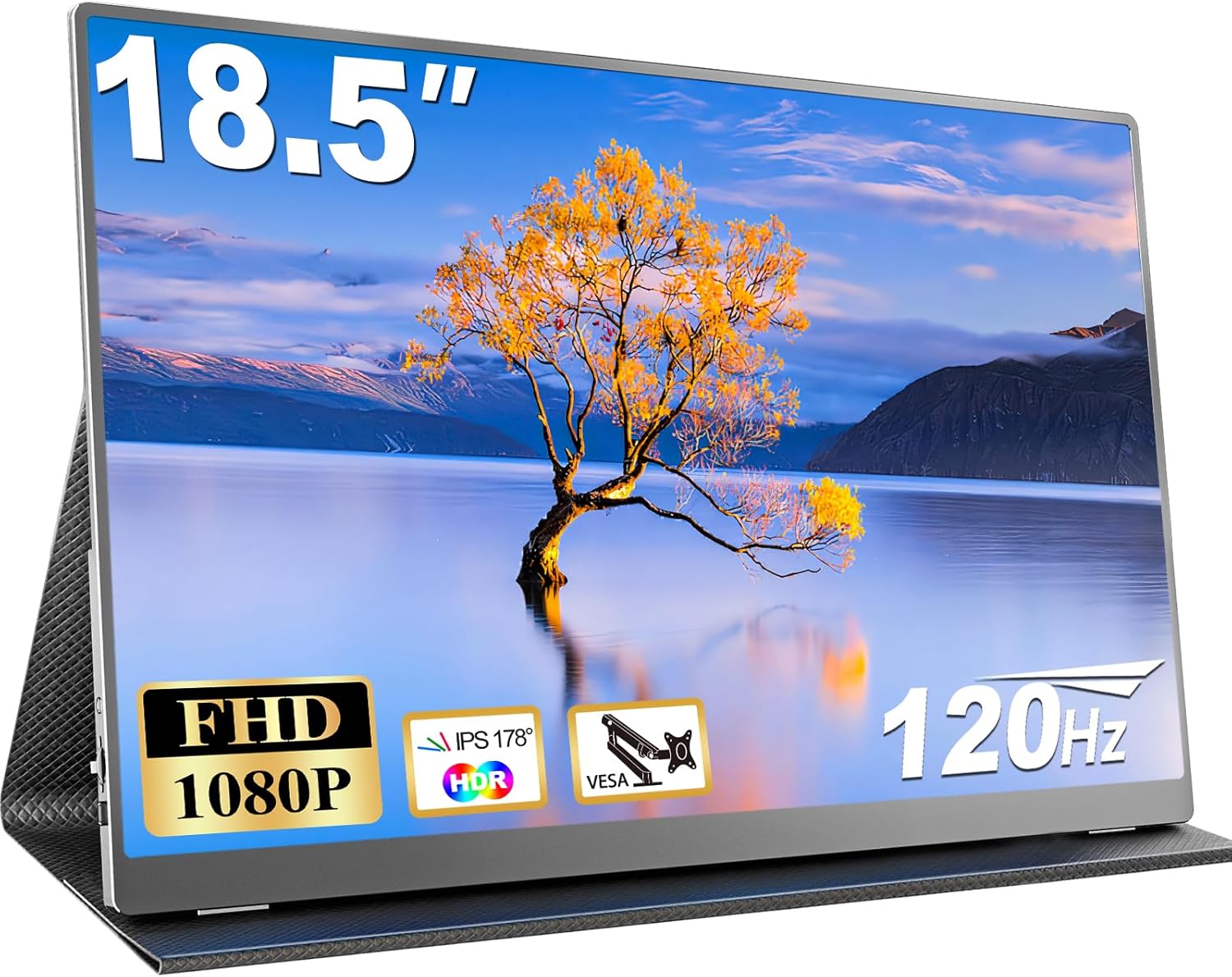
CUIUIC 18.5-inch Portable Monitor Analysis: Big Screen Gains
My Honest Verdict
The CUIUIC 18.5-inch Portable Monitor is a genuinely useful bit of kit for anyone who needs a large second screen on the move. The headline strength is straightforward: at 18.5 inches, it’s noticeably bigger than the 15.6-inch and 17.3-inch portable monitors that dominate this category, and that extra real estate makes a meaningful difference when you’re working away from your desk. The headline limitation is equally straightforward: it’s a no-name brand with a modest track record, and at least one buyer has reported a USB-C port failing after two weeks of use.
The specs that actually matter here are the IPS panel, the 120Hz refresh rate, and the 1920×1080 resolution. At this screen size, 1080p gives you a pixel density that keeps text reasonably sharp without demanding anything exotic from your laptop’s GPU. The 120Hz is a genuine step up from the 60Hz most portable monitors ship with — scrolling feels smoother and gaming is noticeably more fluid. The IPS panel means colours hold up from wide angles, which matters when you’re sharing a screen across a table. 400 nits of brightness is decent for indoor use, though it’ll struggle in direct sunlight. The 100% sRGB coverage is a meaningful spec for anyone doing creative work on the road.
This is the right monitor for remote workers who want a proper dual-screen setup in hotels or coffee shops, and for students who want more screen than their laptop provides in a library or lectures. It also works well as a secondary screen for gaming consoles when travelling. If you need something to replace a primary desktop monitor, or if long-term daily durability is your main concern, look elsewhere — this is positioned squarely as a travel companion, not a permanent fixture.
The CUIUIC 18.5-inch Portable Monitor is listed on Amazon with current availability and buyer Q&As.

What It’s Best For
Remote and hybrid workers. This is where the CUIUIC 18.5-inch Portable Monitor earns its keep. A proper dual-screen setup fundamentally changes how quickly you can work — having reference material on one screen and your main document on another isn’t a luxury, it’s a productivity baseline. At 18.5 inches, this monitor gives you enough screen to run two document windows side by side, which is genuinely useful in a way that a 15.6-inch screen isn’t. The IPS panel keeps colours accurate and viewing angles wide, so colour-matching across screens isn’t a guessing game. The matte anti-glare coating handles fluorescent office lighting without turning the screen into a mirror.
Travellers and students. The included smart cover doubles as a stand, the 20W power draw is low enough that many laptop chargers can power it via USB-C without a separate adapter, and everything you need is in the box. No hunting for cables. Multiple buyers specifically call out the compatibility with Android phones and iPhones via USB-C — if your device supports DP Alt Mode or Thunderbolt, you get a big-screen experience from your pocket. That’s a legitimate use case for anyone who travels without a laptop but wants more than their phone screen.
Console gaming on the road. The 120Hz refresh rate with FreeSync adaptive sync means this isn’t just a productivity tool — it handles PS5 and Xbox sessions with noticeably smoother motion than the typical 60Hz portable screen. The 3ms response time is within an acceptable range for console gaming. You won’t get the instant pixel response of a dedicated gaming monitor, but for hotel room gaming sessions this is a solid option that doesn’t require hauling a full-size screen.
The Specs That Really Matter
The IPS panel is the most important thing on this spec sheet. IPS gives you consistent, accurate colour across a wide viewing angle — the listed 178° is standard for the technology and accurate. In practice, this means two people can look at the screen from different positions without one of them seeing washed-out colour. For a portable monitor that gets used in meetings, on trains, and at shared desks, that matters more than it does on a screen that sits fixed on your desk. The 100% sRGB coverage means colour reproduction is solid for photo editing, design work, and video — respectable for a monitor at this tier.
The 120Hz refresh rate is a genuine differentiator in the portable monitor category. Most portable screens still ship at 60Hz, and the difference in how smooth everyday scrolling and window dragging feels at 120Hz is immediately obvious. If you’re curious about what that gap actually means in practice, our refresh rate and response time guide breaks it down without the marketing noise. The 3ms response time is a claimed GTG figure — treat it as directionally useful rather than gospel, since response time measurement methods vary wildly across manufacturers. For the target use cases here — productivity, casual gaming, streaming — it’s more than adequate.
Connectivity is worth understanding before you buy. The CUIUIC 18.5-inch Portable Monitor has two full-featured USB-C ports and one Mini HDMI port. The USB-C ports require your source device to support Thunderbolt 3/4 or USB-C DP Alt Mode — if it doesn’t, you’ll need the Mini HDMI route instead. This catches people out, particularly with older laptops and some Android devices. The connectivity guide explains exactly what to check on your device before assuming USB-C will work. The box includes two USB-C to USB-C cables, a Mini HDMI to HDMI cable, and a 20W adapter, so you’re covered for most scenarios out of the gate.
The HDR on this monitor is listed as HDR100 — meaning 400 nits peak brightness and no local dimming. By 2026 standards, this sits at the entry level of HDR implementation. It will produce marginally punchier highlights in HDR content compared to SDR mode, but it won’t deliver the dramatic contrast or deep blacks that proper HDR requires. Don’t buy this monitor expecting HDR to transform your viewing experience — the IPS panel and 2000:1 contrast ratio keep it in solid SDR territory. The 400 nits brightness is the real practical spec: comfortable for indoor use, adequate in most ambient light, not ideal outdoors.
Check the full spec sheet and buyer Q&As for the CUIUIC 18.5-inch Portable Monitor on Amazon.
What Buyers Are Saying
The CUIUIC 18.5-inch Portable Monitor carries a rating of 4.3 out of 5 from 2,327 reviews — a meaningful sample with a clear pattern. The praise is consistent and specific: picture quality for the screen size and tier, plug-and-play simplicity, and the value of having all cables and a power adapter included. Multiple buyers explicitly mention the size advantage over smaller portable monitors as a headline selling point. Several note successful connections to phones — both Android and iPhone — which is genuinely useful for buyers looking for a device-agnostic portable screen.
Gaming buyers mention the 120Hz smoothness as a noticeable upgrade from what they’d used before. The cover-as-stand is mentioned regularly and with mixed feelings — functional, but fiddly to get stable. At least one buyer reported a USB-C port failure after about two weeks. One buyer also flagged that landscape mode didn’t work when connected to their tablet, which points to a device compatibility issue rather than a screen fault — but worth being aware of before assuming any USB-C source will work without checking DP Alt Mode support first.
The European reviews (German, Dutch, Belgian, Spanish, Swedish) add a decent international spread and are broadly consistent with UK sentiment. The German review specifically praises the colour reproduction and included cables while noting the stand requires some patience to position. One Swedish buyer reported losing USB-C functionality after two weeks and falling back to HDMI — a data point worth filing, even if it’s a single instance in over 2,000 reviews.
Buyer Highlights
“The 120Hz makes a noticeable difference — everything feels incredibly smooth whether I’m scrolling, working, or gaming.” — Consistent feedback from buyers who came from standard 60Hz portable screens.
“Comes with all the cables you may need and also a power supply, which is really handy.” — Repeatedly mentioned as a standout feature given how often budget monitors ship with nothing useful in the box.
“I connected it to my Samsung S23 Ultra and my laptop and it was perfectly compatible with both.” — A recurring theme from buyers using this across multiple devices rather than as a dedicated laptop extension.
“The cover that doubles as a stand is a bit fiddly, but it does the job and protects the screen when travelling.” — The most common qualified praise — useful, not perfect, which is fair at this size and weight.
“After two weeks of using it, the USB-C stopped working — now only HDMI works.” — An isolated report but worth noting for buyers planning to rely solely on USB-C connectivity long term.

Worth Knowing Before You Buy
The USB-C compatibility caveat is the most practically important thing to check before ordering. This monitor requires Thunderbolt 3/4 or USB-C with DP Alt Mode on your source device — if your laptop, phone, or tablet doesn’t support DP Alt Mode over USB-C, you’ll be routed to Mini HDMI instead. That’s absolutely workable, and the cable is included, but it does mean you may need an HDMI port or an adapter on your source. Older laptops, certain budget Android tablets, and some gaming handhelds may hit this wall. Check your device spec sheet first — our monitor buying guide covers this in plain terms if you’re unsure what to look for.
Build quality sits at what you’d expect for a budget portable monitor from a lesser-known brand. The screen itself draws broadly positive comments, but the smart cover stand requires some patience to get stable — particularly on uneven surfaces. The CUIUIC 18.5-inch Portable Monitor weighs 2.52kg, which is heavier than some 15.6-inch alternatives — that’s the trade-off for the larger screen, and whether it matters depends on how much you’re carrying. For desk use, the 75×75mm VESA mount support means you can skip the stand entirely and attach this to an arm, which is a genuinely useful option. The 2-year warranty provides a reasonable backstop, though with a less established brand, how warranty claims are handled in practice is harder to predict than with a major manufacturer.
The HDR implementation is entry-level and shouldn’t factor into your buying decision as a feature. What should factor in is the matte screen surface — it handles ambient light well, which is exactly what you want in the unpredictable environments a portable screen ends up in. DC dimming for blue light filtering is a real and useful feature for long work sessions, though the practical benefit varies between individuals.
View current stock and availability for the CUIUIC 18.5-inch Portable Monitor on Amazon.
Who Should Buy It (And Who Shouldn’t)
Buy If
- You need a genuinely large portable second screen — the 18.5-inch size is a meaningful step up from the 15.6-inch and 17.3-inch alternatives that dominate this category, and that difference is immediately noticeable in day-to-day productivity use.
- You travel regularly for work and want a plug-and-play setup — everything needed is in the box, the USB-C single-cable connection works cleanly with compatible laptops, and the cover-as-stand gets you up and running without additional accessories.
- You want 120Hz in a portable form factor — most portable monitors at this tier are still 60Hz, and the smoothness difference is real whether you’re gaming on a console in a hotel room or just scrolling through documents.
- You want the option to wall-mount or desk-arm mount it permanently — the VESA support means this isn’t just a travel monitor, it can serve as a fixed secondary screen that you occasionally detach and take with you.
Avoid If
- You can’t confirm your source device supports USB-C DP Alt Mode or Thunderbolt 3/4 — if HDMI isn’t an option on your device either, this monitor simply won’t connect without additional adapters that aren’t guaranteed to work cleanly.
- You need a monitor that will run as a primary screen for several hours daily over years — the brand’s reliability track record is limited, the stand is not ergonomically adjustable, and single-unit port failures in reviews suggest long-term durability is an open question. Check out our guide on choosing the right monitor type if you’re deciding between a portable and a proper desktop screen for this scenario.
- You’re expecting meaningful HDR — at 400 nits with no local dimming, the HDR mode makes a marginal difference at best, and if HDR quality is a genuine priority you’ll need to spend significantly more on a monitor built around it.
The Bottom Line
The CUIUIC 18.5-inch Portable Monitor does one thing particularly well: it gives you a bigger portable screen than almost anything else in its category, at a sensible price, with everything you need in the box. The IPS panel, 120Hz refresh rate, and 100% sRGB coverage are all legitimate specs that improve the day-to-day experience over cheaper alternatives. The caveats are real — USB-C compatibility depends on your device, the stand takes patience, and CUIUIC is not a brand with a long track record — but for remote workers, students, and travelling gamers who want a proper large second screen, this earns a clear recommendation. If the size matters to you, the specs support it.
See the CUIUIC 18.5-inch Portable Monitor on Amazon and check the latest buyer questions.
At The Monitor Expert, our approach is built on data transparency rather than simulated hands-on testing. We rigorously analyse official manufacturer specifications and aggregate verified customer sentiment to provide honest, straightforward buying advice that cuts through the marketing noise.
As an Amazon Associate, I earn from qualifying purchases.
Browse by Specification
Looking for something specific? Browse our analyses by hardware and feature below, or check all monitor analyses in the Portable Monitors and Budget Monitors category archives.
[IPS Monitors] — [VA Monitors] — [TN Monitors] — [OLED Monitors]
Browse by Refresh Rate
[60Hz] — [75Hz] — [100Hz] — [120Hz] — [144Hz] — [165Hz] — [180Hz] — [200Hz] — [240Hz+] — [360Hz+]
Browse by Screen Size
[Small Screen] — [24-inch] — [27-inch] — [32-inch] — [Large Screen] — [Ultrawide]




