
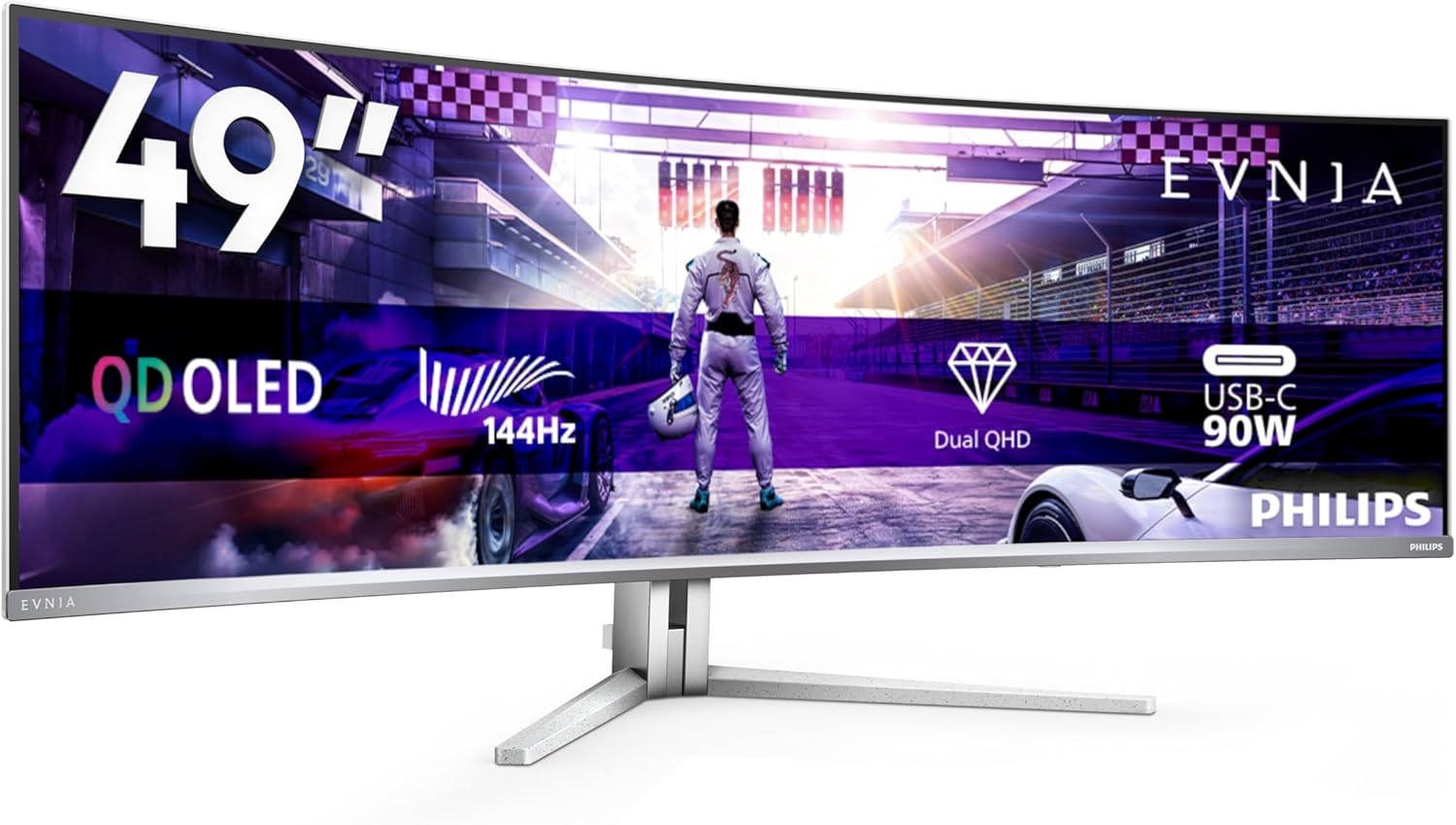
Philips Evnia 49M2C8900L Analysis: QD-OLED at 49 Inches
My Honest Verdict
The Philips Evnia 49M2C8900L is a 49-inch superultrawide QD-OLED gaming monitor with a 5120×1440 resolution, 144Hz refresh rate, and a 32:9 aspect ratio. It’s built for people who want to replace a dual-monitor setup with a single, genuinely cinematic screen — and the QD-OLED panel means the image quality is in a different league to the IPS and VA panels that dominate this size class. If you want the most immersive gaming display you can buy at this format without stepping up to a 240Hz OLED, this is a serious contender.
What you’ll actually notice day-to-day: blacks that are truly black (OLED turns off individual pixels entirely), colours that are saturated without being oversaturated, and a 1800R curve that wraps the screen around your field of view without feeling gimmicky at this width. The 0.03ms GtG response is essentially instantaneous — motion clarity on QD-OLED is genuinely among the best available, and DisplayHDR TrueBlack 400 is a certification that actually means something on an OLED panel, unlike the HDR400 badge slapped on LCD screens. The 1000 cd/m² peak brightness sounds modest next to some competing claims, but on a panel with a 1,000,000:1 contrast ratio it produces HDR that looks real.
Who should buy this: people upgrading from a dual-monitor gaming or productivity setup who want pixel-perfect image quality and have a GPU powerful enough to push 5120×1440 at pace. Who should look elsewhere: anyone on a tighter desk, anyone running mid-tier graphics hardware that’ll struggle with this resolution, or anyone spooked by OLED burn-in risk for static-heavy workloads like spreadsheets all day. This monitor makes no apology for what it is — a big, expensive, visually exceptional display that rewards the right use case.

What It’s Best For
Immersive gaming. This is the primary purpose, and the Philips Evnia 49M2C8900L delivers properly here. The 32:9 aspect ratio means flight simulators, racing games, RPGs, and open-world titles fill your peripheral vision in a way a standard widescreen simply cannot. The QD-OLED panel handles dark scenes without crushing shadow detail, and the 144Hz refresh rate keeps things smooth in fast-paced play. FreeSync Premium Pro with HDR keeps frame delivery clean when your GPU can’t maintain a locked rate. First-person shooters work fine, though the sheer horizontal width means some competitive players prefer narrower screens for target tracking — worth knowing if that’s your primary game type.
Replacing a dual-monitor setup. This is genuinely the strongest non-gaming use case. The 5120×1440 resolution across 49 inches gives you enough horizontal real estate to run two full windows side by side without either feeling cramped — effectively two 2560×1440 panels in one. Productivity, video editing, coding with a reference pane open, streaming with chat on one side — all of these work naturally on this format. Check out our display size and resolution guide if you want to understand what that pixel density actually means at this screen size before committing.
Home cinema and streaming. The Ambiglow feature — a bias lighting halo that mirrors the screen content — adds genuine atmosphere for film watching in a darkened room. Four 7.5W DTS speakers giving a total 30W output means you can skip external speakers for casual viewing and still get decent audio. HDR movie content looks genuinely good on a panel capable of true blacks. This isn’t a dedicated TV and it’s not trying to be — but as a setup for someone gaming and streaming from the same desk, it handles both convincingly.
The Specs That Really Matter
The panel type is the single most important thing here. QD-OLED combines quantum dot colour technology with an OLED backplane — meaning each pixel produces its own light and can switch off completely for true black. The result is a 1,000,000:1 contrast ratio that no LCD can genuinely match, regardless of how many nits it peaks at. If you want to understand how OLED compares to IPS and VA in practical terms, our panel types breakdown covers this in plain English. The quantum dot layer on top pushes colour volume higher than standard OLED — colours stay saturated even at high brightness, which older OLED designs struggled with.
The 144Hz refresh rate paired with a 0.03ms GtG response time is a genuinely strong combination for gaming. Response time on OLED is measured differently to LCD — OLED’s pixel response is organic and fast by nature, so the 0.03ms figure here reflects real panel behaviour rather than a marketing-optimised overdrive result. The practical outcome: motion on this screen is clean and sharp without the haloing artefacts you get from aggressive overdrive settings on LCD panels. See our refresh rate and response time explainer if you want the full picture on why these two specs work together rather than independently.
Connectivity deserves a mention because at this price tier it should be complete — and it mostly is. You get DisplayPort 1.4, two HDMI 2.0 ports, USB-C with 90W power delivery, and a USB 3.2 hub with four ports. The one flag: HDMI 2.0 rather than 2.1. At 5120×1440 and 144Hz, HDMI 2.0 does not have the bandwidth to run the full spec — you’ll need DisplayPort 1.4 or USB-C for that. Connecting a console via HDMI will mean a reduced refresh rate or resolution. Worth knowing before you plan your cable setup — our connectivity guide covers what each port version can actually carry.
The DisplayHDR TrueBlack 400 certification is worth explaining because Philips markets it alongside the generic HDR400 badge on cheaper monitors and the two are not remotely the same thing. TrueBlack 400 is a VESA certification specific to OLED and similar emissive panels — it requires a minimum black level of 0.0005 cd/m², meaning the panel must produce near-absolute black. On an LCD, HDR400 just means it can hit 400 cd/m² peak brightness, which produces no visible HDR effect in practice. On this QD-OLED panel, TrueBlack 400 means HDR actually looks like HDR — the gap between shadow and highlight is real. By 2026 this distinction between emissive HDR certifications and backlit LCD HDR claims is becoming better understood, but it still gets muddied in marketing copy.
Browse the full spec sheet and buyer Q&As for the Philips Evnia 49M2C8900L on Amazon.
What Buyers Are Saying
The Philips Evnia 49M2C8900L holds a rating of 4.0 out of 5 from 130 customer reviews on Amazon. That’s a reasonable sample — enough to draw genuine patterns rather than rely on a handful of outliers. The overall sentiment is clearly positive, with the image quality and format being the consistent praise points across the feedback.
The most frequent theme is how the QD-OLED panel performs in person. Buyers who upgrade from IPS or VA gaming monitors consistently describe the colour and contrast as a step change rather than an incremental improvement — the reaction to OLED blacks in particular comes up repeatedly. The immersive quality of the 32:9 format in gaming is also praised consistently, with open-world and simulation titles singled out. Several buyers mention that the dual-monitor replacement pitch in the product listing holds up in practice — having one cable, one monitor arm point, and one display to manage is genuinely cleaner.
On the concerns side, the size comes up as a practical consideration — some buyers note it requires a deeper desk than they expected, and others mention that the HDMI 2.0 limitation caught them out when connecting consoles. A handful of reviews mention the OSD (on-screen display menu) as fiddly, which is common feedback for gaming monitors with feature-heavy menus. There are a few isolated mentions of dead pixels or panel issues, but no pattern that suggests a quality control problem at scale — at 130 reviews, isolated hardware faults are statistically normal.
Buyer Highlights
“The blacks are genuinely black — coming from an IPS panel I genuinely wasn’t prepared for it.” — A recurring reaction from buyers making their first switch to OLED technology.
“Replaced two 27-inch monitors and I’m not going back. The desk looks completely different.” — Common feedback from buyers who made the dual-to-single-monitor switch.
“Make sure you have a beefy GPU — this thing will absolutely punish a mid-range card at native res.” — A practical note that appeared in multiple reviews from gaming-focused buyers.
“The curve is genuinely subtle but makes a huge difference. It doesn’t feel exaggerated at all.” — Consistent sentiment from buyers who were initially sceptical about the 1800R curve at this width.
“HDMI ports are 2.0, not 2.1 — I had to dig that out of the specs. Worth knowing before you plug in a PS5.” — A pointed heads-up that surfaces regularly among console users.

Worth Knowing Before You Buy
OLED burn-in is a real consideration on any OLED monitor, and it would be dishonest to skip past it. It’s most relevant for static-content-heavy use: taskbars, browser toolbars, spreadsheet column headers sitting in the same position for hours at a stretch. For gaming and mixed use it’s far less of a concern — moving content doesn’t cause burn-in. Philips includes pixel refresh and screen saver functions to mitigate this, and the 3-year manufacturer warranty provides some peace of mind. But if you’re planning to run this as a primary productivity screen with static UI elements locked in place all day, it’s worth factoring that into your decision. Check our monitor selection guide for how to weigh panel type against use case.
Desk depth matters here more than with a typical monitor. At 119.5cm wide and a 1800R curve, this screen wants to be at a particular distance to feel right — too close and the edges distort your focus, too far and the immersion is lost. Most ergonomic guidance puts the optimal viewing distance for a curved superultrawide at around 90–100cm from your eyes to the screen centre, which means your desk needs depth to match. The stand offers 120mm of height adjustment, which is decent, and it’s VESA 100×100 compatible if you prefer a monitor arm — which at this size is often the better option for getting the positioning right.
The HDMI 2.0 ports rather than HDMI 2.1 is a genuine limitation for console users. At 5120×1440, HDMI 2.0 simply doesn’t have the bandwidth for 144Hz — you’ll be dropping resolution, refresh rate, or both when connecting via HDMI. PC users with a dedicated GPU using DisplayPort 1.4 won’t notice this limitation at all, but it’s a spec worth flagging explicitly given what this display costs. Also worth knowing: the VESA ClearMR 8000 certification mentioned in the product description is a real VESA standard for blur measurement and the highest tier available — it’s not marketing fluff, for once.
Check current stock and delivery options for the Philips Evnia 49M2C8900L on Amazon.
Who Should Buy It (And Who Shouldn’t)
Buy If
- You’re running a powerful GPU (RTX 4070-class or above) and want a single display that handles both immersive gaming and side-by-side productivity without compromise — the QD-OLED panel and 32:9 format genuinely serve both.
- You currently use a dual-monitor setup and find the bezel gap between screens irritating — the 5120×1440 resolution gives you equivalent screen area in one continuous display, and the pixel density at this size is sharp enough for text-heavy work.
- You play open-world, simulation, or racing games and want peripheral vision fill that a standard 16:9 screen fundamentally cannot provide — the 1800R curve at 49 inches is the right hardware for that.
- You want HDR that actually looks like HDR — DisplayHDR TrueBlack 400 on a QD-OLED panel is categorically different from the HDR400 badge on LCD monitors, and the result is visible in any content that uses dynamic range well.
Avoid If
- Your desk is shallow or your GPU is mid-range — this monitor’s size and resolution demand both physical space and serious rendering horsepower, and running it below native resolution on a screen this large looks noticeably soft.
- Your primary use is static productivity work for extended hours — the OLED burn-in risk is manageable for mixed use but a genuine long-term concern if spreadsheets, coding IDEs, or browser tabs are locked on screen all day without moving.
- You’re a competitive shooter player prioritising a narrow field-of-view target zone over immersion — the superultrawide format is actively disadvantaged in some esports titles and the 144Hz ceiling is modest compared to higher-refresh options at narrower sizes.
The Bottom Line
The Philips Evnia 49M2C8900L is one of the most complete superultrawide OLED monitors available at this format — the QD-OLED panel, DisplayHDR TrueBlack 400 certification, and 5120×1440 at 144Hz make a genuine case for anyone who wants to consolidate their setup into a single, visually exceptional display. The HDMI 2.0 limitation is a real annoyance, and OLED burn-in requires sensible use habits. But for PC gaming with a capable GPU, or for replacing a dual-monitor setup with something that actually looks spectacular, this earns its recommendation without hesitation. Go in with your eyes open on the desk space and GPU requirements, and it’s a purchase you’re unlikely to regret. If you want a broader framework for evaluating this against alternatives, our monitor buying guide gives you the full decision structure.
View the Philips Evnia 49M2C8900L on Amazon and see what other buyers are saying about it.
At The Monitor Expert, our approach is built on data transparency rather than simulated hands-on testing. We rigorously analyse official manufacturer specifications and aggregate verified customer sentiment to provide honest, straightforward buying advice that cuts through the marketing noise.
As an Amazon Associate, I earn from qualifying purchases.
Browse by Specification
Looking for something specific? Browse our analyses by hardware and feature below, or check all monitor analyses in the Gaming Monitors and Premium Monitors category archives.
[IPS Monitors] — [VA Monitors] — [TN Monitors] — [OLED Monitors]
Browse by Refresh Rate
[60Hz] — [75Hz] — [100Hz] — [120Hz] — [144Hz] — [165Hz] — [180Hz] — [200Hz] — [240Hz+] — [360Hz+]
Browse by Screen Size
[Small Screen] — [24-inch] — [27-inch] — [32-inch] — [Large Screen] — [Ultrawide]




